

9 Senior Remote Monitoring Systems Compared
In this article
A bed-exit alert fires at 2 a.m. The right caregiver responds fast, but only if the alert shows the room, resident, and bed.
That gap between detection and action is where senior remote monitoring succeeds or fails. The right system depends on care setting, alert ownership, privacy, and usable records after an incident.
A family checking on one parent at home needs a different workflow from a care home managing night rounds, falls, and wandering risk across a ward.
This roundup compares 9 researched systems across the criteria that affect daily care:
Care-setting fit
Alert workflow and responder ownership
Privacy approach
Pricing model
Practical limitations
Key takeaways
Falls are common in care settings. The CQC State of Care 2024/25 highlights how night staffing pressure increases safety risk, so alerts need a clear responder.
Night response matters. Monitoring is only useful when the alert reaches someone who can act, especially during night shifts when fewer staff are on the floor.
Privacy is a buying criterion. In the Argentum 2025 Technology Report, 35% of senior living executives identified data privacy and security as a primary technology barrier.
Alert fatigue can make systems unsafe. Excessive notifications lead staff to override or ignore alerts, a safety risk raised in AHCA/NCAL comments on monitoring and AI adoption.
Responder ownership is the deciding detail. Home systems usually notify family or remote caregivers, while facility systems route alerts to on-site staff through dashboards, pagers, or nurse call workflows.
Quick comparison: senior monitoring systems at a glance
These tables separate facility systems from home and standalone systems, then show best fit, monitoring method, and the main note for each option.
Facility systems
System | Best For | Monitoring Method | Deployment Context | Key Differentiator |
Guardian | Care homes and nursing facilities | Passive sensors (motion, bed exit, SOS) | Facility | Camera-free, floor plan-mapped alerts via Guardian Portal |
Smart Caregiver | Fall-risk residents at home or in small facilities | Pressure mat and bed/chair sensors | Home and small facility | Plug-and-play sensor pads with audible and pager alerts |
Envoy at Home | Family-managed home monitoring | Passive motion and door sensors | Home | No cameras, app-based family notifications |
Nomo Smart Care | Remote family caregivers | Sensor-based activity monitoring | Home | Activity pattern insights sent to family smartphones |
Essence SmartCare | Aging-in-place with telehealth integration | Multi-sensor plus wearable hybrid | Home and assisted living | Combines passive sensing with connected health devices |
Val-U-Care | Budget-conscious facility operators | Wireless nurse call and wander management | Facility | Low upfront cost wireless call system |
Frequency Precision | Larger care facilities needing scalable nurse call | Wired and wireless nurse call | Facility | Configurable nurse call system with staff assignment routing |
National Call Systems | Assisted living and memory care facilities | Wireless call and wandering alert | Facility | Door and wander alert integration with call system |
Nursing Home Aids | Facilities and families sourcing standalone sensors | Individual sensor products (bed, motion, door) | Home and facility | Product supplier rather than end-to-end monitoring platform |
Home and standalone systems
System | Best fit | Monitoring method | Main note |
Smart Caregiver | One nearby caregiver monitoring bed, chair, or doorway risk | Pressure pads, mats, motion sensors, pager alerts | One pager supports up to 6 sensors and local alerts |
Envoy at Home | Families monitoring routine changes at home | Passive motion, door, and cabinet sensors | 8-sensor starter kit with app-based family alerts |
Nomo Smart Care | Remote family caregivers needing routine alerts and manual SOS | Hub, satellites, Tags, app alerts | Optional call-center dispatch on higher tier |
Essence SmartCare | Aging-in-place with caregiver or monitoring-centre escalation | Motion, door, bed, SOS, connected health devices | Quote-based setup around daily routine changes |
Nursing Home Aids | Families or facilities buying individual bedside alert products | Bed pads, chair pads, floor mats, call cords | Per-unit hardware for local prompts, not an end-to-end platform |
Types of senior remote monitoring systems
Senior remote monitoring systems fall into four broad categories. The right category depends on what you need to detect, where the senior lives, and who is expected to respond.
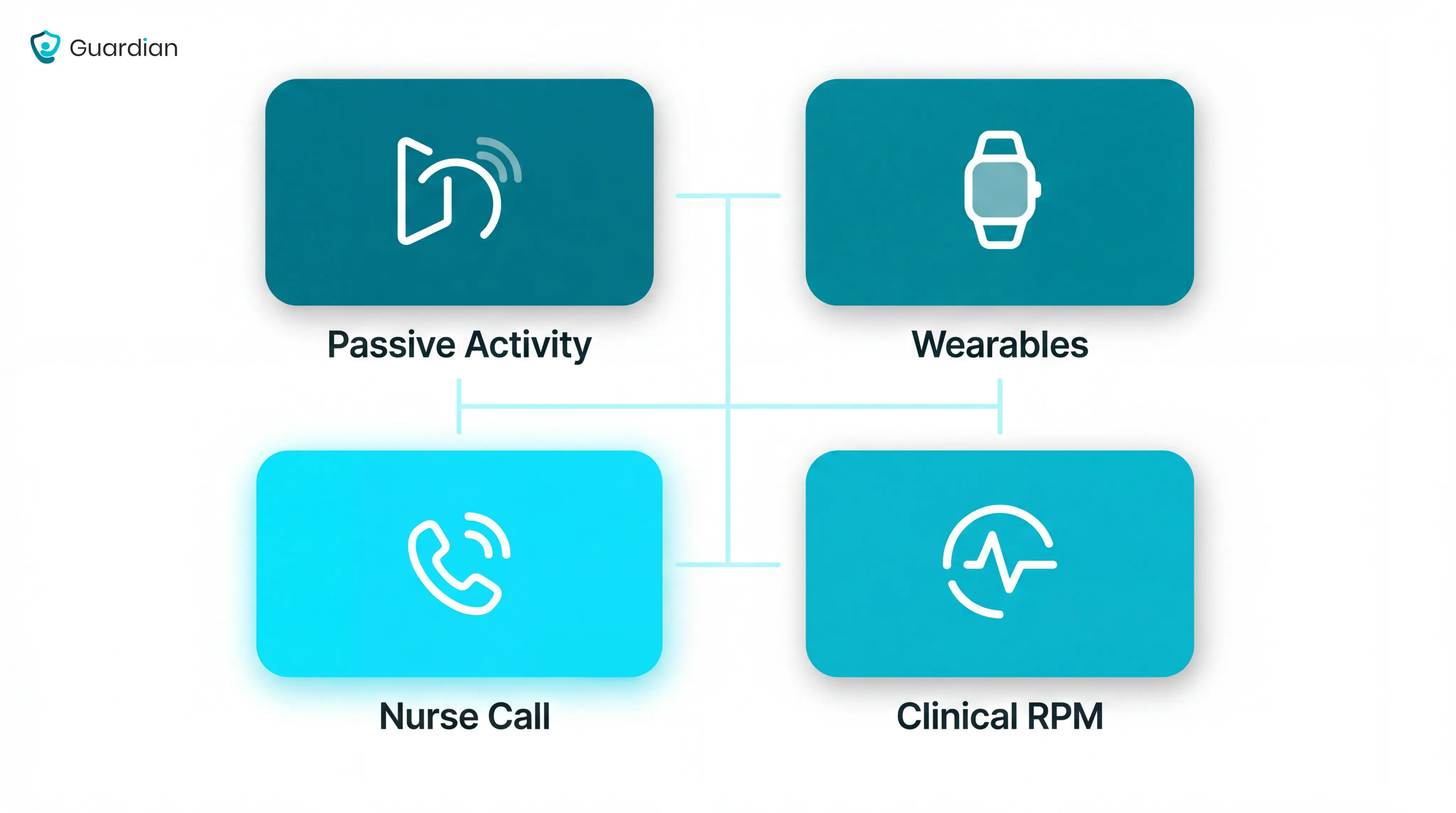
Passive activity monitoring
Passive activity monitoring uses ambient sensors to watch daily routines without asking the senior to press a button or wear a device.
Unusual inactivity: A lack of movement can trigger an alert when the person cannot call for help.
Bed and room routines: Bed, motion, and door sensors show whether the person got up, returned to bed, or moved around as expected.
Routine changes: A sudden change in night movement, kitchen activity, or room visits can prompt a caregiver check.
Best fit: Families and care teams who need quiet background monitoring without cameras.
Wearable and medical alert systems
Wearable and medical alert systems are body-worn devices such as pendants, wristbands, watches, and fall detectors. One-press emergency alerts notify staff or designated contacts.
Manual help calls: The senior presses a button to contact a monitoring centre, family member, or assigned caregiver.
Fall detection: Some devices attempt to detect sudden falls automatically, though performance depends on the device and how the person falls.
Health readings: Higher-tier wearables may track signals such as heart rate, blood pressure, glucose, or oxygen levels.
Best fit: Seniors living independently who will reliably wear and charge the device.
Facility nurse call and resident alert systems
Facility nurse call and resident alert systems are built for care homes, assisted living settings, and wards where staff need room-level alerts.
Good systems tell staff four things before they move:
Where: The floor, room, bed, or exit point linked to the alert.
What: Bed exit, door activity, SOS press, restricted-area entry, or motion pattern.
Who: The resident or room assigned to that sensor.
Who responds: The caregiver, nurse, or team responsible for that area.
Traditional panels often tell staff that an alarm happened. Modern systems make the alert more useful by adding location, event type, and routing rules.
Clinical remote patient monitoring
Clinical remote patient monitoring tracks physiological data from seniors outside hospital, then sends those readings to a clinical team for review.
What it tracks: Vitals such as pulse, blood oxygen, respiratory rate, weight, and blood pressure.
What it detects: Possible deterioration linked to infection, heart failure, respiratory changes, or other clinical risk.
How escalation works: Clinical teams set thresholds so stable readings are observed, moderate scores get senior review, and urgent scores trigger immediate clinical action.
How it differs: Activity systems detect behaviour; clinical RPM tracks the body’s readings over time.
How to choose an elderly monitoring system
Choose the monitoring system after you define the risk, the responder, and the escalation path. Hardware comes second.
Start with the main risk you are trying to manage
Name the main risk first, then match the sensor type to that risk. One resident may need several sensors, but one risk should drive the first purchase.
Use this risk-to-sensor map before comparing products:
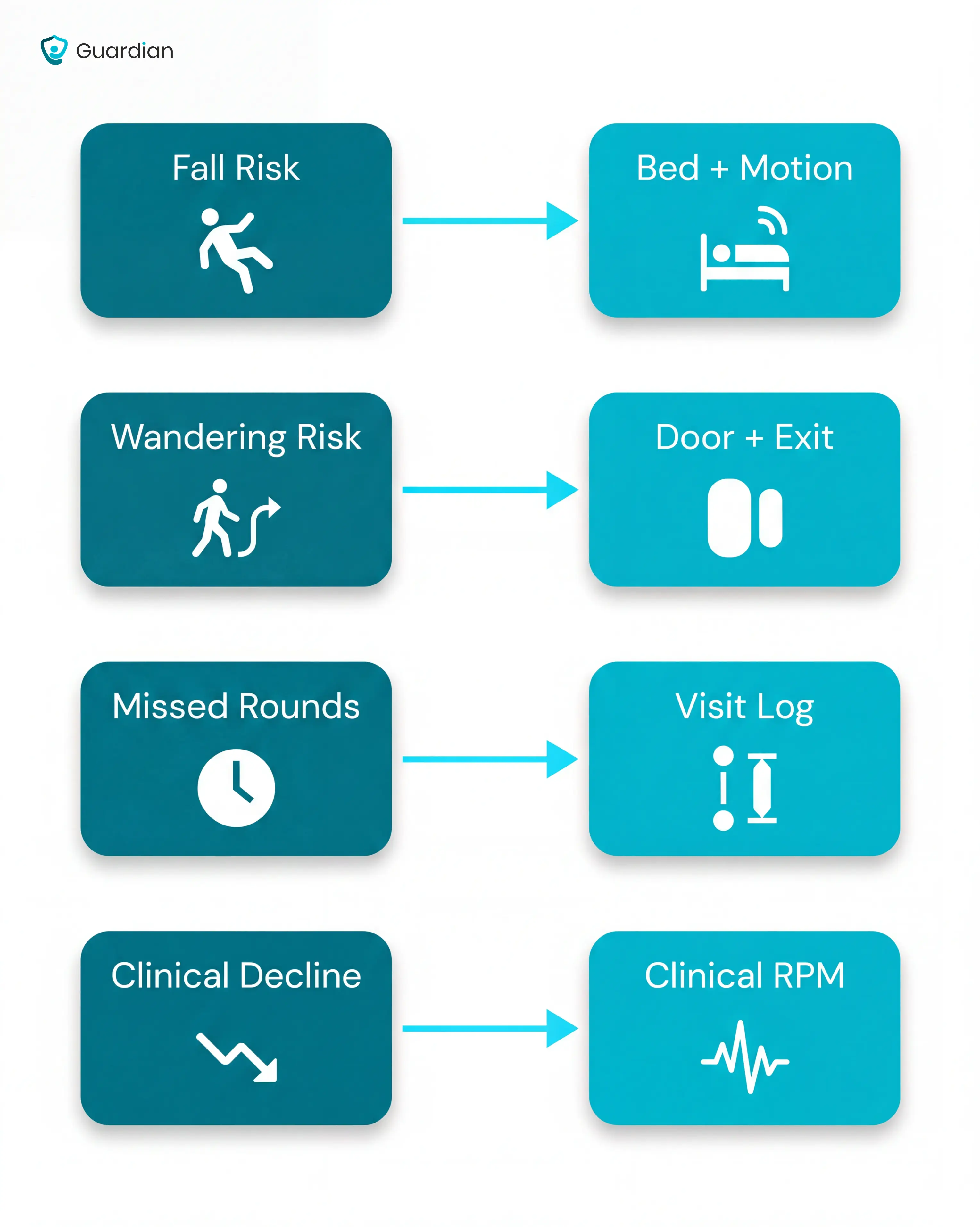
Fall and bed-exit risk: Bed exit sensors and motion sensors help staff see when a high-risk resident leaves bed or does not return.
Wandering risk: Door sensors and exit detection cover room exits, corridor movement, and restricted-area breaches.
Missed-round risk: Automatic visit logging shows whether a caregiver attended, when they arrived, and how long the visit lasted.
Gradual health decline: Clinical RPM tracks changes in vitals such as oxygen, pulse, weight, or blood pressure.
Decide who responds to alerts, and when
Alert routing matters as much as detection. A perfect sensor still fails if no one owns the first response.
Before buying, write down the alert flow:
List each alert type: Fall, bed exit, door opening, SOS press, missed round, or abnormal vital reading.
Name the first responder: Caregiver, nurse, family member, monitoring centre, or manager.
Set the response window: Decide how long the system waits before escalating.
Define the backup route: Send the alert to the next person if no one acknowledges it.
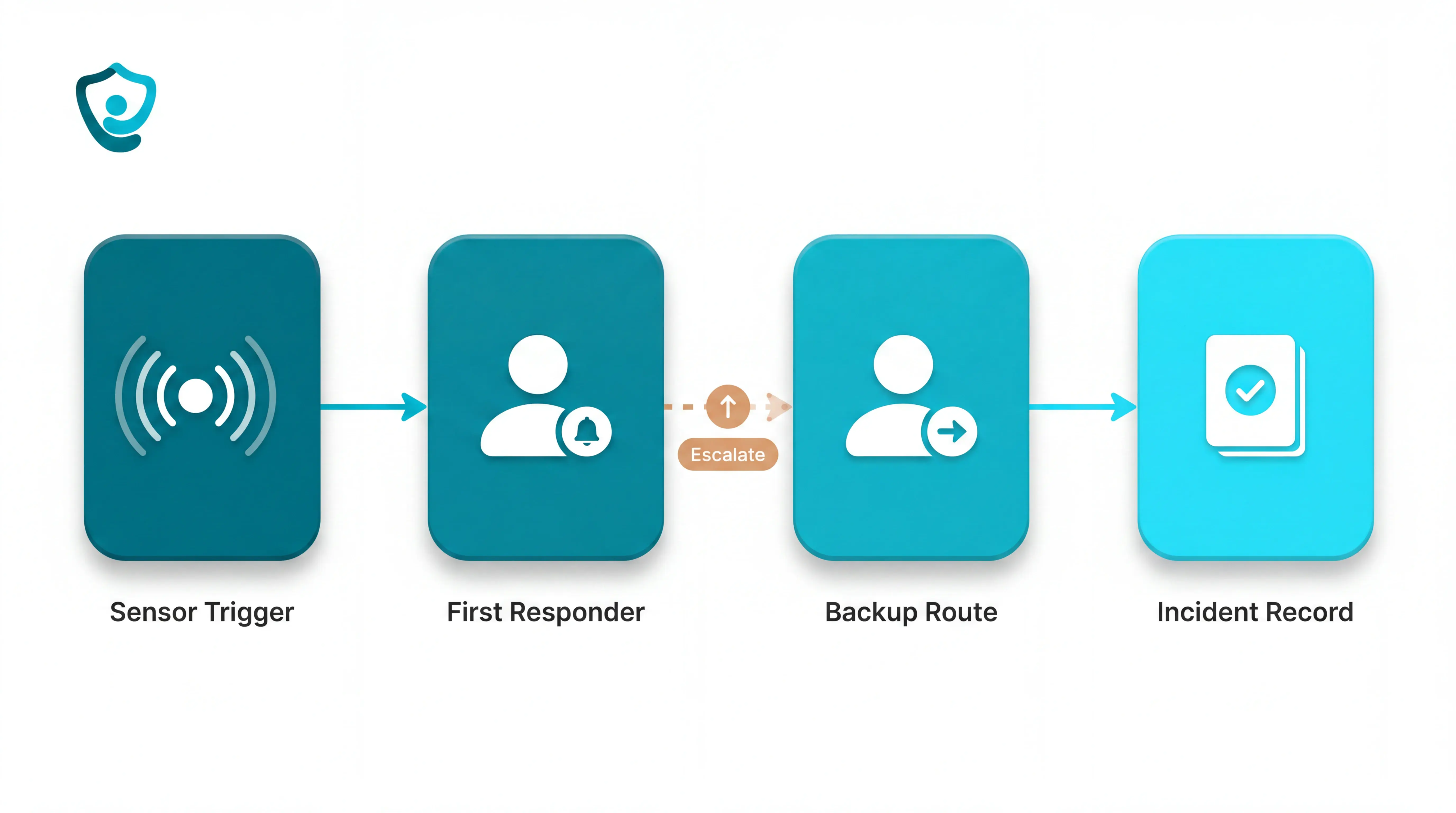
This step is often skipped. When escalation is never configured, an unanswered alert can go silent after the first notification.
Cameras, wearables, or passive sensors?
The right format depends on privacy, compliance, and the resident’s daily habits. Each option has a tradeoff.
Cameras: Give visual detail, but raise dignity, consent, and GDPR questions in bedrooms and bathrooms.
Wearables: Work well when the senior accepts the device, keeps it charged, and remembers to wear it.
Passive sensors: Monitor movement, doors, bed exits, and routines without video or a worn device.
Passive sensors avoid the two common failure points: the resident does not have to wear anything, and staff do not need video to see that activity changed.
For the device-format tradeoffs, the privacy-friendly room-monitor guide compares passive, wearable, and call-button options.
The 9 best senior remote monitoring systems
The systems below cover different segments of senior care, from solo home use to multi-wing nursing facilities.
Guardian
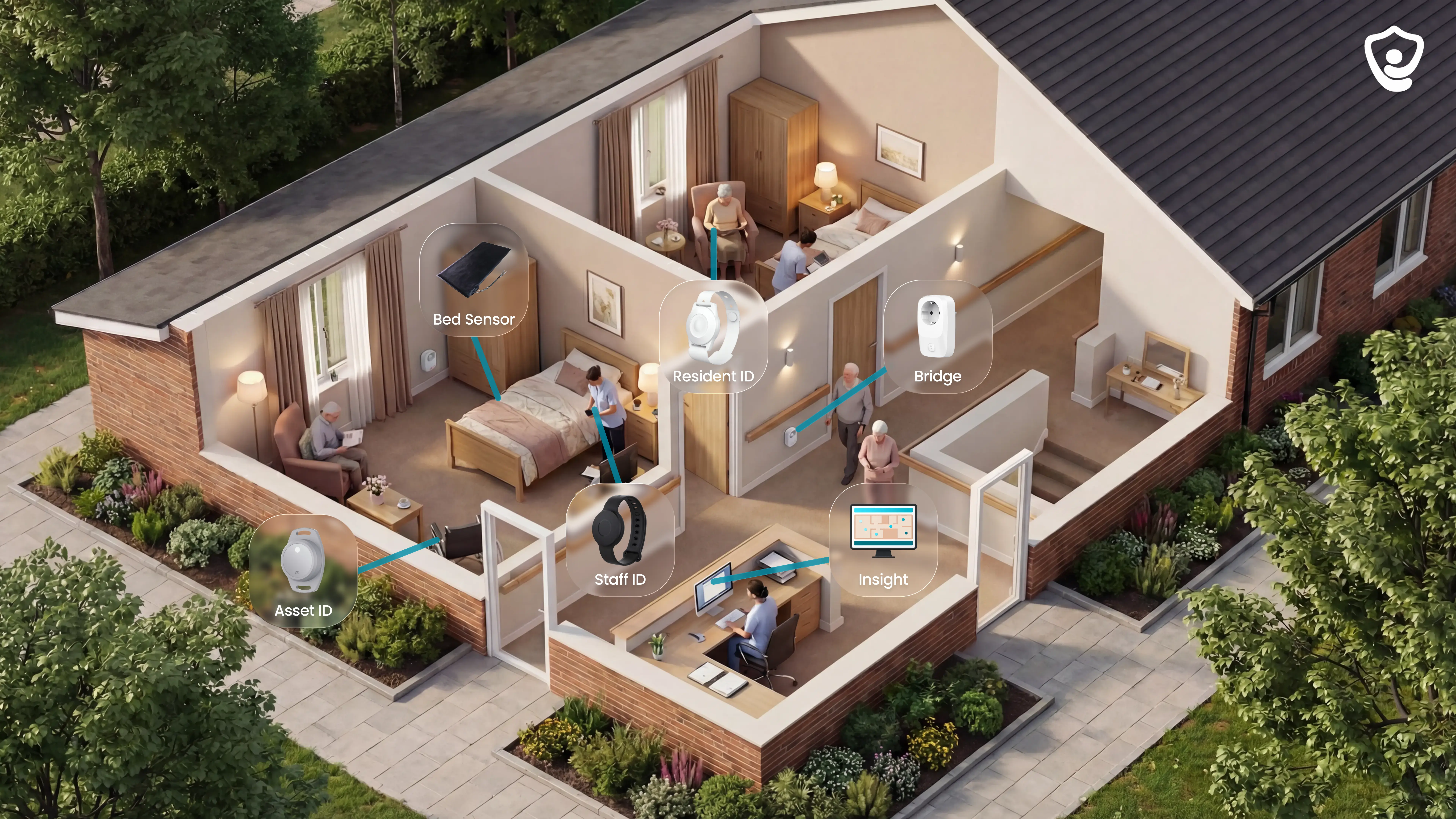
Guardian is our wireless, camera-free monitoring platform for care homes and home care providers.
It combines wearables, in-room sensors, vehicle tracking, asset tracking, and alerts in Guardian Insight, so managers see the operation in one live view.
Wearables: resident wristbands, caregiver SOS bands, and GPS safety watches
In-room sensors: bed, motion, door, fridge, and stove sensors
Vehicle tracking: live fleet visibility for home care teams
Asset tracking: faster location of shared equipment across a home or ward
Alerts and records: events, response times, and visit activity logged automatically
Best for
Guardian fits operators who need live visibility across a ward, care home, or home care team.
It is strongest when managers need to prove what happened, where staff responded, and how quickly events were handled.
Care home owners: fewer blind spots during nights, rounds, and high-risk periods
Nursing managers: clearer alerts with room-level context
Home care leads: verified visits and fleet visibility in one place
Compliance teams: cleaner records for families, payers, and inspectors
What it monitors
Guardian monitors activity through a mix of passive sensors, wearables, and location devices.
Residents who cannot or will not wear a wristband are still covered by passive monitoring.
Bed activity: in bed, out of bed, and time out of bed
Room movement: motion inside rooms and shared areas
Door events: exits, restricted-area entries, and routine changes
Daily routine signals: fridge and stove activity where relevant
People and equipment: residents, caregivers, vehicles, and key assets
For home care teams, vehicle and asset tracking feed into the same Guardian Insight dashboard as resident and staff data.
How alerts and responses work
When a bed exit, SOS, fall-related event, or restricted-area alert fires, Guardian sends context to the devices staff already use.
Staff can see the event before they move:
Where: exact place on the home or facility map
Who: resident or staff member involved
When: event time and current status
What changed: in bed, out of bed, time out of room, or hallway activity
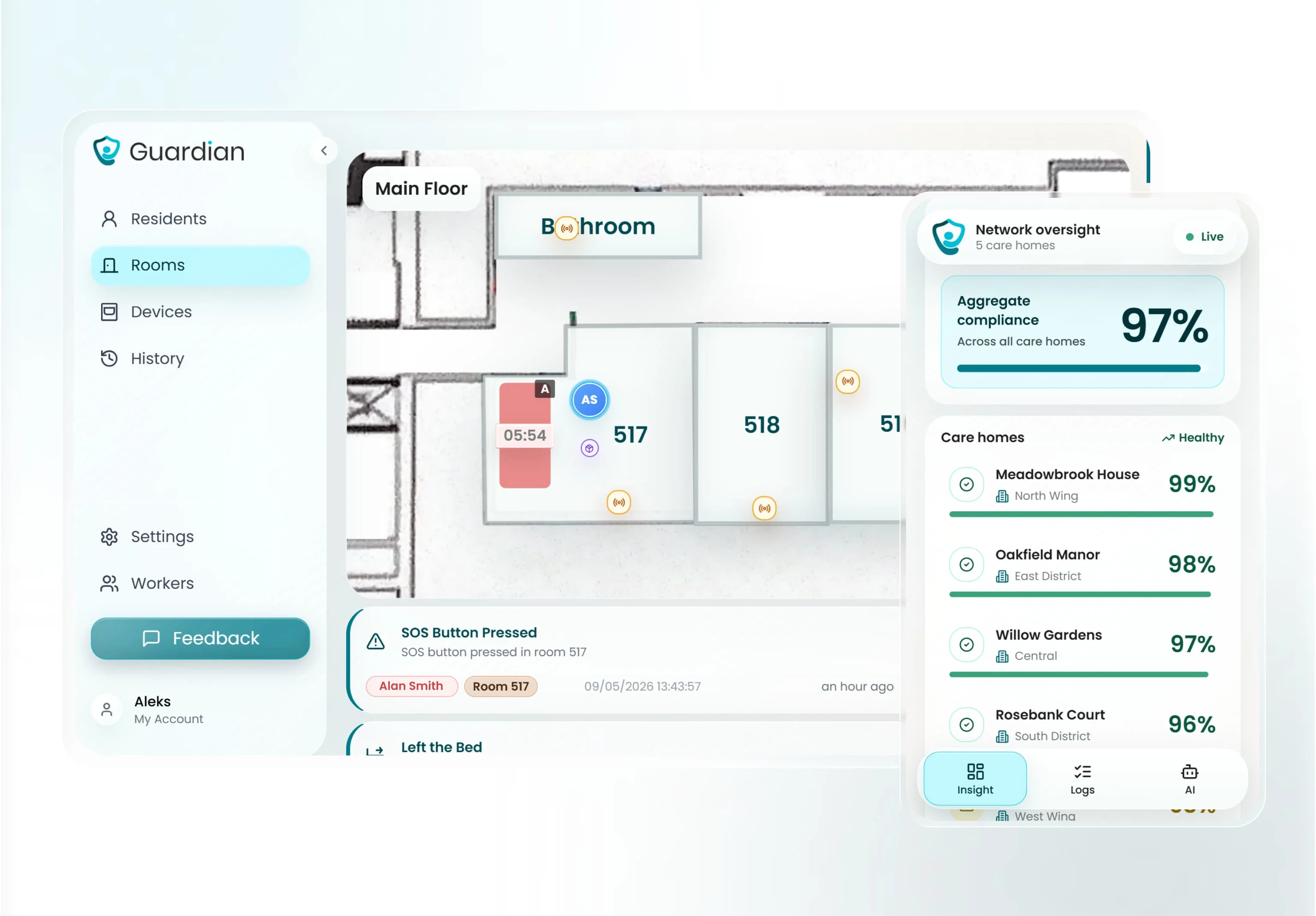
That context helps staff act on the right alert, instead of reacting to a generic buzz from an unknown location.
Guardian can also use smart rules, such as alerting when someone is out of bed for more than 15 minutes at night.
In a Guardian pilot, staff attended 30 potential fall situations before escalation. Average response time was approximately 5 minutes.
Privacy and senior compliance
Guardian is camera-free by design. Monitoring runs through sensors, wristbands, and location signals, without video inside resident rooms.
That matters for residents who need support but still deserve privacy and dignity.
For residents who refuse wearables, Guardian can still use bed, motion, door, fridge, and stove sensors to flag meaningful changes.
The system does not depend on every resident pressing a button or keeping a wristband on all day.
Pricing
Guardian does not publish a self-serve price for care homes or home care providers.
The entry point is a structured 6–8 week pilot in one ward, home, or care team.
The pilot ends with an impact and ROI report covering the use cases you tested.
In one pilot, the ROI calculation showed about €1,000/month in caregiver capacity unlocked.
Rollout scope and commercial terms are set after the pilot, based on the setting, devices, workflows, and results.
Limitations to know before choosing
Guardian is built for care operations, so it is not the right fit for every buyer.
No public consumer plan: families looking for a simple off-the-shelf pendant may need a different route
Pilot-first buying: teams should be ready to test Guardian in a real ward, home, or care team
Workflow mapping required: the best setup depends on rooms, routines, alert rules, and response paths
Scope-based rollout: final commercial terms come after the pilot, not from a public price list
Smart Caregiver
Use Smart Caregiver when one nearby caregiver needs a local alert before a senior leaves a bed or chair.
This is a pager kit, so judge range and response coverage before comparing software features.
Best fit
The best fit is one household where the caregiver stays close enough to hear or carry the pager.
For example, a spouse sleeping nearby can receive a bed-exit alert before a high-fall-risk partner reaches the hallway.
Bed exits from a high-fall-risk bed
Chair departures when a pressure pad lifts
Doorway or hallway movement at one monitored zone
Local pager alerts for the caregiver on duty
Common mistake: buying Smart Caregiver for a small facility because the hardware looks inexpensive.
One pager handles up to 6 sensors, so coverage fragments quickly across rooms, shifts, and responders.
Monitored events
Smart Caregiver monitors point events where a caregiver has already placed a pad, mat, button, or motion sensor.
A single pager can pair with up to 6 sensors, with a listed wireless range of up to 300 feet.
Smart Caregiver provides local movement alerts rather than vitals, fall confirmation, or daily activity history.
Alert workflow
When a sensor triggers, the receiver sends a sound, vibration, or recorded voice prompt.
Pro tip: test the alert at night from the farthest bedroom, with doors closed, before relying on the 300-foot listed range.
Privacy profile
Smart Caregiver’s pad and motion-sensor systems use no cameras and no cloud service. Monitoring happens through local wireless signals between the sensor and pager.
The privacy gain comes with recordkeeping loss: no alert history, response-time log, or missed-event report.
Cost structure
Smart Caregiver uses a one-time hardware purchase model. There are no subscription tiers, cloud fees, or per-user charges for the basic pager systems.
Scaling coverage means buying more sensors or pager hardware.
Product | Price | Includes | Subscription |
Motion sensor with pager | $24.95 (sale from $49.95) | Motion detector + pager | None |
Standalone caregiver pager | ~$29 | Pager unit only | None |
Bed alarm with wireless monitor + call button | $129.95 | Bed pad sensor + wireless monitor + call button | None |
Where Smart Caregiver breaks down
Common mistake: counting devices instead of coverage.
A household setup that works for one bedroom can miss events in a larger home or facility.
Range cap: The listed range is up to 300 feet, and walls can reduce effective coverage.
Sensor cap: One pager supports up to 6 sensors, so larger setups need more hardware.
Local alerts only: Alerts go to the pager carried by the nearby caregiver.
No alert history: Reports, response-time logs, and trend data sit outside the pager workflow.
No published accuracy data: Public materials give no third-party detection accuracy or false-alarm rates.
Envoy at Home is the next step when the responder is remote and needs app-based routine alerts.
Envoy at Home
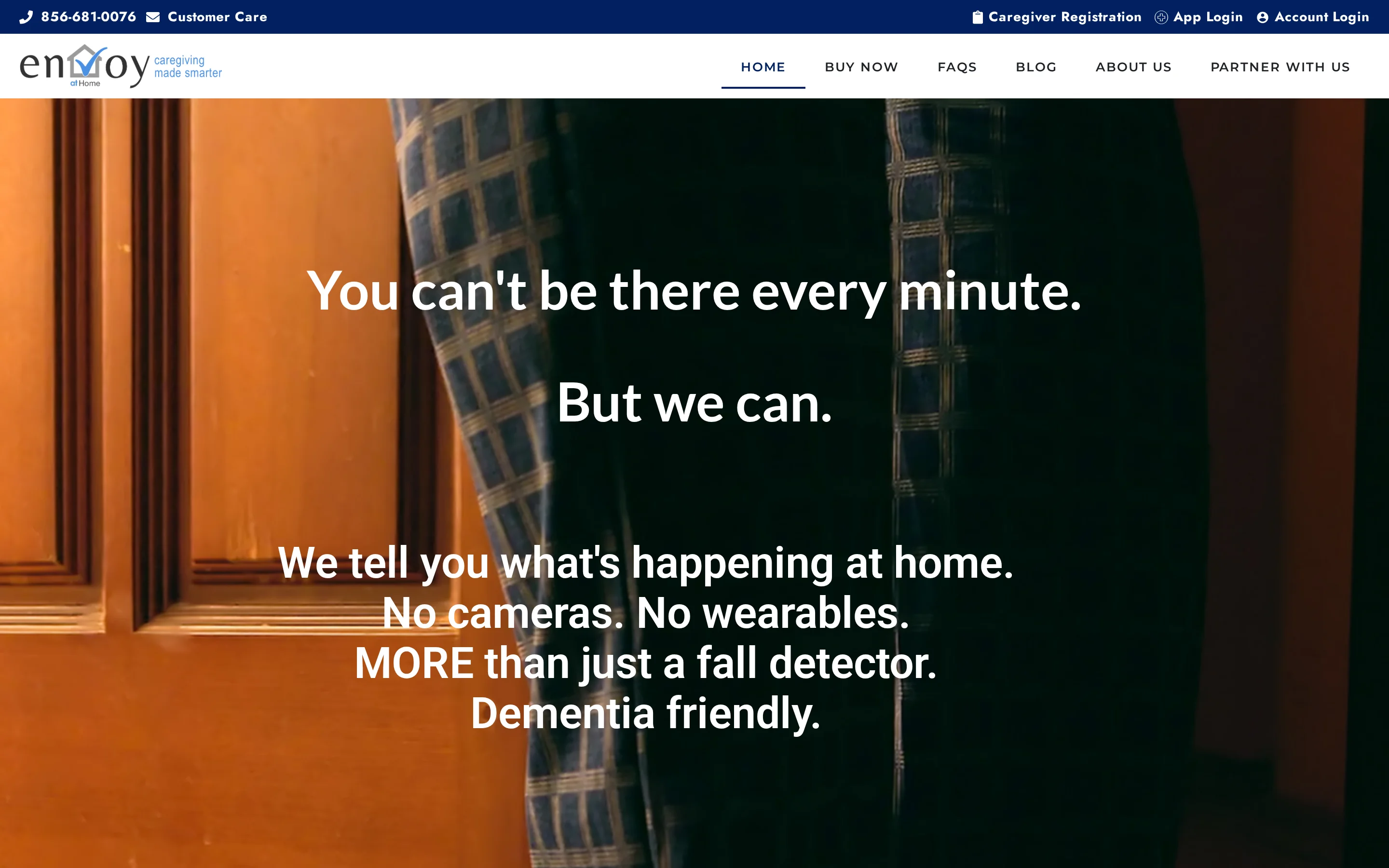
Envoy at Home shifts the job from local alarms to routine monitoring.
Battery-powered sensors build a baseline, then the app alerts remote caregivers when the senior’s pattern changes.
Good fit
Envoy at Home suits families monitoring an independent senior who lives alone and accepts passive sensors.
Pro tip: install sensors around care questions first.
Meal concerns belong near kitchen routines; exit risk belongs at exterior doors.
What Envoy tracks
The starter kit includes a hub and 8 battery-powered adhesive sensors. Additional sensors are sold separately.
Movement changes around the home
Door openings at entrances or key rooms
Cabinet activity that may reflect meal routines
Routine deviations from the senior’s baseline
Envoy says the system covers more than 35 behaviors. The useful signals are fall-risk indicators, meal gaps, and routine changes.
Alert logic
Envoy alerts caregivers when sensor activity moves outside the senior’s usual routine.
That matters because a missed meal or repeated night movement can show risk before someone presses a call button.
Keep broadband live. The hub needs internet service, so a router outage pauses caregiver notifications until the connection returns.
Privacy tradeoff
Envoy at Home uses no cameras, microphones, or wearables. Seniors do not need to press a button, charge a device, or remember to wear anything.
Privacy comes with a verification gap. Caregivers need a separate phone call, neighbor, or responder if an Envoy alert looks urgent.
Pricing and discounts
Envoy at Home lists a $399 equipment fee for the hub and 8-sensor starter kit, plus a $99/month subscription when billed monthly.
Envoy also lists discounted 6-month and annual prepay options. Additional sensors are sold separately, so confirm the current add-on price before ordering.
Cost component | Amount | Notes |
One-time equipment fee | $399 | Hub + 8-sensor starter kit |
Monthly subscription | $99/month | Single tier; 6-month prepay available |
Additional sensors | $29.99 each | Same type as starter kit sensors |
Approximate first-year total | ~$1,587 | Equipment + 12 months subscription |
Limits to check
Common mistake: treating passive routine alerts as emergency response.
Envoy tells a caregiver something changed; the family still needs a responder plan.
Internet dependency: Alerts require active home internet through the hub.
Prepay changes the math: Monthly billing is $99/month, while 6-month and annual prepay options reduce the effective monthly cost.
Verification gap: Families need a phone call, neighbor, or responder to check urgent alerts.
The next question is whether the family wants a tag and optional dispatch, which is where Nomo differs from Envoy.
Nomo Smart Care
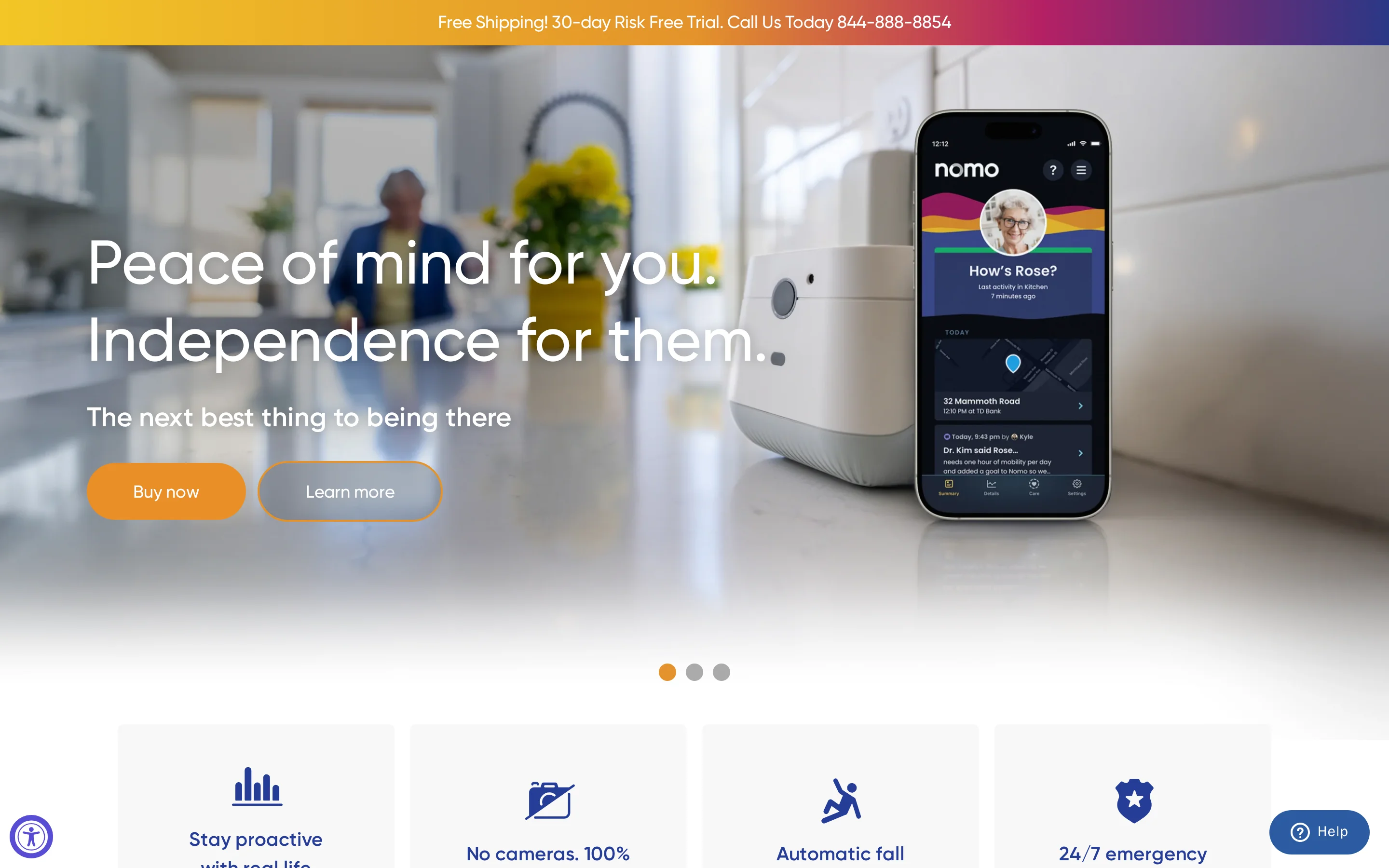
Nomo Smart Care combines passive room sensors with Tags, so families get routine monitoring plus a manual SOS option in the same app.
Best fit for Nomo
Nomo fits families that want app alerts for routines and also want the senior to carry or place a Tag.
Use the dispatch tier after deciding the first responder.
That choice is usually family, the call center, or local emergency services.
Sensors and signals
Nomo Smart Care uses three hardware types:
Hub for the home connection
Satellites for room activity and sound signals
Tags for people, objects, or routine checkpoints
Practical examples include bed-exit patterns and medicine-cabinet access.
Nomo also learns baseline routines for sleep, meals, and medication access, then flags deviations that may need caregiver attention.
Alerts and emergency response
Nomo sends app alerts when routine data or Tag activity suggests a concern. The Tag also works as a manual SOS button.
Professional emergency dispatch sits on the higher monitoring tier, where a call center can contact emergency services.
Privacy profile
Nomo bases monitoring on sensor data, sound detection, object interaction, and Tag activity instead of live video.
The privacy tradeoff is verification. Caregivers and dispatchers need a separate check-in method when an alert looks urgent.
Pricing to verify
Nomo sells hardware separately from monitoring.
The Essential Care Kit is listed at $249.99, but subscription names and monthly rates should be checked against Nomo’s current checkout page before purchase.
Check annual billing before committing because refund rules affect the true first-year cost.
Plan | Monthly Cost | Key Features |
Essential (self-monitoring) | $9.99/mo | App notifications, local 911 self-dispatch |
Essential+ | $19.99/mo | App notifications, 24/7 professional call-center dispatch, 911 escalation |
Limits to test before relying on Nomo
Pro tip: treat the Tag SOS as backup. The safety plan still needs a responder.
LeLaurin 2019 found alert devices went unactivated in 80% of falls reviewed.
Tag dependency: Some alerts depend on the senior wearing, reaching, or placing the Tag correctly.
Verification gap: Caregivers receive sensor data rather than a live view of the home.
Dispatch costs extra: Professional response belongs to the higher monitoring tier.
Annual billing risk: Refund terms affect the cost if care needs change mid-year.
Test the Tag and room coverage during the return window. Essence SmartCare moves further toward a provider-led passive monitoring model.
Essence SmartCare
Read Essence SmartCare as an aging-in-place safety system, not a clinical RPM programme. The public SmartCare setup focuses on activity patterns and SOS events, then routes concerns to caregivers or a monitoring centre.
Use a separate clinical RPM route when a post-discharge plan requires vital signs, prescribed measurements, or clinician review.
Best fit for SmartCare
Use SmartCare when an older adult lives alone and family caregivers need routine visibility without cameras.
Common mistake: treating SmartCare as ward software. A care home still needs multi-resident views, staff workflows, and response reporting.
Private homes and aging-in-place households
Family caregivers first; monitoring-centre escalation when included
Home safety oversight, rather than care home floor operations
Sensors and signals
SmartCare builds a daily-routine picture from non-visual sensors around the home.
Motion sensors: Track activity in rooms such as the bedroom, bathroom, and kitchen
Door contacts: Record entry, exit, and room access events
Bed occupancy: Shows whether the resident got up or returned to bed
SOS devices: Let the resident actively call for help when able
The AI layer compares new activity against the resident's usual pattern. Passive monitoring matters when a resident cannot or does not press an SOS device after a fall.
Alert path and response
SmartCare works best when passive alerts and SOS alerts have different response rules.
Passive routine changes, such as no movement after the usual wake-up time
SOS presses when the resident can actively call for help
App notifications to authorised family caregivers
Monitoring-centre escalation when that service is included
Pro tip: write down who responds at 2 a.m. before installation. A home system fails when every alert waits for an unavailable relative.
Privacy and consent checks
The passive SmartCare setup is camera-free, using motion, door, and bed data instead of video. That makes the system easier to accept for seniors who would reject visual monitoring.
Activity events are stored as sensor signals and timestamps, then shown to authorised caregivers or monitoring staff through the app.
Confirm the exact hardware package before purchase. Privacy risk changes when video or image capture is added.
Quote and pricing checks
Essence SmartCare uses quote-based pricing for the full monitoring setup.
A useful quote separates upfront equipment from ongoing response costs.
Hardware: Sensors, SOS devices, and any required hub
Installation: Setup and placement in the home
Monitoring: Monthly service fees for app and professional response
Ask for a 12-month total cost. Replacement sensors and monitoring-centre fees change the actual budget.
Where SmartCare falls short
SmartCare is built around home routines, so facility environments expose clear gaps.
Multi-resident floor-plan views should be treated as a separate requirement
Baseline period: AI anomaly alerts need routine data before they become useful
Inactivity alerts flag silence after the risk window, rather than the impact itself
Shift reports and response-time records need separate confirmation before a care home rollout
That distinction matters because Val-U-Care and Frequency Precision solve a different problem: on-site call routing.
Val-U-Care
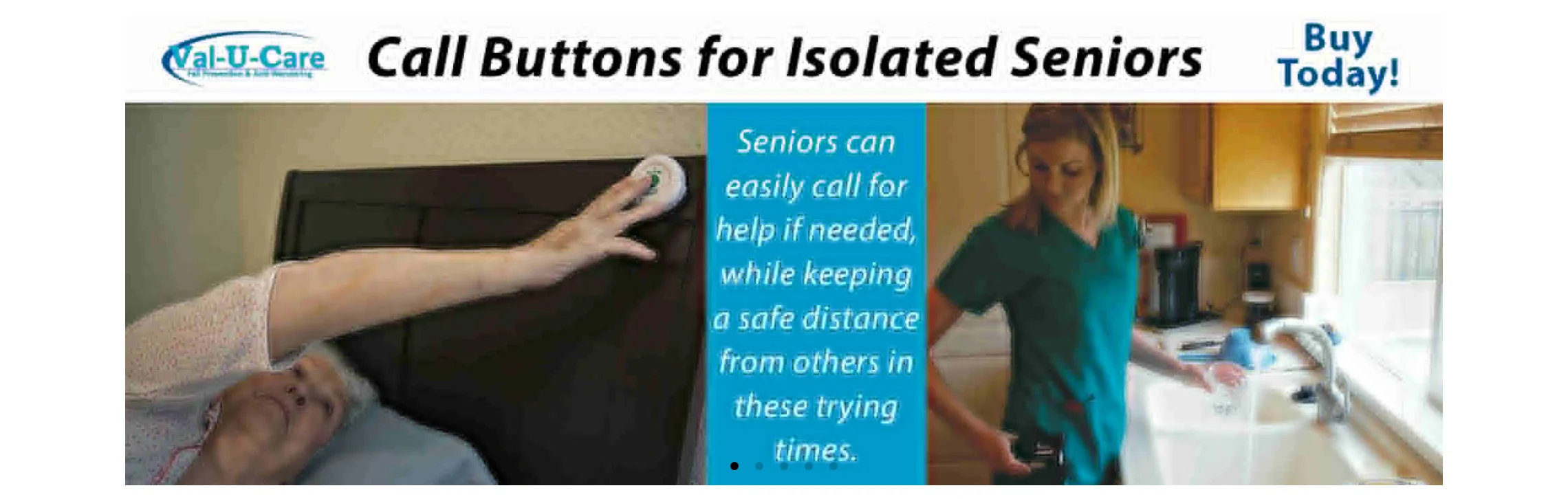
Treat Val-U-Care as installed call hardware first: pendants, pull cords, pressure pads, panels, and pagers for on-site staff.
Best fit
Use Val-U-Care when the building needs a familiar panel-and-pager workflow.
Common mistake: buying a hardware call system and expecting remote family visibility or activity analytics.
Assisted living, nursing homes, and smaller care facilities
Pendant-to-pager and room-call workflows
Installed hardware over dashboards
Devices covered
Val-U-Care monitoring is mainly call-initiated, with some passive exit detection.
Resident calls: Pendants, pull cords, and wall call stations
Exit pads: Bed and chair pads for fall-risk residents
Door events: Magnetic contacts on doors or windows
Val-U-Care is event-led nurse call infrastructure. Use it when staff need a clear signal and room response, rather than a behavioural trendline.
How staff receive alerts
Alerts route to on-site staff through panels, pagers, and corridor indicators.
Central panel: Shows the active call or sensor event
Wireless pagers: Notify assigned staff away from the desk
Corridor lights: Help staff identify the room or zone
Room reset: Staff usually clear the alert at the device or room station
Pro tip: ask the vendor to demonstrate unanswered-call escalation on your floor plan before installation.
Privacy checks
Basic Val-U-Care setups avoid continuous video by using call events and sensor logs.
Common mistake: adding camera modules without a separate consent and retention decision.
Confirm log storage before go-live. On-site storage and cloud access create different compliance questions.
Quote-based pricing
Val-U-Care is quote-based for facility deployments.
Rooms: Resident rooms and bathrooms covered
Devices: Call buttons, pull cords, and exit pads
Staff hardware: Pagers, panels, and corridor lights
Implementation: Installation, testing, and room setup
Ask whether future room changes need a paid site visit.
Limits before you buy
Val-U-Care's tradeoff is simple: local call response comes before remote oversight.
Quote family visibility separately because public materials focus on on-site staff hardware
Treat trend reporting as a separate requirement
Plan for site support when rooms or devices change
If the bigger concern is routing calls across an older building, the next RF-led system is the closer comparison.
Frequency Precision
Frequency Precision takes the nurse-call problem into RF hardware: call stations and sensors send events to staff without depending on facility Wi-Fi.
Best fit
Use Frequency Precision when cabling is hard and the priority is getting alerts across the building.
Common mistake: treating RF nurse call as resident monitoring software. Frequency Precision routes events; live resident dashboards remain a separate requirement.
Care homes, nursing facilities, assisted living, and memory care
Retrofits where wired nurse call installation is impractical
Pager, panel, and zone-based alert routing
Signals monitored
Frequency Precision monitors discrete call and sensor events across the facility.
Resident-initiated calls from pull cords or wall units
Bed and chair exit pads for fall-risk residents
Door contacts: Open and close events for rooms, exits, or restricted areas
Motion sensors: Passive infrared activity detection in selected spaces
RF traffic is separate from facility Wi-Fi. Range checks still matter before go-live.
RF alert routing
A triggered device sends an RF signal to a receiver, then staff see the call through the installed hardware.
Staff pagers: Direct alerts to the assigned caregiver or team
Annunciator panels: Show the active call at a central location
Corridor lights: Give visual room or zone indication
Manual reset: Staff clear the call at the device or panel
Pro tip: test the furthest rooms and high-risk doors before sign-off.
Privacy profile
Frequency Precision uses call devices and RF sensors rather than cameras or audio recording. The system handles event identifiers, room locations, and acknowledgement records.
Event logging needs an access policy. Decide who reviews acknowledgement records before the system goes live.
Pricing model
Frequency Precision uses quote-based pricing.
Rooms covered: Resident rooms, bathrooms, corridors, and exits
Sensor mix: Call stations, pads, contacts, and motion devices
Routing hardware: Pagers, panels, receivers, and corridor lights
Implementation: Mounting, testing, range checks, and staff training
Expect a capital equipment quote, rather than a simple per-resident subscription.
Limits before you buy
Frequency Precision is hardware-first nurse call, so reporting depth is limited.
Treat live floor-plan views as out of scope unless the proposal includes them
Use a separate analytics system for routine baselines
Pager-led workflows depend on local hardware checks and staff reset discipline
The practical use case is RF call routing across a building. Dashboard-led monitoring belongs in a different system category.
National Call Systems
Treat National Call Systems as local nurse-call hardware for on-site staff notification.
Pro tip: test the farthest room before buying extra transmitters.
Where this fits
Use National Call Systems for small care homes that need basic nurse-call hardware inside one building.
Common mistake: treating a pager kit as evidence for response quality. Managers still need a separate handover or incident log.
Alert types to check
Assess coverage by alert type:
Manual calls use buttons, pull cords, or pendants and depend on resident action.
Passive exit alerts use mats or door sensors and trigger from movement or pressure changes.
That split matters because passive sensors deserve attention for high-risk residents, while manual call devices depend on the resident taking action.
How alerts reach staff
A resident press or mat event sends an RF signal to local staff hardware. Response depends on nearby staff seeing the cue.
Pro tip: walk-test the farthest bedroom and bathroom, then repeat from the corridor.
Privacy and record keeping
The privacy footprint is small because the hardware uses room-linked call signals instead of cameras or audio. Care records still sit outside the system.
Hardware costs
Budget for hardware first, then plan upkeep separately.
Batteries for pagers and sensors
Spare pendants and call buttons
Replacement pressure mats
Walk-tests after room changes
Common mistakes before buying
Common mistake: buying National Call Systems when the main need is management evidence after a shift.
Managers keep response-time evidence in a separate log.
Families and regional leads need another system for remote dashboards.
Staff must spot powered-off receivers during routine checks.
For an even more basic hardware-purchase model, Nursing Home Aids is the next comparison.
Nursing Home Aids
Start with Nursing Home Aids for simple bedside exit alerts when staff are nearby.
Common mistake: buying pads as a remote monitoring substitute. Basic alarms create a local signal and leave escalation and care records to staff.
Best fit
Use Nursing Home Aids for one bedside risk: a resident who tries to stand from bed or a chair before staff arrive.
The best fit is a nearby caregiver who needs a prompt; managers still need reporting elsewhere.
Sensors and events
The product range is simple hardware:
Bed and chair pads for exit alerts
Floor mats for first-step pressure
Call cords for resident-initiated help
Use pads for residents who stand without calling first. Use call cords only when the resident reliably asks for help.
How local alerts work
A pad or mat triggers a local alarm unit. Wireless kits send the signal to a staff pager when the pager is within range.
Pro tip: test the pager with the bedroom door closed, then repeat from the hallway.
Privacy and care records
These pressure-based products keep bedrooms camera-free. Staff record follow-up in care notes because basic hardware stores little or no event history.
Per-unit costs
Expect per-unit hardware purchases rather than a subscription for basic pads and alarms.
Typical upkeep is simple:
Replacement pads
Batteries
Spare alarm units
Failed-device checks
Limits before choosing
Common mistake: using Nursing Home Aids as a whole-home monitoring plan.
Staff or family must be close enough to hear the alarm or pager.
Families need another route for off-site alerts.
Managers need a separate record for repeated exits and shift notes.
Use this category for bedside prompts. The next section turns these product tradeoffs into a selection guide.
Which system fits your situation?
Use four filters before comparing brand names: care setting, primary risk, alert responder, and privacy limits.
The same device can be useful in one home and wrong for a busy ward. The fit depends on who sees the alert and what they can do next.
Situation | Start with this category | Systems to shortlist |
A senior living alone with fall risk | Consumer passive sensors or a wearable alert system | Nomo Smart Care, Envoy at Home, Smart Caregiver |
A family caregiver who needs phone alerts | Home monitoring with app-based notifications | Nomo Smart Care, Envoy at Home |
A dementia resident with exit-seeking risk | Facility sensor network with door and bed-exit alerts | Guardian, National Call Systems |
A care home that needs staff routing | Facility nurse call or operations monitoring | Guardian, National Call Systems, Frequency Precision |
A post-discharge patient with clinical readings | Remote patient monitoring with a provider data feed | Essence SmartCare |
Care setting is the first filter. Home-based systems are built around one person and a family responder, while facility systems are built around staff workflows.
Primary risk decides the sensor mix:
Falls: bed exit, chair exit, wearable fall alerts, or passive room activity
Wandering: door contacts, restricted-area alerts, and live location where available
Chronic decline: activity patterns, vital signs, or provider-reviewed data
Missed care: visit records, response times, and staff accountability logs
Privacy can overrule every other feature. If cameras are unacceptable, narrow the shortlist to passive sensors, wearables, door contacts, and floor-plan alerts.
Care needs also change after a fall or hospital discharge. When the shortlist changes, rerun the privacy checklist before booking a demo.
Dementia exit risk raises a separate question: the exit-seeking wander-guard primer explains monitored doors, restricted areas, and escalation.
Privacy and dignity checklist
Use this checklist before approving any senior monitoring vendor. Privacy matters, but the system also has to reduce risk without creating another manual job for staff or family.
Camera placement: Ask where cameras are allowed, whether bedrooms and bathrooms are excluded, and whether sensor-only monitoring is available for private spaces.
Camera alternatives: Check whether motion, bed-exit, door, fridge, stove, or wearable sensors can cover the same risk without video.
Data collected: Ask what data is captured, why each data type is needed, and whether the vendor collects anything beyond safety and care operations.
Data access: Confirm who can view alerts, reports, location history, video, or health data, including family members, staff, administrators, and vendor support teams.
Data storage: Ask where records are stored, how accounts are protected, and how long event history remains available.
Consent: Require documented consent from the resident or legal guardian before activation, especially for cameras, location tracking, and health data.
Compliance evidence: For UK/EU deployments, ask for GDPR mapping and any clinical-device evidence that applies, such as IEC 62304, MHRA, or EU MDR documentation when health readings are captured.
Human oversight: Confirm that staff or clinicians make care decisions, even when software routes alerts or highlights risk patterns.
Workflow fit: Ask how alerts reach the people already responsible for care, and whether the system removes paperwork rather than adding another checklist.
ROI proof: Define what the pilot should prove, such as faster response times or fewer missed visits, then check where human care still has to take over.
What remote monitoring for elderly parents cannot replace
Remote monitoring is a safety and evidence layer. It helps families and care teams see risk earlier, but care decisions still need people who know the resident.
What sensors miss
Mood and distress: Motion sensors cannot judge pain, fear, loneliness, or confusion.
Clinical context: Remote readings can support a review, but diagnosis still needs a qualified clinician.
Cognitive change: Treat activity changes as prompts for assessment; a 2024 JMIR Aging review found limited evidence that sensors distinguish healthy cognition from mild cognitive impairment.
Shared spaces: Passive sensors can misread activity when caregivers, spouses, or other residents move through the same rooms.
What still needs human care
Safety checks: Lighting, footwear, trip hazards, eyesight, and hearing still need regular in-person attention.
Wellbeing checks: Scheduled visits and calls remain important because sensors cannot detect loneliness or family conflict.
Hands-on help: Bathing, medication support, meals, mobility, and reassurance still need trained staff or trusted family members.
Why every alert needs a responder
An alert only starts the response. Someone still has to check the resident, decide the priority, call emergency services if needed, and record what happened.
Frequent false alerts can create alarm fatigue. A 2023 Frontiers in Public Health review describes monitoring devices as support for care management, so keep human contact and review alert rules when noise rises.
When sensors alone are not the full picture
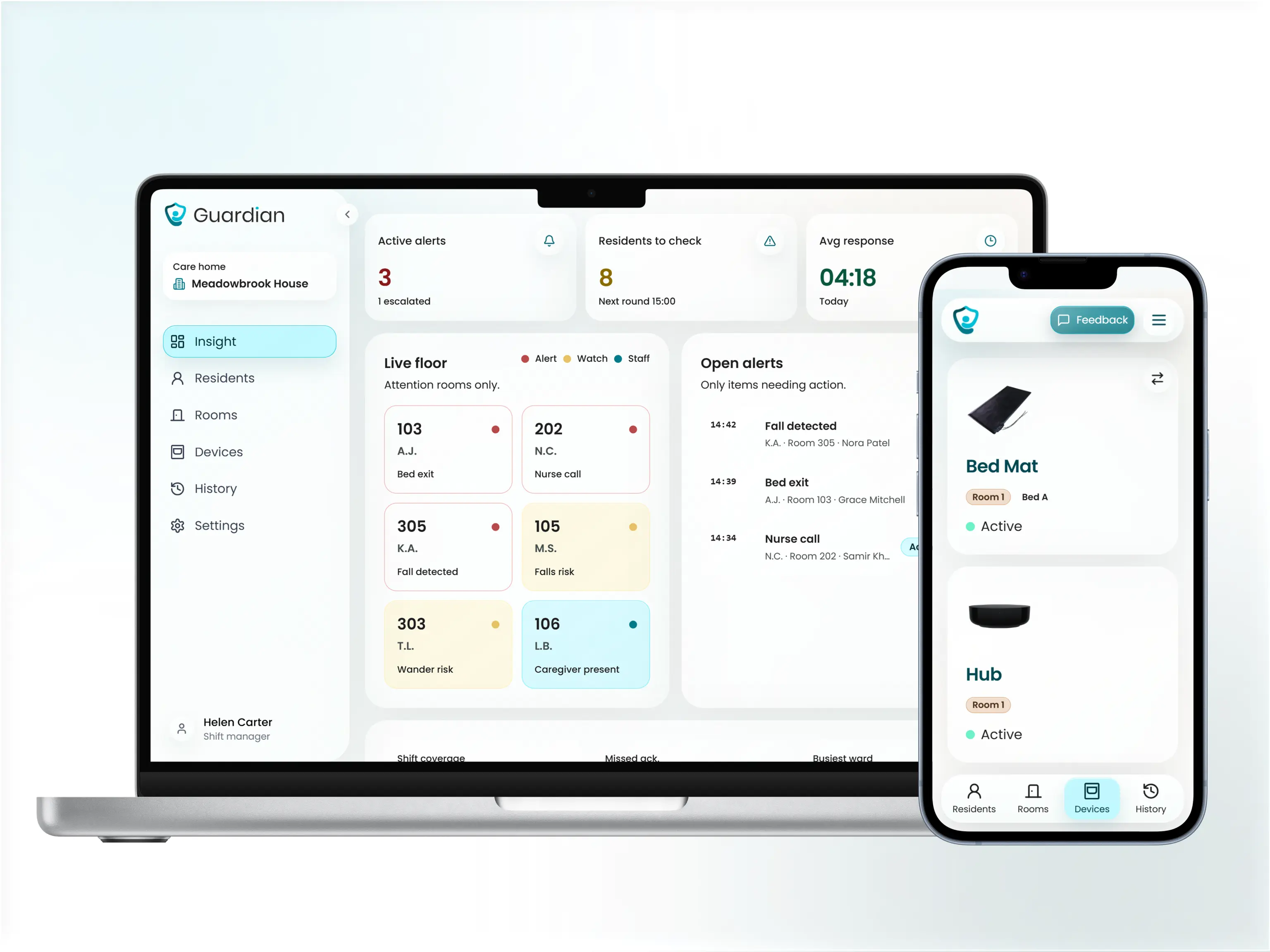
For care homes, Guardian adds the context sensors alone do not provide: where the alert happened, who responded, how fast, and what the record shows afterward.
Map the alert: floor, room, bed, and event type.
Keep the timeline: acknowledgement, status changes, and response notes.
Use existing devices: alerts reach the phones, tablets, or computers staff already use.
Protect private spaces: Guardian uses sensor data instead of cameras.
Standard Medicare can cover clinical remote patient monitoring when a licensed provider orders it, uses an eligible device, and bills the service under RPM rules. Consumer safety monitors and facility alert systems usually do not qualify.
Clinical RPM is usually tied to named condition categories such as diabetes, hypertension, heart disease, COPD, or other high-risk conditions your clinician is actively monitoring.
The HHS RPM guide ties RPM billing to provider services and lists CPT codes 99453, 99454, 99457, and 99458. Use those codes when asking the provider or insurer what is covered.
Standard Medicare coverage usually excludes family-bought fall detectors, motion sensors, and caregiver alert devices. Medicare Advantage and VA benefits may be broader, so check your plan first.
Senior monitoring systems may use Wi-Fi, cellular data, a landline, or a local radio link. Ask what still works during a broadband outage.
Wi-Fi systems use home or facility broadband to send alerts. Cellular systems send alerts through a mobile network, often with less dependence on home internet. Landline systems use a phone line for emergency calling or base-station connection. RF systems send sensor signals to a local pager or hub without broadband for that short-range step.
Wi-Fi-only systems stop sending outbound app alerts when broadband goes down. Cellular backup is worth asking about in rural homes or buildings with unreliable broadband.
Connection paths shape facility installs; the RF-and-Wi-Fi nurse call guide compares wireless options by routing and expansion.
Involve the senior in the choice, frame monitoring around independence, and start with the least intrusive option that still covers the main risk. Passive sensors can feel easier than cameras or wearables because daily behaviour changes less.
Ask which risks worry them, such as falls, night wandering, or missed medication. Explain who will receive alerts and when. Let them choose between acceptable device types where possible.
Passive sensors reduce daily friction because the older person does not have to press a button, charge a watch, or remember to wear a pendant. They also avoid the feeling of being watched.
If agreement is fragile, start with one device in the highest-risk area. If several relatives want updates, set alert rules before adding everyone.
Yes, many senior monitoring systems let more than one family member or caregiver receive alerts. The exact number of contacts and any added cost depend on the product and plan.
Check three details before choosing: contact limits, delivery method, and alert routing. Confirm whether contacts receive app notifications, SMS, phone calls, email, or portal alerts.
Shared alerts help when two adult children cover weekdays and a neighbour checks evenings. Keep the contact list short enough that everyone knows who responds first.

Author
Aleks Timm
Aleks Timm leads Guardian and builds privacy-first operations technology for care homes and home care providers. Teams get location-aware alerts they can act on, clearer situational awareness, and measured insight into how care work actually runs.
Read MoreRecommended reads
Keep reading
9 Best Digital Care Planning Systems (Free & Paid)
9 best digital care planning systems for UK providers—compare free and paid tools for records, alerts, audits, and safer care...
Read more
10 Best Home Care Software Solutions Compared
Compare the 10 best home care software solutions and find the right fit for scheduling, compliance, monitoring, and team...
Read more
8 Best Senior Monitoring Systems
8 best senior monitoring systems reviewed to help you choose the right alert, safety, and location tracking solution for better...
Read more