

Best wireless nurse call systems for hospitals and care facilities
In this article
An alert fires. By the time staff work out which room it came from, the resident has been waiting two minutes.
Choosing a nurse call system should be straightforward. In practice, it rarely is.
The market spans dozens of vendors with incompatible hardware protocols, opaque pricing structures, and compliance requirements (UL 1069 and UL 2560) that vary by care setting and facility size.
Wireless systems have largely displaced wired installs, adding their own layer of confusion: radio frequency vs. Wi-Fi, proprietary pagers vs. smartphone apps, and expandable systems vs. capped device counts that force costly upgrades.
This guide cuts through that noise with a use-case-driven comparison of leading wireless nurse call systems, what separates them on features and deployment, and what to verify before you sign a contract.
Not sure which system fits your ward? Prove the impact in 6–8 weeks without disrupting daily care. Request a pilot
What is a wireless nurse call system?
A wireless nurse call system is a radio-frequency or Wi-Fi-based alert network that lets patients or residents signal caregivers from anywhere in a facility without hardwired connections.
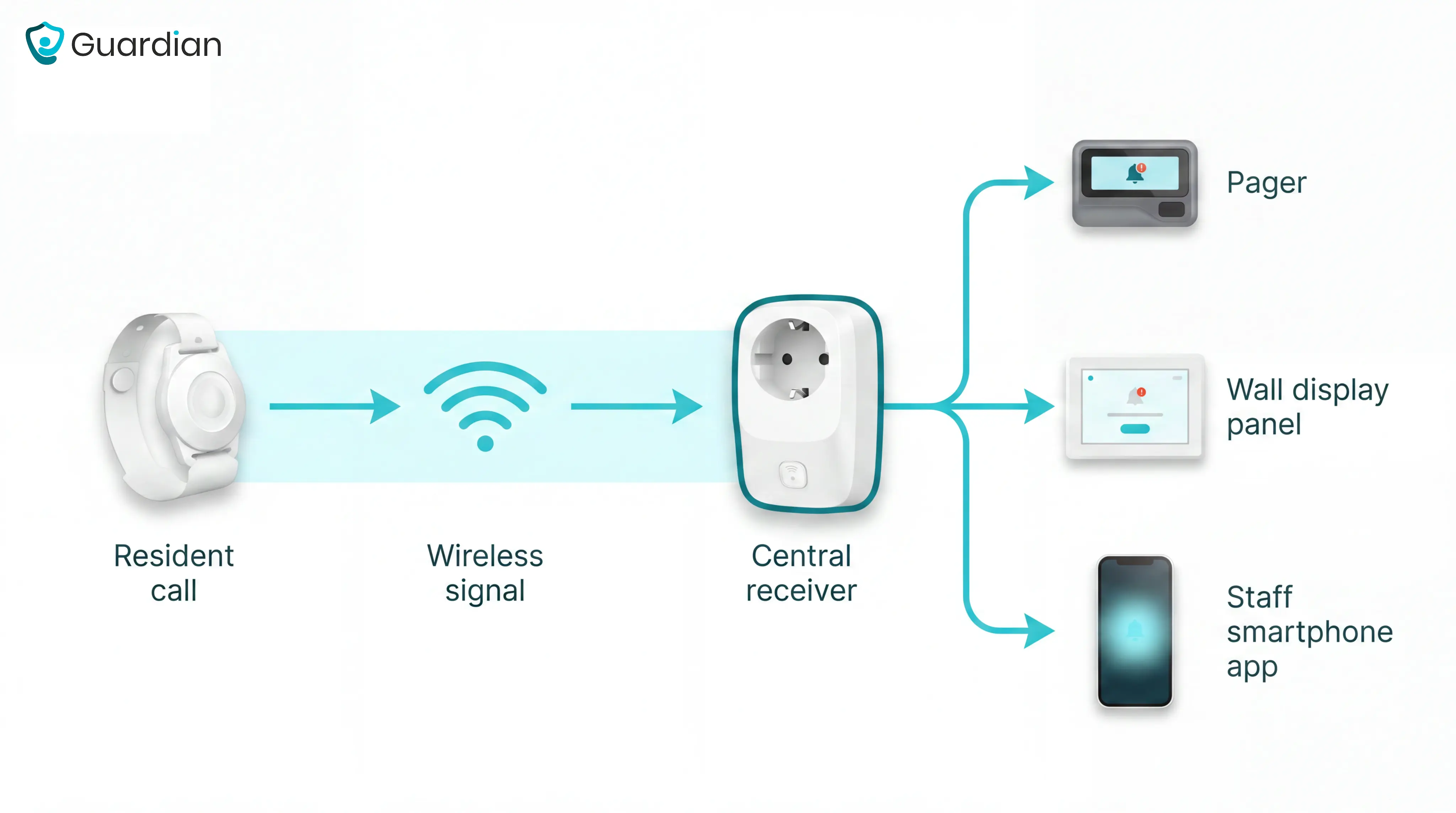
Every system has two layers. The resident side handles input; the caregiver side handles delivery. A signal travels from the call point to the receiver in seconds, with no manual relay required.
Resident-side hardware:
Call buttons and pull cords: wall-mounted or bed-mounted triggers; pull cords are standard in bathrooms
Pendants and wearables: worn around the neck or wrist; some systems support up to 40 devices per receiver, including pendants and SOS sensors
Bed pressure pads and motion sensors: passive detection that fires without the resident pressing anything
Caregiver-side delivery:
Dedicated pagers or watch receivers: common in facilities where staff don't carry smartphones
Wall-mounted display panels: show room number, alert type, and call duration at a glance
Smartphone or tablet apps: route caregiver alerts to devices staff already carry, with no extra hardware
Wired nurse call systems require conduit runs through walls, ceilings, and floors. That is a construction project that can disrupt active care areas for weeks.
Wireless systems transmit over radio frequency or Wi-Fi, so installation amounts to mounting devices and pairing them to a receiver. That difference translates directly to cost: wireless installs run up to 38% less than equivalent wired deployments, per industry cost analysis.
Wireless also simplifies expansion. Because there are no cable runs to extend, adding a room or a wing means adding a device. Systems that support open wireless standards can absorb medical devices already on the floor, so facilities avoid replacing hardware that still works.
Types of wireless nurse call systems
Entry-level pendant/pager kits
Self-contained kits bundle wearable call buttons with one or more pager receivers and no central software. EconomyCare+ starts at $411 for 10 buttons and 2 pagers, scales to 40 devices, and installs in under 4 days without professional wiring.
Simple RF frequencies, no recurring fees
Supports 2–40 resident devices
No UL 1069 or UL 2560 certification — suitable for basic assisted living, not skilled nursing compliance mandates
UL-certified enterprise platforms
These platforms add the compliance layer that states like California and Texas require for skilled nursing facilities. UL 1069 covers hospital signaling and nurse call; UL 2560 covers wireless assisted living systems.
Vision Link II: ETL-listed to UL 1069 Ed.7 and UL 2560
RFT Quick Response: UL 1069 certified with QAPI-compliant dashboards
Arial: UL 1069/2560 with PointClickCare EHR integration
All three include central dashboards, call analytics, and staff response reporting
SYNLETT (by Securitas Healthcare) is a mid-range RF system rated to 660 feet indoors, designed for multi-floor facilities.
Software overlay systems
Overlay systems connect to existing nurse call infrastructure via WiFi and push alerts to staff smartphones, skipping hardware replacement entirely.
NotiSync Notify works with 25+ legacy nurse call makers, claims 50–70% cost savings versus full upgrades, and deploys in approximately 2 hours.
No UL nurse call certification
Best for senior living with a compliant base system already in place
Adds mobile alerting without new hardware investment
The picks above reflect the types. The features below explain what to look for in any of them.
What to look for in a wireless nurse call system
Not every facility needs the same system. Matching criteria to your compliance obligations and operational risks prevents both over-buying and under-buying.
UL certification requirement
Your facility type determines whether this is a legal obligation or a budget decision.
Assisted living, no state mandate: non-UL systems like EconomyCare+ are legally acceptable.
Skilled nursing in California, Texas: UL 1069 required. Look for ETL-listed systems like Vision Link II.
A non-certified system in a California SNF, for example, can be flagged as non-compliant under F920, triggering a corrective action plan and a 90-day remediation window.
Common mistake: facilities accept a verbal assurance of compliance without checking the ETL listing. Ask for the certificate number and verify it against the UL product database.
Resident-activated vs. passive alerts
Button-only systems leave a gap. CMS-cited research found that 80% of older adults who fall and have a call alarm do not activate it.
A system that includes both passive detection (bed-exit sensors, motion, fall detection) and a resident-activated option covers both scenarios. Guardian provides that passive layer and works alongside any nurse call platform already in place, with no hardware replacement required.
Staff alert delivery method
Legacy systems deliver alerts to LCD pagers; modern platforms push to staff smartphones with two-way communication built in. Alert fatigue is a documented safety risk: nursing staff can receive 150 or more alerts per shift, a workload that produces alert blindness and raises the likelihood of a missed real event.
Configurable rules that filter normal activity reduce noise before it reaches staff.
Response-time recordkeeping
Basic systems like EconomyCare+ produce no call logs or analytics, which is acceptable for small assisted living with no reporting obligation. That gap creates problems when incidents are disputed or inspectors arrive. Systems with EHR integration — Arial connects to PointClickCare — write call and response data directly into clinical records.
Total cost of ownership
Hardware price is not the whole picture. EconomyCare+, Vision Link II, and Tek-CARE carry no recurring fees, while enterprise platforms with analytics and EHR integration may add annual licensing costs. NotiSync's overlay approach targets 50–70% savings for facilities with functioning legacy infrastructure that simply needs better staff alerting.
System | UL Cert | Passive alerts | Analytics | EHR integration | Recurring fees |
EconomyCare+ | None | No | No | No | None |
Vision Link II | UL 1069 & 2560 | Yes | Yes | No | None |
Arial | UL 1069 & 2560 | Yes | Yes | PointClickCare | Annual |
NotiSync Notify | None | No | Limited | No | Subscription |
Best wireless nurse call systems by use case
No single system fits every care setting. The right wireless nurse call system depends on facility size, compliance obligations, budget, and how staff receive alerts. Each pick below matches a distinct operational profile, from a 10-bed assisted living home to a multi-site skilled nursing chain.
Under 40 Residents, No UL Mandate: EconomyCare+
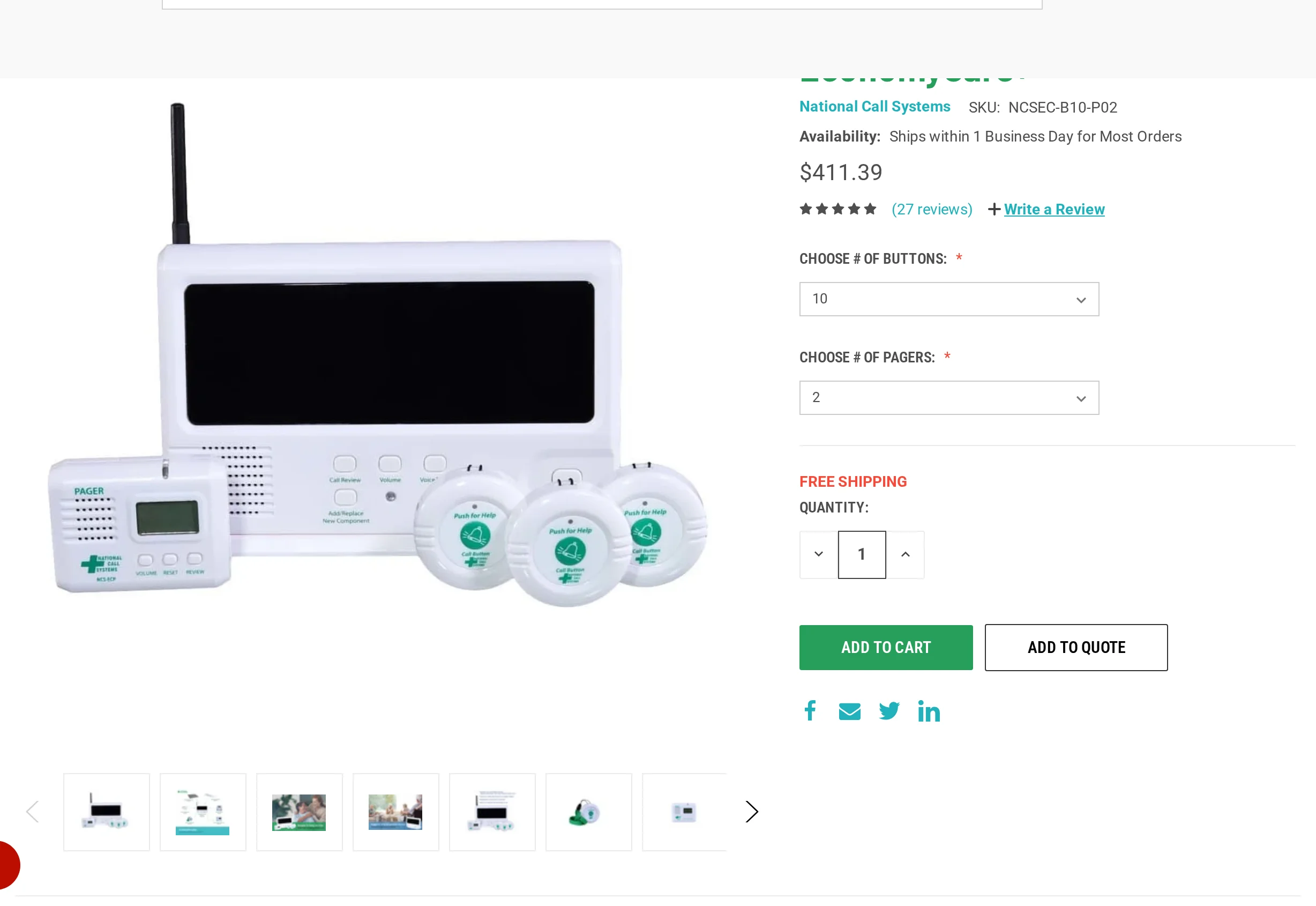
EconomyCare+ by National Call Systems is the only system in this article sized explicitly for 2-30 residents with a sub-$500 entry price. Vision Link II and Tek-CARE scale to full campuses, but both are quote-based with no public pricing, making them a better fit for mid-size and enterprise facilities.
Starter kit: 10 call buttons and 2 LCD pagers for $411
Add-on devices: $30-170 each (pendants, wall buttons, motion sensors, bed sensors)
Maximum capacity: 40 connected devices
Deployment: under 4 days, no cabling required
Fees: no recurring subscriptions or mandatory software upgrades
One customer ran the system across a 45-bed facility for 8.5 years by adding devices incrementally.
Limitations to know before buying. EconomyCare+ carries no UL 1069 or UL 2560 certification. For small assisted living facilities in states that do not enforce UL certification, EconomyCare+ meets functional performance criteria. It is not appropriate for any skilled nursing facility subject to CMS surveys or state UL 1069 mandates. The LCD pager displays resident ID only. There are no analytics, call logs, or EHR integration.
Who should look elsewhere. Skilled nursing operators in states that mandate UL 1069 should consider Vision Link II or Tek-CARE instead. Facilities needing response-time reports for QAPI documentation are better served by RF Technologies' QR Plus or Arial by Securitas Healthcare.
For care homes under that ceiling that want passive fall detection and automatic visit records without replacing the call kit, Guardian adds that layer on top. Motion sensors, bed exit alerts, and timestamped caregiver visit logs run in the background, separate from the nurse call hardware.
When the resident count climbs above 40 or compliance reporting becomes mandatory, the requirements shift, and so does the system.
For a broader overview of system types and selection criteria, see our guide to nurse call systems for care homes.
Running Multiple Sites: Arial
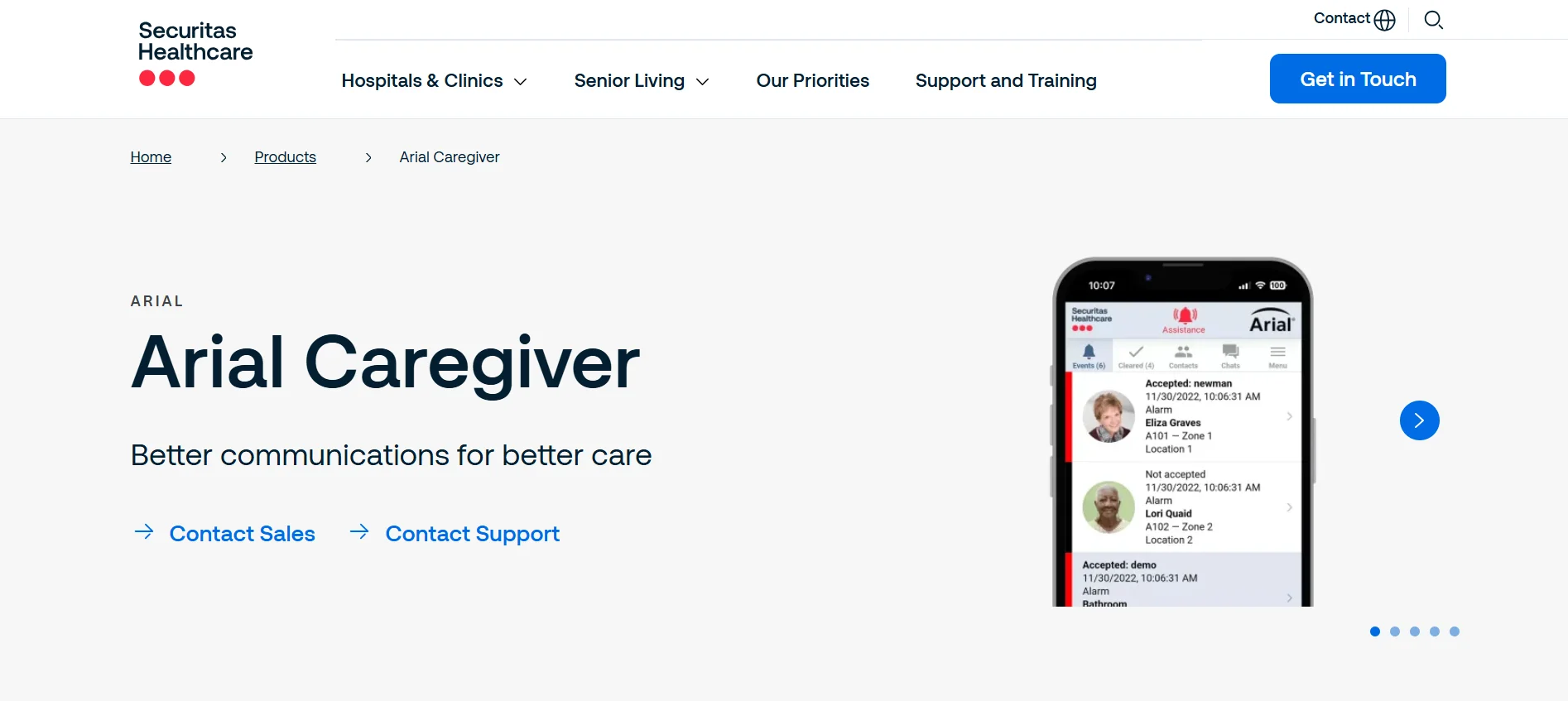
Six thousand installations across senior living and skilled nursing give Arial's field data a scale few vendors match. Built for operators managing multiple communities from a single platform, it includes PointClickCare EHR integration and a mobile caregiver app as standard.
Feature | What it means for your operation |
Centralized multi-site management | One interface across all communities, not one login per site. |
Caregiver mobile app | Voice, text, and resident calls on staff smartphones. |
PointClickCare EHR integration | Call data flows into clinical records automatically. |
Arial Web Client analytics | Response times and alarm counts by shift. |
Pricing and limitations
Arial is quote-based only, structured as multi-year enterprise agreements covering hardware, software licensing, installation, and support. Request a per-bed quote from the vendor directly.
Facilities where UL 1069 or UL 2560 compliance is the primary requirement may find Vision Link II (ETL-listed to both standards) a stronger fit.
The deciding factor is scale. Operators running a single community under 40 residents will find EconomyCare+ or NotiSync a simpler fit.
See how Guardian compares in your own ward. Request a pilot
The Compliance-First Pick: Vision Link II
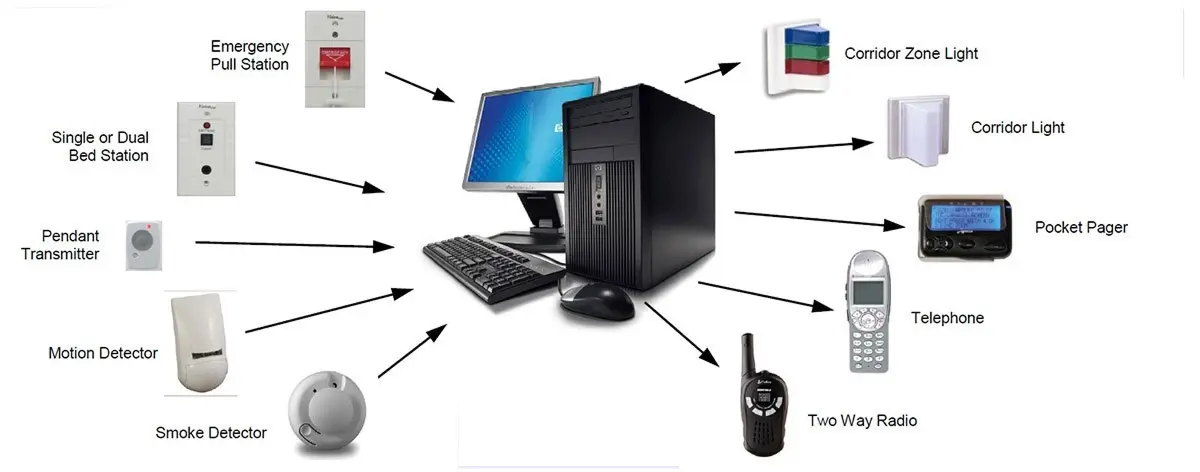
ETL-listed to UL 1069 Edition 7 and UL 2560, Vision Link II is the only system in this comparison to hold both current certifications.
QAPI-ready reporting — cloud dashboard with call duration, shift performance, and room-level response data mapped directly to documentation requirements
Fall detection and wander management — pendants rated waterproof for bathing environments, plus pull cords and bed exit integration
Scalable mesh network — single room to multi-building CCRC, with 30 years of backwards compatibility so expansions don't require rip-and-replace hardware
Pricing is quote-based with no published per-unit rates. The vendor positions Vision Link II at roughly 50% lower install cost than equivalent wired UL 1069 systems, with no ongoing licensing fees.
Vision Link II has no documented native EHR integration with platforms like PointClickCare. Facilities that need EHR-linked care documentation should look at Arial, which lists PointClickCare as a core feature.
Mobile staff alerting is functional, not a standout capability. Facilities built around smartphone-first workflows will find NotiSync a better fit.
The deciding factor is UL 1069. If your state mandates it for skilled nursing, start here.
Best budget-friendly expandable system
Starter kit: $411. One monitoring unit, 10 call buttons, 2 LCD pagers. No subscription fees, ever.
40 connected devices maximum (call buttons, pendants, motion sensors, door mats, bed pads)
Unlimited pagers for staff, not counted toward the cap
One 45-bed facility operated the system for 8.5 years, expanding incrementally as resident needs changed
Limitations. The 40-device ceiling is a hard stop. Facilities approaching 40 residents should plan around it before committing. There are no analytics, reporting dashboards, or call logs. The LCD display shows resident ID only. UL 1069 and UL 2560 certifications are absent, ruling it out for skilled nursing in compliance-heavy states.
The 40-device ceiling is the only hard constraint. Under it, EconomyCare+ is the lowest-cost path with no ongoing fees.
The picks above match systems to settings. The features below explain what to look for in any system and what separates the ones worth shortlisting.
Wireless nurse call features that matter most
Call buttons, pull cords, and pendants
Call buttons, pull cords, and pendants are the three standard resident-side alert devices in wireless nurse call systems, each suited to different mobility levels and room types.
EconomyCare+ covers up to 250 feet with water-resistant buttons, making it a practical fit for small to mid-size single-floor facilities. For multi-floor or larger campus buildings, range becomes a hard constraint.
SYNLETT (by Securitas Healthcare) is a mid-range RF system. It extends to 660 feet, which handles multi-room and multi-floor layouts where shorter-range systems lose signal reliability. For facilities spanning more than one corridor or floor, SYNLETT's range removes that uncertainty.
Alert delivery: pagers, displays, and mobile apps
The channel matters because coverage, noise, and workflow differ significantly across them.
Pagers: body-worn and reliable away from WiFi, delivering resident ID and room location alongside an audible alert.
Display panels: show all active calls simultaneously at the nursing station, giving charge nurses a live queue across the whole floor.
Mobile apps: push alerts to staff smartphones with two-way communication, shortening response times through direct caregiver contact.
Unanswered alerts are where systems diverge. SYNLETT re-triggers both the display panel and pager if a call goes unacknowledged, preventing silent missed calls. Wireless Nurse Call goes further: unacknowledged alerts escalate automatically to secondary staff or a supervisor until someone responds.
Industry guidance recommends escalation thresholds of 2-3 minutes for high-priority calls. Ask vendors whether the escalation timer is configurable per alert type or set globally.
Pro tip: Configuring every bed sensor to fire on first trigger is the fastest way to train staff to ignore your system. Start with conservative rules and tune down from there.
NotiSync Notify replaces pagers and walkies entirely with a WiFi push-to-talk smartphone app. No new hardware, 10 minutes of staff training, and 50-70% cost savings over a full system upgrade.
TekTone runs smartphone and tablet alerts alongside radio paging in parallel. Facilities can layer in mobile coverage without retiring existing infrastructure.
Reporting, call logs, and analytics
Wireless nurse call analytics track call response times, room-specific alarm counts, shift-based performance, and caregiver interactions through cloud dashboards or on-premise reporting software.
CMS mandates functional resident call systems under 42 CFR §483.90(g) (F920 tag). Non-compliance can trigger F600, F675, or F689 citations.
Call log analytics directly support F865 (QAPI) and F726 (staffing sufficiency) documentation.
QAPI (Quality Assurance and Performance Improvement) is a CMS-mandated continuous improvement program under 42 CFR §483.75. Nurse call response data is a primary input for F865 documentation.
Response time is also an independent predictor of fall rates per AHRQ-funded research. That means call log data serves both regulatory and clinical purposes.
EconomyCare+ — no reporting features; relies on basic LCD resident ID only.
Vision Link II — cloud dashboard with call duration, room-specific data, and shift performance metrics.
Arial (Securitas Healthcare) — response times and caregiver interactions via the Arial Web Client.
NotiSync Notify — response time analytics plus AI-assisted no-show recovery, though senior care case data is limited.
The Harrogate District Hospital deployment (Ascom) recorded a 12.2% improvement in average response times and a 41% reduction in patient falls post-implementation, per Ascom-published deployment data.
One benchmark worth noting: 72-99% of nurse call alarms are non-actionable, which makes analytics that identify noise patterns particularly useful.
EHR integration determines how actionable the reporting data becomes. Arial is the only system in this comparison with a confirmed EHR connection: PointClickCare, named explicitly, enabling call log data to flow automatically into resident care records.
Vision Link II and TekTone Tek-CARE both offer standalone reporting dashboards without named EHR connectors. TekTone Tek-CARE is a direct alternative to Vision Link II for operators who want radio fallback alongside smartphone alerts.
Wired vs wireless nurse call: which is right for your facility?
The right choice depends on your building infrastructure, installation budget, compliance requirements, and how much you expect to grow.
Cost and installation
Wireless systems cost up to 38% less to install than wired equivalents. Wired installations require conduit runs, wall fishing, and junction boxes, costs that compound in multi-story or historic buildings.
Compliance
UL-certified wireless systems exist. Vision Link II, Arial, and Tek-CARE all carry UL 1069 or UL 2560 listings, so wireless does not automatically disqualify a facility. California and Texas specifically enforce UL 1069 for skilled nursing facilities.
Scalability
Wireless systems add devices without rewiring. EconomyCare+ expanded from a starter kit to 40 devices over 8.5 years with no infrastructure changes; Vision Link II's mesh network scales from a single room to a multi-building campus. Wired systems require new conduit runs for every room addition.
When wired still makes sense
Facilities with fully functional existing wired infrastructure may not see ROI from switching unless they need mobile alerting or analytics. Dense concrete construction or environments near MRI suites can degrade wireless reliability.
NotiSync Notify offers a middle path: keep existing wired infrastructure, add a wireless app layer on top, and cut upgrade costs 50–70% versus full replacement.
Decision factor | Wired | Wireless |
Installation cost | High: conduit, wall fishing, labor | ~50% lower: no rewiring required |
Deployment speed | Weeks to months depending on construction | Days to weeks; some systems pre-programmed |
Scalability | Each addition requires new conduit run | Add devices without infrastructure changes |
Signal reliability | High; not subject to RF interference | Dependent on building materials and RF environment |
UL compliance | Established standard; widely accepted | Available: UL 1069/2560 certified options exist |
Existing infrastructure | Cost-effective if already installed | Requires upfront hardware investment |
Best fit | Existing wired facilities or dense concrete buildings | New construction, renovations, and most modern facilities |
UL 1069 and UL 2560: when compliance matters
UL 1069 covers hospital signaling systems for acute and skilled nursing facilities; UL 2560 covers emergency call systems for assisted living and residential care environments.
UL 1069 applies to acute care hospitals and skilled nursing facilities, covering signal transmission, annunciator panels, and call station performance under emergency conditions. UL 2560 covers assisted living and residential care environments, with less stringent response time and annunciator requirements than UL 1069.
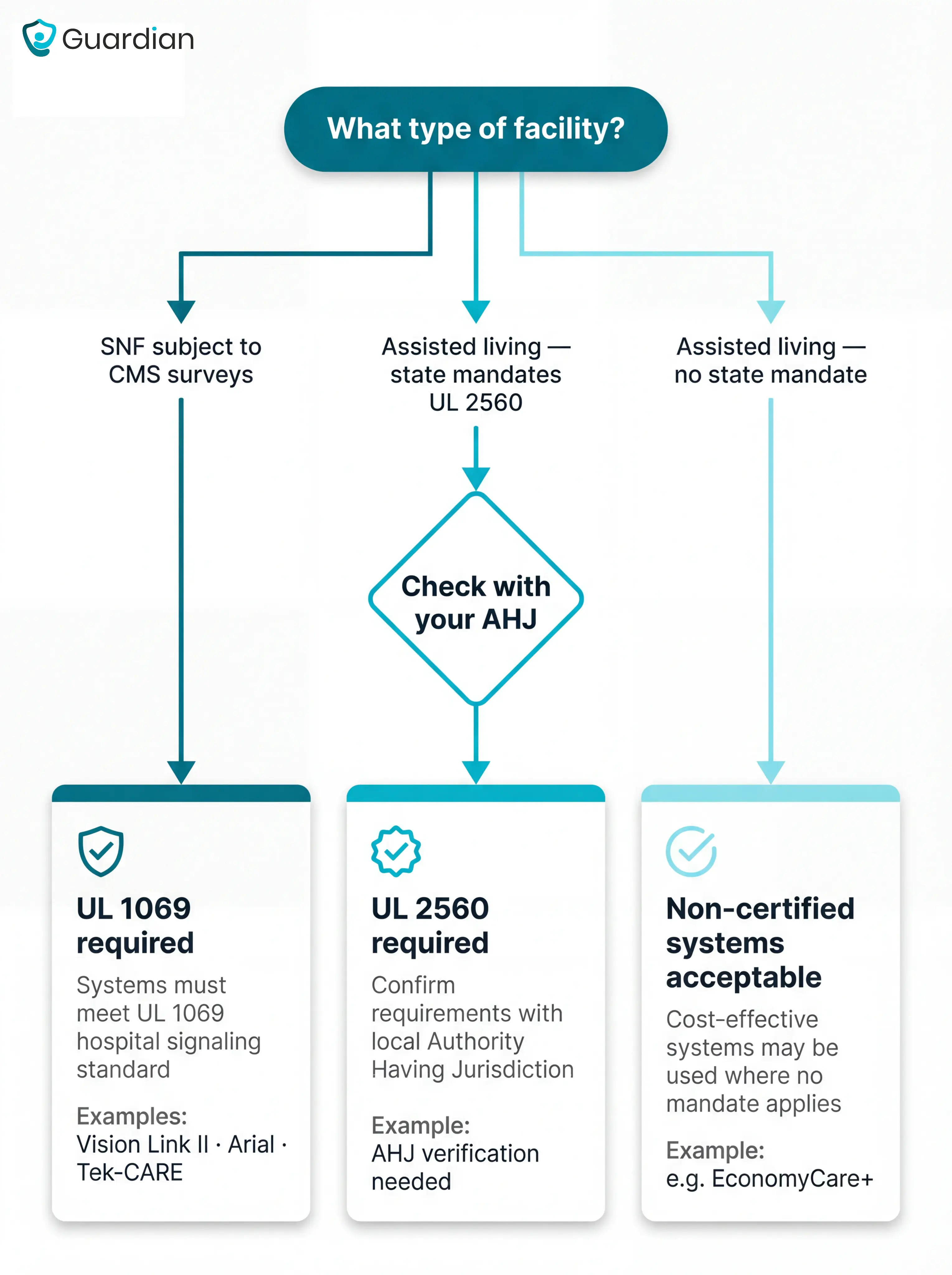
Systems in this article and their certifications:
Vision Link II (Systems Technologies) is ETL-listed to UL 1069 Edition 7 and UL 2560.
RFT QR Plus (RF Technologies) holds UL 1069 certification and includes QAPI-compliant reporting for CMS requirements.
Tek-CARE NC300, NC110, NC150, and NC400 are UL 1069 listed; TekTone also holds a UL 2560 listing for wireless models.
EconomyCare+ and Notify carry no UL 1069 or UL 2560 certification.
SNFs typically face state-level inspection requirements that reference UL 1069, particularly in California and Texas. Assisted living facilities often fall under UL 2560, though many states accept non-certified systems that meet functional performance criteria during inspections.
A non-compliant system in a CMS-surveyed SNF triggers an F920 deficiency citation. The consequence is a corrective action plan and a remediation window, typically 90 days, during which inspectors expect to see a compliant replacement in place or in active procurement. Procurement decisions made under that kind of deadline tend to be expensive.
Assisted living facilities face a different standard. Many states do not mandate UL 2560, but do require systems to meet functional performance criteria during licensing surveys. EconomyCare+ is legally acceptable in those states. In California or Texas, it is not. The practical step before purchase: confirm your facility's exact requirement with your state health department or the AHJ for your county.
For your specific requirements, check with your state health department or Authority Having Jurisdiction (AHJ).
Questions to ask before you buy
The questions below surface what vendors rarely volunteer: whether the system will pass a compliance audit, what it actually costs to grow, and whether it protects residents who cannot call for help themselves.
Is the system UL 1069 or UL 2560 certified, or just 'compliant'?
'Compliant' is not the same as certified. UL 1069 governs skilled nursing; UL 2560 covers assisted living. California and Texas enforce UL 1069 as a condition of licensure. EconomyCare+ and Notify carry no UL certification, which is a regulatory risk for any SNF subject to CMS surveys.
A vendor who says their system is compliant without naming the certification standard is a red flag. Ask for the ETL certificate number and check it against the UL product database.
What does expansion cost, and are there recurring fees?
System | Per-device expansion | Recurring fees |
EconomyCare+ | $30–$170 per device | None |
Vision Link II | Quote-based | None |
Arial | Quote-based | Annual licensing |
NotiSync Notify | Quote-based | Subscription |
Ask for per-device expansion cost, annual software fees, and second-site pricing before signing.
How does the system handle false alarms and alert fatigue?
Alert blindness is a documented safety risk. Nursing staff overwhelmed by alerts per shift begin ignoring them, and the failure mode is a missed real event.
Ask whether alert rules can be configured per resident, what the reported false-alarm rate is, and whether unacknowledged alerts escalate automatically.
Common mistake: Facilities accept a vendor's stated false-alarm rate without asking for site-specific data. Ask for the alarm-to-actionable-event ratio from a facility with similar resident acuity, not a marketing average.
What happens when a resident cannot or will not activate the call device?
80% of older adults who fall and have a call alarm do not activate it. Dementia residents frequently remove or ignore wearable pendants. Ask whether passive detection is included: bed-exit sensors, door sensors, or fall-detection wristbands that require no resident action. Vision Link II and Arial include wander and fall management; EconomyCare+ does not at the base level.
Who installs the system, and who is responsible for commissioning?
EconomyCare+ is designed for self-installation, but the Amazon listing explicitly places full installation and testing responsibility on the buyer. Ask whether the vendor provides on-site commissioning, what staff training is included, and who handles coverage gaps discovered after go-live.
What is the system's scalability ceiling?
Vision Link II scales from a single room to a multi-building CCRC campus and maintains backwards compatibility across 30 years of hardware. EconomyCare+ caps at 40 devices. Ask for the maximum device count per controller, whether multiple buildings share one dashboard, and what the migration path looks like if you outgrow the current tier.
Guardian: camera-free monitoring for care homes
Most nurse call systems tell you a resident pressed a button. They don't tell you what happened in the 20 minutes before. Guardian fills the monitoring gap that nurse call hardware leaves open: passive fall detection, automatic caregiver visit records, and a live floor plan view, without cameras, cabling, or replacing existing call infrastructure.
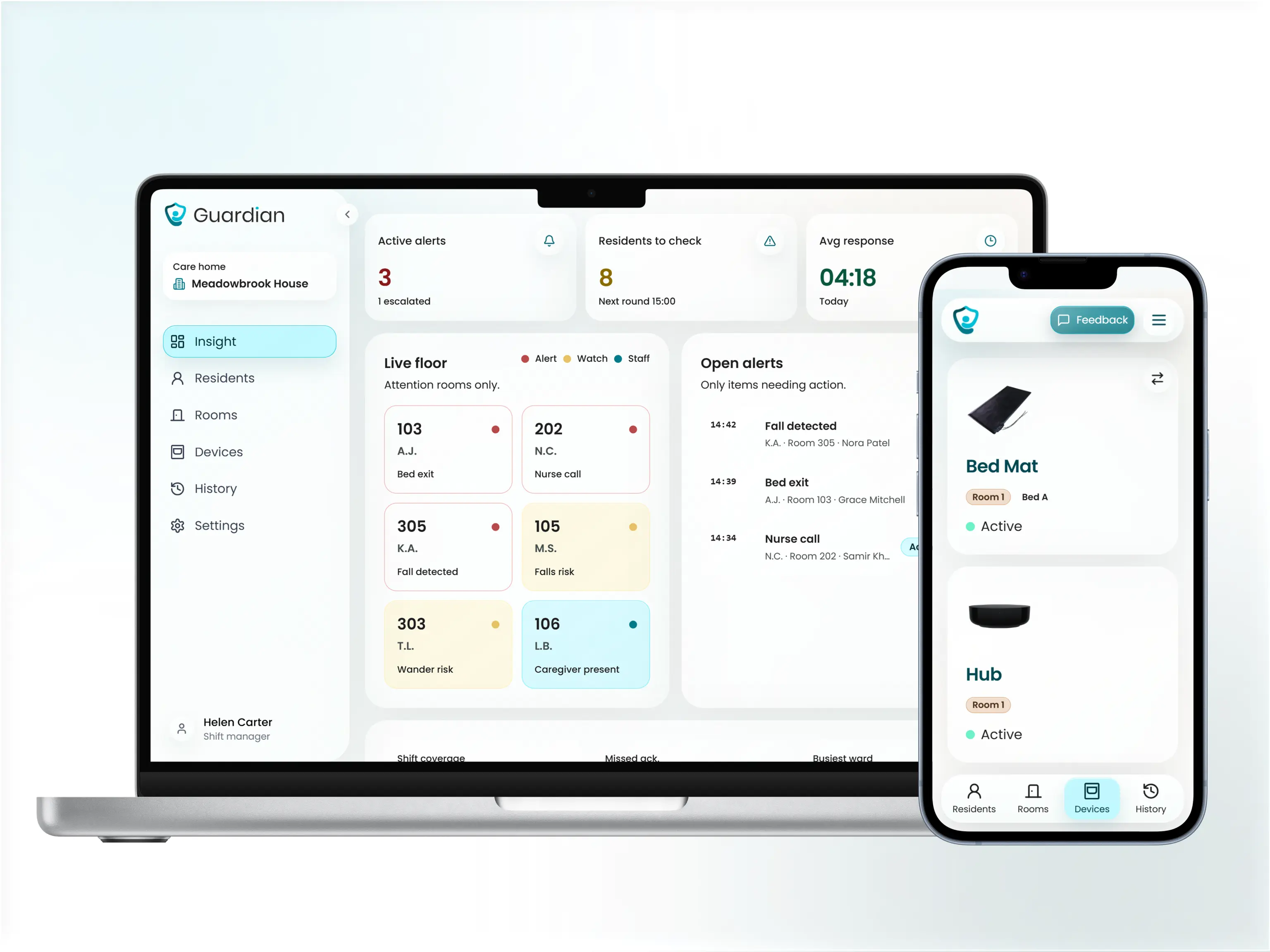
Guardian uses three sensor types:
Motion sensors — know when a resident is active or has not moved in an unusual period, without any camera.
Bed exit sensors — alert staff the moment a resident leaves bed, day or night.
SOS wristband — residents press once to send an alert with their name and live location to staff phones. No pager hardware required.
No cameras, no cabling, no IT project. Sensors mount to walls and doors. Pairing to the Guardian Portal takes about a week per ward.
Guardian maps your floor plan and pre-configures sensors before arrival.
Sensors are mounted and paired to the Guardian Portal in about a week, ward by ward.
Alert rules are tuned to your routines during the first two weeks, and a written impact report follows at 6–8 weeks.
Guardian records caregiver visits and shift timing automatically. Staff get clean, timestamped records without manual notes. Managers see response times, visit durations, and shift data in the Guardian Portal. Caregivers carry an SOS wristband for their own safety, with no phone needed.
Alert rules are configurable per resident, for example flagging only bed exits longer than 15 minutes at night, so caregivers are not woken for normal movement.
Alerts go directly to staff smartphones and tablets. No new pager hardware needed.
Staff manage emergency contacts, review routine reports, and track facility-wide safety metrics from one interface. Response time data is captured in the pilot impact report at the end of each 6–8 week deployment.
Guardian is built for care homes and home care providers. It gives operations and nursing managers a live view of the ward, automatic visit records, and real-time alerts without cameras, cabling, or an IT project.
Guardian is a monitoring layer, not a replacement for a UL-certified nurse call platform. For SNFs already running Vision Link II or Arial, it adds the passive detection and visit recording that those systems don't cover natively. For SNFs in California or Texas where UL 1069 is a hard licensing requirement, the nurse call system itself must be Vision Link II, RFT Quick Response, or equivalent. Guardian runs alongside it.
Some do. Vision Link II, Arial, RFT QR Plus, and Tek-CARE list UL 1069 or UL 2560 certification, while simpler pendant kits and software overlays often do not.
For skilled nursing facilities, ask for the ETL or UL certificate number and verify it before buying. Do not rely on the word “compliant” by itself.
Yes, if it meets your facility’s compliance requirements and performs reliably in your building. Wireless systems can reduce cabling work and make expansion easier.
If your wired system still works, an overlay may be a better first step. It can add mobile alerting and reporting without replacing the full infrastructure.
Start with one ward, one workflow problem, and one measurable outcome. Track response times, alert volume by shift, missed alerts, and staff feedback before committing facility-wide.
A phased pilot is safer than a full-system switch. It shows whether the system fits your rooms, routines, and reporting needs before you scale.
Good systems reduce noise with resident-specific rules, time windows, delay thresholds, and escalation settings. The aim is to alert staff when action is needed, not on every normal movement.
For example, a night bed-exit rule can alert only when a resident has been out of bed for more than 15 minutes, rather than every bathroom trip.

Author
Aleks Timm
Aleks Timm leads Guardian and builds privacy-first operations technology for care homes and home care providers. Teams get location-aware alerts they can act on, clearer situational awareness, and measured insight into how care work actually runs.
Read MoreRecommended reads
Keep reading
8 Best Senior Monitoring Systems
8 best senior monitoring systems reviewed to help you choose the right alert, safety, and location tracking solution for better...
Read more
7 Best Medical Alert Systems with Fall Detection
Discover the 7 best medical alert systems with fall detection—compare top picks, features, and response times to find the right...
Read more
10 Best Nurse Call System Suppliers for Care Facilities
Explore the best nurse call system suppliers and care operations monitoring platforms to boost response, compliance, and care...
Read more