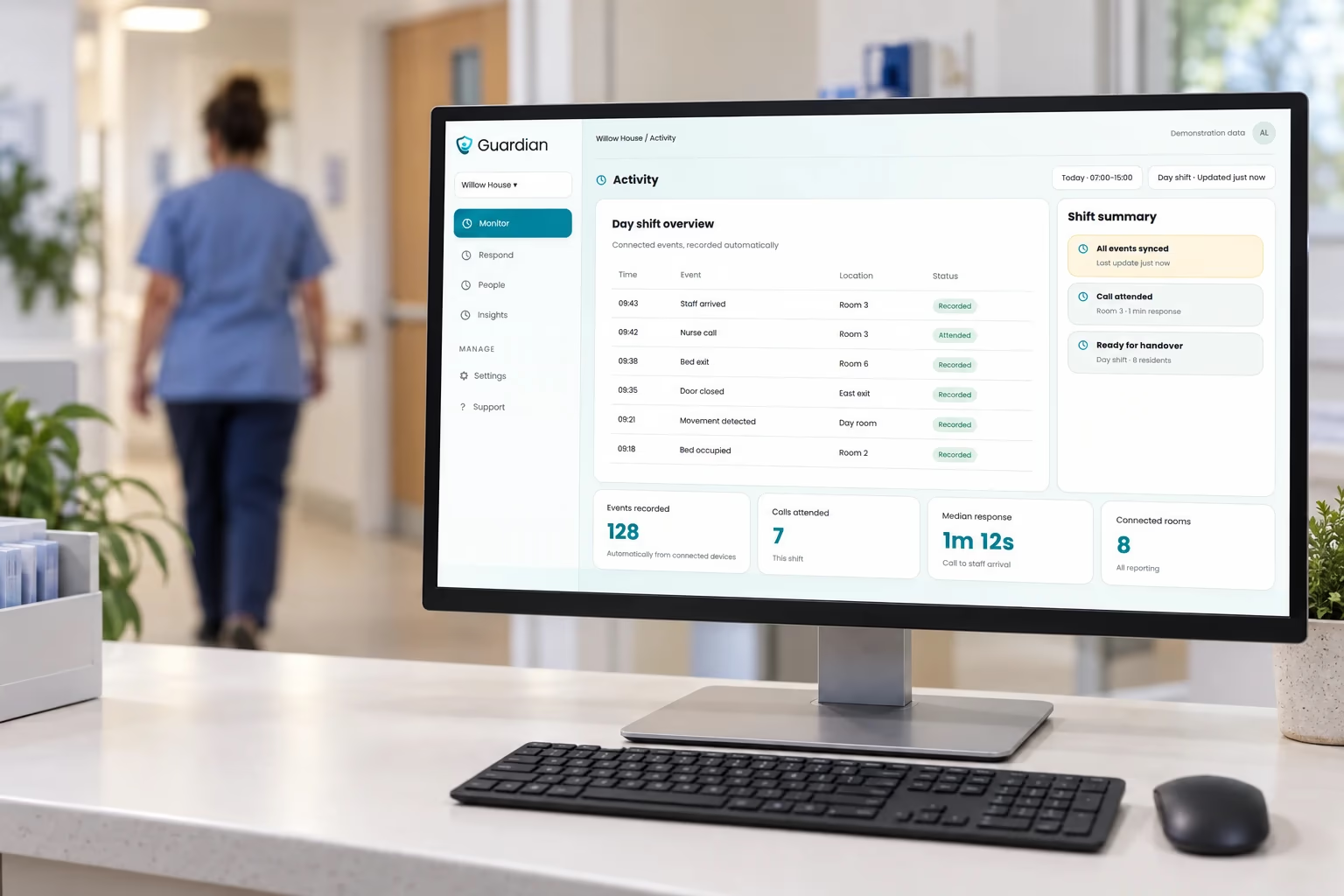


Response time
How long it takes staff to reach a resident after an alert.


Last activity 2 min ago
 Alex At home Since 08:40
 Ten capabilities on the same sensors and the same screen. Nothing here needs a camera in a resident’s room.
Every sensor event is written into the care log as it happens, so nobody reconstructs the night from memory at 07:00.
When a call comes in you see who, where, and who is closest, on the actual floor plan.
A door opens at 03:00 and the right person knows in seconds, instead of at the morning round.
Bed mats, wristbands and radar catch falls and immobility, with a confirmation window that keeps false alarms down.
One button reaches whoever is nearest, with the room already on their screen.
Hoists, pumps and chairs stop disappearing. Every tagged asset has a last-seen room and a time.
Occupancy and bed exit with no camera and nothing the resident has to wear or remember.
Movement and presence in bathrooms and private spaces, where a camera is never an option.
The ordinary rhythm of a room, so a change in pattern surfaces before it becomes an incident.
Risk scoring and trends across people, so the picture is not only what happened last night.
The house keeps reporting after the carer drives away, and the round itself becomes a record instead of a phone call.
Visits and connected-device events form a timestamped record, so the team can follow what happened without another round of phone calls.
Where the team is, how long the drive took, and which visits are running late.
The rhythm of a house. Up, moving, in the kitchen, back to bed, without a camera anywhere.
A dedicated GPS tracker keeps location and an SOS button available when a client is away from home.
One press reaches the person best placed to respond, with a location attached.
See visits, team locations and homes needing follow-up in one operational view for the care team.
The same floor coverage as a care home, plus location outside it, and logs written from what the sensors actually saw.
Every sensor event is written into the care log as it happens, so nobody reconstructs the night from memory at 07:00.
When a call comes in you see who, where, and who is closest, on the actual floor plan.
A door opens at 03:00 and the right person knows in seconds, instead of at the morning round.
Bed mats, wristbands and radar catch falls and immobility, with a confirmation window that keeps false alarms down.
One button reaches whoever is nearest, with the room already on their screen.
Hoists, pumps and chairs stop disappearing. Every tagged asset has a last-seen room and a time.
Occupancy and bed exit with no camera and nothing the resident has to wear or remember.
Movement and presence in bathrooms and private spaces, where a camera is never an option.
The ordinary rhythm of a room, so a change in pattern surfaces before it becomes an incident.
Location outside the building, on the same platform as everything inside it.
Risk scoring and trends across people, so the picture is not only what happened last night.
Location, presence and response times for patients, staff and equipment, on infrastructure you already have power and network for.
Every sensor event is written into the care log as it happens, so nobody reconstructs the night from memory at 07:00.
When a call comes in you see who, where, and who is closest, on the actual floor plan.
A door opens at 03:00 and the right person knows in seconds, instead of at the morning round.
Bed mats, wristbands and radar catch falls and immobility, with a confirmation window that keeps false alarms down.
One button reaches whoever is nearest, with the room already on their screen.
Hoists, pumps and chairs stop disappearing. Every tagged asset has a last-seen room and a time.
Occupancy and bed exit with no camera and nothing the resident has to wear or remember.
Movement and presence in bathrooms and private spaces, where a camera is never an option.
The ordinary rhythm of a room, so a change in pattern surfaces before it becomes an incident.
Risk scoring and trends across people, so the picture is not only what happened last night.
The same coverage in every home, whoever delivers the care, with reporting that holds up in a council meeting.
Bring participating homes and completed visits into one service overview, so gaps in coverage are easier to spot across districts.
Motion and activity sensors help participating care teams notice changes at home, without putting cameras in private rooms.
Dedicated GPS trackers give participating clients location sharing and a way to request help when they are out.
Connect each client’s SOS button to the response team responsible for their service.
Automatic visit records give coordinators a common account of when care was delivered, without chasing separate updates.
See team locations and travel between homes, so service planning reflects the time it takes to reach people.
Give care coordinators a shared view of visits and follow-up needs across participating providers, so the next action has a clear owner.
Review visit records and coverage over time to understand where the service is working and where capacity needs attention.
Help with everyday plans through shared reminders and updates, with Lumi on both phones and each person choosing what to share.

Support a parent, partner or another adult in your family with shared reminders, easy calls and Lumi, your AI assistant on both phones.
Explore Hey MomSee whether they are home, out or on the way back, using the location they choose to share from their phone.
Check daily activity and phone battery at a glance, then call when you want to hear their voice.
Appointments and everyday reminders sit in one easy Today view, so your parent can see what is next and mark things done.
Guardian is already being used in care homes, special care and home care. It is not a concept, but live infrastructure supporting daily operations.

Activity and door monitoring
Live activity and door visibility helps care teams replace routine night rounds with exception-based care.
Read the case studyGPS in special care
Live location helps staff respond faster while supporting safer, more independent movement for residents.
Read the case study
Municipal home care
Everyday activity between visits gives care teams an earlier signal when a person's routine changes.
Read the case studyGuardian is designed around operational metrics care organisations can actually manage.
How long it takes staff to reach a resident after an alert.
How many physical checks can be replaced by remote monitoring.
How much staff time is spent on real care versus unnecessary rounds and searching.
How often unusual behaviour, inactivity, exits or falls occur.
Whether residents receive attention when expected.
Whether changes in behaviour can be identified early enough for preventive intervention.
Guardian does not just generate more data.
It gives care organisations the information needed to run safer services with fewer unnecessary tasks, faster response and better use of staff.







No. Guardian is built around privacy-first sensors such as motion sensors, bed sensors, radar, wearables, door sensors and indoor positioning. Residents can be monitored without placing cameras in private rooms.
Not necessarily. Guardian can work alongside existing infrastructure and connect different types of sensors and devices into one platform. We first look at what is already installed and only add what is actually needed.
Depending on the setup, Guardian can detect falls, bed exits, unusual inactivity, room exits, SOS alerts, location, movement patterns, staff response times and equipment location.
Guardian helps teams move from routine checking to exception-based care. Staff can focus on residents who actually need attention instead of spending time on unnecessary room rounds, searching for equipment or manually reconstructing what happened.
A pilot can usually start with a limited number of rooms, residents or one care unit. Guardian is modular, so organisations can begin with one use case and expand later into location tracking, fall detection, nurse call, activity monitoring or workforce analytics.
Show us your floor plan and current setup. We’ll map the risks, identify where staff time is being lost, and show you exactly how Guardian could improve safety and daily operations.


