

5 Best Elderly Fall Detection Devices for Homes and Care Teams
In this article
A fall alarm is only useful when the right person hears the alert, trusts the signal, and knows where to go.
For care homes, fall detection needs more than a pendant button. The system needs reliable alerts, room-level context, and records staff can check after the shift.
This guide covers both consumer fall detection devices for private homes and care-operation systems for care homes or home care teams.
It compares response model, practical fit, and whether the alert leaves a usable record. Care teams can also review the Guardian pilot for room-level alerts and passive monitoring.
Quick picks: elderly fall detection devices by situation
No device is best in every setting. The right fit depends on who responds, whether the resident will wear a device, and what records the service needs.
Situation | Quick pick | Why it fits |
|---|---|---|
Care home staff or home care operations | Guardian | Staff-routed alerts, passive monitoring, and operational records in one care-focused system. |
Family monitoring one independent senior | Nomo | App-based home monitoring for relatives who want updates without a facility workflow. |
Senior who will not wear a device | Envoy | Non-wearable fall detection for homes where pendants or watches are unlikely to stay on. |
Senior living alone who needs 24/7 monitored response | Lifeline | A monitored response model for emergencies when family or staff may not be nearby. |
Multi-site facility operator | Essence | A connected wearable platform suited to organisations managing more than one location. |
Fall detection vs fall alert vs fall prevention: what's the difference?
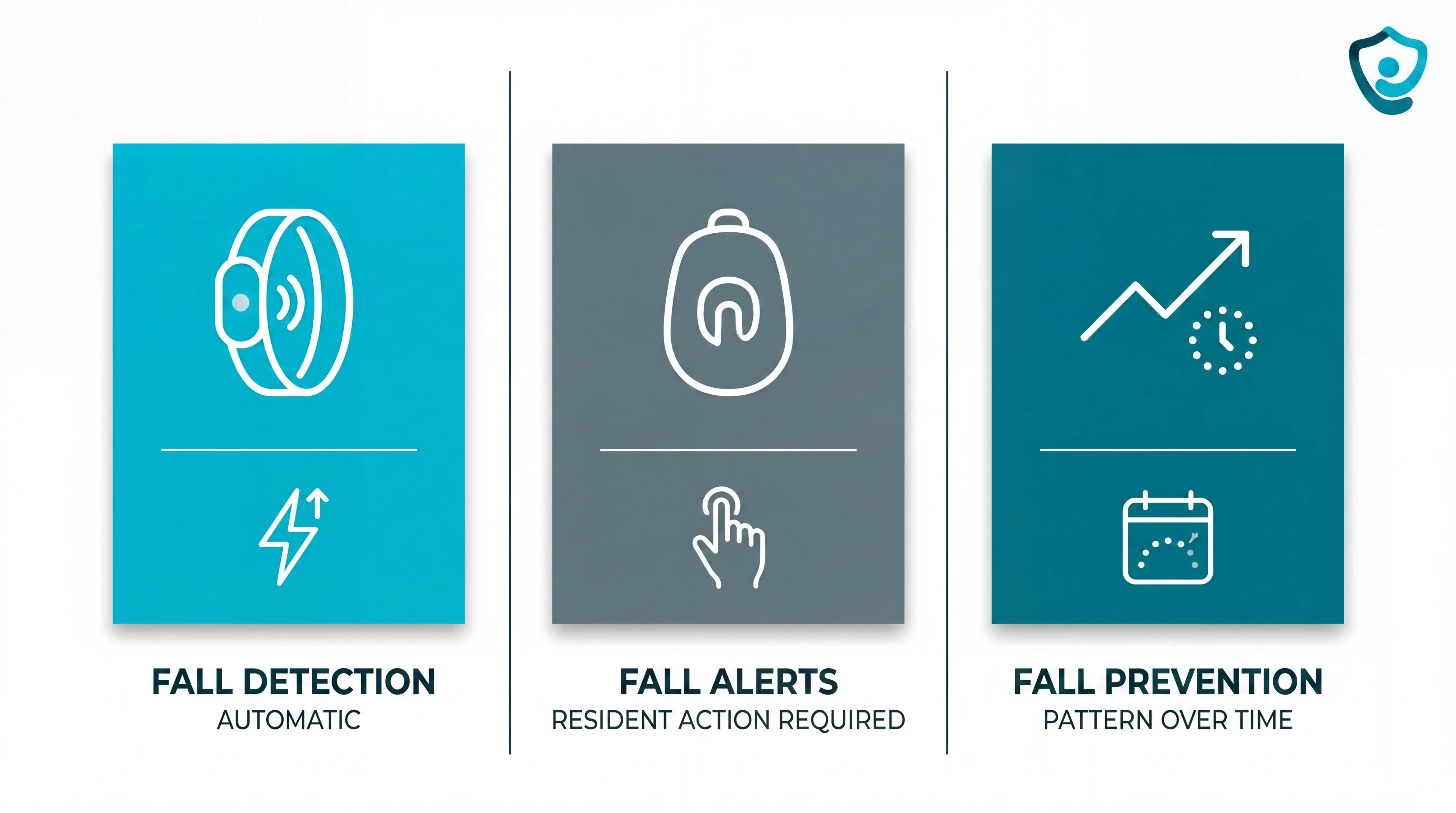
Fall detection, fall alerts, and fall prevention solve related problems, but they are not the same category.
Fall detection: The device identifies a likely fall automatically and sends an alert through the chosen response route, without waiting for a button press.
Fall alerts: A pendant, wall button, or wrist button relies on the resident being conscious, close enough, and able to press for help.
Fall prevention: Passive sensors look earlier for risk patterns, such as unusual inactivity or repeated night-time bathroom visits.
For operators, the practical question is simple: does the system only raise an alarm, or does the system support risk review, staff response, and CQC-ready records?
How to choose: monitored response, caregiver alerts, or passive monitoring?
The first decision is the response model: 24/7 monitored response, caregiver alerts, or passive monitoring.
Choose based on who can respond, what happens if the senior cannot press a button, and where the device will be used.
Start with the response pathway:
Monitored response: Use when a senior lives alone and needs a monitoring centre that can call emergency services.
Caregiver alerts: Use when family or staff can reliably answer app notifications at any hour.
Passive monitoring: Use when wearables are refused, removed, or likely to be forgotten.
Do not treat the button as the whole safety plan. Manual alerts fail when a resident is unconscious, confused, out of reach, or reluctant to press the alarm.
A night-shift notification should name the floor, room, and ideally bed area, so response time is not spent checking the wrong doors.
Where room-specific alerts drive the response, the night-shift emergency call guide covers triggers, channels, and records.
How we evaluated these devices
This review uses desk research, expert review, and care-operations judgment, not personal lab testing. We checked public product information against CQC expectations, NICE falls guidance, and alert-workflow practicalities.
Before scoring features, we asked three operational questions:
Who hears the alert at 2 a.m.?
Can the responder find the resident without searching rooms?
Is there a record to review after handover?
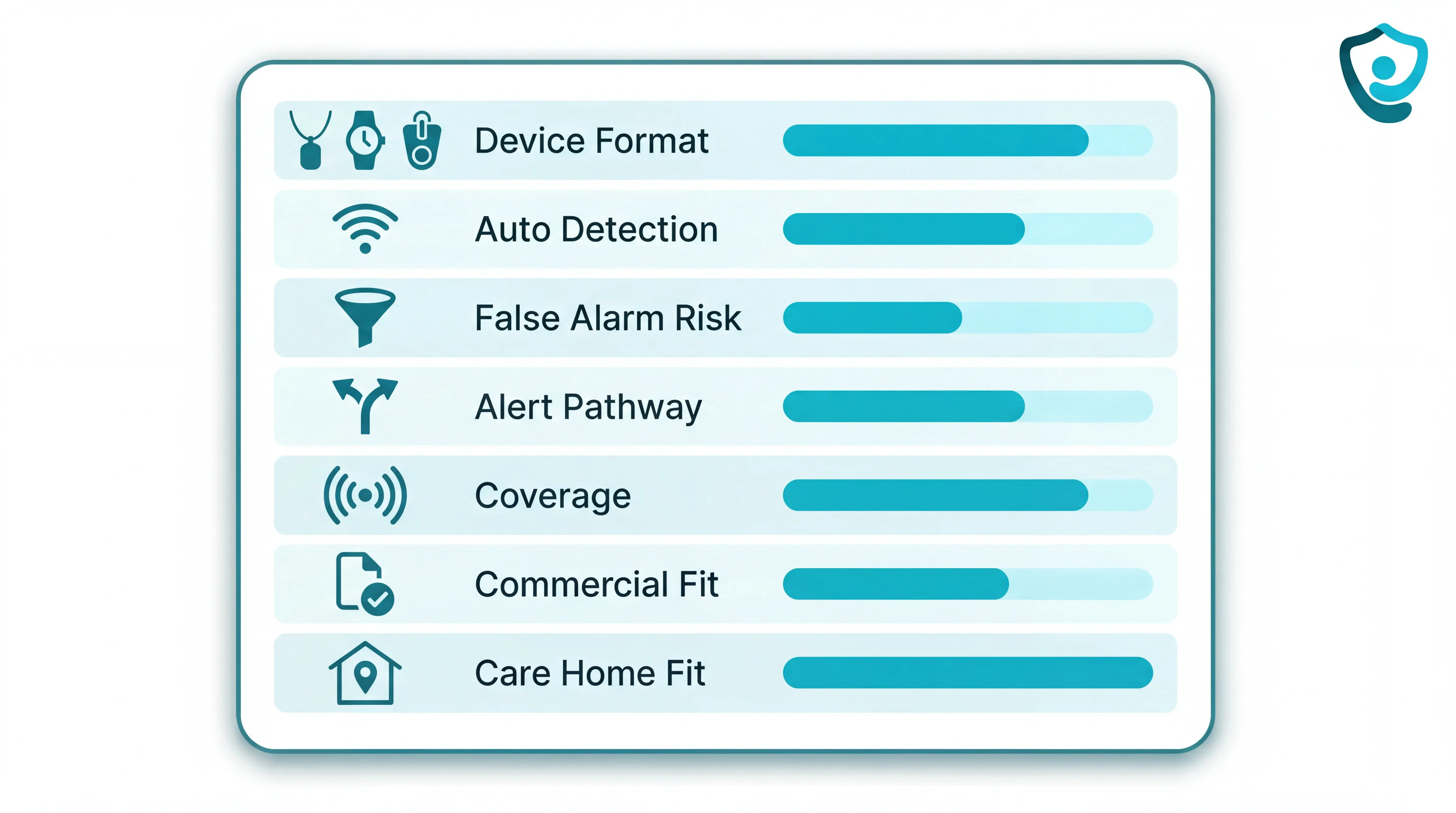
Then we looked at seven criteria:
Device format: Whether the product is a pendant, watch, clip, base station, mobile GPS unit, or passive sensor system.
Automatic detection: How the product describes fall detection, sensitivity settings, and coverage for sudden or slow falls.
False-alarm risk: Whether public testing, reviews, or complaint patterns suggest caregivers may start ignoring alerts.
Alert pathway: Whether alerts go to a monitoring centre, a family app, on-site staff, or several routes at once.
Coverage: Whether the device works only near a base station or also outside the home through mobile connectivity.
Commercial fit: Published pricing, monitoring fees, equipment costs, add-ons, and contract limits.
Care home fit: Whether alerts include resident identity and room-level context, rather than a generic alarm.
Simulated-fall tests counted as supporting evidence, not final proof. A claimed detection rate mattered less than whether staff could trust the route, find the resident, and document the event.
The 5 best elderly fall detection devices
The five devices below were selected to cover distinct care scenarios: professional facility operations, family-monitored independent living, no-wear passive detection, 24/7 professionally monitored response, and scalable organisational platforms. Each entry is evaluated on alert pathway, detection method, coverage range, and real-world response experience.
1. Guardian: best for care home and home care operations
In high-noise care settings, one ward can reach 150 alerts per shift. Without room-level context and automatic records, staff spend time chasing information instead of responding to events.
Guardian is built for care home wards and home care teams that need live alerts, automatic visit records, and one clear view across residents, staff, vehicles, and assets.
Guardian fits care settings that need more than a single fall alarm. The platform brings fall detection, passive monitoring, nurse-call alerts, exit detection, asset tracking, and visit verification into one live operations view.
Good fit for:
Care home owners: prove response times, incidents, and visit records with clean data.
Operations managers: see open alerts, resident location, and staff movement without phoning around.
Home care leads: verify visits, routes, and client safety across a moving team.
Quality leads: answer family, payer, and inspector questions with records rather than memory.
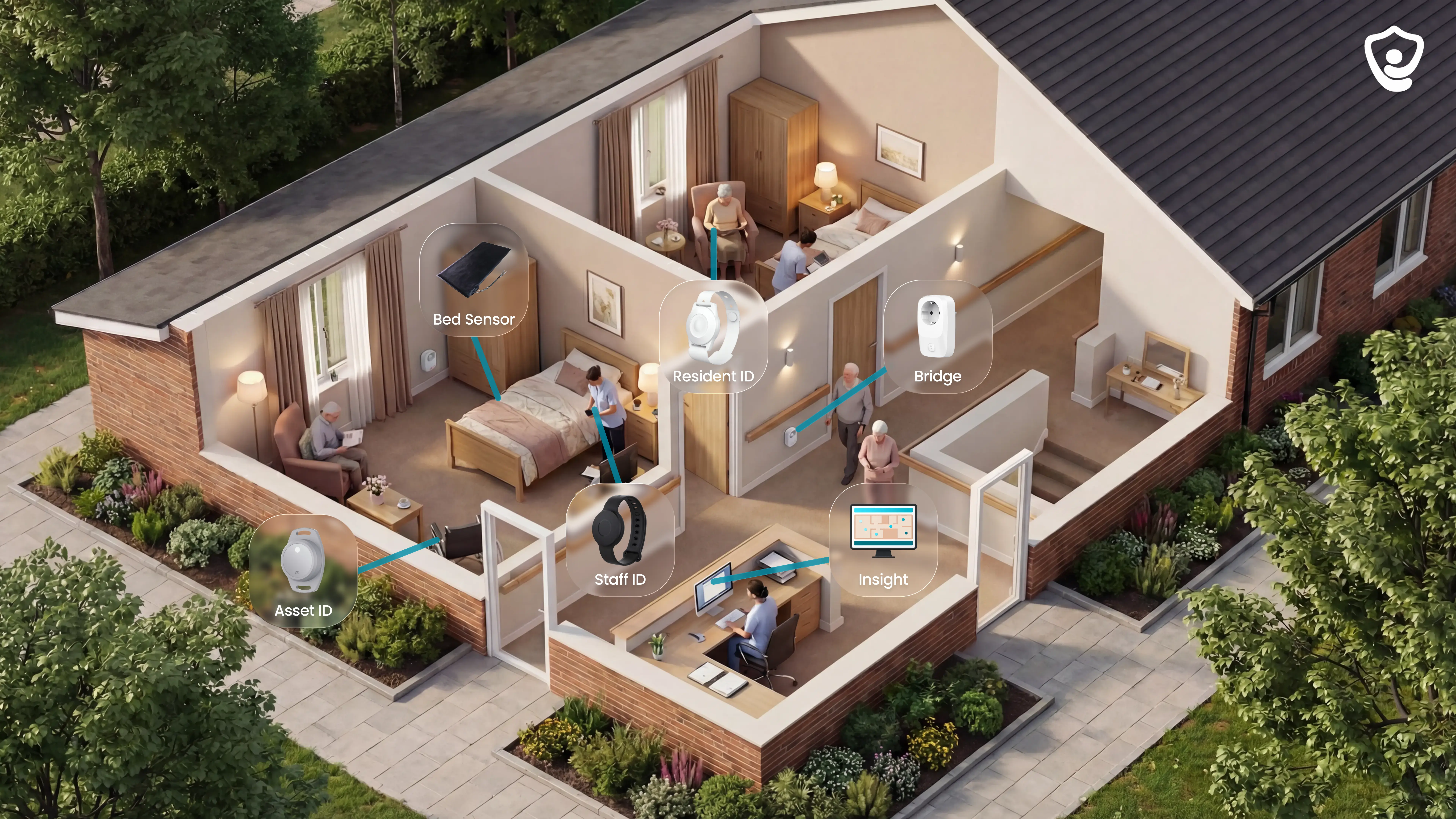
Guardian is camera-free by design. Alerts come from wristbands, bed sensors, motion sensors, door sensors, and routine signals, so residents keep privacy while staff gain context.
What Guardian monitors and how alerts reach caregivers
Guardian combines wearable and non-wearable signals, so each resident can be monitored in the way that fits their routine.
The core sensor set includes:
Resident wristbands: automatic fall detection through an accelerometer, plus SOS button press.
Bed sensors: in-bed and out-of-bed activity, including night-time bed exits.
Motion sensors: room-level movement and inactivity patterns.
Door sensors: exits, restricted-area entries, and room access events.
Fridge and stove sensors: routine changes inside a home care setting.
Vehicle and asset trackers: live location for cars, wheelchairs, lifts, and other equipment.
Every alert carries context. Staff see the resident's name, room-level location, and the event type on smartphones, tablets, or nurse station screens.
Guardian Insight adds the wider view. The dashboard shows residents, caregivers, vehicles, assets, and active alerts on one live map or floor plan.
Passive monitoring without a wearable
Passive monitoring matters because some residents cannot wear a device reliably. Others remove pendants, forget to charge watches, or cannot press a button after a fall.
Guardian covers those cases with sensors that work in the background:
Bed exit sensor: alerts staff when a resident leaves bed and stays out beyond the configured threshold.
Motion sensor: flags inactivity or unusual movement at room level.
Door sensor: detects exits, restricted areas, and room access.
Fridge and stove sensors: show whether a home care client is following normal daily routines.
A night-time bathroom trip can stay quiet by default. A resident out of bed for more than 15 minutes can trigger a staff alert, depending on the rule set.
That makes passive monitoring useful for fall risk, wandering risk, and daily-routine changes without putting cameras in private rooms.
Smart alert rules and avoiding alert fatigue
Care teams need fewer vague alarms and more actionable alerts. Guardian rules are configured around thresholds, routines, and room-level risk.
Examples include:
Out of bed for 15 minutes at night: alert staff after the threshold, so a brief movement does not become an alarm.
Fridge not opened by the usual time: notify the care team when a routine signal is missing.
No motion for a configured period: flag possible inactivity without constant check-ins.
Restricted-area entry: alert staff when a resident enters a stairwell, kitchen, or medication room.
Rules can be set by resident, room, or ward. Guardian Insight helps managers tune alerts to the care setting, rather than forcing one global threshold across everyone.
The goal is simple: staff should know where to go, who needs help, and why the alert matters.
Deployment, setup, and the pilot model
Guardian is wireless and pre-configured. A ward can go live in about a week, without drilling, cabling, pagers, EMR integration, or a dedicated IT project.
Setup starts with the floor plan. Guardian maps rooms and beds, links each sensor to the right location, and routes alerts to the devices staff already use.
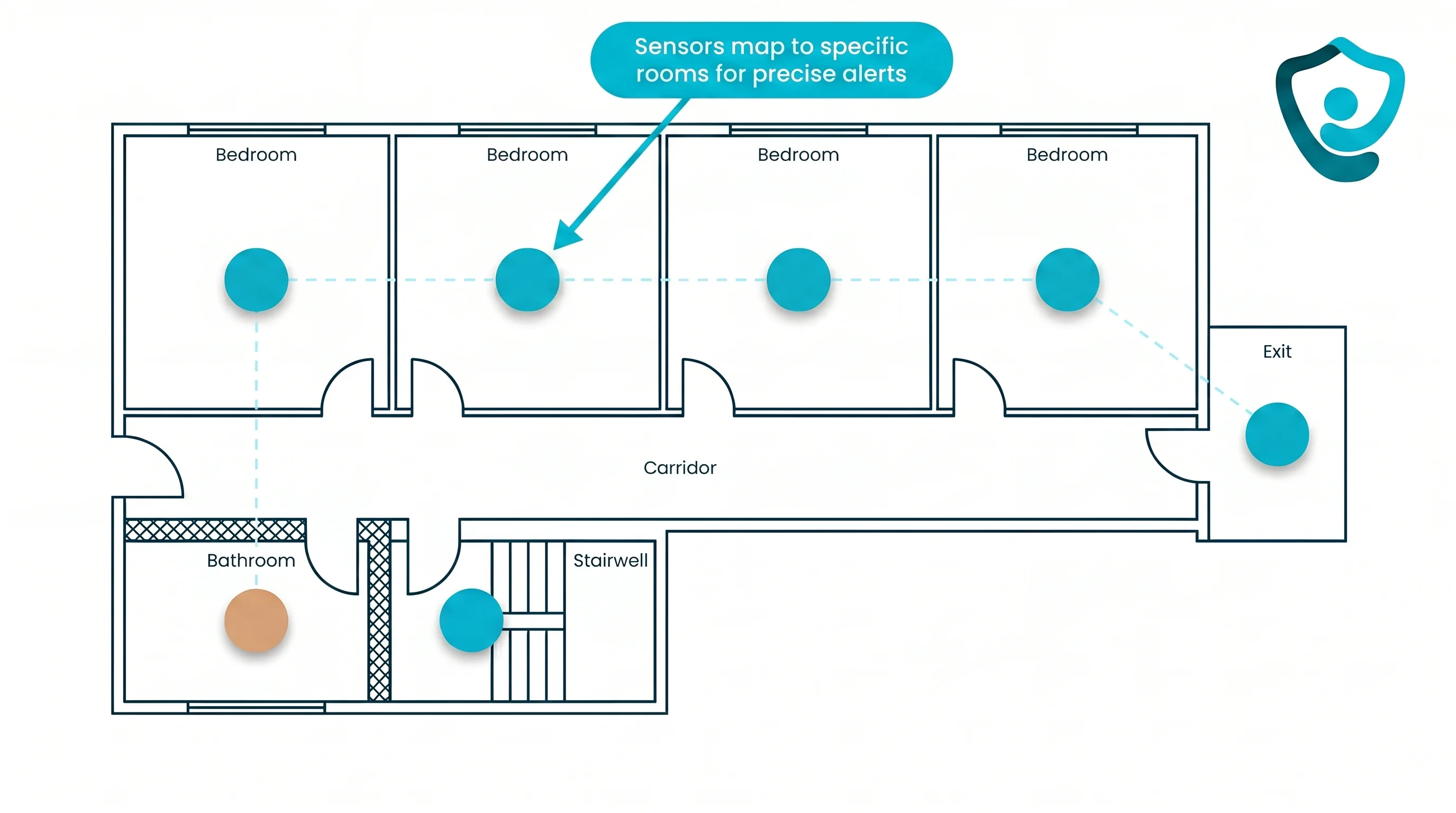
The pilot gives operators proof before wider rollout:
6–8 weeks in one ward, home, or care team.
Workflow mapping to pick the highest-value use cases first.
Live alerts for the chosen rooms, residents, staff, vehicles, or assets.
Impact report covering response times, incident-prevention data, staff feedback, ROI, and rollout planning.
Guardian does not publish a care home price list. Commercial terms are set after the pilot, based on scope and the rollout recommendation.
Use the pilot to test concrete operational goals before a wider rollout:
Reporting time: test whether automatic visit and shift records can reduce administrative time by roughly half.
Alert volume: test whether smart rule tuning can roughly halve unnecessary alerts.
Search time: test whether live location can at least double the speed of finding a resident, caregiver, vehicle, or asset.
2. Nomo Smart Care Elderly Monitoring System: best for families monitoring a senior living independently
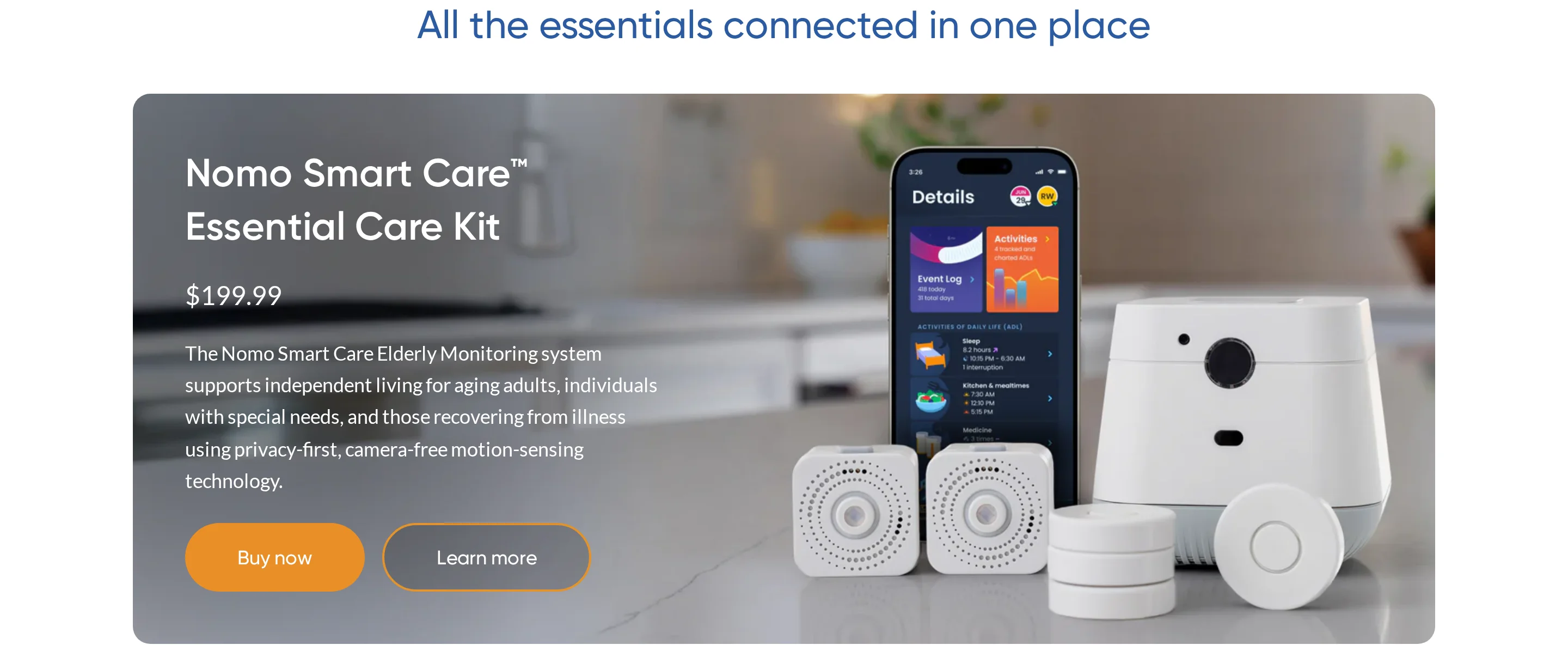
Nomo Smart Care is a consumer home monitoring system for one senior living independently. The system is camera-free and sends updates to a family Care Circle app.
The Essential Care Kit includes:
1 central Hub for the home connection
2 Satellite sensors for extra room coverage
Wearable Tags for activity tracking, manual emergency calls, and fall alerts
The practical question is wearable compliance. Nomo can judge body movement only when the senior actually wears the charged Tag.
Where Nomo fits
Nomo fits a family trying to notice routine changes in one private home before a welfare check is needed.
The fit depends on whether relatives can check these signals every day:
Routine changes: Sleep, meal, and activity patterns are compared with the senior's usual day.
Object activity: Tags can attach to a medicine cabinet, room door, or other high-signal item.
Family routing: Alerts go to relatives through the Care Circle app, rather than a facility dashboard.
That scope matters. Guardian is built around rooms, beds, caregivers, and assets in one care operation, while Nomo is built around one home.
What the Tag can and cannot do
Nomo describes fall alerts as a wearable Tag workflow. The Tag monitors movement and orientation, then sends an alert when the pattern matches a fall.
The wearable fall claim deserves a home test, especially for night bathroom trips or a fall between the bed and a wall.
Response options differ by subscription:
Care Circle alerts: Family caregivers receive app notifications.
Manual help button: The senior can press the Tag when help is needed.
Essential+ monitoring: The $19.99/month tier adds professional 24/7 monitoring and 911 dispatch.
During a trial, log whether a named caregiver sees the alert, acknowledges it, and calls back within 5 minutes.
Setup and first-year cost
Nomo Smart Care's Essential Care Kit costs $199.99 upfront. Essential+ monitoring costs $19.99/month.
Budget for three cost lines:
Essential Care Kit: $199.99
Essential+ monitoring: $19.99/month
First year: About $439.87 before taxes and shipping
Compared with Envoy At Home, Nomo has the lower upfront hardware cost. Envoy's starter kit is $399 plus $99/month.
What I would pressure-test before buying
The fall claim depends on the Tag being worn. A Tag left off the body cannot read the senior's movement.
Ask Nomo for answers you can test, rather than accepting the product demo:
Wearable compliance: How many hours per day is the Tag usually worn in similar homes?
Fall performance: Does Nomo publish sensitivity, false alarm rates, or missed-fall data for the Tag?
Multi-person homes: How does the app separate the senior's routine from a visiting carer or another resident?
Alert ownership: Who receives alerts overnight, and what happens if the first person misses the notification?
Run one test around the full night bathroom route while the senior wears the Tag as usual.
Treat Nomo as family activity monitoring with wearable fall alerts. Homes with wearable refusal or several active occupants need a stricter trial before relying on Nomo for fall risk.
That wearable dependency is exactly why some families look at Envoy At Home. Envoy removes the Tag, then asks families to trust pattern-based alerts instead.
3. Envoy At Home Fall Detection System: best for seniors who will not wear a device
Envoy At Home is a passive home monitoring system for family caregivers. The starter kit uses a hub and 8 motion or contact sensors to track activity without a wearable.
The system does not use cameras or microphones, so families are buying pattern recognition rather than direct fall confirmation.
The wearable-free tradeoff
Envoy's practical case is a senior who will not keep a wearable on.
In that situation, passive sensors can still show whether the home is moving through its normal rhythm:
Room movement: Sensors track activity across placed locations.
Door and cabinet activity: Contact sensors monitor entries, exits, and selected routines.
Behavior changes: Envoy says it flags deviations across more than 35 monitored behaviors.
Family app alerts: Notifications go to caregivers managing one private residence.
The tradeoff is accuracy visibility. Envoy can infer risk from patterns, but Envoy has not published the evidence a buyer needs to compare missed falls and false alarms.
What the sensors actually infer
Envoy infers risk from activity gaps instead of observing a fall directly. The system compares motion and contact events with the senior's usual routine.
Useful alerts are likely to come from ordinary patterns:
Bathroom trip: No activity follows a movement event when the senior usually returns to bed.
Front door: Activity appears overnight when the senior usually stays inside.
Kitchen routine: Limited kitchen or cabinet activity appears when meals are expected.
Alerts go to family caregivers through the mobile app.
Envoy leaves three response tasks outside the hardware:
Professional monitoring
Two-way voice assessment
Emergency dispatch
Cost and sensor coverage
Envoy At Home costs $399 for the starter equipment kit plus $99/month for the subscription.
The starter kit includes:
1 hub
8 battery-powered adhesive sensors
Motion, door, and cabinet tracking depending on placement
Budget for three cost lines:
Starter kit: $399
Subscription: $99/month
First year: About $1,587 before taxes and shipping
Larger homes may need more coverage. Additional sensors cost $49.00 new or $29.00 refurbished.
Reliability questions before you buy
For a passive fall system, missing accuracy data should be resolved before Envoy becomes the primary safety net. Envoy does not publish detection accuracy rates or false positive frequencies.
The missing data may be manageable for family check-ins. The same data gap is harder to accept if Envoy is expected to act as the primary fall safety net.
Pressure-test Envoy with the vendor before relying on the alerts:
Missed events: What fall-like situations were tested, and how often were alerts missed?
False alarms: How often do pets, visitors, or open-plan rooms create alerts?
Verification: Can caregivers confirm what happened without cameras, microphones, or two-way audio?
Escalation: Who acts if the first caregiver misses the mobile notification?
Layout: Where should sensors go in a two-storey home with a bathroom far from the bedroom?
Envoy solves the wearable problem, but it shifts trust onto inference and family response. It fits routine monitoring better than primary emergency dispatch.
4. HomeSafe with AutoAlert by Lifeline: best for seniors living alone who need 24/7 monitored response
HomeSafe with AutoAlert by Lifeline is a pendant-based medical alert system for seniors living independently at home.
The core service is 24/7 monitored response, with automatic fall detection available through the AutoAlert pendant.
Best for
HomeSafe with AutoAlert fits seniors who live alone and want a dispatcher involved when an alert comes in.
The system depends on a wearable pendant, so it suits someone willing to wear the device consistently.
Key use cases are straightforward:
Higher fall risk: AutoAlert can start a response call if the wearer cannot press the button.
Home-first coverage: HomeSafe is an in-home system; mobile coverage requires Lifeline's separate On the Go option.
Professional response: A dispatcher verifies the situation, then contacts emergency services or named contacts.
How it alerts for falls or emergencies
AutoAlert uses accelerometers inside the pendant to detect fall-like movement and impact.
When AutoAlert detects a fall, or the wearer presses the button, the HomeSafe base station connects to Lifeline's response center.
The alert workflow has 4 parts:
Wearable detection: The pendant senses a fall event or button press.
Base station call: The base station opens a two-way voice channel into the home.
Dispatcher assessment: Lifeline staff check what happened and whether the senior can respond.
Escalation: The dispatcher contacts emergency services or the senior's listed contacts when needed.
HomeSafe can use a landline or cellular base station, depending on the plan.
Key requirements and costs
HomeSafe is rented as a monitored service rather than bought outright.
Equipment is included in the monthly fee, but Lifeline usually charges an activation or setup fee at sign-up.
AutoAlert is an add-on, so the $34.95/month HomeSafe line is not the full fall detection cost.
Plan / Option | Monthly Cost | Connection Type | Notes |
|---|---|---|---|
HomeSafe annual billing | $34.95/mo | Landline | Base monitoring only; no fall detection |
HomeSafe Cellular | Higher than $34.95/mo | Cellular | Base monitoring only; no fall detection |
AutoAlert add-on | About $15/mo extra | Added to any HomeSafe plan | Automatic fall detection via pendant accelerometer |
On the Go mobile | $39.95-$49.95/mo | Cellular + GPS | Extends coverage outside the home |
Activation / setup fee | One-time charge | All plans | Amount is separate from the monthly subscription |
Main limitation to consider
AutoAlert can start a call without a button press, but Lifeline says the system does not identify 100% of falls.
That matters because the coverage model depends on the pendant being worn, charged, and close enough to connect through the HomeSafe system.
Common issues to check before buying:
Missed falls: A conscious user may still need to press the button manually.
False alerts: BBB complaints describe alerts triggered by normal movement, including sitting or rolling in bed.
Battery dependency: Some complaints report pendant battery life falling below 24 hours.
Account friction: The same BBB complaint record includes billing and cancellation disputes after service changes or returns.
HomeSafe with AutoAlert is therefore a monitored pendant system first. It is less suitable when the main requirement is room-level passive monitoring without a wearable.
5. Essence SmartCare fall detection solution: best for facilities and organisations needing a connected wearable platform

Essence SmartCare is a B2B telecare platform for organisations that want connected fall alerts across sites, not a single consumer pendant for one home.
The public product material describes wearable devices, MDsense radar-based room monitoring, and the CareView dashboard. That makes Essence a procurement comparison, not a quick online purchase.
Best for
Essence fits organisations evaluating telecare infrastructure across multiple homes, housing schemes, or monitored settings.
It is most relevant when a team needs:
Wearable options: resident devices that can raise fall or emergency alerts.
Room monitoring: radar-based sensing for spaces where a wearable may not be enough.
Dashboard routing: CareView to manage alerts and user status across a service.
Multi-site planning: a platform conversation with procurement, operations, and monitoring teams involved.
How fall detection and alerts work
Essence can route alerts from wearable devices and MDsense room sensors, depending on the deployment. CareView then gives staff or monitoring teams a central place to see and manage those events.
Ask the vendor to demonstrate the full route from event to response:
Event trigger: wearable alert, detected fall, inactivity pattern, or room-level sensor event.
Alert destination: monitoring centre, on-site team, family caregiver, or mixed routing.
Location context: whether the responder sees a room, resident, device, and event type.
Escalation: what happens when the first responder does not acknowledge the alert.
Setup, coverage, and pricing
Essence is scoped like an organisational platform. Public pricing is not listed, so buyers should expect a quote based on site count, sensor mix, user volume, and monitoring model.
Before comparing it with consumer devices, confirm:
Deployment scope: one facility, several sites, or a wider telecare service.
Sensor plan: which rooms use radar, which residents use wearables, and where gaps remain.
Response ownership: who receives alerts during nights, weekends, and handovers.
Commercial terms: hardware, subscription, support, replacement devices, and cancellation rules.
Main limitation to consider
The main public-data gap is evidence. Essence describes the platform, but public material does not show enough fall-detection accuracy, false-alert, or response-time data for a buyer to compare it on numbers alone.
Resolve that gap before procurement:
Accuracy: What fall types were tested, and in what room layouts?
False alerts: How often do normal movements, visitors, or equipment trigger alerts?
Response time: Can Essence provide benchmark data from similar settings?
Room mapping: How precise is location context for staff response?
Reporting: What audit trail is created after each alert?
Essence makes sense for organisations comparing B2B telecare platforms, especially where wearable and room-sensor options need to sit in one dashboard. Treat it as a procurement evaluation, not a quick consumer fall alarm.
Fall detection devices compared: features, response model, and costs
The five devices use different response models, so the price only makes sense when you know who answers the alert.
A low monthly fee can still be the right fit for one older adult at home. A care home needs room-level context, staff routing, and records across many residents.
Use the table to compare the practical trade-offs:
Lowest upfront cost: HomeSafe with AutoAlert rents equipment and starts around $44.95-$49.95/month with fall detection.
Family-owned hardware: Nomo Smart Care costs $199.99 upfront plus $19.99/month.
Highest consumer subscription: Envoy At Home costs $399 for equipment plus $99/month.
Pilot-first deployments: Guardian is scoped through a care-home or home-care pilot, while Essence SmartCare prices on request.
Device | Format | Automatic fall detection | Alert pathway | Home vs. on-the-go | Starting cost |
|---|---|---|---|---|---|
Guardian | Passive sensor network, with no wearable required | Motion and bed-exit sensors detect activity changes; wristbands can add active alerts | Staff dashboard with floor-plan-mapped alerts for on-site care teams | Facility-wide indoor coverage; not designed for on-the-go use | Custom enterprise pricing based on pilot scope |
Nomo Smart Care | Hybrid passive sensors plus optional wearable Tag | Wearable Tag detects possible falls; Satellites monitor home routines | Family app through Care Circle; professional dispatch available on Essential+ | Home-based; no GPS or cellular outdoor coverage | $249.99 hardware + $19.99/month |
Envoy At Home | Fully passive 8-sensor home kit, no wearable | Detects immobility and behaviour changes across monitored routines | Family caregiver app alerts; no 24/7 professional monitoring listed | Home only; no on-the-go capability | $399 equipment + $99/month subscription |
HomeSafe with AutoAlert by Lifeline | Wearable pendant plus in-home base station | AutoAlert pendant uses impact and orientation sensing | 24/7 Response Centre with two-way audio and emergency escalation | In-home base-station range; base model has no built-in GPS | From $34.95/month, equipment rented |
Essence SmartCare | Modular wearable and radar-based options | Wearable and MDsense radar options with cloud alert processing | Configurable routing to a monitoring centre or family caregivers | Indoor facility coverage; scalable across sites | Pricing on request for organisations |
Professional monitoring gives a backup responder when family cannot answer. App-only alerts depend on a named caregiver seeing the notification and taking action.
The staff-routed nurse call guide compares wired, wireless, and hybrid models for care-home alert workflows.
What to look for in an elderly fall detection device
The best fall detection device is the one the older person will tolerate and the responder can act on without guessing.
NICE falls guidance treats falls as a multifactorial risk, so device choice should sit alongside care planning, observation, and environmental checks.
Use this checklist before comparing brand names:
Wearability: Run a 7-day trial before buying, including sleep, bathing routines, and clothing changes.
Automatic backup: Ask what triggers an alert when the resident cannot press SOS.
False alarms: Confirm how sensitivity is tuned after installation and who reviews nuisance alerts.
Location context: Require resident, room, and bed-level detail in care homes.
Coverage area: Test every fall-risk route before relying on the system, especially bathrooms and weak cellular spots.
Escalation: Confirm who gets the first alert, who gets the backup alert, and when emergency services are called.
Audit trail: Require a time-stamped record from trigger to outcome.
Common buying mistakes
Buying for features first: A feature-rich device can still fail if nobody answers the alert.
Skipping the wearing test: A pendant left on the bedside table gives no coverage during a bathroom fall.
Accepting brochure range: Base-station range changes in older buildings and behind closed doors.
Ignoring night workflow: Night staff need alert priority, room context, and a clear acknowledgement process.
Vendor test
Ask the vendor to walk through one scenario: the resident is on the bathroom floor, cannot speak, and the first responder misses the notification.
A workable system should identify the location, escalate the alert, and leave a record staff can review after the event.
How accurate are fall detection devices?
Fall detection devices are never 100% accurate. Treat accuracy as a pilot question, not a brochure number.
Treat any 98% accuracy claim as controlled-test evidence unless the vendor shows data from lived settings. Ask for sensor placement and fall types, plus the false-alert definition.
Chaudhuri et al. (2014) found fall-detection studies often relied on simulated falls. Simulated tests may miss slow slides and cluttered-room falls.
Ask vendors for these measures:
Sensitivity: the percentage of test falls the system detected.
Specificity: the percentage of normal activity that avoided an alert.
False-alert load: nuisance alerts per resident or room each week.
Missed-fall review: the process for investigating undetected events.
Response evidence: the audit trail from trigger to action.
For care homes, set practical pilot thresholds before the device goes live. For example: every missed-fall report is reviewed, and nuisance alerts are tuned toward fewer than 1 per resident per week.
Staff trust is the practical limit. If carers hesitate because night alerts are usually wrong, the false-positive rate is too high.
Test the awkward scenarios, because brochures rarely show them:
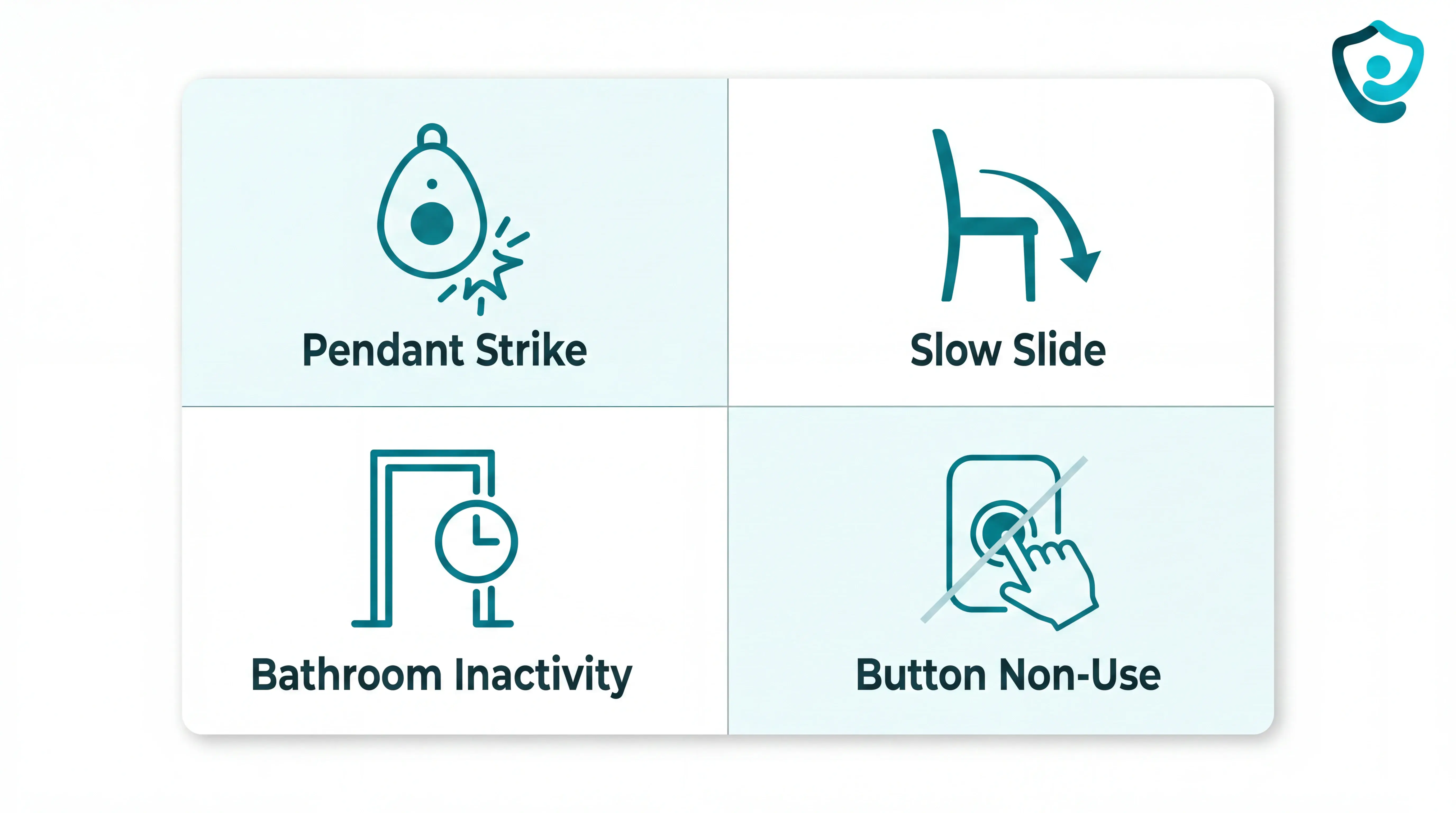
Pendant strike: the resident bumps a table during dressing, creating an impact alert.
Slow slide: the resident slips from a chair without a sharp impact.
Bathroom inactivity: movement stops after a toilet visit, so passive sensing should prompt a check.
Button non-use: the resident is conscious but confused and never presses SOS.
Manual buttons solve one problem: the resident can call for help. Automatic detection and passive sensing cover different failure modes.
A strong setup should detect the event and route the alert with a response record.
Costs: monthly monitoring vs no-monthly-fee devices
Fall detection costs fall into three groups: monitored subscriptions, app-alert systems, and nursing home software platforms with scoped pricing.
Monitored devices usually start around $20-$50+/month before add-ons. HomeSafe with AutoAlert starts around $44.95-$49.95/month with fall detection, depending on plan and current offer.
Check these line items before comparing plans:
Base monitoring: paid access to a call centre or response team.
Fall detection add-on: sometimes separate from the advertised monthly price.
Hardware model: rented equipment can lower upfront cost, while purchased kits raise it.
Activation fee: a one-time setup charge can add $75-$200.
Caregiver app: often included, but some plans charge extra.
True no-monthly-fee devices are usually local alarms, direct-dial buttons, or basic pressure-pad systems. They can be useful at home, but they do not provide a staffed monitoring centre.
Purchased sensor kits can still carry a monthly subscription. Nomo lists $199.99 hardware plus $19.99/month; Envoy lists $399 equipment plus $99/month.
Cost component | Typical range | Notes |
|---|---|---|
Base monitoring subscription | $20-$50+/month | Required for call-centre monitoring |
Automatic fall detection add-on | $5-$11/month | Often separate from the base plan |
Equipment protection plan | $5-$7/month | Covers loss, theft, or damage to hardware |
One-time activation fee | $75-$200 | Charged at service start by some providers |
One-time equipment or hardware | $0-$399 | Rental models lower upfront cost; sensor kits cost more upfront |
Caregiver app | Free to about $5/month | Usually included, but verify before signing |
Facility platform pricing | Custom scope | Guardian and similar B2B systems price by pilot or deployment scope |
For families, the cheapest plan is usually the one that matches the real response need. For care homes, the bigger cost question is whether the system gives staff usable alerts and records across the whole setting.
Pressure-pad devices raise separate placement questions; the pressure-pad alarm buying guide covers mat size, sensitivity, and receivers.
Setup checklist for caregivers
Before a fall detection device goes live, run setup like a safety check, not a tech task. Confirm active status, coverage in the real fall-risk routes, and the full alert pathway before the resident is alone.
Lay out the full kit. Check the sensor list, SOS button, hub, cables, and power supplies before anything is mounted.
Power the hub first. Connect the hub, then confirm each sensor appears with active status in the dashboard.
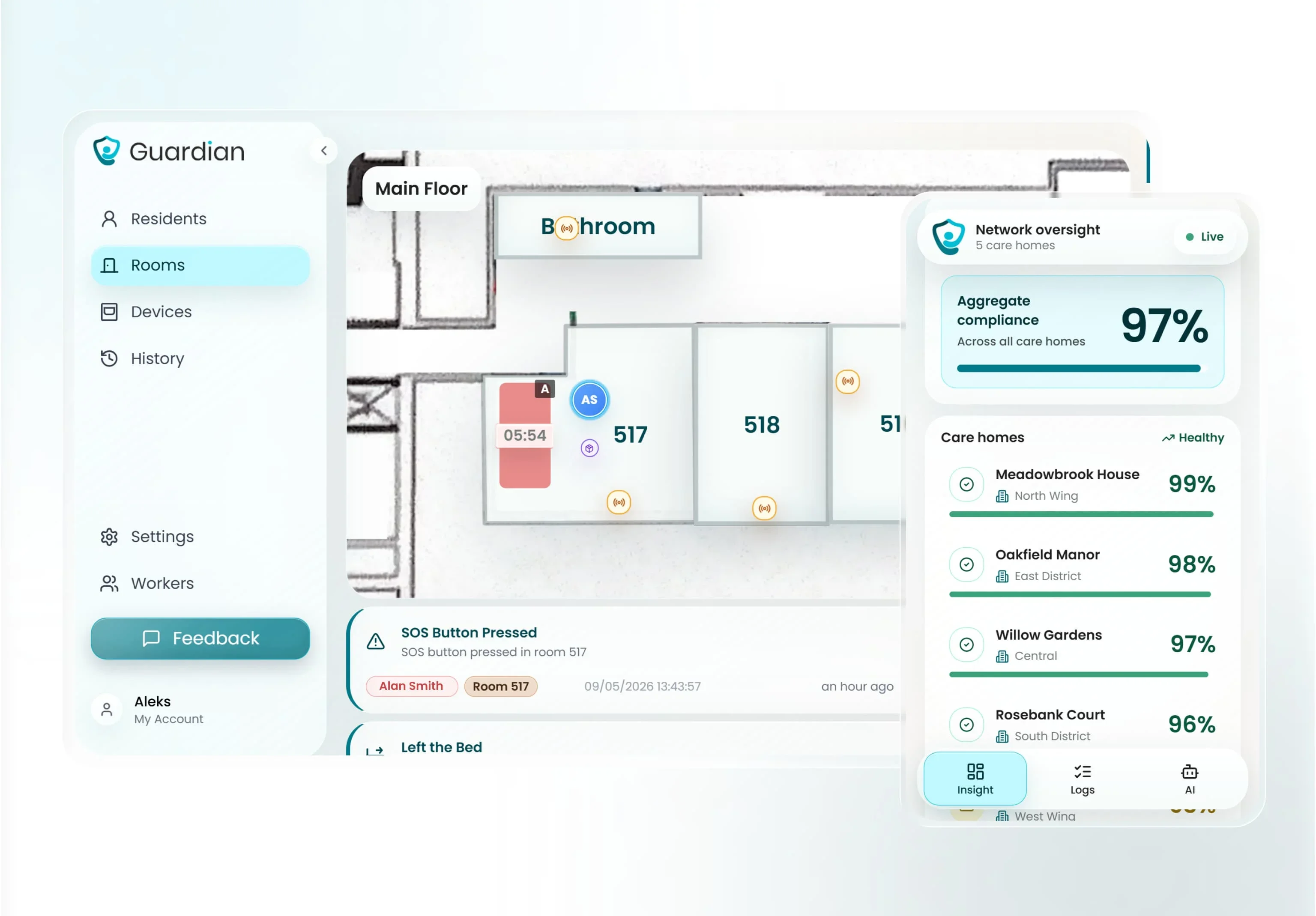
Example only: this Guardian active-status screen shows the kind of dashboard check to run. Nomo, Envoy, Lifeline, and Essence use different setup screens.
Place sensors around the risk window. A bed-exit sensor belongs near the bed, while motion or door sensors should cover night-time falls and exits.
Run a walk test in each room. Enter from the normal doorway, move through the care path, and confirm the dashboard records activity without blind spots.
Test the alert pathway end to end. Trigger a manual SOS or test event and confirm the alert reaches the right caregiver device with the correct room or resident.
Add an automatic layer. A manual button helps only when the resident can press it, so pair SOS with wearable detection, bed-exit sensing, motion sensing, or door activity rules.
When a fall detection device isn't enough on its own
No single fall detection device covers every failure mode. A safer setup checks for impact, inactivity, unusual room patterns, and whether someone actually receives the alert.
Use one device as the trigger, then layer around the gaps:
Wearables can be removed. Wristbands and pendants help when the resident wears the device, keeps it charged, and the fall pattern matches what the accelerometer can detect.
Manual SOS depends on the resident. A button only works when the person is conscious, able to reach it, and remembers what to do.
Passive sensors infer risk. Motion, door, bed, fridge, and stove sensors can flag unusual inactivity or routine changes, but they cannot always confirm a fall.
App-only alerts depend on attention. If the family caregiver is asleep, driving, or has notifications muted, a correct alert can still wait too long.
Single-room coverage leaves blind spots. A hallway sensor may miss a bathroom fall, while a bedroom sensor may miss an exit through another door.
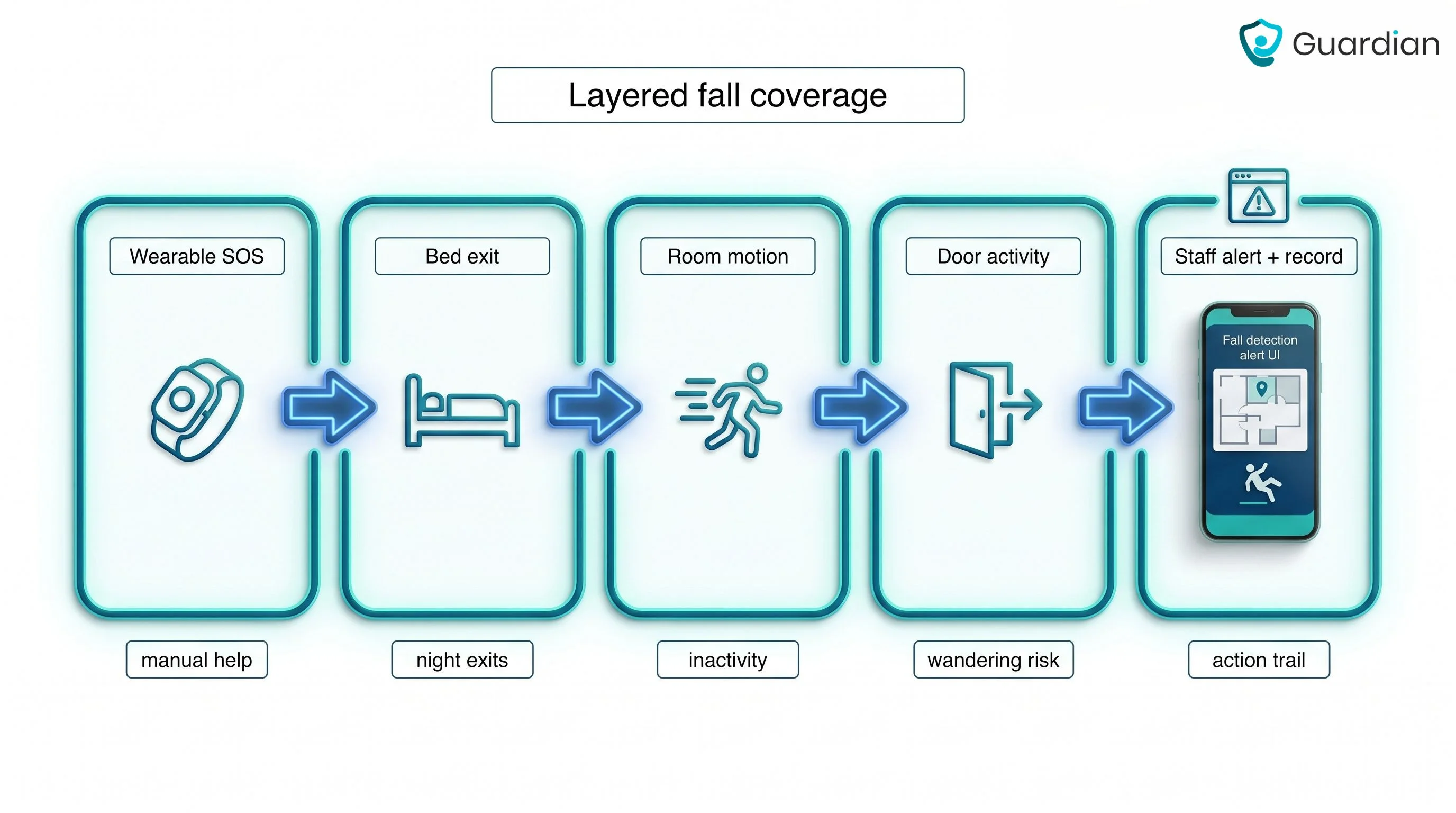
Layered monitoring helps because each signal covers a different failure mode.
In a care home, that can mean wearable SOS, bed-exit sensing, room activity rules, and a dashboard alert that points staff to the right room.
Simple test
Ask what happens if the resident is on the floor, cannot press a button, and the first caregiver misses the notification.
A reliable setup should still create a visible alert, point staff to the right room, and leave a record of what happened.
For camera-free layers, use the room-pattern motion sensor guide to evaluate inactivity, night movement, and blind spots.
Which fall detection device should you choose?
Choose based on the response model first, then the device.
Choose Lifeline for one senior living alone who needs a monitored response centre.
Choose Nomo for family app-based monitoring in one private home.
Choose Envoy when the senior will not wear a device and family caregivers can respond.
Choose Essence for organisations evaluating a B2B telecare platform, once evidence and pricing are verified.
Choose Guardian when staff need room-level alerts, passive monitoring, and operational records across a care setting.
See your whole care operation with Guardian
Use Guardian to run a small, measurable pilot before you scale across a care home or home care team.
Shared operational view: Guardian Insight combines sensor and asset signals in one place.
Clear staff action: Alerts point staff to the right room and bed on the floor plan.
Camera-free rooms: Smart rules reduce noise while resident rooms stay private.
Pilot evidence: After 6-8 weeks, Guardian reports response times and ROI from visit records and staff feedback.
For individual device buyers, the questions below cover the checks that affect daily use.
Original Medicare Parts A and B generally do not include standard fall detection device coverage. Some Medicare Advantage Part C plans may include personal emergency response benefits, but coverage depends on the plan.
Use the plan documents or call the Medicare Advantage provider before buying. Ask which benefit category applies and whether prior approval is required.
Other funding routes may include:
FSA or HSA funds: Ask your administrator whether the device qualifies as a medical expense.
State or local programs: Medicaid waiver programs or an Area Agency on Aging may fund personal emergency response systems for eligible seniors.
Yes. Some fall detection devices work without Wi-Fi when they use cellular service or a landline connection.
Cellular devices need mobile network coverage at the home address. Landline base stations use a phone socket, which helps where broadband is unreliable.
Run the manufacturer’s test call after setup. Test signal strength inside the home and in the outdoor areas the person uses.
A long-term contract is not always required. Fall detection devices are often sold with monthly monitoring, but terms vary by provider.
Check the cancellation rules before subscribing:
Minimum term: Some providers require an initial commitment before cancellation is available.
Upfront fees: Equipment, activation, and shipping fees may be separate from the monthly subscription and may not be refundable.
An Apple Watch can support fall alerts for some wearers. High-risk users still need a dedicated system with monitoring processes or in-home sensors.
The wearer must keep the watch on and charged. Fall detection is unavailable when the watch is off or left on a table.
Check two gaps before relying on a smartwatch alone:
Response model: A smartwatch alert differs from a professional monitoring centre or a staffed care-home escalation process.
Passive monitoring: A wrist device cannot replace in-home sensors when the resident is not wearing a device.
They can help, but the response model matters more than the label. Many dementia patients remove wearables, forget buttons, or cannot explain what happened after an alert.
Look for passive monitoring, door or bed-exit rules, and a clear escalation path for staff or family.
Some pendants and watches are water-resistant, but coverage varies by device. Check the IP rating and test the bathroom route before relying on it.
Bathroom falls are common enough that the device should work during washing, toileting, and night-time trips, or be paired with room sensors that flag inactivity.

Author
Aleks Timm
Aleks Timm leads Guardian and builds privacy-first operations technology for care homes and home care providers. Teams get location-aware alerts they can act on, clearer situational awareness, and measured insight into how care work actually runs.
Read MoreRecommended reads
Keep reading
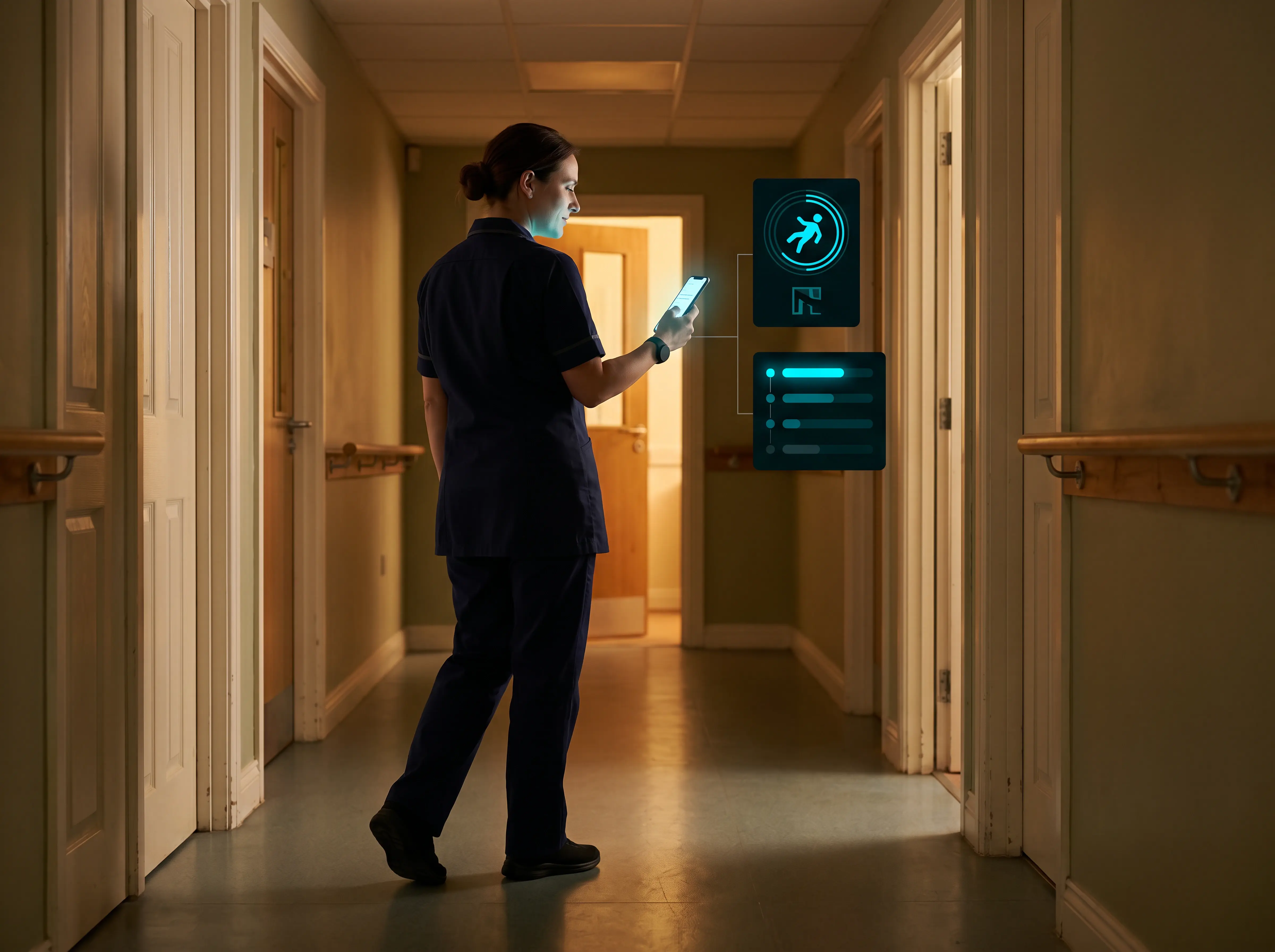
Wireless Patient Monitoring Systems for Care Homes
A complete guide to wireless patient monitoring systems, connected sensors, alert logic, care-home deployment, privacy, and...
Read more
Remote patient monitoring: a complete guide
Remote patient monitoring: the complete guide to sensors, benefits, and buying tips for safer care homes and better resident...
Read more
Smart Nurse Call Systems for Care Homes and Home Care Providers
Smart nurse call systems for care homes and home care providers: compare features, improve response times, and choose the right...
Read more