

8 Best Senior Monitoring Systems
In this article
A sensor fires at 2am. The pager beeps. But which resident? Which bed?
That gap between alert and location is where incidents happen. Staff end up in the wrong room while someone waits on the floor.
Location context is what separates a useful system from one that just generates noise.
This guide reviews 8 systems in depth, with 10 included in the full comparison table at the end.
Quick picks: best senior monitoring system by need
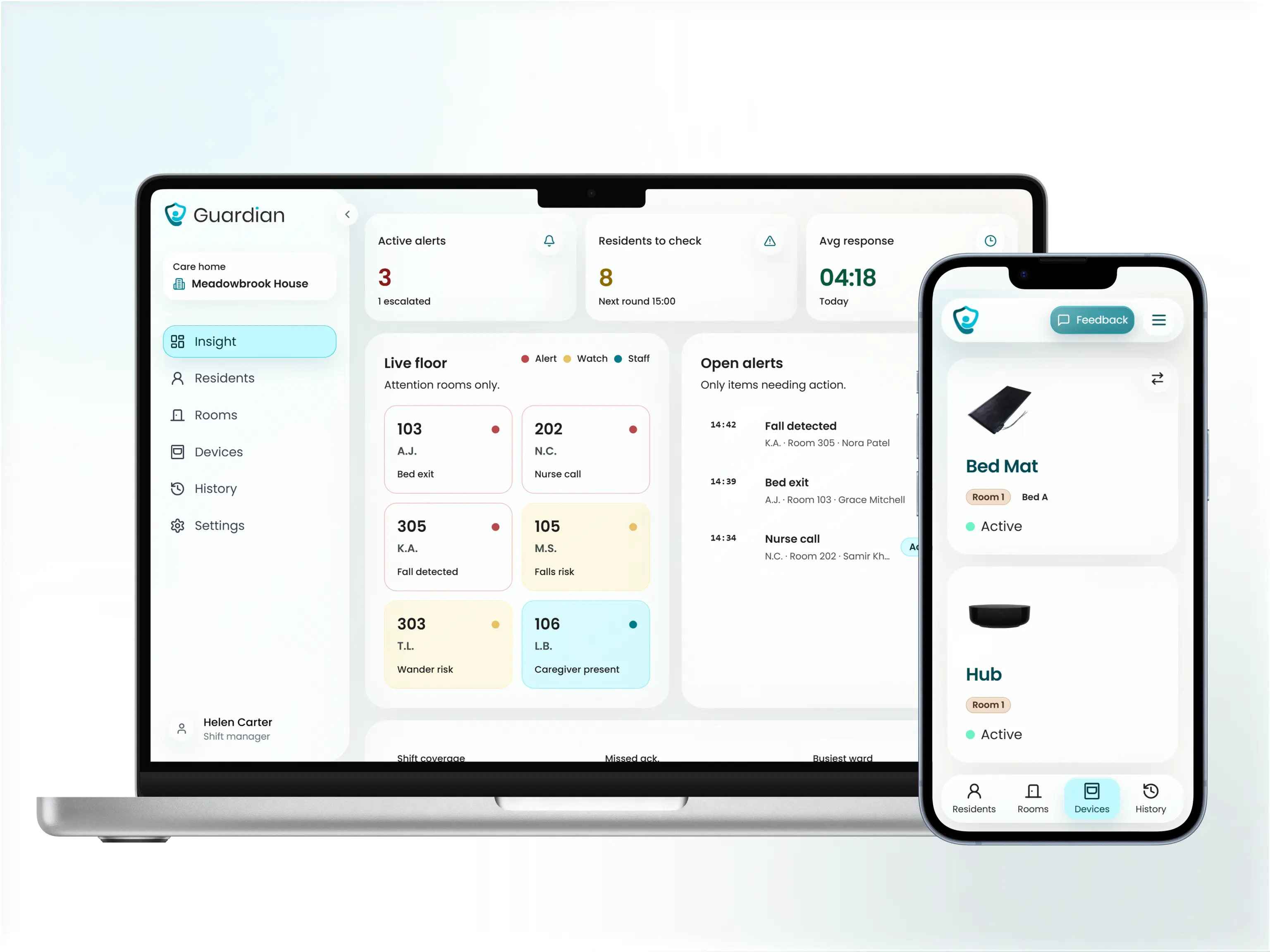
Guardian is best for care homes and nursing facilities that need real-time operational visibility without cameras. Wireless bed exit, motion, door, and SOS sensors map to a live floor plan dashboard, so staff know the exact room and bed before they move. Deployable in about a week with no drilling or cabling.
Smart Caregiver is best for budget-conscious families setting up monitoring at home. A basic bed alarm kit starts at around $60 with no recurring monitoring fees, no app required, and no cameras. It plugs in and works, with no technical setup.
Alarm.com is best for homes or facilities already using Alarm.com's security ecosystem. Its Wellness module uses predictive AI to flag deviations from a senior's normal daily routine, and alerts route through the same app as existing security devices. It suits families who want passive monitoring layered onto a system they already have.
Tunstall Healthcare is best for large care homes where staff efficiency and compliance reporting are priorities. The Carecom dashboard routes alerts by staff location and workload, and one documented case study reduced alarm volume from 500 to 50 per shift. Trend reporting supports regulatory audit requirements.
Envoy at Home is best for seniors who refuse to wear a device. An 8-sensor passive network detects falls and tracks daily routines with no wearables, buttons, or cameras involved. Family members receive app alerts and clinician-style activity reports remotely.
SensorsCall is best for independent seniors with low care needs and a tight budget. Plug-in nightlight sensors offer passive activity tracking at around $280 for a 2-pack, with claimed free lifetime monitoring and no monthly subscription. SensorsCall is an entry-level option for households that want basic presence detection.
Nomosmartcare is best for privacy-focused families monitoring a senior with dementia or recovering from surgery at home. The Essential Care Kit costs $199.99 to $249.99 and includes a 60-day free monitoring trial. No cameras or audio recording; the platform is HIPAA and SOC2 compliant.
Lifeline is best for seniors who are comfortable wearing a device and want 24/7 professional emergency dispatch. With 7.5 million subscribers across 50-plus years of operation, it is one of the most established names in personal alert systems. Consumer plans start at $34.95 per month with U.S.-based dispatch centers.
The 8 best senior monitoring systems reviewed
1. Guardian - wireless sensor network for care homes and nursing facilities with a real-time staff dashboard
2. Smart Caregiver - plug-and-play hardware alarms for home fall and wandering prevention with no monthly fees
3. Alarm.com - cloud-based AI activity monitoring with security integration for homes and senior facilities
4. Tunstall Healthcare - scalable telecare platform built for residential care homes and group living settings
5. Envoy at Home - fully passive sensor network for families monitoring seniors at home without wearables
6. SensorsCall - low-cost AI nightlight sensors for passive home activity tracking with no cameras
7. Nomosmartcare - AI hub and motion satellites for routine tracking with a 60-day free monitoring trial
8. Lifeline - veteran wearable PERS service with 24/7 U.S. dispatch and predictive analytics
These 8 systems split into three broad monitoring approaches. Four are fully passive: Envoy at Home, SensorsCall, Nomosmartcare, and Smart Caregiver all use sensors that trigger without any action from the resident. Lifeline is the only primarily wearable-dependent system in the group, relying on pendants and smartwatches for most alerts. Guardian, Tunstall Healthcare, and Alarm.com are built for care facilities, though Alarm.com also supports home setups.
1. Guardian
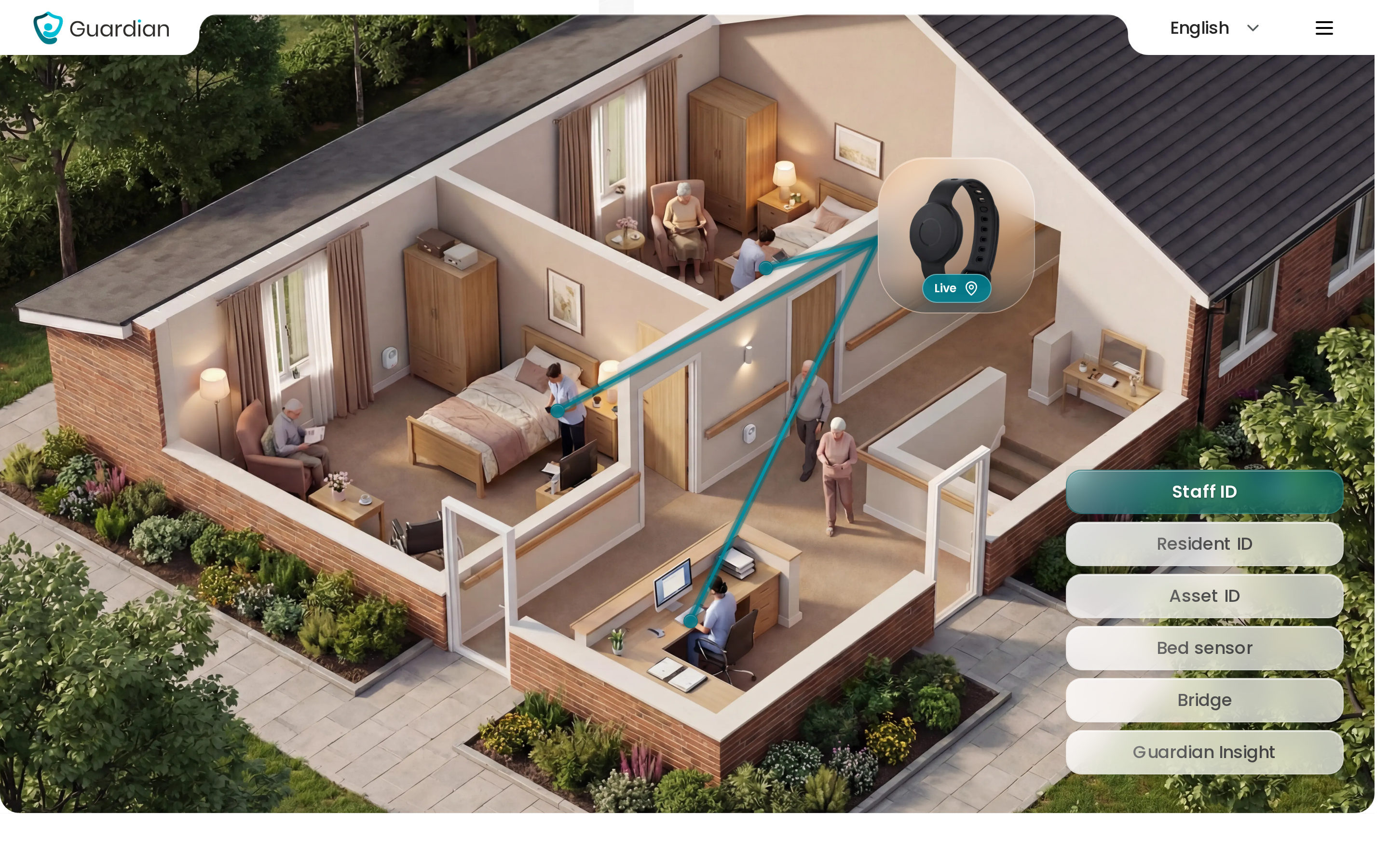
Guardian is a wireless, camera-free monitoring platform built for care homes and home care providers. It combines wearables, in-room sensors, and a live operations dashboard to give care teams real-time visibility over residents, staff, and assets without cameras or cabling.
Guardian Insight maps residents, caregivers, vehicles, and assets onto a digitised floor plan or live route view. One screen replaces five separate tools.
Guardian is built for care home owners, nursing managers, and home care agency operators running one or more wards or a moving fleet. Guardian is a B2B operations platform, not a consumer pendant service.
Best for
Guardian suits care home operators and home care agencies that need verifiable visit records, real-time location, and a single view across staff, residents, and vehicles. Facilities running 80-100 residents across multiple wards get the clearest return.
Families monitoring one resident at home are better served by a consumer PERS pendant or a passive home sensor system. Guardian's minimum deployment is a ward or a home care team, not one resident.
Key strengths
In a single pilot deployment in Estonia, staff attended 30 potential fall situations that would otherwise have gone undetected. The same facility unlocked roughly €1,000 per month in caregiver capacity by replacing manual rounds with targeted, alert-driven visits.
3 things Guardian delivers in the background:
Automatic visit records. Guardian logs caregiver visits, shift times, and response times without post-shift assembly. Reports are ready when the manager logs in.
Location-aware alerts. Every nurse call and fall alert arrives with the resident's name and room number before the caregiver leaves the station.
A scoped pilot with a written ROI report. The 6-8 week pilot ends with explicit response-time data and an ROI calculation, not a sales pitch.
Many pendant and PERS providers bill from day one with no trial period or exit clause. The Guardian pilot is finite: defined scope, clear end date, measurable results before any rollout decision.
On a 90-bed ward without Guardian, a caregiver responding to a nurse call spends 2-3 minutes locating the right room. With Guardian, the alert arrives with the resident's name and room number before they leave the station.
That difference compounds across a 12-hour shift.
How a pilot works
Map one ward or care team. Guardian's team works through your floor plan and shift workflows with the ops lead and floor supervisor.
Install wireless devices. Wearables, bed sensors, door sensors, and motion sensors go live with no drilling or cabling. A ward is typically up in about a week.
Set alert rules. Rules are configured to your actual routines, for example, flagging a bed exit only after 15 minutes at night to avoid noise from normal activity.
Run live for 6-8 weeks. Staff use alerts on the devices they already carry: phones, tablets, or nurse station screens.
Review response-time and ROI data. The pilot ends with a written impact report and a rollout plan, not a pitch deck.
Common mistake: operators who skip the workflow mapping session and set generic alert rules get noise, not signal. Without input from the floor supervisor, the rules won't reflect how the shift actually runs.
Limitations
Guardian is not the right fit for individual consumers or single-resident setups. Onboarding requires workflow mapping with operations staff, so facilities expecting a plug-in-and-go experience will find the process more involved than a pendant order.
In practice, the setup question most operators forget to ask is who owns the workflow mapping session. It needs to involve both the ops lead and the floor supervisor. Without both in the room, the alert rules won't reflect how the shift actually runs.
Pricing
For care homes and home care operators, Guardian is priced after the pilot, scoped to the ward or fleet. The pilot is the entry point. Run one ward or one care team, then review response times and ROI after 6–8 weeks.
2. Smart Caregiver
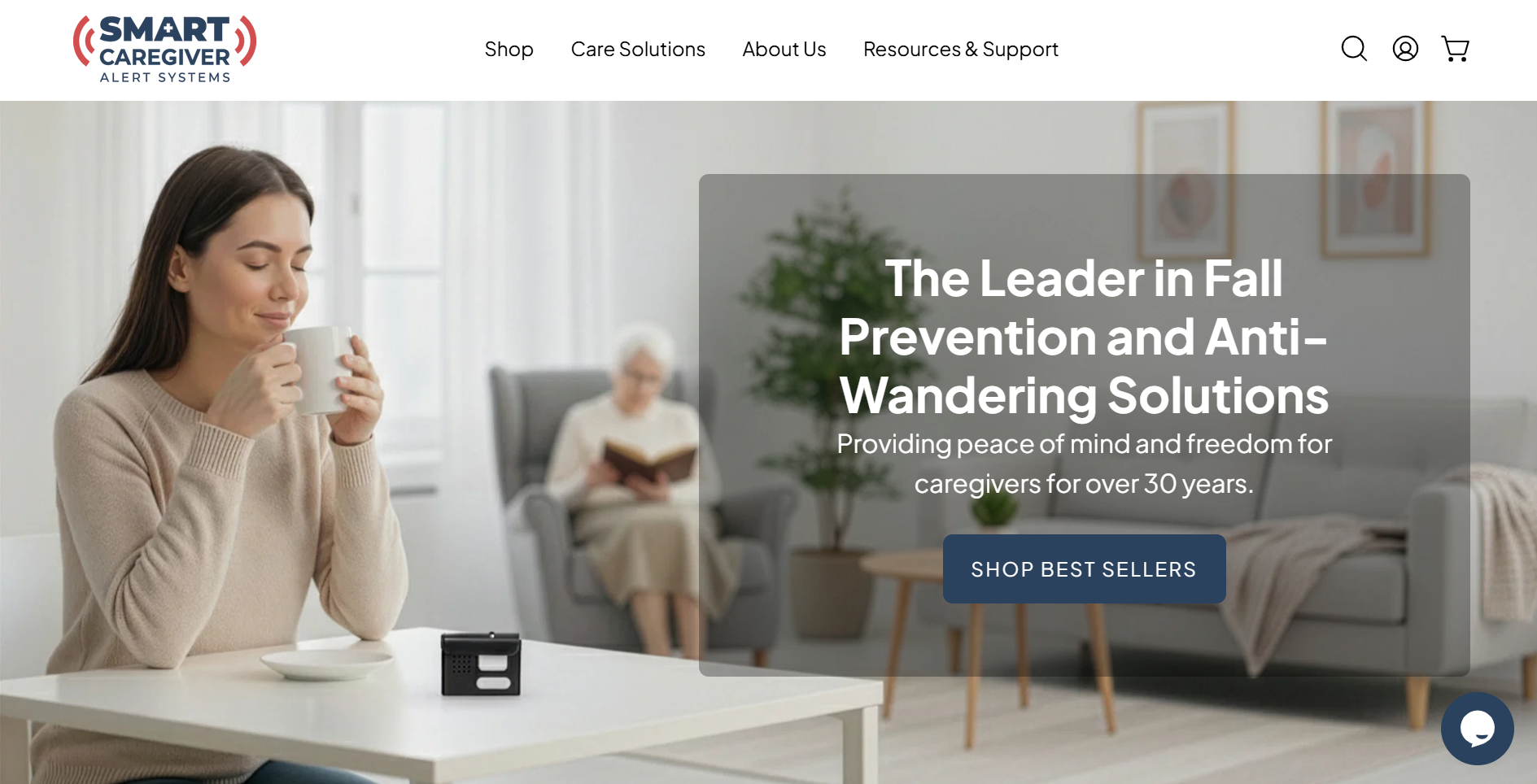
Fall alarms depend on a resident pressing a button. Smart Caregiver doesn't, and for dementia care, that difference matters.
Best for
Smart Caregiver is best for budget-conscious family caregivers at home monitoring a senior with dementia or fall risk who needs immediate local alerts without monthly fees.
Smart Caregiver works best when a caregiver is physically present in the same home or small facility and can respond to a local pager alert within minutes.
Passive pressure pads and floor mats catch movement without requiring the resident to press a button or wear anything — well suited to dementia-related wandering and nighttime bed exits.
What makes it work for home dementia care
Four strengths that matter in home dementia care:
Passive sensors — bed pads, floor mats, door sensors, and motion detectors all fire automatically. No resident action needed.
No cameras by default — the standard setup preserves privacy. An optional video monitor exists but is not part of the standard sensor-and-pager setup.
No monthly fee — a basic kit starts at around $60 one-time. Lifeline charges $34.95/month; Envoy runs $99/month.
30-year track record — deployed across 9,000+ facilities and 200,000 residents. Nighttime bed-exit detection is the most cited use case in home dementia settings.
For buyers who only need local alerts, no other system in this list matches that cost structure.
Where this breaks down: no signal outside the room
The system works only when someone is in the building. No app, no cloud dashboard, no dispatch.
Alerts go only to a local pager within radio range. Remote family members receive nothing — for long-distance caregivers, Envoy at Home or Nomosmartcare are better fits.
The system fires real-time alarms but does not learn routines, flag deviations, or produce weekly reports. If behavior trends matter, Alarm.com's Wellness platform uses predictive analytics to flag deviations, reducing costs up to $2,000/month per resident (per Alarm.com Wellness product documentation; no independent peer-reviewed validation was found at time of writing).
There is no call center or emergency response service behind Smart Caregiver. If the caregiver does not hear or respond to the pager, no backup is triggered — for seniors living alone who need 24/7 emergency coverage, Lifeline's HomeSafe Cellular plan with U.S. dispatch is the stronger option.
Pricing
Smart Caregiver hardware starts at approximately $60 for a basic bed alarm kit, with no recurring monthly monitoring fees.
You pay once for the hardware: no subscription, no monitoring fee. Smart Caregiver includes a price-match guarantee and free shipping on orders over $60, and additional sensors (floor mats, door alarms, motion detectors) are purchased separately, so total cost scales with the number of sensors you need.
A Smart Caregiver kit at $60–$150 one-time suits buyers who only need local alerts and have no use for remote dispatch.
Smart Caregiver covers the local-alert use case well. If the caregiver is not in the building, the next system in this list handles remote monitoring.
3. Alarm.com
Alarm.com started as a home security platform. Its Wellness add-on brings AI activity monitoring to the same dashboard, useful if you already run Alarm.com security and want passive senior monitoring layered in.
Best for
Alarm.com is best for senior living facilities and tech-savvy families who want AI-driven routine monitoring, predictive alerts, and optional security or video integration.
Alarm.com Wellness supports families monitoring a senior at home via app and facility operators managing multiple residents from an enterprise dashboard.
It is not the right fit for families who want a simple wearable button. Lifeline's HomeSafe Cellular pendant plans are a better match in those cases.
Where the AI earns its keep
Alarm.com Wellness uses AI to learn each resident's daily routine and flag deviations. Key capabilities:
Routine deviation alerts — flags a delayed morning wake-up or unusual bathroom frequency before an acute episode
Predictive cost reduction — Alarm.com reports savings up to $2,000 per resident per month via early intervention. This figure comes from Alarm.com's own marketing materials and has not been independently verified in a published study. Treat it as a directional benchmark, not a tested outcome.
Enterprise dashboard — multi-resident view with staff tools; only Lifeline CarePoint and Tunstall Healthcare share this dual home-and-facility capability
Security integration — connects with the base Alarm.com security platform; optional add-ons include a Wellcam HD camera, a Qolsys fall pendant, and a personal safety button
Alarm.com holds a 4.5/5 rating on G2 based on 24 reviews and has been highlighted by AARP as a senior monitoring option.
Pro tip: Ask the Alarm.com dealer for the Wellness product demo separately from the security demo. The two are often sold together but serve different decision-makers.
The pricing opacity problem
Alarm.com is harder to budget for upfront because pricing sits with local dealers. Reported subscription costs run $15–$40/month (unverified), with hardware billed upfront. Buyers who want clear costs before calling should look at Nomosmartcare ($199.99 kit + $19.99/month) or Envoy at Home ($399 hardware + $99/month).
Limited independent validation. Independent reviews for Alarm.com Wellness specifically are scarce. The 4.5/5 G2 score covers all 24 Alarm.com reviews, not the Wellness product alone. Tunstall Healthcare publishes facility case studies showing a 33% cut in emergency admissions.
Optional camera introduces a privacy trade-off. Sensors are non-intrusive by default, but the optional Wellcam HD camera with two-way audio adds a privacy consideration for residents. Envoy at Home, Nomosmartcare, and SensorsCall are all confirmed camera-free alternatives.
In practice, the most common procurement friction is the quote process. Dealers vary significantly in price, so get quotes from at least two before comparing Alarm.com to transparent-pricing alternatives like Nomosmartcare.
Common mistake: buyers approve Alarm.com Wellness because they already run Alarm.com security. The Wellness add-on serves a different decision-maker and needs a separate demo with the dealer. Without that, it often gets deprioritized after go-live.
Pricing
Alarm.com Wellness has no publicly listed pricing; it is sold as an add-on through authorized dealers with reported costs of approximately $15 - $40 per month, plus upfront hardware costs.
Nomosmartcare: $199.99 hardware kit, then $19.99/month (or $199.99/year) after a 60-day free trial
Envoy at Home: $399 one-time hardware, then $99/month (approx. $89/month on an annual plan)
Lifeline consumer plans: $34.95–$39.95/month on annual plans; fall detection adds $10–$15/month with no upfront hardware fee
Alarm.com Wellness is bundled with a base Alarm.com security subscription and sold through authorized dealers. Final cost depends on the local dealer, the security plan tier chosen, and the hardware selected — there is no standardized price list.
Alarm.com's AI analytics and facility dashboards point toward the care home market. Tunstall Healthcare takes that capability further, with published case studies from European residential facilities.
4. Tunstall Healthcare
Tunstall has been in European care homes long enough to publish real outcome data. That makes it one of the few vendors where you can verify the claims before you buy.
Best for
Tunstall Healthcare is best for care home operators and nursing facility managers who need scalable staff-efficiency tools, compliance reporting, and proactive dementia monitoring across multiple residents.
For a broader view of audit-focused platforms, see our care home audit software comparison.
Tunstall serves 60,000+ users across European care facilities. Vendor case studies report a 33% reduction in emergency admissions, though these are Tunstall-commissioned and not independently peer-reviewed.
Tunstall is built for staffed settings. For one person at home, a home sensor kit is easier to buy and run.
What the outcome data shows
The Carecom dashboard routes alerts based on staff workload and physical location, not just by zone. That distinction matters: overloaded caregivers stop getting simultaneous alerts for the same event.
One documented deployment cut shift alarms from 500 to 50, reducing noise without dropping real events. That reduction came from workload-balanced routing: alerts go to the nearest available caregiver, not just the nearest caregiver, which eliminates simultaneous multi-staff responses to the same event.
Tunstall uses discreet bed sensors, motion sensors, door sensors, and SOS pendants with no cameras. The platform is GDPR compliant, making it a fit for regulated European care environments where resident privacy is a procurement requirement.
Tunstall vendor case studies report a 33% reduction in emergency admissions across facility deployments. These are commissioned case studies, not independently peer-reviewed data.
The support and pricing gap
Three things to verify before committing:
No published pricing — a quote is required; initial budget comparisons take longer than with Nomosmartcare or Envoy at Home
2/5 on Trustpilot — reviews reflect service and support complaints, not platform reliability
No consumer self-install option — the platform requires a staffed facility and a scoped deployment
What we see in procurement: Trustpilot scores for Tunstall reflect service and support complaints, not platform reliability. Ask for references from facilities of similar size before treating those scores as a proxy for product quality.
Pricing
Tunstall Healthcare does not publish facility pricing; a quote is required. The only public reference is an Australian consumer example of approximately $399 upfront plus a monthly monitoring fee.
Most consumer tools in this list publish clear pricing upfront. Tunstall and Alarm.com both require a quote, with no public rate card.
Nomosmartcare: $199.99 hardware + $19.99/month
Smart Caregiver basic bed alarms: approx. $60, no monthly fee
Alarm.com Wellness: dealer-quoted; reported add-ons of $15–$40/month (unverified)
Facility-grade nurse call systems: roughly $2,500–$10,000 per room upfront for wired installs; ongoing monitoring typically $20–$80 per resident per month
Tunstall does not publish facility contract pricing. Procurement involves a direct quote, with costs shaped by facility size, number of beds, device mix, integration requirements, and support tier. Buyers typically receive a scoped proposal after an initial discovery call rather than a standard price list.
5. Envoy at Home
If your parent refuses to wear anything, the monitoring conversation usually ends there. Envoy was built for exactly that situation.
Best for
Envoy at Home is best for long-distance families monitoring independent or dementia-affected seniors at home who refuse to wear devices.
Seniors who refuse to wear pendants or press call buttons. Envoy's 8-sensor network is fully passive, so a resistant senior cannot opt out by removing a wearable or ignoring a button.
The AI tracks daily routines and flags anomalies like wandering patterns, disrupted sleep, and irregular meal times, which are relevant early markers in dementia progression. Seniors who are willing to use a wearable may get stronger fall detection from Nomosmartcare or Lifeline at a lower hardware cost.
Routine tracking and anomaly alerts sit squarely within remote patient monitoring systems, especially when clinician review and escalation matter.
Why passive-only monitoring changes the compliance problem
Eight sensors covering motion, doors, and cabinets feed an AI that detects falls and routine deviations without any resident action.
The system can also flag possible UTIs by tracking changes in bathroom visit frequency and duration, something wearable systems cannot detect.
That bathroom-pattern insight alone justifies passive monitoring for families who have missed early UTI signs in a parent living alone.
No cameras, microphones, or call buttons are required. Envoy is the only system in this review with no wearables, no pressure mats, and no call buttons. It works entirely from ambient motion sensors.
Weekly and monthly reports are formatted for clinician review, not just raw alert logs. TechEnhancedLife and AgingInPlace.org both recommend Envoy at Home, and the company publishes 14+ user testimonials on its site.
The cost and dispatch gap
The cost is the honest objection. At $399 upfront plus $99/month, Envoy is the most expensive consumer option in this review.
Alerts go to family via app only. There is no monitored response center that dispatches help if no family member answers, unlike Lifeline, which runs 24/7 U.S.-based dispatch centers as its core service.
Hardware costs $399 upfront plus $99/month. Nomosmartcare starts at $199.99 for hardware plus $19.99/month; Smart Caregiver core products start around $60 with no monthly fee.
Envoy has 14+ user testimonials and positive editorial coverage but no G2 or Trustpilot presence. Lifeline has 1,000+ Trustpilot reviews; Nomosmartcare has 190 site reviews and 53 on Amazon.
Pricing
Envoy at Home costs $399 one-time for the 8-sensor hardware kit plus $99/month for the subscription, or approximately $89/month when prepaid for 6 months.
The $99/month covers AI behavior analysis, passive fall detection, and clinician-formatted weekly and monthly reports. User testimonials position the fee as a fraction of assisted living costs for families keeping a senior at home longer.
System | Hardware Cost | Monthly Fee | Dispatch Included |
Envoy at Home | $399 (8-sensor kit) | $99/mo (or ~$89/mo prepaid 6mo) | No (family app alerts only) |
Nomosmartcare | $199.99–$249.99 | $19.99/mo or $199.99/year | No (family app alerts) |
Smart Caregiver | ~$60 (basic kit) | None on core products | No (local pager alerts) |
Lifeline | No upfront listed | $34.95–$39.95/mo (annual) | Yes (24/7 U.S. dispatch) |
SensorsCall | $280 (2-pack) / $415 (3-pack) | Claims free lifetime monitoring | No |
Envoy at Home serves families monitoring one senior. If budget is the constraint and local alerts are enough, SensorsCall offers the lowest entry price in this review.
6. SensorsCall
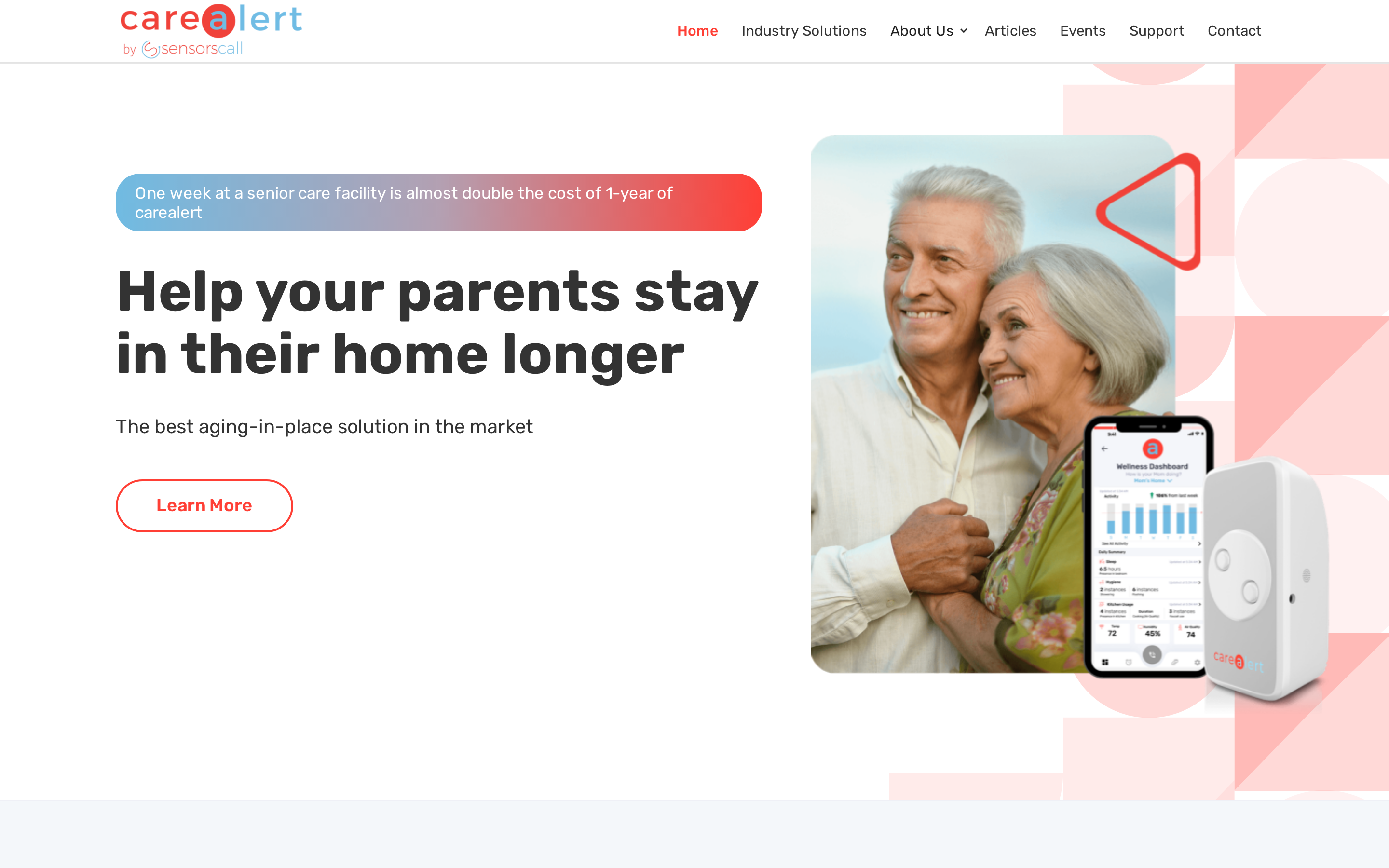
SensorsCall is the lowest-cost passive option in this review. The validation data to match that price is not yet there.
1. What stands out
Nightlight form factor — plugs into wall outlets, no drilling or hub mounting
Passive and camera-free — activity inferred from motion only, no images or audio
Low hardware cost — $280 for a 2-pack or $415 for a 3-pack, with free lifetime monitoring claimed
2. What to verify
No reviews on G2, Trustpilot, or Reddit
No published AI accuracy data or false-alert rates
"Free lifetime monitoring" conflicts with ~$19/month references in other materials — confirm current terms before purchasing
With no independent reviews on any third-party platform, there is no way to validate SensorsCall's claims about AI accuracy or lifetime monitoring. Treat it as a first-generation product worth revisiting in 12-18 months rather than a proven solution.
3. Who it fits
Cost-sensitive families monitoring an independent senior who won't wear a device. Memory-care needs, anti-wandering alerts, and emergency dispatch are outside this system's scope.
7. Nomosmartcare
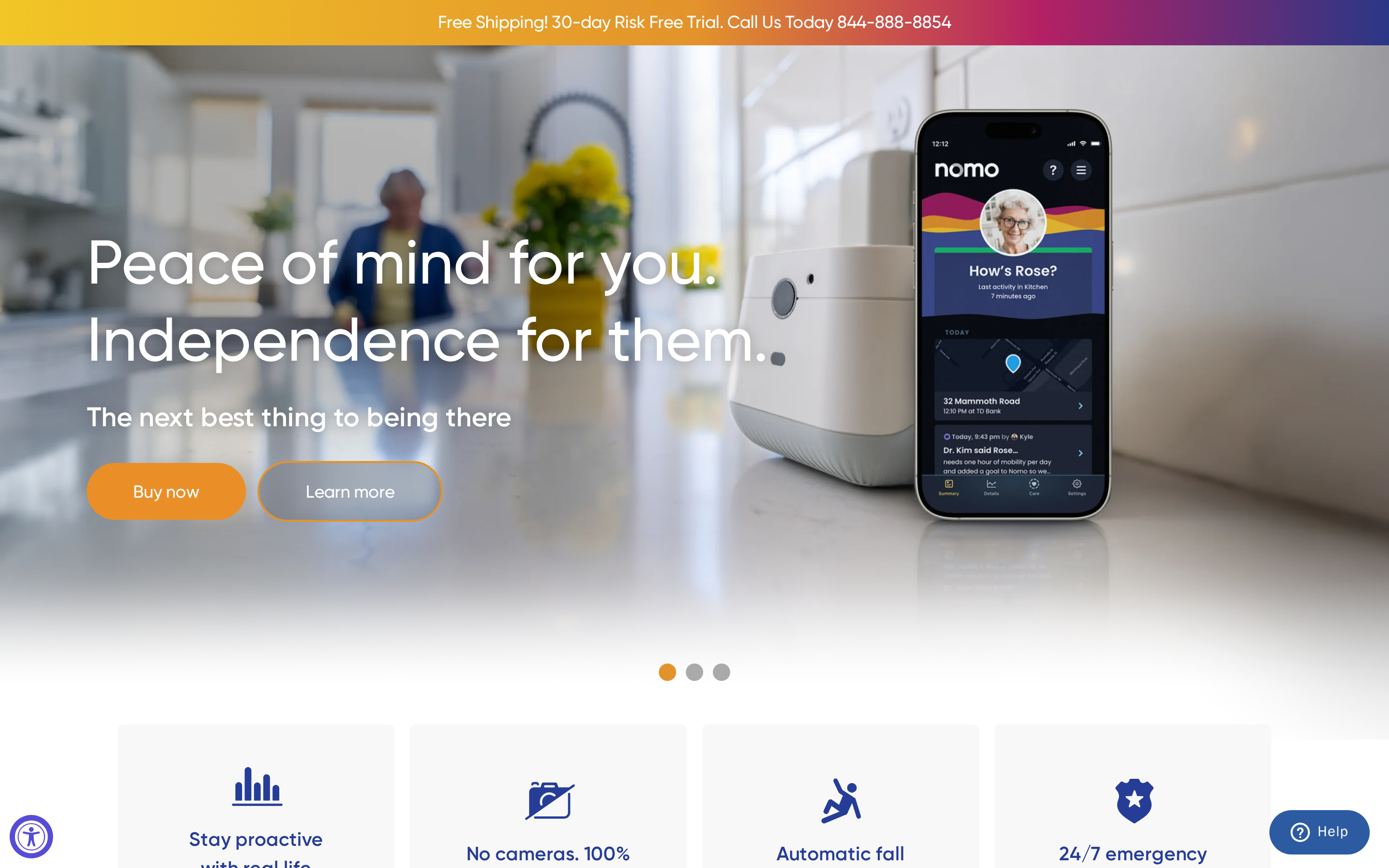
Nomosmartcare is a camera-free, AI-powered home monitoring system with passive motion satellites, routine tracking, and a family app for remote caregiving.
Best for
Nomosmartcare is best for privacy-focused families with WiFi-enabled homes monitoring post-surgery, dementia, or independent seniors on a budget.
Nomosmartcare tracks sleep, meals, and movement passively without requiring the senior to press anything, making it practical for memory-impaired users who won't reliably operate a pendant.
Nomosmartcare is a consumer-only product with no facility dashboard or multi-resident management. Care home operators need a facility-grade platform such as Tunstall Healthcare or Lifeline's CarePoint instead.
Key strengths
A 60-day trial, HIPAA/SOC2 compliance, and no cameras put Nomosmartcare ahead of most budget home monitoring options on privacy and low-risk entry.
Nomosmartcare uses no cameras, audio recording, or microphones. It is HIPAA and SOC2 compliant with encrypted data transmission, placing it alongside Envoy at Home as one of only two fully camera-free, compliance-certified systems in this review.
New subscribers get a 60-day free monitoring trial before any recurring charges begin. No other system reviewed here offers a trial period of this length.
User ratings are strong for a newer brand: 4.5/5 on the Nomosmartcare site (190 reviews) and 4.1/5 on Amazon (53 reviews). ZDNet has praised the system, and it appears in Reddit recommendations for home senior care.
The AI baselines each resident's sleep, meal, and movement patterns over time, then pushes anomaly alerts to the family app. Multiple family members can share access through the Care Circle feature for multi-member visibility.
Limitations
Four gaps are worth knowing before buying:
Consumer-only scope — no facility dashboard or multi-resident management; care home operators need a platform such as Tunstall or Lifeline
Fall detection not included — requires an optional pendant tag purchased separately, unlike Lifeline's HomeSafe where fall detection ships in base packages
WiFi only, no cellular backup — monitoring gaps are possible where broadband is unreliable; Lifeline's HomeSafe Cellular needs no home broadband at all
No published clinical studies — validation comes from user reviews and press mentions; Lifeline and Tunstall both have documented outcome data
Pricing
Nomosmartcare's Essential Care Kit costs $199.99 to $249.99 upfront, with a 60-day free trial followed by $19.99/month or $199.99/year.
At $19.99/month, Nomosmartcare costs a fraction of Envoy at Home ($99/month after a $399 hardware outlay), which does include clinical-grade behavior interpretation and family reports. Smart Caregiver's base kit costs around $60 with no monthly fee, but offers no app, no AI analytics, and local-only pager alerts.
For families who want passive AI monitoring and a long trial period at a low monthly rate, Nomosmartcare is competitively priced. Those needing 24/7 professional dispatch or clinical reporting will outgrow it quickly.
System | Hardware Cost | Monthly Fee | Trial / Contract |
Nomosmartcare | $199.99–$249.99 | $19.99/mo or $199.99/yr | 60-day free trial |
Envoy at Home | $399 one-time | $99/mo | No trial mentioned |
SensorsCall | $280–$415 one-time | ~$19/mo or $500/yr (claimed lifetime) | No trial mentioned |
Smart Caregiver | ~$60 base kit | No monthly fee | No trial mentioned |
Lifeline | No upfront fee listed | $34.95–$39.95/mo | No trial mentioned |
8. Lifeline
Lifeline is a veteran PERS provider with 24/7 U.S. dispatch, wearable pendants with fall detection, and CareSage predictive analytics for senior living facilities.
Best for
Lifeline is best for seniors comfortable wearing a device who need reliable 24/7 emergency dispatch, and for facilities wanting predictive analytics.
Lifeline suits seniors and families who want 24/7 professional emergency dispatch behind every alert. Lifeline works best when the senior is willing to wear a pendant or smartwatch consistently.
Facility operators who want predictive risk data are also a strong fit. Lifeline's CareSage platform models 30-day hospitalization risk using real-time sensor data and health records, enabling proactive interventions before an acute episode.
Key strengths
Lifeline's core strengths are its 50+ year track record, 24/7 U.S. professional monitoring centers, fall-detecting wearables, and CareSage hospital prediction analytics.
Lifeline has served 7.5 million subscribers over 50+ years and holds a BBB A+ rating.
Billing complaints appear regularly in user reviews despite the high rating.
Lifeline reports its monitoring centers average a 12-second response time to alert activations. Trained agents handle every call and can escalate directly to emergency services, unlike app-only systems such as Nomosmartcare or Smart Caregiver's local pager alerts.
CareSage uses real-time sensor data and historical health records to generate a 30-day hospitalization risk score per resident. Staff can intervene before an acute episode rather than reacting after it.
Lifeline includes fall detection in base packages. Alarm.com and Nomosmartcare treat it as a paid add-on.
Limitations
Two issues matter more than the others for most buyers: wearable dependency and fall detection accuracy.
Lifeline only monitors when the pendant or smartwatch is being worn. A senior who removes the device at night or forgets it on the nightstand gets no protection. Envoy at Home (purely passive sensors) and Smart Caregiver (pressure pads, motion alarms) both work without any wearable.
Independent reviews have raised concerns about fall-detection reliability. Some tests suggest a significant portion of falls go undetected, which matters for families paying specifically for that protection.
At $34.95–$39.95/month, Lifeline costs significantly more than Nomosmartcare ($19.99/month) or SensorsCall, which charges a one-time hardware fee. Lifeline's Trustpilot score sits at 3.8/5 from over 1,000 reviews, with billing complaints appearing alongside the BBB A+ rating.
Pricing
Lifeline consumer plans cost $34.95 - $39.95 per month on annual plans, with fall detection as a $10 - $15/month add-on; business/facility pricing is via custom quote.
Lifeline's $34.95–$39.95/month base fee includes 24/7 U.S. dispatch, which Nomosmartcare's $19.99/month app-only plan does not offer. The gap is real if professional emergency escalation matters.
Adding fall detection costs an extra $10–$15/month, pushing the total to $44.95–$54.95/month. With independent reviews raising questions about fall-detection reliability, the add-on has a gap worth weighing against its cost.
Common mistake: paying $10–$15/month extra for fall detection when independent reviews suggest a significant portion of falls go undetected. Weigh the add-on cost against that accuracy rate before assuming the upgrade adds meaningful protection.
System | Starting Price | Model | Fall Detection |
Lifeline | $34.95/mo | Monthly subscription | Add-on ($10–$15/mo) |
Nomosmartcare | $19.99/mo | Monthly or $199.99/year after trial | Included (optional pendant) |
Envoy at Home | $99/mo | $399 hardware + $99/mo subscription | Passive AI detection |
SensorsCall | ~$280 one-time | One-time hardware, claimed free monitoring | AI inference (no pendant) |
Smart Caregiver | ~$60 one-time | Hardware purchase, no monthly fee | Not applicable (local pager) |
Bay Alarm Medical and Medical Guardian are included in the comparison table for context, though the detailed reviews above focus on 8 systems.
Senior monitoring systems compared: features, type, and pricing
The table below compares all 10 systems by monitoring type, monthly cost, fall detection, 24/7 dispatch, works outside home, camera use, and best-fit setting.
System | Type | Monitoring Approach | Best Setting | Monthly Cost | Standout Feature |
Guardian | Facility sensor network | Passive (motion, bed exit, SOS sensors) | Care homes / nursing facilities | Contact for quote | Floor plan dashboard with location-aware alerts; no cameras |
Smart Caregiver | Hardware alarms | Passive (pressure pads, floor mats, pagers) | Home caregiving | No monthly fee | ~$60 one-time; price-match guarantee; plug-and-play setup |
Alarm.com | Cloud sensor + AI | Passive sensors + optional wearables | Facilities and tech-savvy families | $15–$40/mo (dealer, unverified) | Predictive AI learns routines; optional Wellcam video integration |
Tunstall Healthcare | Wireless telecare platform | Hybrid passive + wearable SOS pendants | Care homes / group living | Contact for quote | Carecom routes alerts by staff workload; cut alarms from 500 to 50/shift |
Envoy at Home | Passive AI sensor network | Fully passive (no wearables, no cameras) | Families, home-based seniors | $99/mo ($89/mo prepaid) | 8-sensor kit interprets falls and routines as vital signs |
SensorsCall | Passive nightlight sensors | Passive AI activity inference | Home aging-in-place | ~$19/mo or $500/yr (marketing) | $280–$415 one-time hardware; claims free lifetime monitoring |
Nomosmartcare | AI hub + motion satellites | Passive + optional pendant tags | Home (dementia, recovery, independent) | $19.99/mo or $199.99/yr | $199.99–$249.99 kit; 60-day free monitoring trial |
Lifeline | Wearable PERS | Active wearable (pendant, smartwatch) | Consumer home + senior living | $34.95–$39.95/mo | 24/7 U.S. dispatch; CareSage 30-day hospitalization prediction |
Bay Alarm Medical | Wearable / home PERS | Active wearable + home base | Consumer home | $27.95–$39.95/mo | SOS Home, SOS Micro, and SOS Smartwatch tiers; no landline required for cellular plans |
Medical Guardian (MG) | Wearable / home PERS | Active wearable + optional GPS | Consumer home + on-the-go | $31.95–$46.95/mo | MGMini offers 5-day battery life; MGMove smartwatch with touch screen |
The table narrows the field. The next step is matching the system type to the senior's routine and the response model needed.
How to choose the right type of senior monitoring system
Three things determine the right system: location, device acceptance, and who responds to alerts.
System types map directly to these variables:
Wearable PERS pendants and smartwatches (Lifeline, Medical Guardian) suit seniors who wear a device consistently and want 24/7 dispatch backup.
Passive sensor networks (Envoy at Home, Nomosmartcare, SensorsCall) work without any resident action, covering falls and routine deviations inside the home.
Facility-grade platforms (Tunstall, Guardian) serve care homes where staff response times and compliance records matter alongside the alert itself.
Hardware-only sensor kits (Smart Caregiver) serve families who need local fall and wandering alerts without subscriptions.
Situation | Recommended type | Example system |
Senior goes out often | Mobile PERS wearable | Lifeline, Bay Alarm Medical |
Senior refuses to wear anything | Passive sensor network | Envoy at Home, Nomosmartcare |
Care home or nursing facility | Facility-grade platform | Guardian, Tunstall Healthcare |
Home, budget-constrained, carer on-site | Hardware sensor kit | Smart Caregiver |
The decision depends on three variables: where the senior spends time, whether they'll reliably use a device, and who responds when an alert fires.
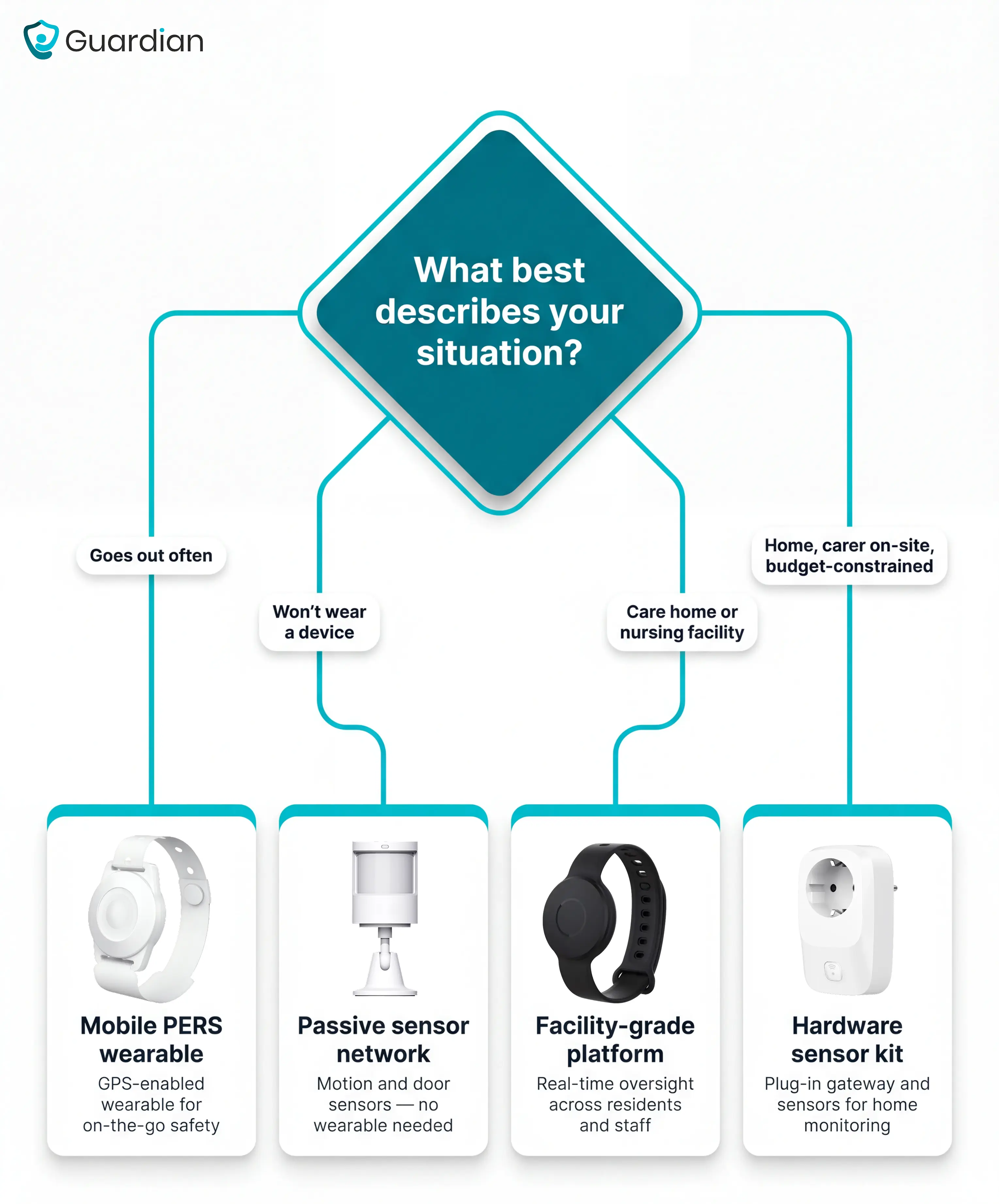
A frequent mismatch: a wearable pendant for a resident with dementia who removes it every day. A passive sensor system is more reliable for anyone who won't consistently wear a device.
For residential settings between home care and skilled nursing, the assisted living nurse call guide gives the clearer fit.
If the senior lives alone and goes out often
Active seniors who go out often need a mobile medical alert device with GPS and cellular connectivity, not a home-only sensor system.
Mobile monitoring systems use cellular coverage and GPS, so they work at home, in a car, at the grocery store, and while traveling. When an alert fires, the monitoring center can dispatch emergency services to the senior's exact location, not just their registered home address.
Form factors include wearable pendants, wristbands, and pocketable devices carried in a bag. Lifeline's HomeSafe Cellular and fall-detecting smartwatch cover on-the-go use with 24/7 U.S. dispatch. Bay Alarm Medical's SOS All-In-One 2 and SOS Smartwatch are designed specifically for active seniors.
Common mistake: buying a home sensor kit for an active senior who drives. Motion sensors and bed pads provide zero coverage once the front door closes. A GPS cellular pendant costs roughly the same per month as a home-only sensor subscription and works everywhere.
Passive sensor systems like Envoy at Home and Nomosmartcare are designed for inside the home only. They do not track the senior once they leave the property.
Home-only passive monitoring overlaps heavily with room monitors for elderly, especially for motion, door, and bed-based coverage.
If they won't wear a device
A passive sensor system is the only reliable option when the device sits in a drawer. Motion, door, and bed sensors around the home infer activity without anything worn or pressed.
Bed exits are often the earliest warning sign before a fall. A patient bed alarm focuses on that trigger point specifically.
Passive systems for device refusers:
Guardian — bed sensors, motion sensors, door sensors, and exit alerts all run without a wearable. The wristband is available for residents who can use one, but the sensor layer works independently. Built for care homes and home care teams, not single-resident home setups.
Envoy at Home — 8-sensor kit, AI behavior analysis, no wearables or cameras.
Nomosmartcare — AI hub and motion satellites, tracks sleep and meals, $19.99/month.
The trade-off is location. Passive systems only monitor inside the home, so a senior who falls outside has no coverage. They also cannot provide GPS location tracking, which matters if the senior is mobile or wanders.
If memory loss or wandering is a concern
The most dangerous moment in dementia care is the one nobody sees: a door opening at 2am. Systems built for wandering risk detect that exit the moment it happens.
Smart Caregiver includes door alarms and bed or chair exit pads that alert locally the moment a resident leaves a safe area, making it a practical choice for home dementia care. Tunstall Healthcare uses geofencing for wandering alerts in care home settings. Envoy at Home's AI can flag early wandering behavior by detecting a door opening at an unusual hour.
Home sensors alert caregivers at the moment of exit but cannot track the senior once they leave the property. For seniors who wander outdoors, combining home door sensors with a GPS wearable, such as Lifeline's smartwatch, gives both an exit alert and a recovery location if the senior goes out undetected.
If caregiver visibility matters more than 24/7 dispatch
Visibility-first systems center on caregiver apps, passive activity sensors, and anomaly alerts rather than 24/7 call centers. Core features to look for:
Daily activity reporting: First-movement-of-day alerts and routine summaries give remote family a daily status check without calling anyone.
Anomaly detection: Passive sensor networks that learn routine baselines and flag deviations (delayed wake-up, unusual bathroom frequency) alert caregivers proactively.
Multi-user Care Circle sharing: Alerts go to several named family members simultaneously, bypassing a dispatch center entirely.
Alarm.com Wellness is the strongest option for tech-oriented families or small facilities, using predictive AI to flag pattern deviations across multi-client dashboards. Envoy at Home sends app alerts with no wearables or cameras, making it the top pick when the senior refuses any device. Nomosmartcare offers Care Circle sharing at $19.99/month after a 60-day trial, the most accessible entry point for budget-conscious caregivers. Lifeline is the weakest fit here: it relies on wearable pendants and 24/7 dispatch, with limited passive monitoring or app-first visibility.
Care home operators running one or more wards can run a scoped 6-8 week pilot in a single ward. You get a written impact report with response-time data and an ROI calculation at the end. Start the pilot
What does a senior monitoring system cost?
Senior monitoring system costs split into two categories: recurring monthly monitoring fees and one-time hardware purchases. Some systems charge both; others charge only one. The subsections below break each down.
Monthly monitoring fees
Monthly monitoring fees for senior monitoring systems typically range from $19.95 to $64.95 per month, with most plans falling between $20 and $40.
Monthly fees vary by system type and add-ons. Common extras that raise the base price:
Fall detection: $5 to $12 per month on top of the base plan; $10/month is most common.
Device protection plans: $3 to $8 per month for warranty or loss coverage.
Caregiver app access: Free on many platforms, up to $8/month on some.
How the reviewed systems compare on monthly fees:
Lifeline: $34.95 to $39.95/month; fall detection costs extra.
Nomosmartcare: $19.99/month or $199.99/year after a 60-day free trial.
Envoy at Home: $99/month, or roughly $89/month on a 6-month prepay.
Alarm.com Wellness: No public pricing; reported at $15 to $40/month, sold via dealers only.
Most systems also charge upfront hardware or activation fees. Envoy at Home charges $399 one-time for the 8-sensor kit, then $99/month. Nomosmartcare's kit runs $199.99 to $249.99 one-time, then $19.99/month. Several others charge $100–$200 for hardware activation.
What 'no monthly fee' actually means. Monitored systems connect to a staffed 24/7 call center that can dispatch emergency services. No-fee systems skip this entirely. Alerts go to a family member's phone or a local pager, and if nobody answers, no dispatch occurs automatically.
Systems with no recurring fees reviewed here:
Smart Caregiver: Around $60 one-time for a basic bed alarm kit. Alerts go to a local pager.
SensorsCall: $280 to $415 one-time hardware. Claims 'free lifetime monitoring' but some tiers reference $19/month or $500/year.
Nomosmartcare is not a true no-fee system. It offers a 60-day free trial, then charges $19.99/month.
Price narrows the shortlist, but the safer choice usually comes down to resident compliance, alert quality, and response coverage.
System | Hardware / activation | Monthly fee | First-year total |
Smart Caregiver | ~$60 (one-time) | $0 | ~$60 |
Nomosmartcare | $200–$250 (one-time) | $19.99/month | ~$440–$490 |
Lifeline | $100–$200 (activation) | $34.95–$39.95/month | ~$520–$680 |
Envoy at Home | $399 (one-time) | $99/month | ~$1,587 |
What to look for before you buy
The right buy depends on three things: whether the senior will engage with the device, how the system handles false alarms, and what happens if nobody responds.
Common mistakes to avoid:
Buying a home sensor kit for a senior who goes outdoors regularly. Home-only systems lose coverage the moment the front door closes. Rule out indoor-only sensors first if the person leaves the house daily.
Paying for fall detection without checking the miss rate. Ask the vendor for real-world detection accuracy data from live installations, not just confirmation that the feature exists.
Skipping the question on alarm frequency. High alert volume trains staff to ignore notifications. Ask vendors how many alerts a comparable installation generates per shift.
Does the system require the resident to do anything?
80% of older adults who fall and have a call alarm do not activate it (a finding consistent across multiple fall-response studies, including reports from the American Journal of Emergency Medicine). Button-press dependency fails anyone with dementia or who loses consciousness after a fall.
[Infographic: '80% of older adults who fall and have a call alarm do not press it' — bar or split graphic contrasting button-press activation rates against passive sensor detection; source: American Journal of Emergency Medicine and related fall-response studies]
Passive systems — motion, bed, door, and floor sensors — trigger without resident input. Of the systems reviewed here, Envoy at Home and Smart Caregiver are fully passive; Lifeline relies on pendant buttons.
How does the system prevent alert fatigue?
When every movement triggers a notification, real emergencies stop registering as urgent. Tunstall's Carecom platform reduced active alarms from 500 to 50 per shift in one documented case using smart workload routing.
Look for configurable rules — for example, alert only if the senior is out of bed for more than 15 minutes at night, not on every movement.
Cameras vs. camera-free sensors.
Camera-based systems create consent and dignity issues in bedrooms and bathrooms, where most falls occur. Motion, bed, and door sensors cover the same risk without video. Among the systems reviewed here, Alarm.com is the only option with an optional live camera (Wellcam). All others are camera-free.
System | Camera-free by default | Optional camera |
Guardian | Yes | No |
Envoy at Home | Yes | No |
Nomosmartcare | Yes | No |
SensorsCall | Yes | No |
Smart Caregiver | Yes | Optional (add-on) |
Alarm.com | Yes | Yes (Wellcam HD) |
Tunstall Healthcare | Yes | No |
Lifeline | Yes | No |
Will the senior wear or accept the device?
Real user reports describe pendants being refused because they are too visible or because dementia residents remove them. Check for sharp edges, strap materials that may irritate fragile skin, and whether the device is discreet enough not to draw attention. Battery life matters too: a device removed to charge overnight creates a gap at exactly the time when falls are most likely.
Contract terms and cancellation.
Look for month-to-month plans with no long-term contracts and no separate equipment fees on top of monitoring costs. A free trial period is worth confirming before signing. Alarm.com and Tunstall both require a quote call with no public pricing. Nomosmartcare and SensorsCall publish prices online. Lifeline publishes consumer rates but uses custom quotes for facilities.
How do I know if the system is working?
Track three numbers after go-live:
Average staff response time from alert to arrival. Under 5 minutes is a strong benchmark for fall and bed-exit events.
Proactive interventions per week. Rising numbers show the system is catching events before they escalate to an incident.
False alarm rate. High false-alarm volume predicts alert fatigue within weeks.
Guardian's pilot report provides all three metrics automatically at the end of week 8.
Questions to ask every vendor before buying
Can you share alarm frequency data from a live installation, not a demo?
Are smart rules overrideable for SOS alerts? If yes, walk away — that is a safety liability.
What is the total cost breakdown across 24 months, including battery replacement and support calls?
What happens when the monitoring hardware needs replacing — is there a charge?
Can I cancel month-to-month, or is there a minimum contract term?
Compliance certifications worth checking before signing:
HIPAA — required for US vendors handling protected health information.
SOC2 — confirms the vendor has passed a third-party data-security audit (Nomosmartcare holds this).
GDPR — required for EU and UK data handling; relevant for European care homes (Tunstall Healthcare).
FDA registration — applies to consumer PERS devices sold as medical alert systems in the US.
For UK care homes, CQC inspectors increasingly ask about digital care records and alert response times.
Facility-wide senior monitoring without cameras — see how Guardian works
Guardian monitors every room, bed, and corridor across a facility without a single camera. Sensors, wearables, and a live floor-plan dashboard give staff location-aware alerts on the devices they already carry. No cabling, no drilling, and no IT project.
Run a scoped pilot in one ward or home care team. At the end, you get a written impact report with response-time data and an ROI calculation.
Consumer review sites don't agree on a single winner. NCOA tested more than 50 systems and ranks Medical Guardian best at 9.9/10 with a 29-second response time. Bay Alarm Medical tops 4 out of 7 major review lists. Average response times vary by source and test methodology — no independent consensus exists on which system responds fastest in real-world use.
Original Medicare (Parts A and B) does not cover senior alert systems. The CMS classifies them as non-covered durable medical equipment under NCD 280.1, so no reimbursement applies regardless of medical necessity.
Standard Medicare (Parts A and B) does not cover medical alert systems. Medicaid coverage and some Medicare Advantage plans vary by state, so it's worth checking your specific plan. Some long-term care insurance policies may also include partial reimbursement.
No. Fall detection is not included as standard.
A Consumer Reports survey found only 36% of devices include it. Bay Alarm Medical, Medical Guardian, and Lifeline sell fall detection as a paid add-on, typically $5–$10/month extra.
Guardian's wristbands include automatic fall detection in the core package. No add-on, no extra monthly fee.
Yes. Bed-exit sensors, motion sensors, pressure mats, and radar systems can all detect events without a worn device.
A University of Missouri depth-camera study across 10,707 days of monitoring achieved 98% fall-detection sensitivity with one false alarm per month.
Guardian pairs in-room sensors with an automatic fall-detection wristband. Bed, motion, door, and fridge sensors cover the room. The wristband covers residents who can't or won't press a button. Alarm.com, SensorsCall, and Nomosmartcare are sensor-only.
For care home and home care operators, a star rating from a consumer review site tells you little. What matters is whether your team can see every resident in real time, respond with a name and room number, and produce clean records afterwards.
Guardian runs a 6–8 week pilot in one ward. You leave with your own response-time data, verified visit records, and an ROI calculation.

Author
Aleks Timm
Aleks Timm leads Guardian and builds privacy-first operations technology for care homes and home care providers. Teams get location-aware alerts they can act on, clearer situational awareness, and measured insight into how care work actually runs.
Read MoreRecommended reads
Keep reading
7 Best Medical Alert Systems with Fall Detection
Discover the 7 best medical alert systems with fall detection—compare top picks, features, and response times to find the right...
Read more
10 Best Room Monitors for Elderly Home Care
10 Best Room Monitors for Elderly Home Care: compare top options for safety, alerts, and peace of mind to find the right fit for...
Read more
Home care platforms compared: visits, safety, proof
Home care platforms compared: visits, safety, and proof—see which tools improve EVV, reduce risk, and give agencies trustworthy...
Read more