

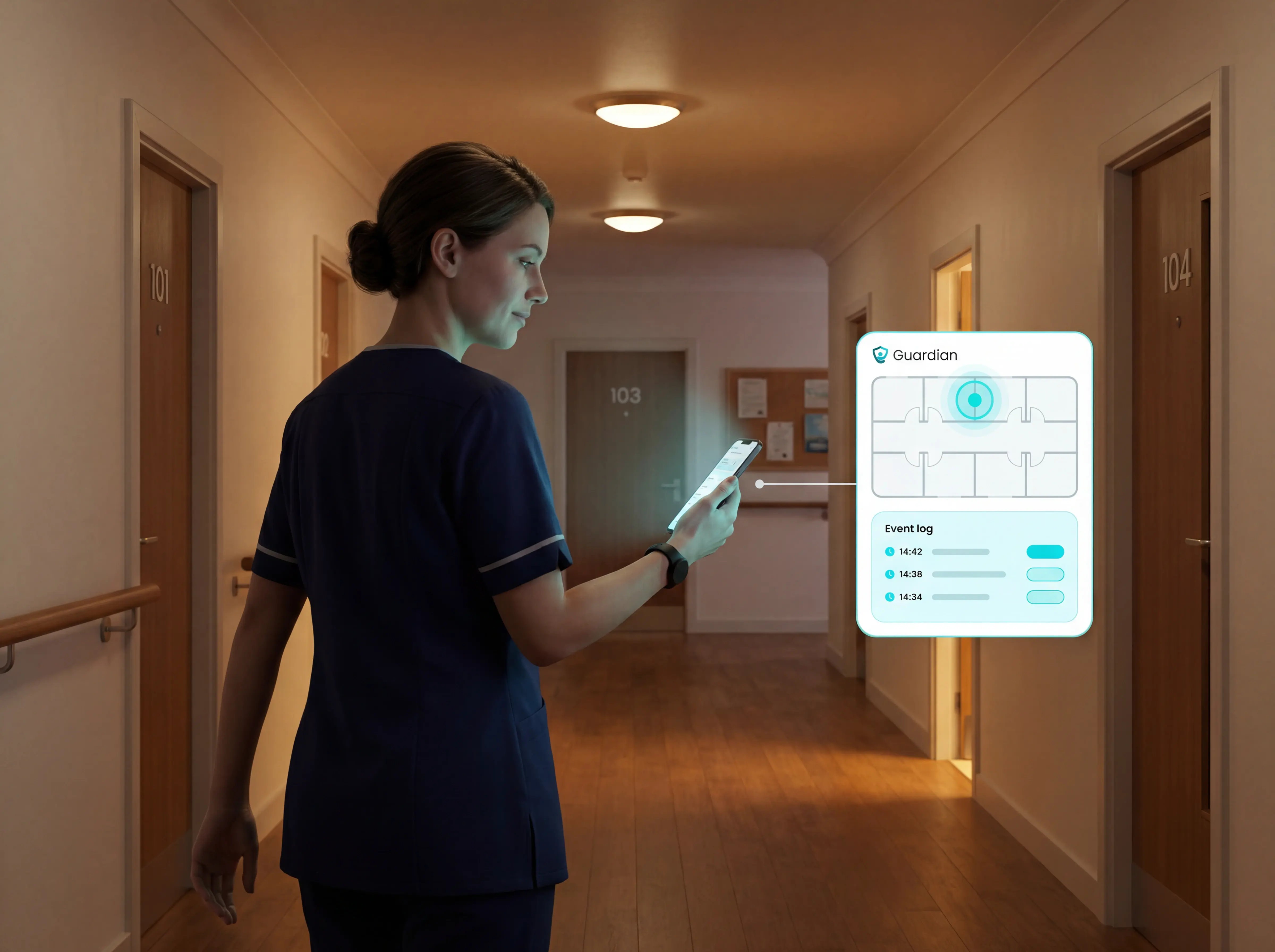
9 best wireless caregiver alert systems for seniors
In this article
Clear alerts. Room-level context. Automatic records.
Care homes and home care teams usually start looking for a wireless caregiver alert system when proof is missing.
Who visited which resident, when, and for how long? Was a fall, wander, or missed round spotted in time, or reconstructed later from complaints and notes?
The strongest options are not just buttons.
They create a clear alert pathway, add room-level context, and help staff act before managers have to step in.
This guide compares each system by alert pathway, location context, passive detection, staff routing, reporting, and recurring cost.
Facility note: If you want to test location-aware alerts and reporting in one ward before rollout, Guardian's pilot route is built for that: Try it now.
Quick picks: best wireless caregiver alert systems at a glance
Use this table to shortlist by care setting first, then compare how alerts reach staff, whether location context is included, and how costs recur. A low-cost pager, a medical alert subscription, and a facility platform solve different jobs.
System | Best For | Alert Pathway | Pricing Signal |
Guardian | Care homes needing facility-wide location-aware alerts and staff compliance reporting | Staff smartphones via Guardian Insight portal with floor plan mapping | Quote-based (B2B) |
Smart Caregiver | Family caregivers needing low-cost, plug-and-play bed-exit detection at home | Dedicated RF pager, no Wi-Fi required | From $129.95, no subscription |
Alarm.com | Users combining property security with passive wellness monitoring | Mobile app or enterprise dashboard | Hardware + monthly dealer fee |
Tunstall Healthcare | Public sector and social care organizations needing large-scale monitored alarms | Home hub, pendant, and 24/7 Alarm Response Centre | Hardware $140-$500 + subscription |
Lifeline | Independent seniors needing instant access to professional emergency dispatchers | 24/7 U.S.-based response center via wearable button | From $34.95/month |
Nomosmartcare | Seniors who refuse wearables but need passive routine monitoring | App notifications to a Care Circle of unlimited members | $249.99 hardware + subscription |
Envoy at Home | Families managing dementia who need behavioral reports for clinical teams | Mobile alerts and periodic behavioral insight reports | $399 hardware + $99/month |
SensorsCall | Users needing combined fall-risk, environmental, and sound monitoring | App notifications with built-in two-way intercom | $416 starter pack + $19.99/month |
Amazon/EverNary | Budget-conscious buyers needing basic portable pager or call-button options | Portable pager or Wi-Fi app | Varies by product; no subscription on basic models |
The 4 types of wireless caregiver alert systems
Wireless caregiver alert systems split into four categories based on who receives the alert, how far the signal travels, and whether a professional monitoring center is involved. For care homes, the category matters because response routing, location context, and records become more important than the button itself.
Local wireless pager systems
Local wireless pager systems are simple, hardware-only setups. A bed pad, chair pad, floor mat, or button sends a radio signal to a portable pager carried by one caregiver.
This category works best when the caregiver is nearby and the home layout is small enough for a local receiver. It does not create a shared alert queue, a live map, or a care record.
Range is local: Smart Caregiver systems are documented at about 300 feet, while some pager kits reach up to 500 feet.
Buildings reduce reach: Thick walls, stairwells, and multi-floor layouts can shorten the usable range.
Pager alerts are basic: The screen may show which sensor fired, such as “Bed 1,” but not a resident name, room map, or care history.
No Wi-Fi needed: RF systems work without internet, smartphones, or apps, but they also do not create logs for compliance review.
Wi-Fi and app-based caregiver alerts
Wi-Fi and app-based systems send alerts to caregiver smartphones instead of a single local pager. They fit families or teams that need more than one person to see the same alert.
The trade-off is dependency on the network, app delivery, and charged devices.
Phone delivery: Alerts can reach mobile apps, tablets, or dashboards rather than one device in one building.
Multi-user routing: Systems such as Nomosmartcare can notify a care circle of family members and professional caregivers.
More context: App-based tools may include activity logs, device status, or two-way audio depending on the product.
Network risk: If the home Wi-Fi or internet connection fails, Nomo Smartcare cannot send real-time alerts or notify emergency contacts.
Professionally monitored medical alert systems
Professionally monitored medical alert systems connect a pendant, watch, or home hub to a staffed response centre. The alert usually goes first to the monitoring team, then to family, caregivers, or emergency services.
This model suits independent seniors when no caregiver is on site. It is less useful on a staffed ward where staff need the room, resident, and alert type immediately.
Call-chain model: Lifeline connects users to response centres after a button press, while Tunstall routes alerts through home hubs and pendants to 24/7 alarm response centres.
Subscription cost: Lifeline plans start at $27.95/month on annual landline plans, with higher prices for cellular and mobile options. Tunstall pricing varies by device, region, and monitoring model.
Best fit: These systems are built mainly for independent seniors who need emergency escalation outside a staffed care setting.
Key limitation: Manual SOS buttons fail if the person forgets the device, cannot reach it, loses consciousness, or does not press it.
Sensor-based fall and wandering prevention
Sensor-based fall and wandering systems monitor movement patterns around the resident, not just a button on the resident.
They are most useful when risk builds before the emergency, such as getting out of bed at night or opening an exit door.
For care homes, passive sensing matters because residents do not always press a button, wear a pendant, or explain what happened. The system needs to detect risk without waiting for self-activation.
Night-shift risk: Falls are a major care-home issue, and the CQC report links many incidents to night shifts, when staffing is thinner.
Sensor types: Bed exit pads, door sensors, motion sensors, and floor mats can flag rising, wandering, or movement into restricted areas.
Passive detection: Sensors do not rely on a resident pressing a pendant or remembering to wear a device.
Care-team routing: Alerts can go to staff devices with location context, instead of only to a remote response centre.
The 9 best wireless caregiver alert systems
The detailed reviews below cover systems with clear care workflows, support models, and deployment details. Amazon/EverNary stays in the tables as marketplace context because products vary by seller and listing.
1. Guardian
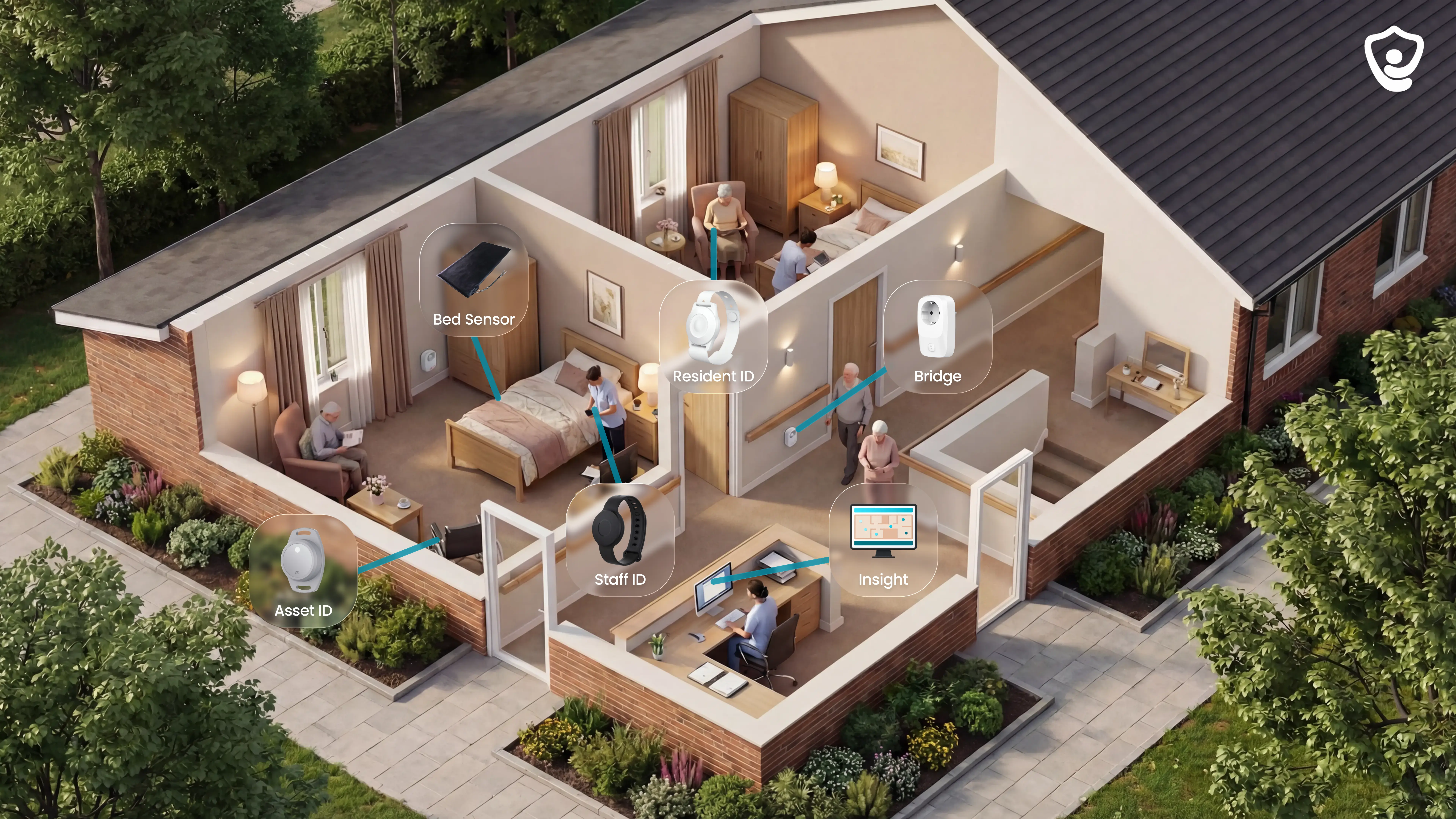
Guardian is the facility-wide option for care homes that need wireless alerts with floor-plan location, staff response records, and camera-free monitoring.
Instead of sending every event to a single pager, Guardian routes actionable alerts through the Guardian Insight portal to the staff devices your team already uses.
Best for
Guardian fits care homes, nursing facilities, and home care operators that need to know which resident needs help, where the alert came from, and how quickly staff responded.
Guardian is strongest when you need clean records of what happened, not just an alert that something did:
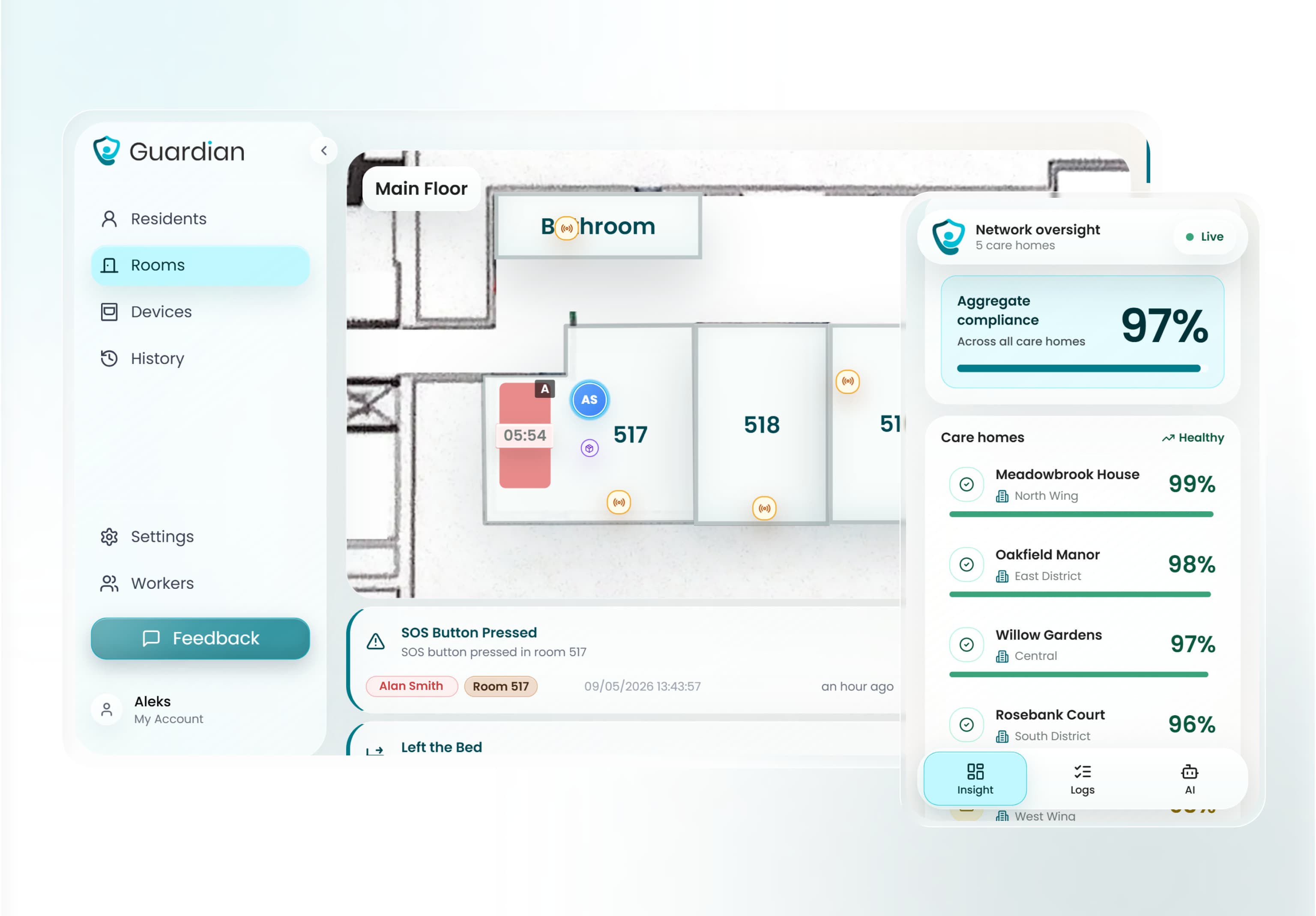
Room and bed context: alerts map to your digitised floor plan, so staff see where to go before entering the corridor.
Wearable-optional coverage: residents who remove wristbands or cannot wear a device are still monitored through bed sensors, motion sensors, and door sensors. Passive monitoring is a standard part of the system.
Camera-free monitoring: residents keep privacy in rooms while staff still see live safety signals.
Automatic records: visits, response times, incidents, and shift activity are captured for managers in the background.
Pilot data: you test Guardian in one ward or team for 6-8 weeks, then receive response-time, visit-verification, alert-quality, and ROI data in a written impact report.
In the Estonia pilot, Guardian helped staff attend 30 potential fall situations, unlocked about 1,000€/month in caregiver capacity, and recorded an average event response time of about 5 minutes.
How the alert works
Guardian starts with the events care teams already manage on every shift: a resident leaving bed, pressing SOS, entering a restricted area, or triggering a wristband fall alert.
The portal turns those signals into a clear staff action:
Detect the event: wristbands, bed sensors, doors, and selected room sensors send the trigger.
Add location: Guardian maps the event to the resident, room, bed, or area on the floor plan.
Apply rules: time-based rules suppress routine activity, while threshold rules flag patterns that cross a set limit, such as out of bed for more than 15 minutes at night.
Notify the right people: alerts go to phones, tablets, or nurse station screens with the resident name and location.
Record the response: managers can review response times, visit activity, and incident patterns after the shift.
An alert without room context still sends staff to the wrong place. Guardian adds the resident name and floor-plan location before staff leave the station.
Setup and connectivity
Guardian is designed for existing care buildings, not new construction projects or long IT rollouts.
A typical pilot setup follows five steps:
Map the ward: we digitise the floor plan and assign priority rooms, beds, and alert zones.
Place the hardware: wristbands, bed sensors, door sensors, and any needed motion sensors are installed without drilling or cabling.
Connect staff devices: alerts run through the web portal on phones, tablets, or computers your team already uses.
Train the team: caregivers and managers learn the alert flow, floor-plan view, and reporting basics.
Measure the pilot: after 6-8 weeks, you receive an impact report with response times, staff feedback, incident data, and ROI.
Commercial terms are set after workflow mapping and pilot scope. Guardian does not publish a self-serve consumer price or one-time hardware bundle.
Trade-offs to know
Guardian is not a plug-in chime box for one caregiver at home. It is a B2B care operations platform for facilities and teams that need live visibility, reporting, and rollout planning.
For a ward or home care team, the pilot is the right test because the impact report shows response times, alert quality, and reporting time saved.
The main trade-offs are commercial and operational:
No open shelf price: scope, pilot design, and rollout plan come before commercial terms.
Scope: Guardian tracks resident movement, bed exits, SOS events, falls, exits, and staff response. It does not monitor air quality or ambient sound.
Best for managed care settings: families may benefit from the outcomes, but the buyer is usually the care provider.
Setup still needs workflow input: the pilot works best when managers help choose priority beds, alert rules, and reporting goals.
What changes in 6-8 weeks
After the pilot, managers can review response times, visit verification rates, alert quality, shift timing accuracy, and time saved on reporting.
Guardian also gives the team a written ROI calculation and rollout plan based on the ward's own data.
See what 6-8 weeks of pilot data looks like in your ward.
2. Smart Caregiver
Smart Caregiver is a local wireless pager system for bed exits, chair exits, floor mats, and simple motion alerts. It is built around one-time hardware purchase, not cloud monitoring or facility reporting.
Best for
Smart Caregiver fits one-on-one home caregiving where the caregiver is nearby and needs a local alert when one person gets up, leaves a chair, or crosses a doorway.
Care setting: Private homes and close-range caregiving for dementia, Alzheimer's, or mobility impairment.
Typical cost: Smart Caregiver starts at $99.95 for the Bed Alarm with Caregiver Pager. Bed alarm kits with a wireless monitor list at $114.95 to $129.95, with no monthly subscription.
Monitoring model: Local caregiver response only, not a staffed call center or remote family app.
Scale: A single pager can monitor up to six sensors, enough for a bed, chair, and doorway setup.
How the alert works
A pressure pad or floor mat sends a 433 MHz radio signal to a portable pager when weight is removed or movement is detected.
The pager shows a zone label, such as Bed 1, so the caregiver can tell which sensor fired. It does not show a live map or room-level floor plan.
Range: Up to 300 feet between the sensor and pager, before walls and building layout reduce coverage.
Sensor types: Bed pads, chair pads, floor mats, motion sensors, and call buttons.
Notification device: A physical pager carried by the caregiver.
Network need: No Wi-Fi, cellular plan, hub, or mobile app is required.
Setup and connectivity
Setup is mainly physical placement. The caregiver places the cord-free sensor pad on a bed or chair, pairs the pad with the pager, and tests the alert path before daily use.
Because the system uses local RF, it can still work during an internet outage. That also means alerts stop at the pager, not at a smartphone or web dashboard.
Installation: DIY placement, no professional installer required.
Cords: Cord-free pads reduce cable clutter between the sensor and alarm unit.
Internet: Not required for normal operation.
Expansion: More than six monitoring points requires additional pager hardware.
Trade-offs to know
Smart Caregiver is simple, but that simplicity defines the limit. It works for nearby response, not remote oversight, multi-staff routing, or care-team reporting.
Verdict: 300 feet of RF range is not 300 feet of usable coverage in a two-storey facility. Test the pager from the furthest bedroom before you trust the label.
Range limit: The stated 300-foot range can shrink through walls, floors, and long corridors.
No phone alerts: Alerts go to the pager only, so remote caregivers are not notified.
No records: The system does not log alert events, response times, or visit history.
No facility view: There is no digitised floor plan, staff location view, or proof-of-service reporting.
For teams that need room-mapped alerts and automatic visit logs, a local pager is a different category.
3. Alarm.com
Alarm.com is a security and automation platform that can route motion, door, smoke, and environmental sensor alerts to a mobile app or enterprise dashboard.
Best for
Alarm.com fits homes and small multi-site operators that already want a professionally installed security system, then add caregiver-style activity alerts on top.
Core use case: Security, access, video, and home automation first; caregiving alerts are an adjacent use.
Caregiver alerts: Door openings, motion activity, smoke alarms, and other sensor events.
Users: Residential households and small businesses using dealer-installed systems.
Multi-site view: Enterprise accounts can manage alerts and activity across more than one location.
How the alert works
When a connected sensor triggers, Alarm.com sends a push notification through its mobile app to iOS or Android devices. Enterprise users can also receive events in a centralized dashboard.
The system can combine sensor status with live or recorded video clips where cameras are installed. That may help some home users, but cameras are often unsuitable inside care rooms.
Mobile alerts: Push notifications for motion, doors, smoke, carbon monoxide, and other connected devices.
Video context: Live and recorded clips where video devices are part of the installation.
Dashboard view: Multi-site accounts can monitor activity centrally.
Location context: Alerts are tied to a sensor zone, not to a care-specific floor plan.
Setup and connectivity
Alarm.com normally runs through an authorized dealer. Hardware, installation, monitoring, support, and monthly pricing can vary by provider.
The platform operates over broadband or cellular connectivity. It is not a standalone local pager system like Smart Caregiver.
Installation: Usually professional installation through a third-party dealer.
Pricing model: Often priced per system rather than per user, but the final bill depends on the dealer.
Users: Multiple users can usually access the app under one system account.
Connectivity: Broadband or cellular service is required for remote alerts.
Trade-offs to know
Alarm.com can bring caregiver-style alerts into a security setup, but it is not purpose-built for care home operations.
Verdict: Alarm.com makes sense when security is the primary job. Treat caregiver alerts as an add-on, not the system you rely on for visit proof or ward response.
App dependency: User reports describe app loading problems and missed or delayed notifications.
Dealer dependency: Support, cancellation, and monthly cost are shaped by the third-party provider.
No staff visit logs: Automated caregiver visit duration and proof-of-service reporting are not core features.
No care floor plan: Activity is tracked by sensor zone, not by resident room, bed, or corridor on a live care map.
Care-home operators who need room-level floor-plan alerts and visit logging will find Alarm.com is in a different category.
4. Tunstall Healthcare
Tunstall Healthcare provides personal emergency response systems for older adults and people with disabilities, including pendants, mobile GPS alarms, fall detection devices, and monitored response services.
Best for
Tunstall is built for users who need a monitored medical alert route, especially in aged care or disability support settings connected to government-funded care channels.
Care model: 24/7 professional alarm response rather than direct-only family notification.
User profile: Older adults and people with disabilities who need long-term emergency response coverage.
Mobile coverage: Gem4 and Gem5 devices support GPS tracking, fall detection, and manual SOS outside the home.
Funding context: Tunstall's Australian materials are weighted toward NDIS, My Aged Care, and healthcare-sector channels.
How the alert works
A Tunstall alert routes from a pendant, mobile alarm, sensor, or home hub to a professional Alarm Response Centre. The centre then contacts the user, nominated contacts, or emergency services.
Some devices can trigger without a button press.
Gem4 and Gem5 include automatic fall detection, while the wider product range includes bed and condition-specific sensors.
Manual alerts: Pendants and SOS buttons let the user request help.
Automatic alerts: Fall detection and selected sensors can trigger without manual input.
Response path: Alerts go to a 24/7 response centre, not only to a local caregiver pager.
Location: Mobile devices can provide GPS outdoors; indoor context depends on the home unit and device setup.
Setup and connectivity
Tunstall setups vary by product. Some in-home units use a landline, while newer mobile devices use cellular connectivity with SIM data.
The purchase model usually includes upfront hardware, then monitoring where applicable. Pricing varies by product and region.
Hardware: Gem4 or Gem5 devices are listed around $399, depending on product and region.
Bundles: Some bundles are listed around $499 to $599, depending on device mix and included monitoring.
Home range: In-home base-unit coverage is limited to about 20 to 30 meters.
Landline: Some legacy in-home units still require a physical landline connection.
Where monitored response leaves facility gaps
Tunstall is built around monitored emergency response, not care-team workflow management inside a facility.
Verdict: Tunstall is built for escalation through a response centre. A staffed ward still needs local room context and staff records, not only an emergency call chain.
Upfront cost: Hardware purchase can be significant compared with app-only or monthly-only options.
Range limit: Standard in-home units cover a short radius from the base station.
Indoor location: Home hub proximity is not the same as room-level floor plan mapping.
Reporting gap: Automated staff visit logging and proof-of-service reporting are not documented as standard features.
Guardian maps alerts to specific rooms and beds on a live floor plan, and records which caregiver visited, when, and for how long automatically.
5. Lifeline
Lifeline is a professionally monitored medical alert service for seniors who need a wearable SOS button and a 24/7 response center, rather than alerts going only to family or facility staff.
Best for
Lifeline fits independently living seniors who may need emergency dispatch when no caregiver is nearby. It is a personal medical alert service, not a care-home operations platform.
Response center: SOS calls route to a U.S.-based 24/7 response team.
Fall detection: AutoAlert can place a call after a detected fall without the user pressing the button.
Care setting: It suits one senior at home more than a facility team that needs floor-plan mapping, staff routing, or visit logs.
How the alert works
The user presses a pendant or mobile help button, then speaks with the response center through the base station or mobile device. The operator can contact family members or dispatch emergency services.
Alert path: Wearable button or fall-detection pendant to Lifeline response center, then family contact or emergency dispatch.
Location: Mobile devices use GPS, Wi-Fi positioning, and cellular triangulation to help locate the user during an emergency.
Fall detection: AutoAlert uses pendant sensors to detect fall-like movement and initiate a call automatically.
Guardian comparison: Guardian routes room-level alerts to facility staff devices, while Lifeline routes emergencies to a professional monitoring center.
Setup and connectivity
HomeSafe uses a home base station connected by landline or cellular service. Mobile systems use cellular connectivity and do not require a home base station.
Pricing: Current annual-plan starting prices are $27.95/month for HomeSafe Landline, $34.95/month for HomeSafe Cellular, $39.95/month for On the Go, and $34.95/month for Smartwatch.
Upfront fees: Monthly pricing does not include activation, programming, or hardware fees charged at setup.
Installation: The home base station plugs in without specialist installation; professional installation is optional.
Connectivity: In-home coverage depends on the base station, pendant range, and the home's physical layout.
Trade-offs to know
Verdict: Lifeline is personal emergency dispatch, not a ward workflow. Wearable dependency is the main risk when the senior forgets, removes, or cannot reach the button.
Fall detection: BBB complaints describe false positives during routine activity and missed real falls.
Battery management: Some users report pendant battery life under 24 hours, which can leave gaps if charging is missed.
Battery management: Missed charging can create gaps, so pendant and mobile-device charging routines need to be checked.
Support delays: BBB records include long hold times, disconnected calls, and unresolved service issues.
Platform scope: Lifeline does not provide facility floor-plan views, staff visit verification, or multi-resident operational reporting.
6. Nomosmartcare
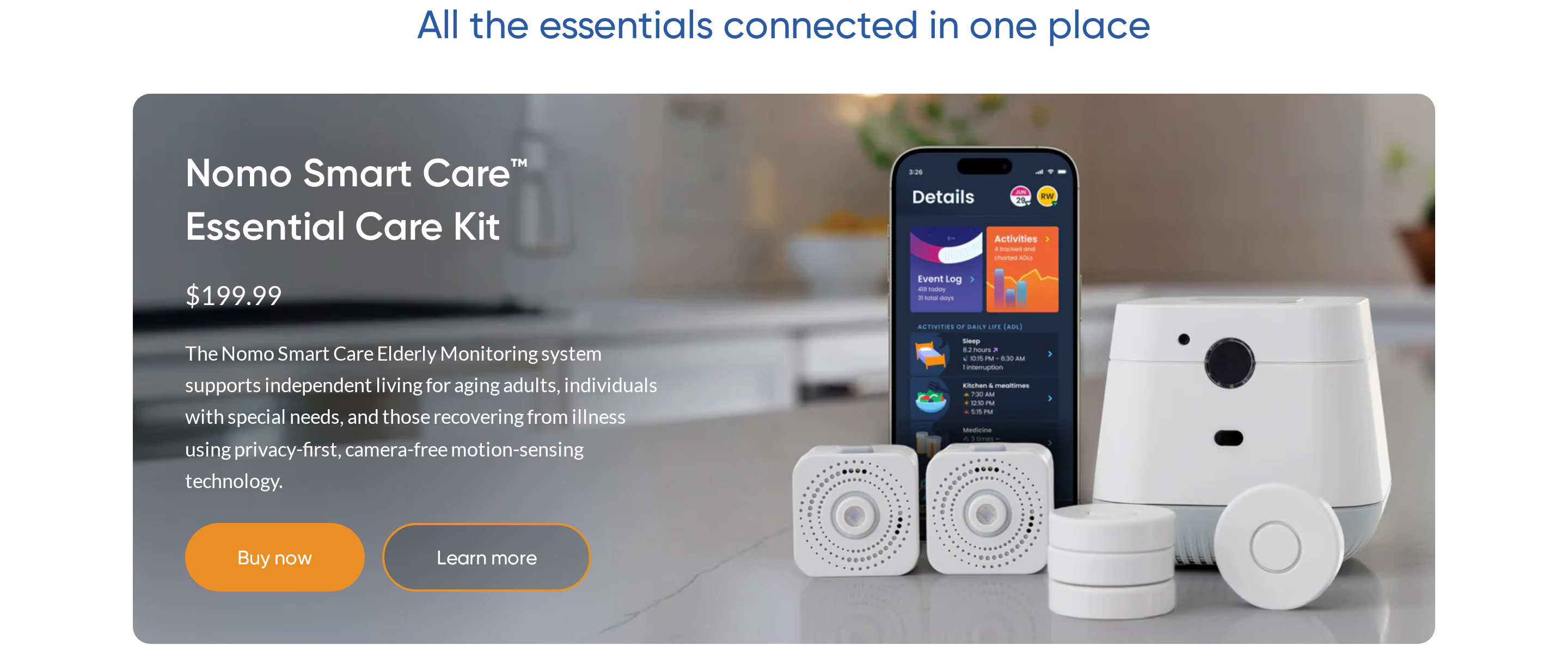
Nomosmartcare is a family-facing home monitoring kit that uses room sensors, wearable Tags, and app alerts to watch for routine changes in a senior's home.
Best for
Nomosmartcare fits families monitoring one senior remotely, especially when cameras feel intrusive or the senior does not consistently use a pendant.
Monitoring style: AI learns baseline routines such as sleep, meals, movement, and medication access.
Care Circle: Unlimited family members and caregivers can receive app notifications without per-user fees.
Privacy: The system is camera-free, which may suit households uncomfortable with live video.
Care setting: It monitors a private home, not a ward, staff team, or care fleet.
How the alert works
Nomosmartcare sends alerts through two paths: routine deviations from room sensors and sudden motion changes from wearable Tags.
Routine alerts: Satellite sensors track activity patterns, then notify the Care Circle when movement differs from the learned baseline.
Fall detection: Tags worn as pendants monitor orientation and movement for fall-like events.
App path: Alerts go to caregivers in the mobile app, not to a pager or professional response center.
Voice path: Two-way voice is limited to the central Hub, so communication depends on the senior being close enough to hear and speak.
Setup and connectivity
The Essential Care Kit includes a Hub, two Satellite room sensors, and wearable Tags. Families place the hardware at home and activate monitoring through the app.
Hardware cost: The Essential Care Kit is listed at $249.99 upfront.
Subscription: Remote monitoring and emergency alert functionality require an active monthly subscription.
Installation: Setup is consumer self-installation, with Satellite sensors placed in key rooms and the Hub connected to the home network.
Connectivity: Alerts depend on the Hub, home network, and app notification delivery.
Trade-offs to know
Nomosmartcare is useful for passive family monitoring, but it is not the same category as a facility safety platform.
Verdict: Nomosmartcare is useful when the question is "Did Mum's routine change today?" It is the wrong category when managers need staff response records across a ward.
Fall detection: Fall alerts still depend on the Tag being worn and detecting the event, so families should test both manual and real-world alert paths before relying on it.
Returns: Current official pages advertise a 60-day no-hassle return policy.
No visual check: Sensor-only monitoring cannot show a live camera view when a caregiver wants immediate visual confirmation.
Vitals add-ons: Nomo supports vitals tracking through paired devices such as its Smart Blood Pressure Monitor and non-contact thermometer. The Essential Care Kit does not include vitals hardware by default.
Facility scope: Care teams that need floor plans, staff visit logs, and room-level records are evaluating a different category from family home monitoring.
7. Envoy at Home
Envoy at Home is a U.S.-only sensor monitoring system for families watching over a senior at home without cameras or wearables.
Best for
Envoy at Home fits family caregivers who need passive activity monitoring for one senior at home. No wearables, no cameras, and no care-team routing.
No wearable: The senior does not need to remember a pendant, watch, or wall button.
Cognitive decline: The system still works when the senior may not press a button.
No cameras: Monitoring is based on motion and contact sensors rather than video.
Care setting: The product is built for private homes in the United States.
Not facility-focused: It does not include staff routing, ward dashboards, or proof-of-service reporting.
How the alert works
Motion and contact sensors build a baseline of the senior's routine. The hub sends mobile alerts when activity suggests a possible problem.
Behavior tracking: Envoy says it monitors more than 35 behaviors, including fall risks, meal skipping, and activity changes.
Sensor inputs: Motion, door, and cabinet sensors provide the activity data.
App path: Alerts go to the caregiver's mobile device in real time.
No response center: Unlike Lifeline, Envoy at Home relies on the caregiver to see the alert and act.
Setup and connectivity
Setup uses a hub and 8-sensor starter kit, with adhesive battery-powered sensors placed around the home.
Starter kit: Equipment costs $399 for the hub and 8-sensor kit.
Subscription: The monthly subscription is $99/month, putting first-year cost around $1,587 before taxes and shipping.
Extra sensors: Additional new motion or contact sensors are listed at $49 each. Refurbished sensors are listed at $29.
Connectivity: The system requires a consistent home internet connection, with no documented cellular backup or offline mode.
Where passive home monitoring stops
Envoy at Home's limits are mostly about availability, connectivity, cost, and the amount of operational context it provides.
Verdict: Envoy at Home gives families passive routine signals. Care teams still need a separate way to prove who responded, when they arrived, and what happened next.
Availability: Service is limited to U.S.-based users.
Internet dependency: If the home router loses power or internet access, alerts cannot transmit.
Ongoing cost: The subscription model is materially different from hardware-only local pager systems.
Facility scope: Care-home operators who need floor-plan mapping and staff response records are evaluating a different workflow from Envoy at Home.
8. SensorsCall
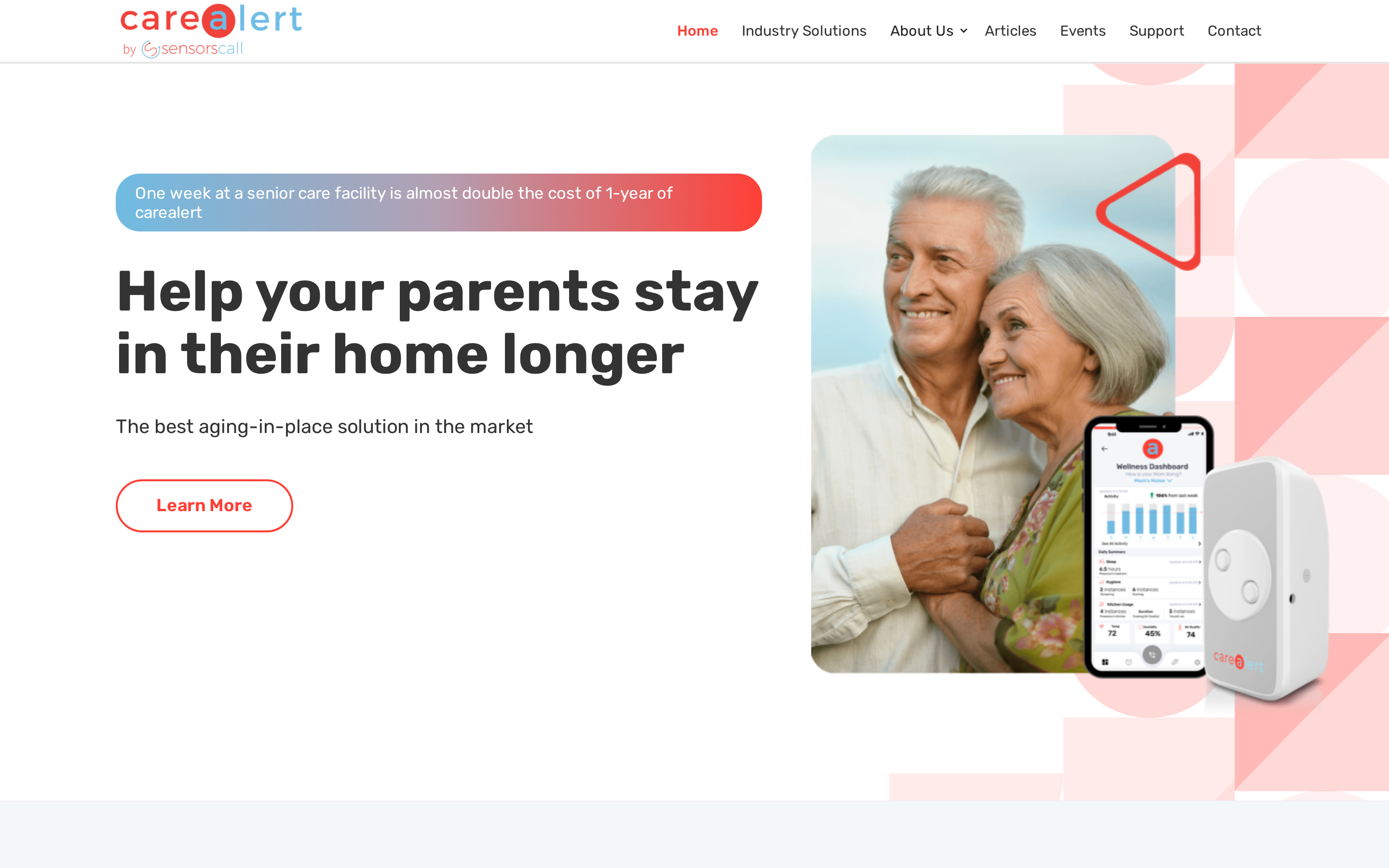
SensorsCall CareAlert is a room-level monitoring device for family caregivers. It monitors sound, motion, and air quality, then sends app alerts without cameras or wearables.
Best for
SensorsCall fits family caregivers checking on an independent senior at home, especially where the senior will not wear a pendant or accept cameras.
SensorsCall also markets industry and provider use cases through an enterprise or central wellness dashboard.
The distinction for care homes is narrower: CareAlert does not document Guardian-style floor-plan mapping or automatic staff-visit reporting.
Caregivers can use SensorsCall to watch for routine changes:
Bathroom patterns: flags changes from the usual hygiene routine.
Kitchen activity: alerts on missed or unusual use.
Sleep and shower timing: tracks deviations from normal daily patterns.
Sound events: classifies glass breakage and third-party smoke alarms.
How the alert works
The plug-in CareAlert device detects changes in activity, sound, and environment, then sends notifications to the companion app.
The device also includes a two-way intercom. A caregiver can speak with the senior through the app after an alert.
Alerts route to the caregiver's Care Circle. There is no documented connection to a 24/7 professional monitoring centre or emergency dispatch service.
Setup and connectivity
Setup is plug-in by room. SensorsCall describes CareAlert as Wi-Fi and Bluetooth hardware with free lifetime monitoring service.
Official technical specifications list 2.4 GHz Wi-Fi and Bluetooth 4.2, not a cellular subscription.
That room-by-room design suits a private home more than a ward. Coverage expands by adding devices, not by mapping a whole facility floor plan.
App Store reviews report pairing problems and delayed or missing push notifications, so teams should test setup and alert delivery before relying on time-sensitive checks.
Trade-offs to know
SensorsCall removes cameras and wearables from home monitoring, but the care model depends on family or informal caregivers seeing and acting on app alerts.
Verdict: SensorsCall is better treated as room-level wellbeing monitoring than facility alert routing. One plug-in sensor does not replace a ward map, staff queue, or response log.
No professional monitoring: alerts go to the Care Circle, not a response centre.
No facility floor plan: room events are not mapped to a live ward view.
No staff reporting: the system does not log caregiver visit timestamps or durations.
Known app complaints: public reviews mention pairing and notification reliability issues.
Staff-led care settings that need room-level alerts, floor-plan context, and automatic visit records are evaluating a different workflow.
Side-by-side comparison: all 9 systems
The side-by-side table is most useful when read as a trade-off map, not a ranking. Basic pagers, medical alert services, ambient home sensors, and facility platforms solve different parts of caregiver alerting.
A "yes" in one column rarely means the same workflow. GPS location, sensor labels, and floor-plan mapping each answer different operational questions.
System | Alert pathway | Location context | Passive detection | Best fit |
Guardian | Staff devices via Guardian Insight | Digitised floor plan with room or bed context | Wearables plus bed, motion, and door sensors | Care homes and home care teams |
Smart Caregiver | Local RF pager | Sensor label, such as bed or chair | Bed pads, chair pads, floor mats, and motion sensors | One nearby caregiver at home |
Alarm.com | Mobile app or enterprise dashboard | Sensor zone; video where installed | Depends on connected sensors | Security-first homes or small operators |
Tunstall Healthcare | Pendant, mobile alarm, or hub to response centre | GPS outdoors; indoor context depends on setup | Fall detection and selected sensors | Monitored emergency response |
Lifeline | Wearable button to 24/7 response center | GPS, Wi-Fi positioning, and cellular triangulation on mobile devices | AutoAlert on selected pendants | Independent seniors living at home |
Nomosmartcare | Care Circle app notifications | Routine context across rooms | Room sensors plus wearable Tags | Family monitoring for one senior |
Envoy at Home | Mobile alerts to family caregivers | Household routine signals | Motion and contact sensors | U.S. private-home monitoring |
SensorsCall | Care Circle app notifications | One room per plug-in device | Sound, motion, and air-quality monitoring | Room-level wellbeing checks |
Amazon/EverNary | Portable pager or Wi-Fi app | Device or sensor label, depending on product | Varies by listing | Budget marketplace option |
How to choose a wireless caregiver alert system
Choose the alert path first, then check whether the system can still work when the care setting gets busier.
A simple pager can be enough for one room and one caregiver. A care home needs routing, location context, passive detection, and records managers can review later.
Match the alert path to the caregiving situation
Use this checklist before comparing brands or prices. The right system depends on the alert recipient, the care setting, the resident's ability to act, and the record managers need after the event.
Who receives the alert: one family caregiver can use a local pager, but a care team needs alerts routed to the right staff member.
Where the alert happens: a single home may only need range; a multi-room facility needs room, bed, or floor-plan context.
How the resident triggers it: button-only alerts are weakest when the resident has dementia, falls silently, or removes wearables.
What works passively: bed-exit pads, motion sensors, door sensors, and fall detection add coverage when nobody presses a button.
What network it needs: ask what happens during Wi-Fi, cellular, landline, and power outages. RF pagers can work without Wi-Fi; app-based systems need reliable internet and charged staff devices.
What record it leaves: ask vendors to show an actual alert log from a live installation, not a demo. If they cannot produce timestamped response records, assume the audit trail will not survive an inspection.
How cost is structured: ask for a 24-month cost breakdown covering hardware, subscription, monitoring, add-on sensors, installation, and cancellation terms.
For a single caregiver at home, range may be the deciding factor. Smart Caregiver lists a wireless range of up to 300 feet, while Lifeline-style in-home systems can cover larger homes through a base station.
For active seniors, GPS matters more than indoor range. For care homes, the critical question is different: can staff see exactly where to go, who should respond, and what happened after the alert?
Pro tip: Ask each vendor to run one live alert while you stand at the furthest practical response point. If the alert path fails there, the spec sheet range does not matter.
When a basic caregiver pager is not enough
A pager becomes limiting when the alert needs more context than “Bed 1” or “Sensor 2.” That label may work in a bedroom, but it does not tell a night team which corridor, room, resident, or response priority applies.
Watch for these upgrade signals:
More than one responder: alerts need staff routing, not a single device that may be in the wrong pocket.
More than one floor: staff should not have to translate a sensor label into a physical location during an incident.
More than one risk type: bed exit, wandering, falls, SOS calls, and inactivity need different rules.
Repeated false alerts: if every movement triggers the same alarm, staff learn to distrust the system.
Family or inspector questions: managers need a clean record of what happened, not a memory-based explanation.
Recurring fees without proof: professional monitoring and subscriptions should be weighed against response quality, records, and actual use.
If you are choosing for a private home, a simple pager may still be the most practical answer.
If you are choosing for a care home, prioritise location-aware alerts, passive detection, and automatic reporting over the lowest hardware cost.
Common mistake: Buying the cheapest button first usually moves the cost into staff time. If managers still reconstruct events from memory, the alert system has not solved the operations problem.
Why care homes switch to Guardian after basic pager systems fall short
Care homes usually outgrow pager systems for practical reasons, not because the pager stops working entirely.
The problem is scale. A 300-foot RF signal, no mobile app delivery, no visual map, and no response log leave too much for staff to remember during a busy shift.
Guardian is built for the moment when “an alarm went off” is no longer enough.
What breaks when a care home relies on pagers
Basic pager systems are useful for a contained home setup, but they create gaps inside a multi-resident facility:
Range becomes uncertain: Smart Caregiver lists up to 300 feet of range, and real buildings add walls, corridors, and floors.
Alerts lack context: “Bed 1” still requires staff to know which room, resident, and route that label means.
No app delivery: staff cannot manage alerts from smartphones, tablets, or nurse station screens.
No automatic log: the system does not create a record of who responded, when they arrived, or what happened next.
No smart rules: every trigger can feel equally urgent, even when the movement is routine.
The home may respond well in practice, but still struggle to prove response times, visit patterns, or incident handling after the fact.
What Guardian adds when you upgrade
Guardian replaces pager-only alerts with a live, camera-free operations view for the care team.
Floor-plan alerts: staff see the resident, room, and bed or corridor on a digitised map.
Existing staff devices: alerts go to smartphones, tablets, and nurse station computers.
Passive detection: bed, motion, door, fridge, and stove sensors cover residents who cannot reliably press a button.
Custom rules: teams can configure alerts around routines, such as out of bed for too long at night.
Automatic records: alert history, response context, and operational summaries are captured without paper chasing.
Fast setup: Guardian digitises the floor plan and can start with priority rooms during the first week.
The benefit is simple: staff know where to go, managers can see what happened, and the home has cleaner evidence when families, owners, or inspectors ask for detail.
Why the audit trail matters
Pager-only systems make documentation depend on memory. That gap matters when a fall or safeguarding concern turns into a review.
Audit trails matter because serious incidents are reviewed after the shift, not during the moment when staff are acting.
Clean timestamps show when an alert fired, who saw it, and how quickly someone responded. That gives managers a stronger record than handwritten notes or memory.
For CQC-style inspections, family complaints, or internal incident reviews, a timestamped alert trail gives managers something stronger than handwritten notes.
Pilot Guardian before you roll it out
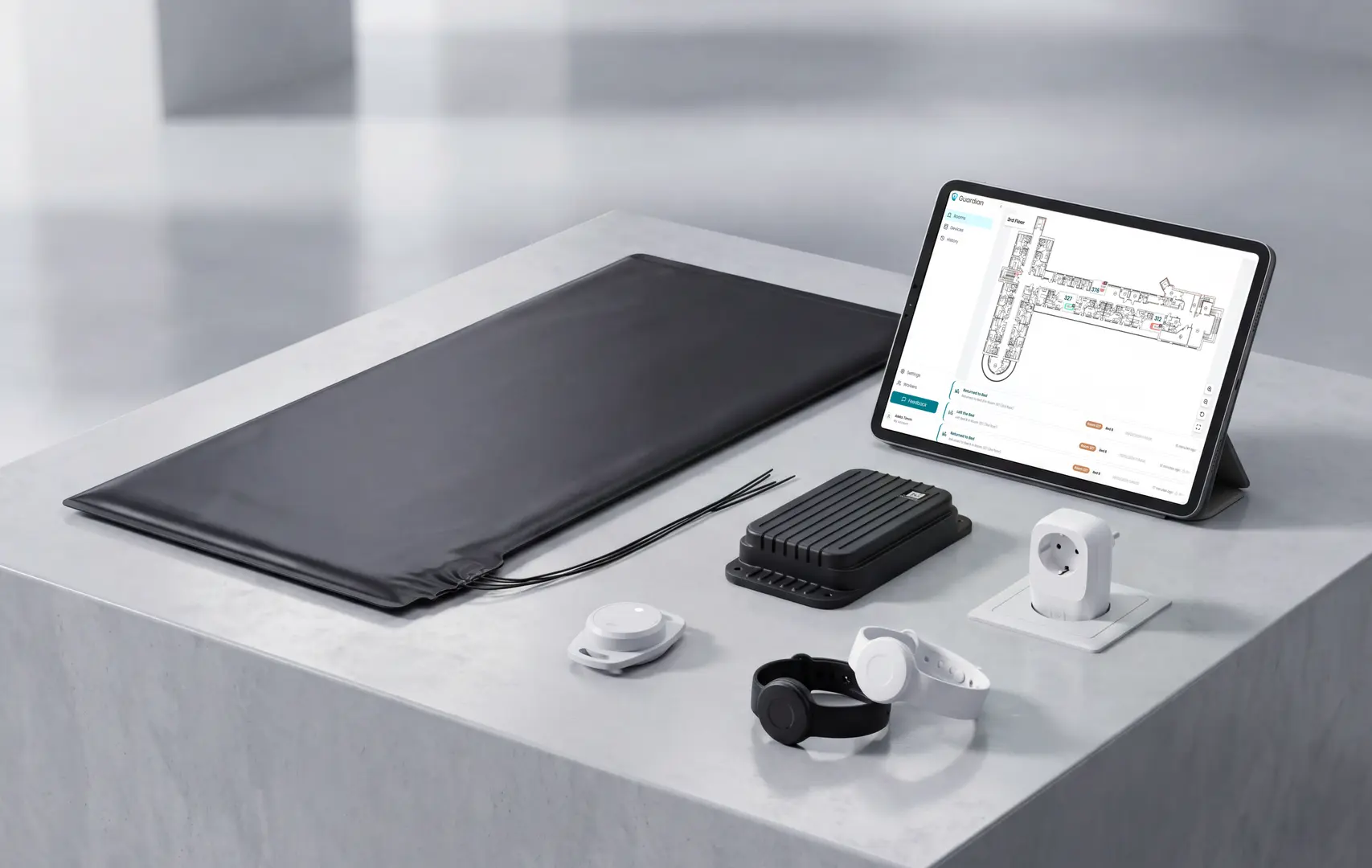
If your care home has outgrown pagers, start with one ward or one high-risk area.
Guardian’s 6-8 week pilot maps your workflows, tests the highest-value use cases, and ends with an impact report and rollout recommendation. Pricing is scoped around the pilot and next step, not a public fixed plan.
Tell us which ward you want to test first. We will reply with scope and next steps.
Yes, app-based and sensor-based caregiver alert systems can usually notify a family member's smartphone in real time. Care homes should still decide whether family alerts are appropriate for every event, or whether staff should receive the first operational alert.
App alerts: Nomosmartcare can send notifications to family members and caregivers in a Care Circle through its companion app.
Guardian SOS: Guardian can trigger an automated phone call to designated responders, and the portal can be configured for custom contacts and routine-based alerts.
Pager-only systems: Smart Caregiver alerts the person carrying the local receiver, not a family member's phone.
For care homes, check whether the alert should go to family, staff, or both. Staff usually need the first operational alert because they are on site.
Yes. Local pager systems, landline base stations, and cellular medical alert systems can work without a home Wi-Fi network. App-based systems still need a reliable data path for remote notifications and dashboards.
RF pagers: Smart Caregiver and CallToU-style systems send a local radio signal from a pad, mat, or button to a receiver.
Cellular or landline alerts: Tunstall and Lifeline can use 4G cellular or landline connections, depending on the device and plan.
Internet-based systems: Guardian, Alarm.com, Nomosmartcare, Envoy at Home, and SensorsCall need internet, Wi-Fi, or cellular data for app alerts and cloud dashboards.
Guardian is built for care settings with an internet-connected hub and portal. That connection powers live alerts, floor-plan mapping, and staff notification routing.
Some systems have no subscription, but app-based and professionally monitored systems usually charge an ongoing monthly fee. Care homes should compare that fee against alert quality, reporting, support, and the evidence the system produces.
No monthly fee: Smart Caregiver-style local pager systems are usually one-time hardware purchases, because alerts stay inside the home.
Medical alert monitoring: Lifeline plans start at $27.95/month on annual landline plans, with higher monthly prices for cellular and mobile options. Tunstall monitoring varies by device and region.
App and sensor platforms: Nomosmartcare Essential+ costs $19.99 per month, SensorsCall lists a $19.99 monthly service fee, and Envoy at Home is listed at $99 per month.
Guardian: Guardian has no public consumer monthly rate and no fixed B2B price list. Care homes start with a quote-based 6-8 week pilot, then review ROI and rollout scope.
If you only need a bedroom-to-caregiver pager, no-fee hardware may be enough. If you need remote alerts, reporting, or a live operations view, expect a subscription or quoted commercial plan.
Yes. Most systems include a pendant, wristband, wall button, or SOS button that a senior can press, but the safer evaluation question is what happens when they cannot press it.
Passive monitoring helps close that gap:
Bed and motion sensors: These can flag unusual activity without the senior taking action.
Door and wandering alerts: These can notify caregivers when someone exits or enters a restricted area.
Fall detection: Wearable sensors can detect some events automatically, but they still depend on the device being worn.
Guardian: Guardian combines SOS buttons with passive, camera-free monitoring, so the system is not dependent on one button press.
For one resident at home, a simple button may be enough. For higher-risk seniors or care homes, choose a system that can also detect risk in the background.
Pilot Guardian in one ward. Review the impact report in 6-8 weeks. Try it now.

Author
Aleks Timm
Aleks Timm leads Guardian and builds privacy-first operations technology for care homes and home care providers. Teams get location-aware alerts they can act on, clearer situational awareness, and measured insight into how care work actually runs.
Read MoreRecommended reads
Keep reading
7 Best Medical Alert Systems with Fall Detection
Discover the 7 best medical alert systems with fall detection—compare top picks, features, and response times to find the right...
Read more
Wander Guard System: How It Works, Types, and Costs
Wander guard system guide: reduce missed exits, speed staff response, and keep cleaner resident records for care homes and memory...
Read more
10 Best Room Monitors for Elderly Home Care
10 Best Room Monitors for Elderly Home Care: compare top options for safety, alerts, and peace of mind to find the right fit for...
Read more