

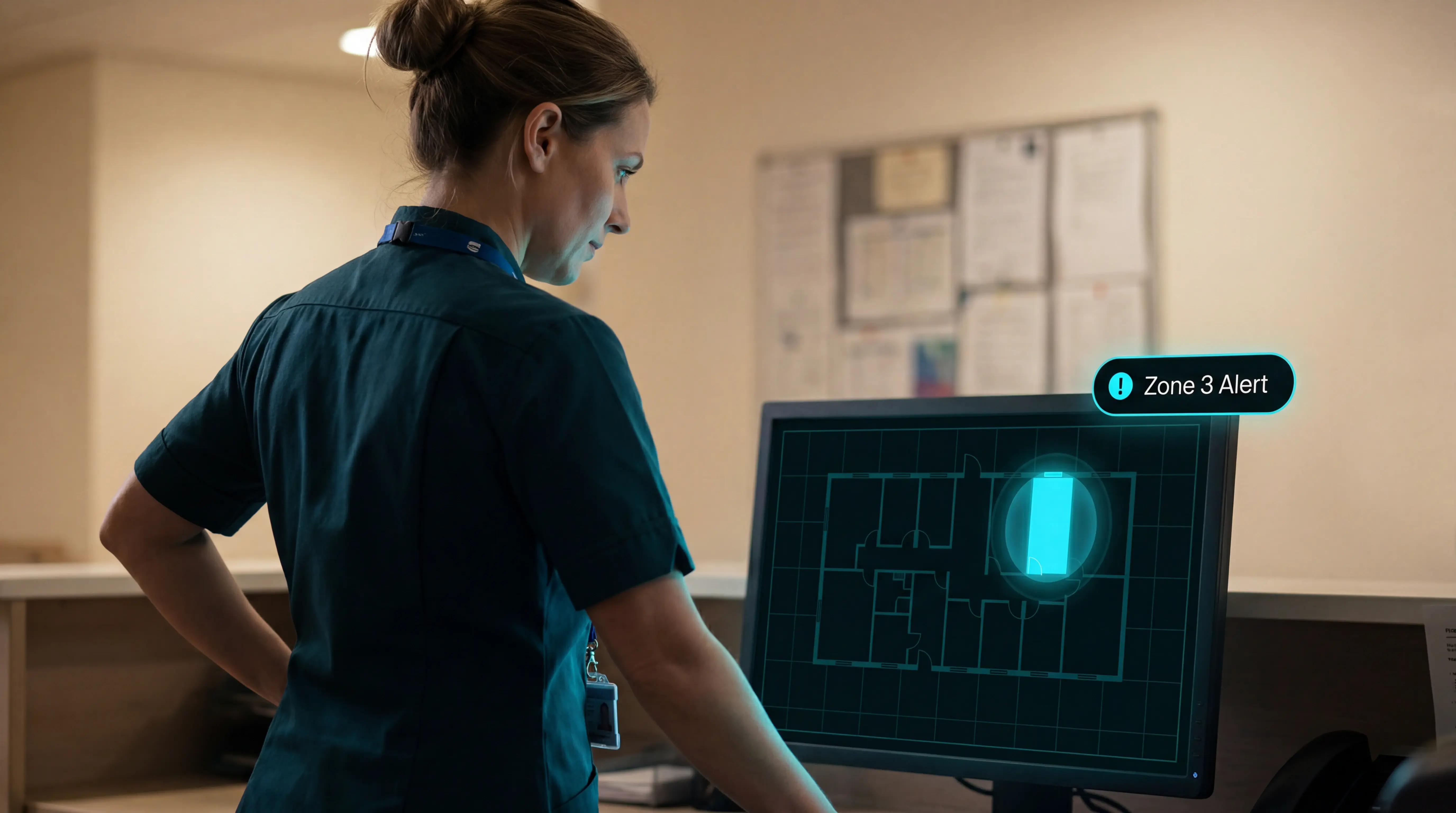
Wander Systems for Care Homes: Types, Costs, and What to Look For
In this article
Do wander systems actually keep residents safe? Yes, when they do more than sound an alarm at a door.
The safer setup combines passive detection, mapped alerts, clear escalation rules, and an event record staff can review after the response.
Use this as the practical verdict:
Basic door alarms reduce one risk: a resident reaching a known exit.
Wearable-only systems are weaker for dementia care because residents may remove devices or fail to press buttons.
Better systems tell staff the resident, room, trigger, and acknowledgement status from the first alert.
The safest setup is still only as good as the response workflow behind it.
That is why button-press alarms cannot be the only layer. Fleming and Brayne (2008) found that 80% of people aged over 90 who fell and had a call alarm did not use it during the fall event.
This guide compares door alarms, RFID and BLE bracelets, passive sensors, RTLS floor-plan systems, and integrated operations platforms for care homes.
The short version
Wander systems are worth reviewing when there is a known risk of unsupervised exit, night movement, or missed response. The useful systems do three jobs: detect movement, tell staff where to go, and create a response record.
Best systems combine passive sensors, mapped alerts, configurable rules, and automatic records.
Wearables can help, but they should not be the only safety layer for dementia wards.
Basic door alarms can fit low-risk exits, but they still leave indoor search and follow-up notes to staff.
Integrated platforms are a better fit when managers need room-level context, response times, and proof after an incident.
Do not buy a full platform unless the team has a clear response plan for the alerts it creates.
What is a wander system?
A wander system detects movement toward a monitored door, zone, room, or restricted area. Care-home setups may use a wearable, passive sensors, or both.
It is different from a basic nurse-call button or fall alarm. A wander system is built around movement and exit risk, while the better setups also show staff where to respond.
The alert should include a named resident and mapped location. Staff can respond to a real place instead of searching the ward.
Types of wander systems compared
The 5 system types below show the tradeoff: simple exit alarm, mapped location, passive coverage, alert filtering, and response records.
System type | Alert trigger | Location context | Wearable dependence | Alert filtering | Reporting | Best-fit setting |
|---|---|---|---|---|---|---|
Basic door alarm | Door opens | Exit point only | None | Minimal | Manual notes | Small, low-risk settings |
RFID/BLE bracelet | Bracelet near door | Door or zone | High | Basic rules | Event log | Dementia units with exits |
Passive sensor network | Door, bed, motion events | Room-level patterns | Low | Routine-based rules | Activity history | Residents who remove wearables |
RTLS floor-plan system | Tag or sensor movement | Floor, room, corridor | Medium | Zone-based rules | Location history | Multi-ward care homes |
Integrated operations platform | Wearables plus sensors | Resident, room, staff | Optional | Configurable care rules | Automatic incident records | Care homes needing proof |
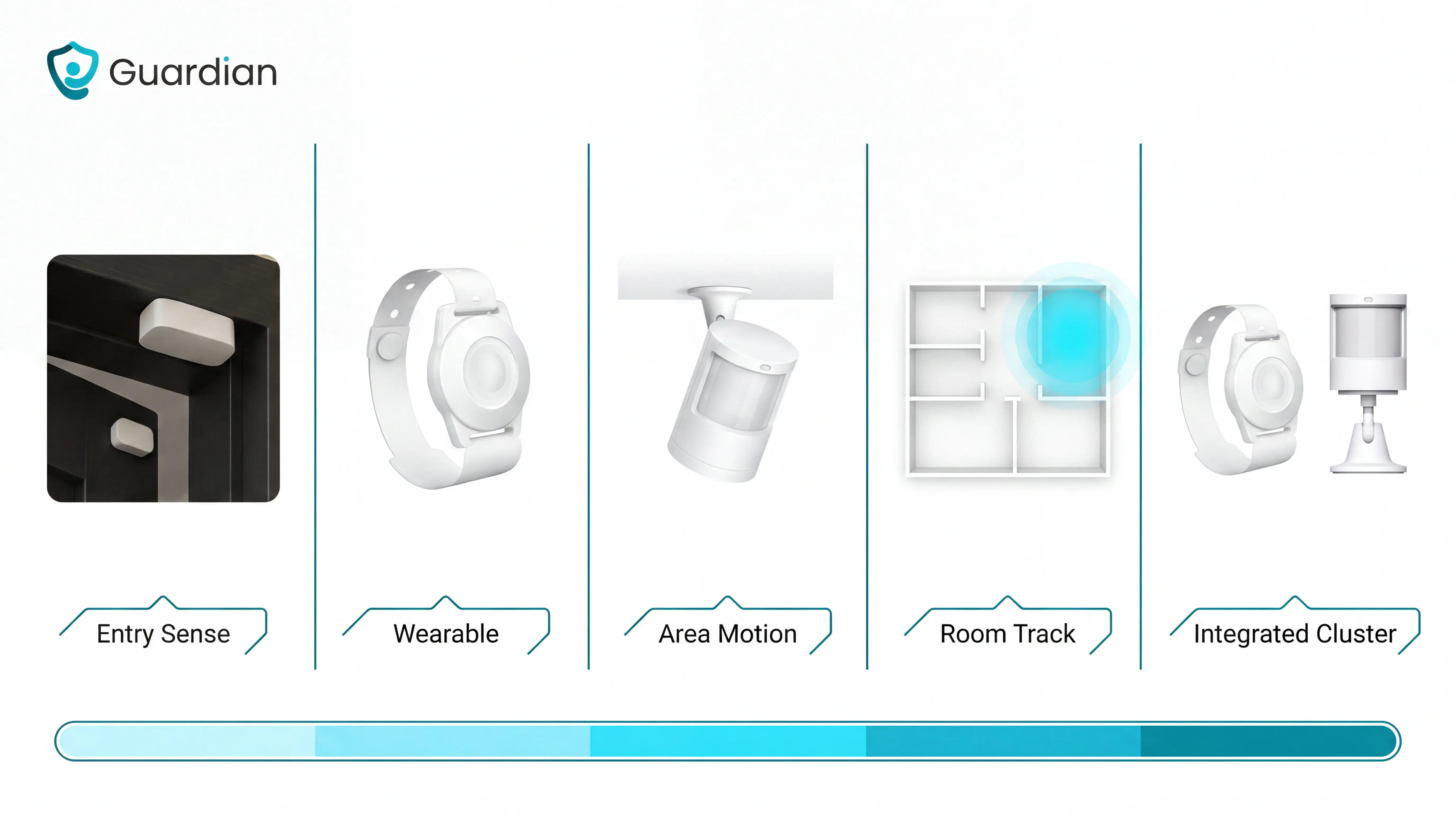
An integrated operations platform is the broader category Guardian belongs to: wearables, passive sensors, floor plans, staff alerts, and records in one workflow.
The right choice depends on the job staff need the system to do: sound an exit alarm, name the room, or create an incident record.
Door-focused access-control options get their own treatment in the monitored-exit WanderGuard deep-dive.
What to look for in a wander management system
Use the comparison above as a shortlist, then make each vendor prove the workflow in a ward scenario.
Ask the same five questions in every demo:
Can staff see the resident and exact room or bed from the first alert?
Can rules suppress routine movement while escalating high-risk events?
Can private rooms be monitored without video or audio capture?
Will wearables stay on residents who remove unfamiliar devices?
Can managers export an incident record without rebuilding the timeline?
The point is not dashboard polish. Night staff need to see where to go, what to do, and what gets recorded.
1. Room and bed context in every alert
Room and bed context is the difference between hearing an alarm and knowing where to go.
A usable alert gives staff the operational detail before they leave the nurse station:
The resident linked to the sensor
Exact location, down to bed or doorway where available
Event type, for example bed exit or restricted-area entry
Start time and acknowledgement time
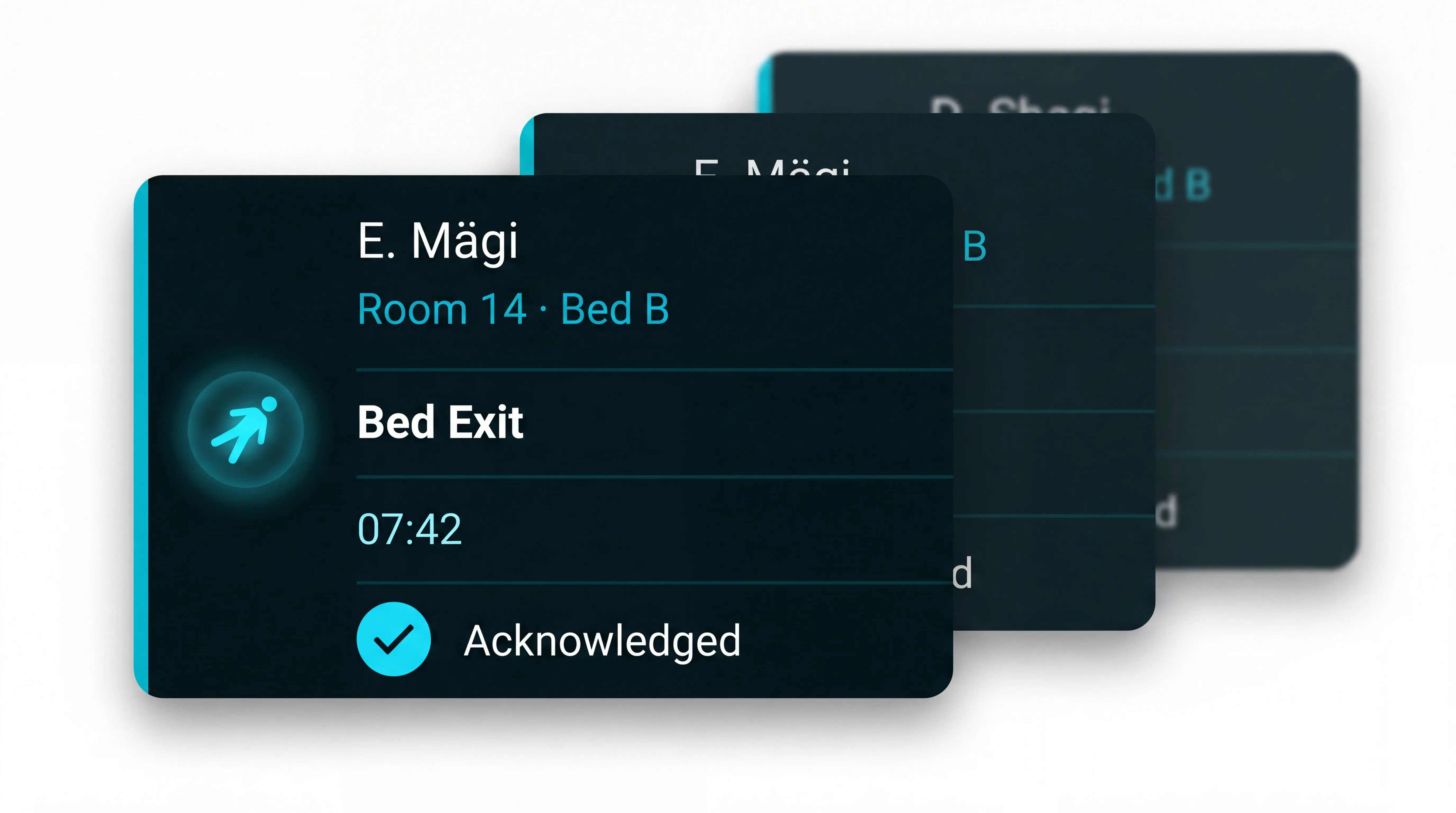
Floor-plan marker that matches the care home layout
For this guide, 5 minutes is an example internal urgent-response target, not a regulatory standard. Use your own care plans to set the benchmark before the demo.
Ask the vendor to show the workflow live:
Trigger a bed-exit alert from a named room.
Send the same alert to a staff phone and nurse station view.
Acknowledge the alert and show the audit trail.
Repeat the test in a multi-bed room.
Common mistake: buying a door alarm that only says 'north exit opened'. Staff then search corridors while the resident's starting point stays unknown.
Keep the evidence practical. Managers should be able to show which alert fired, where staff were sent, and whether response met the care plan.
Guardian maps sensors to rooms and beds during setup, then shows the alert on the same floor plan staff use. Ask any vendor to prove that same path before go-live.
2. Smart rules that reduce alert noise
Smart rules decide when sensor activity becomes a staff interruption. Use your night routine as the test, because clean demo scripts hide alert fatigue.
A nurse receiving a stream of routine alerts cannot treat every ping as urgent. Alert volume needs controls before the system goes live.
Rule to test | What good looks like |
|---|---|
Time windows | Day, night, and mealtime routines can use different thresholds. |
Duration thresholds | A bed-exit alert can use your agreed limit, such as 15 minutes at night. |
Resident profiles | Higher-risk residents can have stricter rules without changing the whole ward. |
Escalation | Unacknowledged alerts move to another staff member or station within the 5-minute response target. |
Ask these questions before signing:
Who can change thresholds, and is every change logged?
Can the vendor explain the rule behind a disputed alert?
What happens when Wi-Fi drops or a staff phone is muted?
How are rules reviewed after an incident or care-plan change?
Common mistake: switching on every sensor as an urgent alert. The ward then trains itself to ignore the system.
Safe-care evidence starts with individual risk. Alert rules should match named resident risk instead of relying on ward-wide defaults.
Guardian's Portal can apply rules such as “out of bed for more than 15 minutes at night.” Use that kind of resident-specific rule as the demo test.
3. Monitoring without cameras
A camera-free system should collect safety signals rather than images. That matters in bedrooms and bathrooms, where dignity and consent are difficult to manage with video.
Coverage usually comes from:
Motion sensing for movement and routine changes
Door sensing for exits or restricted areas
Bed sensing for in-bed and out-of-bed status
Kitchen sensors for fridge or stove activity where relevant
Walk the vendor through one private-space scenario:
A resident leaves bed at 2am.
Door activity shows the room exit.
Corridor motion confirms the direction of travel.
Staff receive the resident and room on their device.
The record shows whether staff met the 5-minute target.
The standard is practical: useful signal, minimal personal data. Care providers need enough information to act without collecting images they do not need.
Ask the vendor:
Is any video or audio captured?
How long are event logs retained?
Can a sensor be paused if a resident withdraws consent?
What access, retention, and consent records would you show after a privacy complaint?
Can families understand the monitoring without a technical explanation?
Common mistake: using cameras to compensate for poor alert design. Bedrooms need coverage that staff can act on without storing images.
Guardian uses passive sensors rather than cameras in resident spaces. For any vendor, check that private rooms can be monitored without storing images or audio.
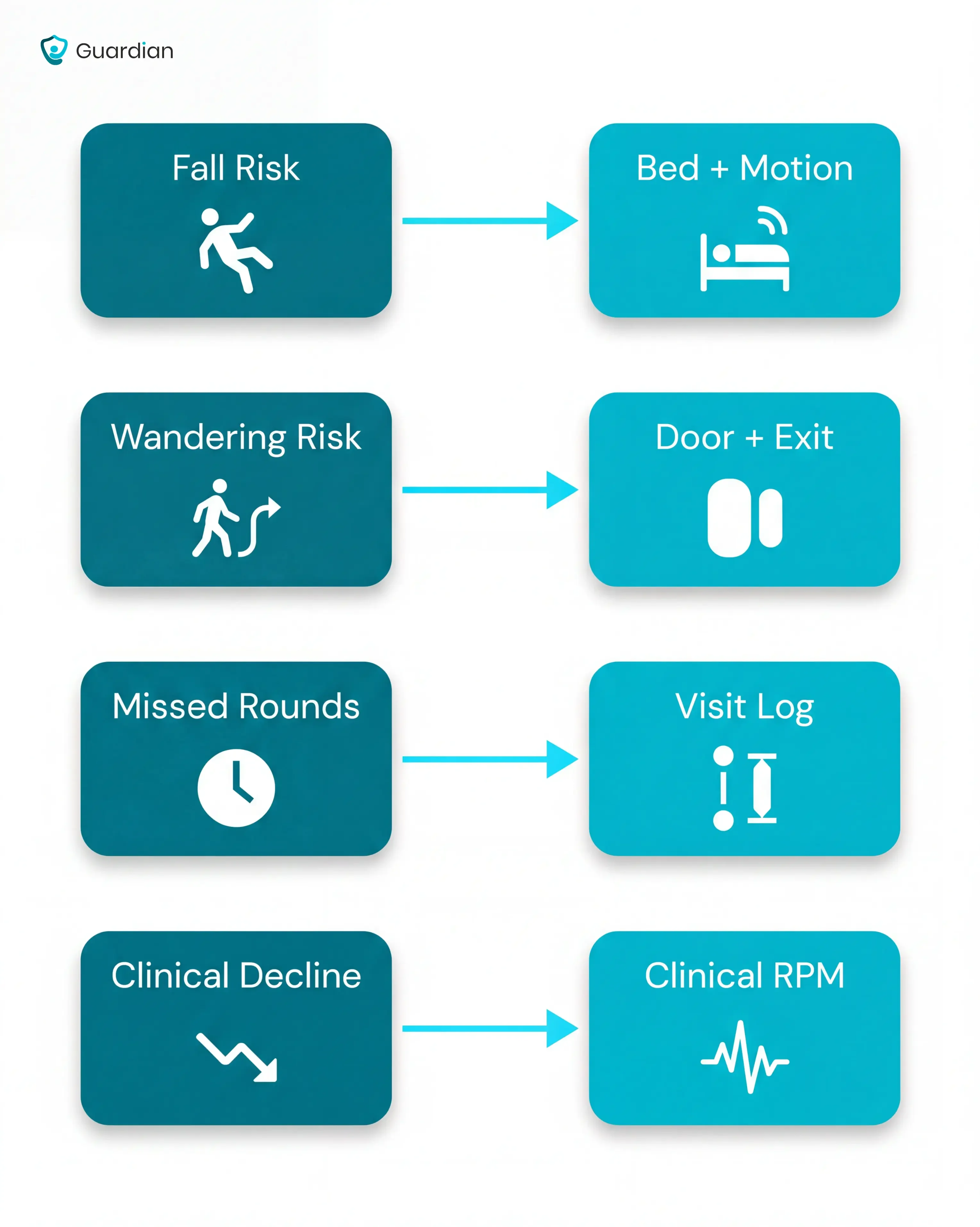
4. Wearables residents will actually use
Judge wearables in a night-shift scenario: the resident is confused, tired, and unlikely to press a button.
The question is simple. What still gets detected when the resident does nothing?
Turn the evidence into procurement checks:
Do not make button press the only alert path. The call-alarm evidence above shows why passive detection matters on dementia wards.
Ask whether the resident can tolerate the device overnight, during washing, and during confused periods.
Ask specifically about comfort, charging, and device burden, because wearable non-use is common when a device feels intrusive or hard to keep on.
A 2021 JMIR mHealth and uHealth review found privacy worries can sit alongside stigma and fear of dependence; vendors should explain consent and UK GDPR handling clearly.
Simulate a slow fall, then ask which alert reaches staff within your agreed urgent-response target.
Ask what happens when the device is charging or left on a bedside table.
Backup path test
Good vendors can explain the backup path without improvising. The backup path should use room sensors already mapped to the resident's bed and daily routine.
Guardian pairs a fall-detection wristband with room sensors, so a removed wristband is not the only signal staff depend on.
Then check how the response is recorded.
5. Automatic records and reporting
Automatic records should remove the end-of-shift reconstruction exercise. The system needs to log the whole response as the shift happens.
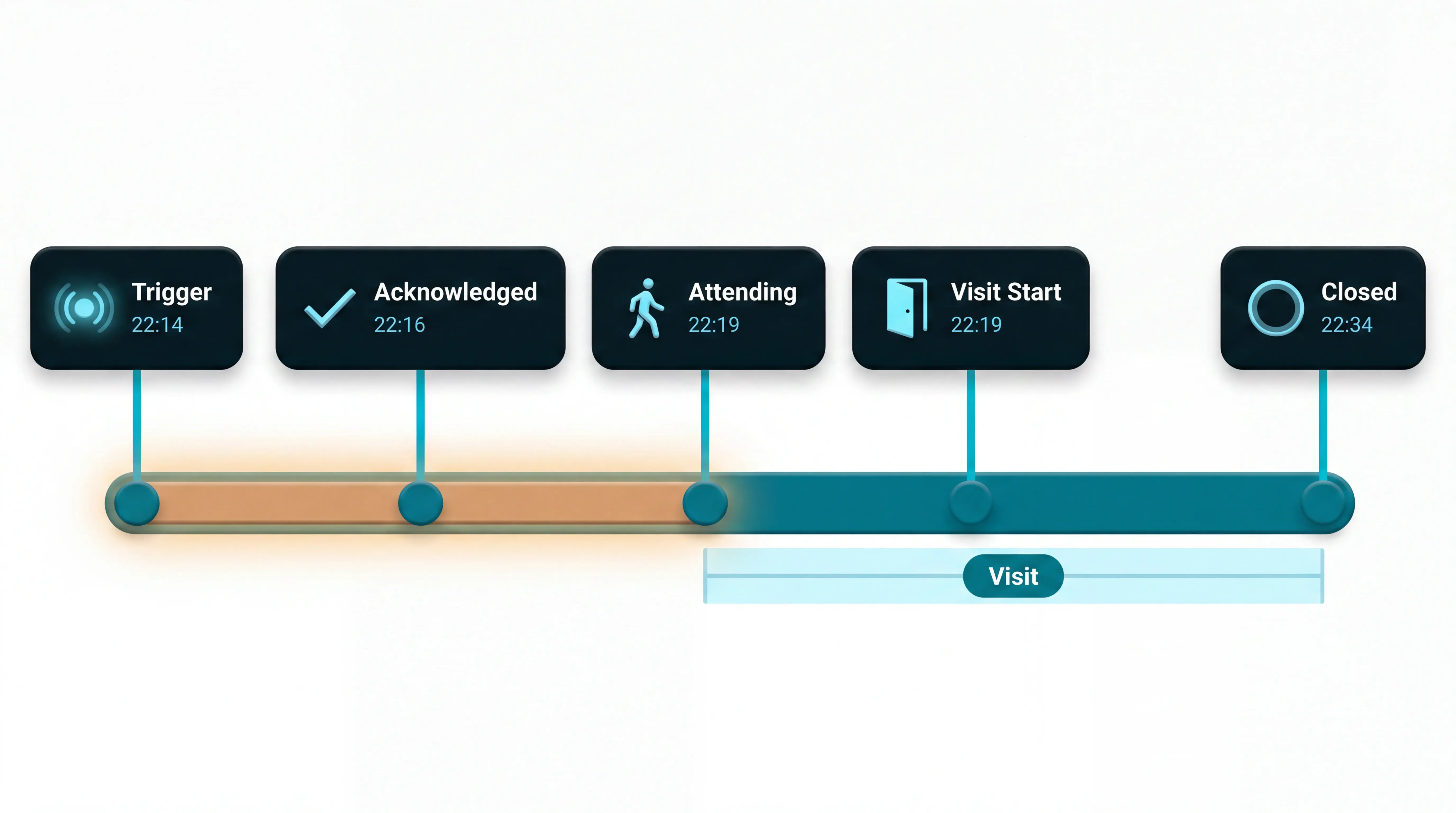
CQC inspections increasingly scrutinise how services evidence incident response times. The audit trail should show the full chain:
Record | What good looks like |
|---|---|
Alert trigger | Shows the sensor and mapped location. |
Acknowledgment | Shows when a caregiver saw or accepted the alert. |
Response time | Checks urgent events against your 5-minute internal target. |
Caregiver attendance | Shows who attended and when the room visit started. |
Visit duration | Shows how long staff stayed with the resident. |
Trend evidence | Shows repeat exits or night movement patterns over time. |
Vendor test
Do not accept a spreadsheet export as proof. Ask the vendor to open one alert and show the timestamp trail from sensor trigger to caregiver attendance.
Common mistake: counting alerts while ignoring response speed. A useful dashboard should flag urgent events that miss your agreed urgent-response target.
Guardian records the alert trail from trigger to acknowledgement. Managers can review room-level response and visit duration for incident reviews.
The record is only useful when the alert flow is clear. Test the live shift next.
How wander monitoring works in a care home
Use this section as a live-shift test, not another feature checklist. Ask the vendor to run one resident through the full flow from sensor trigger to closed record.
Basic setups detect a door event. A care-home workflow adds resident identity, room context, escalation, and a timestamped close.
The resident approaches a monitored point. A wearable or fixed sensor detects movement near a monitored point.
The system identifies the resident and trigger. Staff see who generated the alert and which risk to check first.
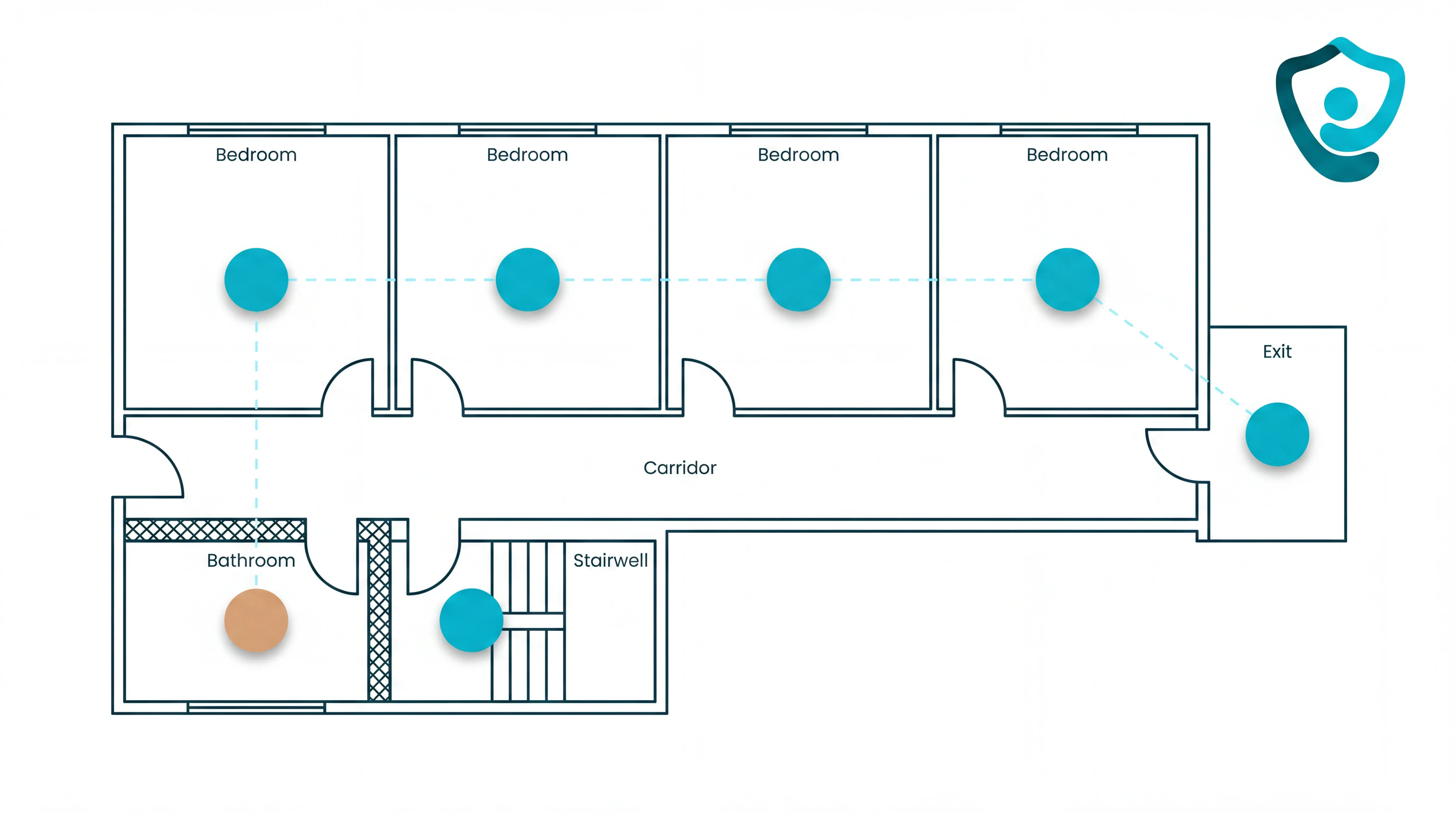
The alert is placed on the floor plan. The system ties the alert to the room, bed, or zone where staff should start.
The notification reaches caregivers. The alert should support your agreed urgent-response target, with enough detail to act without searching.
The team follows the local response plan. Staff close the event with a timestamped record after the resident is safe.
Floor-plan test
Test the floor-plan step live during the demo.
A generic alert says “exit door.” A mapped alert shows which room or bed is connected to the event, so staff go straight to the likely location.
Guardian digitises the facility floor plan and links installed sensors to named rooms and beds. Each alert stays tied to the ward layout staff use every day.
Alert filtering test
Alert filtering matters just as much as detection.
Staff stop trusting the system when every movement becomes a notification. Smart rules turn normal activity into context and unusual activity into an alert.
For example, out of bed at 3pm may be routine. Out of bed for more than 15 minutes at night is a different signal for a high-risk resident.
Night-threshold examples connect to the bed-exit alarm systems guide, which compares motion sensors, pads, and floor mats.
Real-world issues with wander systems
Wander systems fail in practice when the operating model is not maintained after installation.
The technology may detect movement correctly, but the care home still has to tune alerts, keep wearables in use, train new staff, and decide what data follows a resident outside the building.
Plan the first month around staff response before expanding alert rules.
Risk | What goes wrong | Control to set |
|---|---|---|
Alarm fatigue | High alert volumes slow response when alerts ignore the resident's baseline or care plan. | Start with high-value alerts, review false alarms weekly, and adjust thresholds. |
Wearable removal | Coverage weakens when a resident removes, forgets, or refuses a bracelet or tag. | Add passive layers such as bed, door, room, or motion sensors. |
Training drift | New starters and agency staff can turn a good setup into an ignored screen. | Put response steps into induction, handover, and shift routines. |
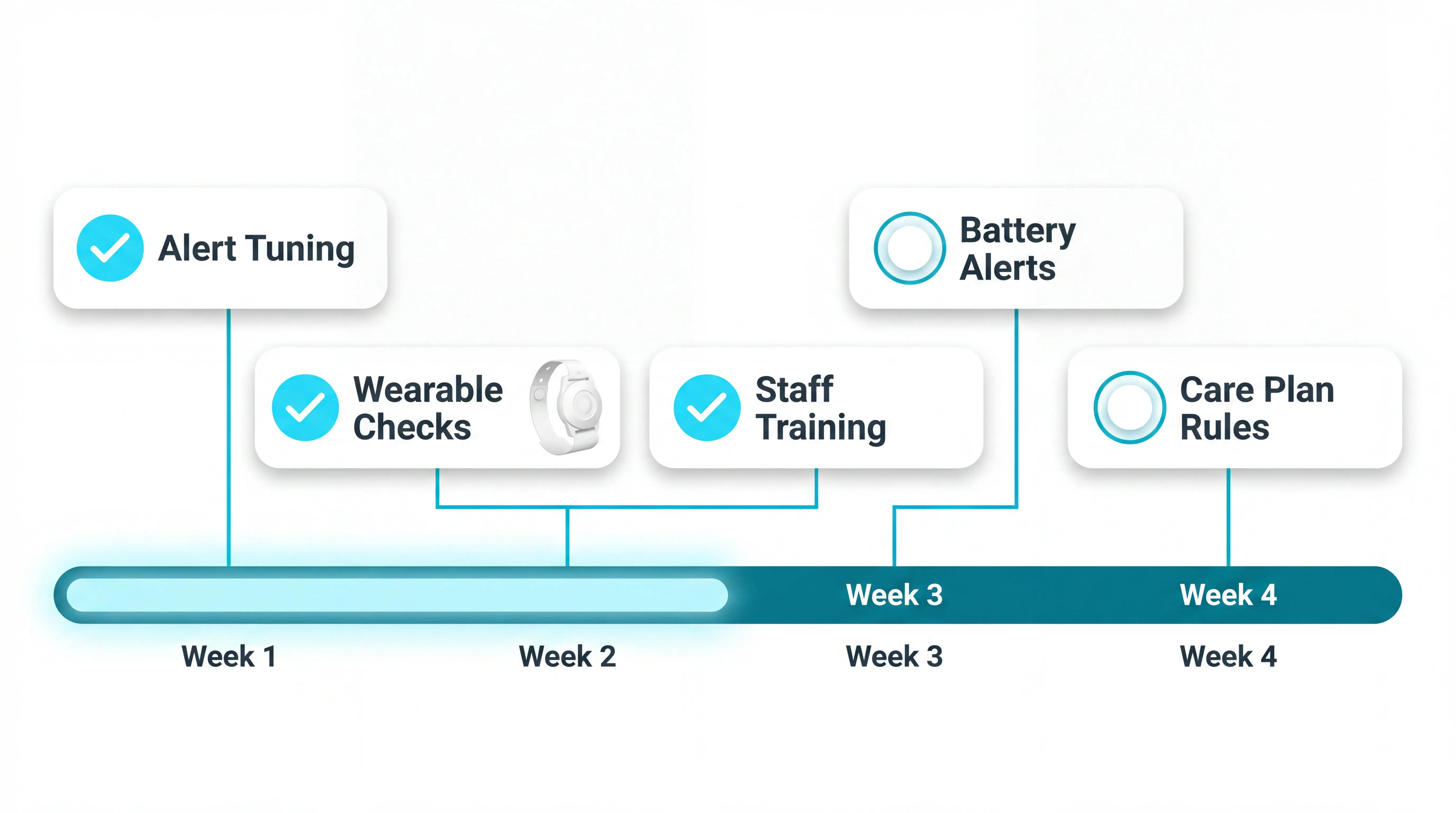
Give the first month an owner, not just a go-live date. Assign one person to review false alarms weekly, one to update care-plan rules, and one to keep training current.
Add the technical checks to the same routine:
Low-battery alerts for bands, tags, and sensors
Wi-Fi or gateway outage procedures
Replacement steps for damaged devices
Agency-staff training on alert acknowledgement
Rule updates after a care-plan change
Data handover is the quieter risk, especially when a resident leaves the building or transfers to hospital.
Decide in advance what leaves the dashboard:
Last-known room, door, or zone
Alert time and acknowledgement time
Staff response notes
Actions shared with ambulance, hospital, or family contacts
Review the handover against:
CQC expectations for safe care
DHSC digital guidance for social care technology
UK GDPR responsibilities
Cost is the next filter, because rollout only works when the budget covers setup, training, and ownership.
Who wander systems are best for
Wander systems are best for care settings where one missed movement can become an exit, fall risk, or search across the building.
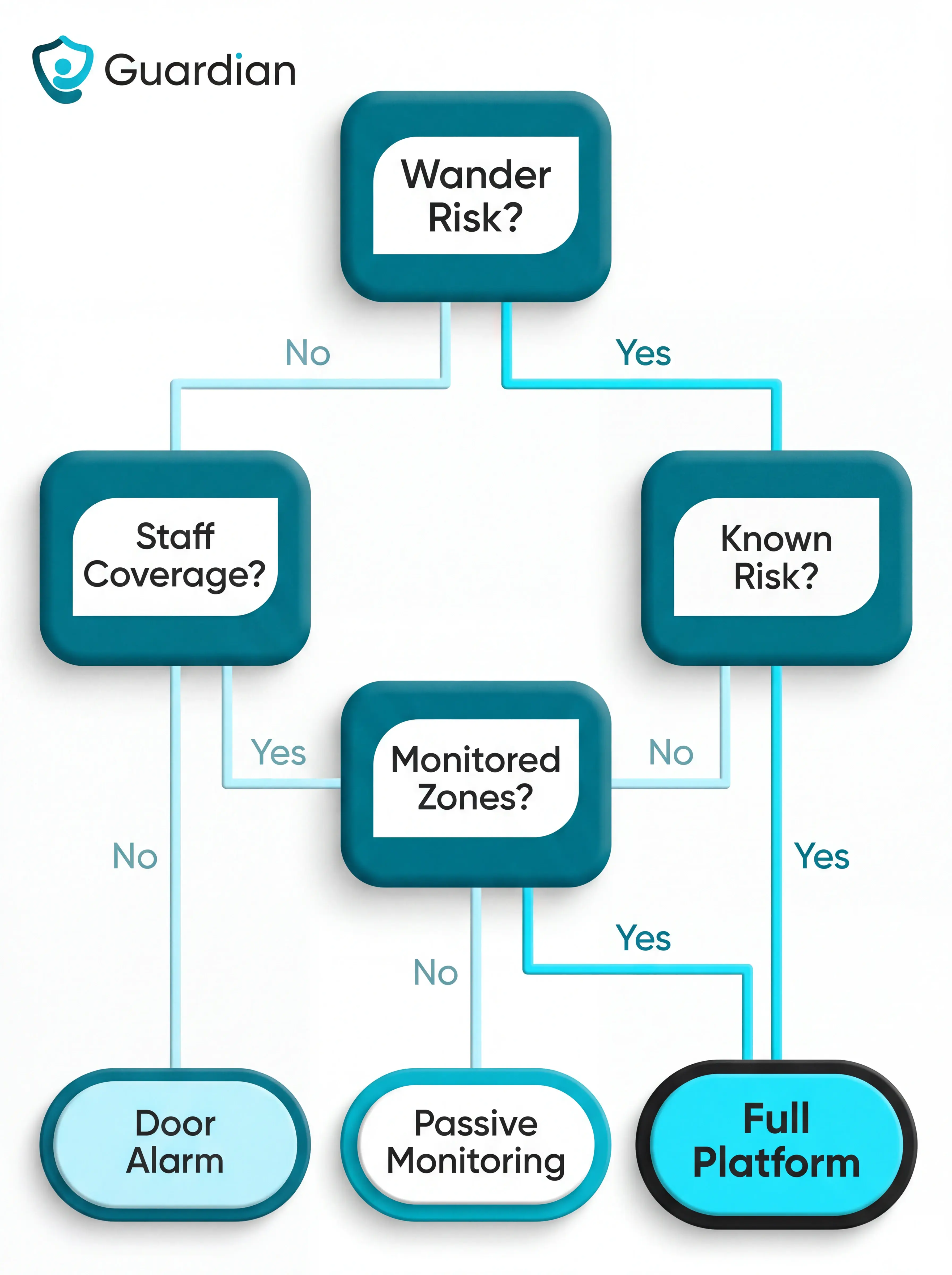
The strongest fit comes when three conditions line up:
Known wander risk: residents have a history of exit attempts, disorientation, or moving into unsafe areas.
Limited staff visibility: caregivers cannot watch every corridor, door, and room at the same time.
Clear monitored zones: the building has doors, rooms, or restricted areas where alerts can guide a fast response.
Do not buy a full platform just because the category sounds useful. If there is no known wander risk, no clear monitored zone, and no team ready to act on alerts, start with care-plan review and environmental controls first.
Small care homes and residential settings
A small, low-risk home may only need a basic door alarm at one known exit. A small home with dementia-related risk or lone-staff cover needs richer alert context.
If the risk is real but the home is small, keep coverage simple:
Route overnight exit alerts to the caregiver on duty
Monitor the main entrance and the highest-risk secondary access point
Use wireless Guardian hardware that can deploy in about 1 week, with no drilling or cabling
Send alerts to existing staff devices and nurse station computers
Memory care units and dementia wards
Memory care units and dementia wards need monitoring inside the building, especially when residents may move into the wrong room or restricted exit route.
A useful before-exit workflow is step by step:
A resident approaches a monitored exit route.
The rule checks the resident's care plan and zone rules.
Staff receive an alert before the resident reaches the unsafe point.
The alert escalates if the first caregiver cannot respond.
Guardian can send the alert to existing staff devices and nurse station computers already in use on the ward.
Multi-ward care homes and home care fleets
Multi-ward homes need more than a door alarm. They need one live view as residents, caregivers, vehicles, and assets move across wards, buildings, and private homes.
Home care fleets fit the same logic when managers need proof of visit, route visibility, and a fast response if a client leaves home or misses contact.
In a care home, each sensor is linked to a specific room or bed on a digitised floor plan. When an alert fires, staff see the location in context, not just a door, zone, or generic alarm.
Use this as a fit check before buying:
Need | What to verify |
|---|---|
Live ward view | Active alerts appear across multiple floors on one operations map. |
Caregiver location | Staff can see who is closest before sending a response. |
Asset tracking | Shared wheelchairs, hoists, and other equipment can be found quickly. |
Cross-ward rules | Escalation changes by time, location, and resident risk. |
Fleet visibility | Vehicles and field workers can be tracked during home care routes. |
For home care, verification matters as much as response. Guardian can log caregiver arrival, visit duration, and end time automatically, creating proof of service without handwritten timesheets.
The buying question is simple: can the system show the whole operation, or only confirm one resident reached one monitored door?
Once fit is clear, compare the system types and decide how much context staff need from each alert.
What wander systems cost
Wander monitoring is rarely a single line item. Retail device prices can look simple, but care-home cost depends on the workflow around the alert.
Separate consumer device pricing from scoped care-home rollout costs. A home comparing US retail examples with EU care-home pilots should treat them as different buying motions.
Cost component | Published example | Budget risk |
|---|---|---|
Pendant monitoring | From $34.95/month | Add-ons raise cost |
RFID tags | $218-$244 per tag | Replacements add up |
Home equipment kit | $399 + $99/month | High first-year cost |
Sensor kit | $416 + $19.99/month | Hardware plus subscription |
Installation and training | Varies by site | Often underplanned |
Guardian pilot | Scoped 6-8 weeks | Rollout priced by scope |
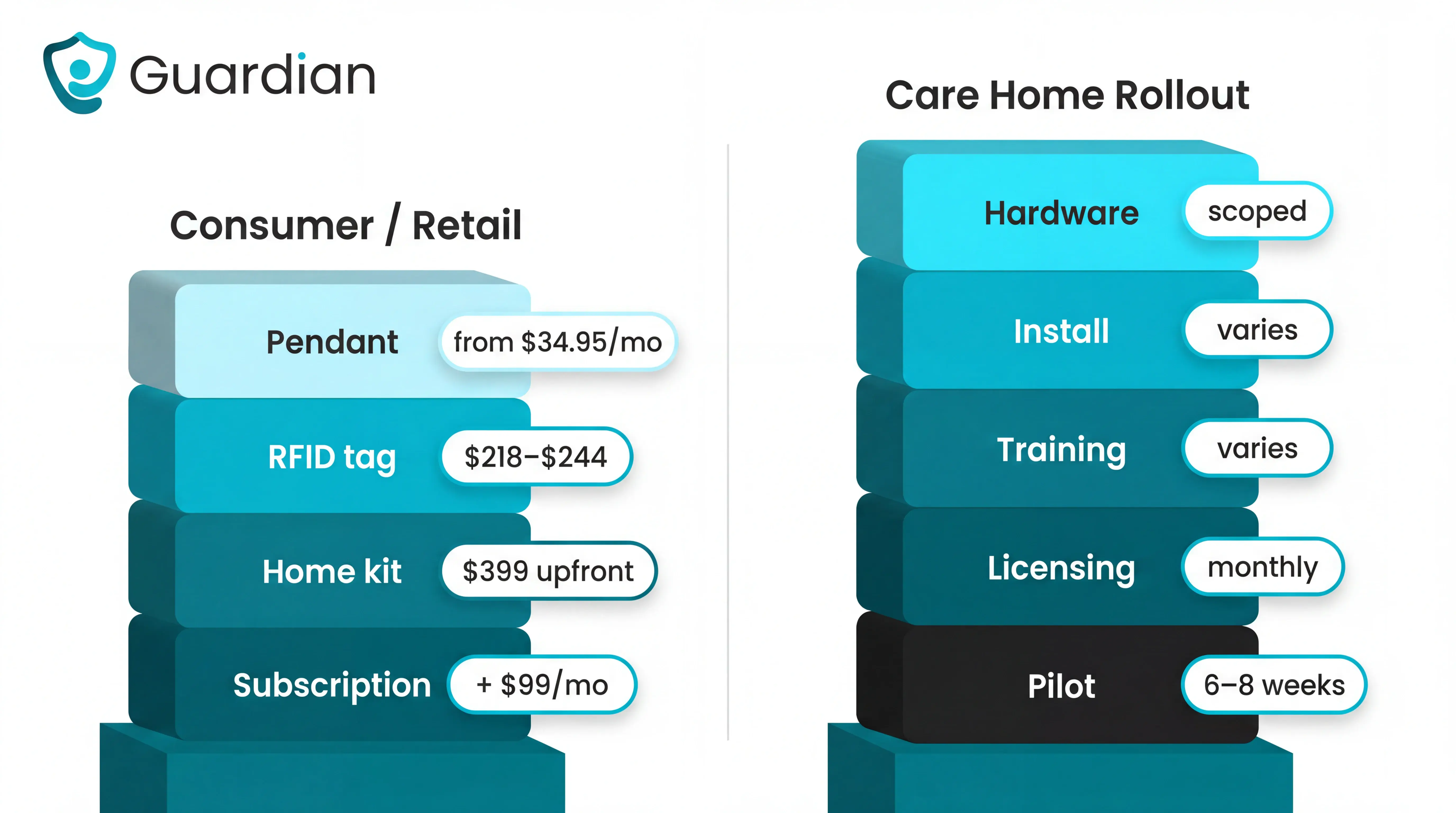
Guardian does not publish list pricing for consumers or care homes. The pilot is a discovery and validation stage rather than a list-price alternative to pendant or tag subscriptions.
The non-device cost matters. DHSC figures cited in CQC's State of Care report highlight the adoption barriers social care providers plan around:
Setup cost: 73% cite initial cost as a major barrier.
Licensing fees: 70% flag ongoing fees as a separate concern.
Funding support: 82% need external support to sustain systems.
Training burden: 52% cite training and turnover as barriers.
Low sticker prices can still create expensive follow-up work when staff must maintain devices and write records manually.
After the budget check, look at the work basic systems still leave to your team.
Where basic wander systems leave the work to your team
Door-centric wander monitoring answers one narrow question: has someone reached a monitored exit? That matters, but it still leaves the team with the indoor search, the notes, and the follow-up.
The gap is strongest in door-centric or tag-only systems. RFID tags and door controllers are built around exit proximity, not full operational visibility inside the home.
The remaining work usually falls into 5 buckets:
Category gap | What the team still handles |
|---|---|
Indoor search | Find the resident manually |
Last-known location | Reconstruct the movement path |
Incident notes | Write records after the event |
Follow-up actions | Update care plans manually |
Wider context | Check rounds and staffing separately |
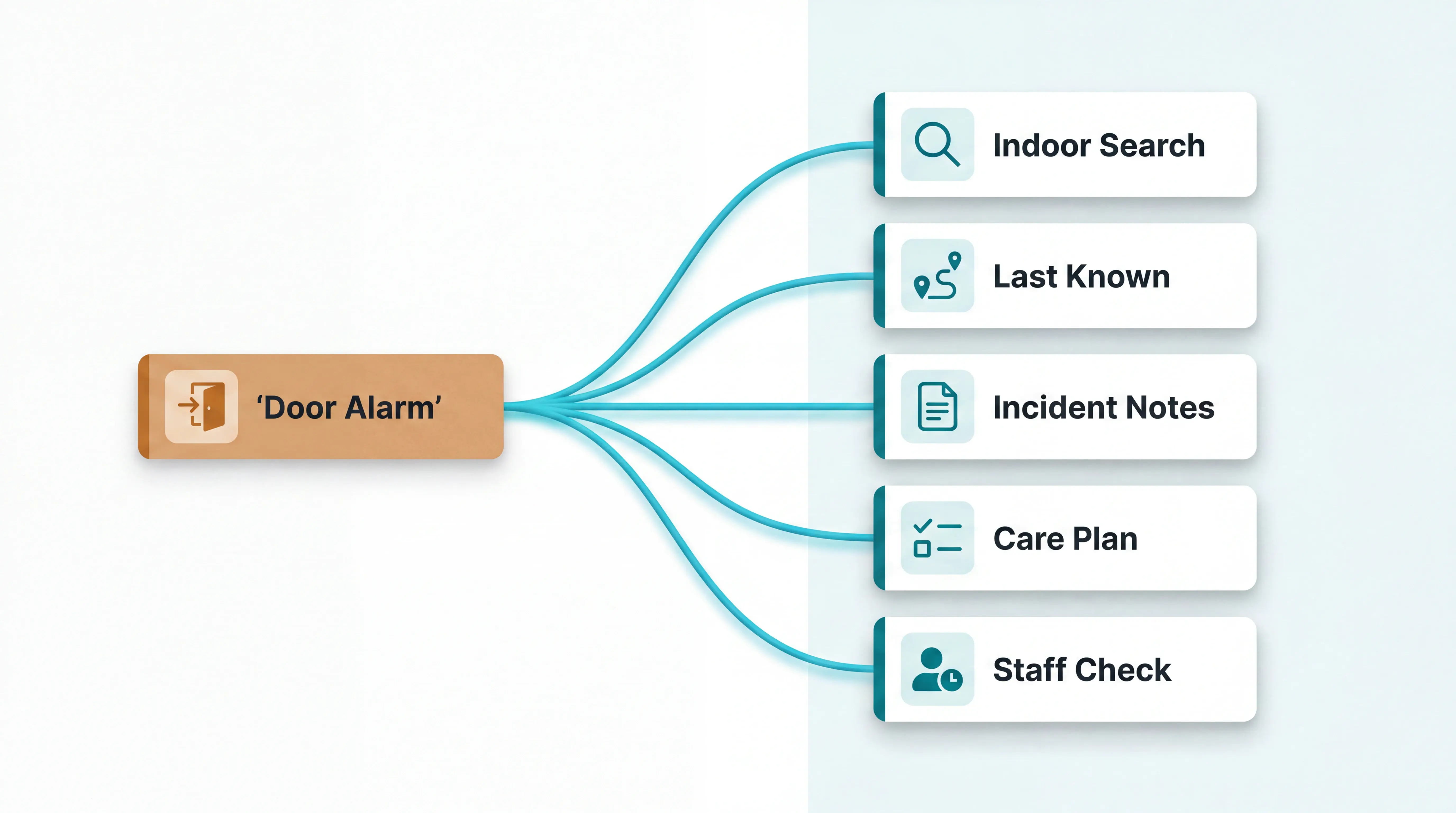
If the main risk is elopement through a known exit, door monitoring can help. If the question is “where is this resident now?”, the home needs a second monitoring layer.
That second layer should answer 4 operational questions:
Where is the resident now?
Which caregiver is closest?
What happened before the alert?
What record is created after response?
Without those answers, staff still have to search first, then reconstruct the incident after the resident is safe.
When the alert fires, Guardian already knows the room and creates the response record
Guardian connects each wander alert to the room, bed, resident, and response record.
Staff see the exact room and bed on the floor plan. Managers get the response record afterwards.
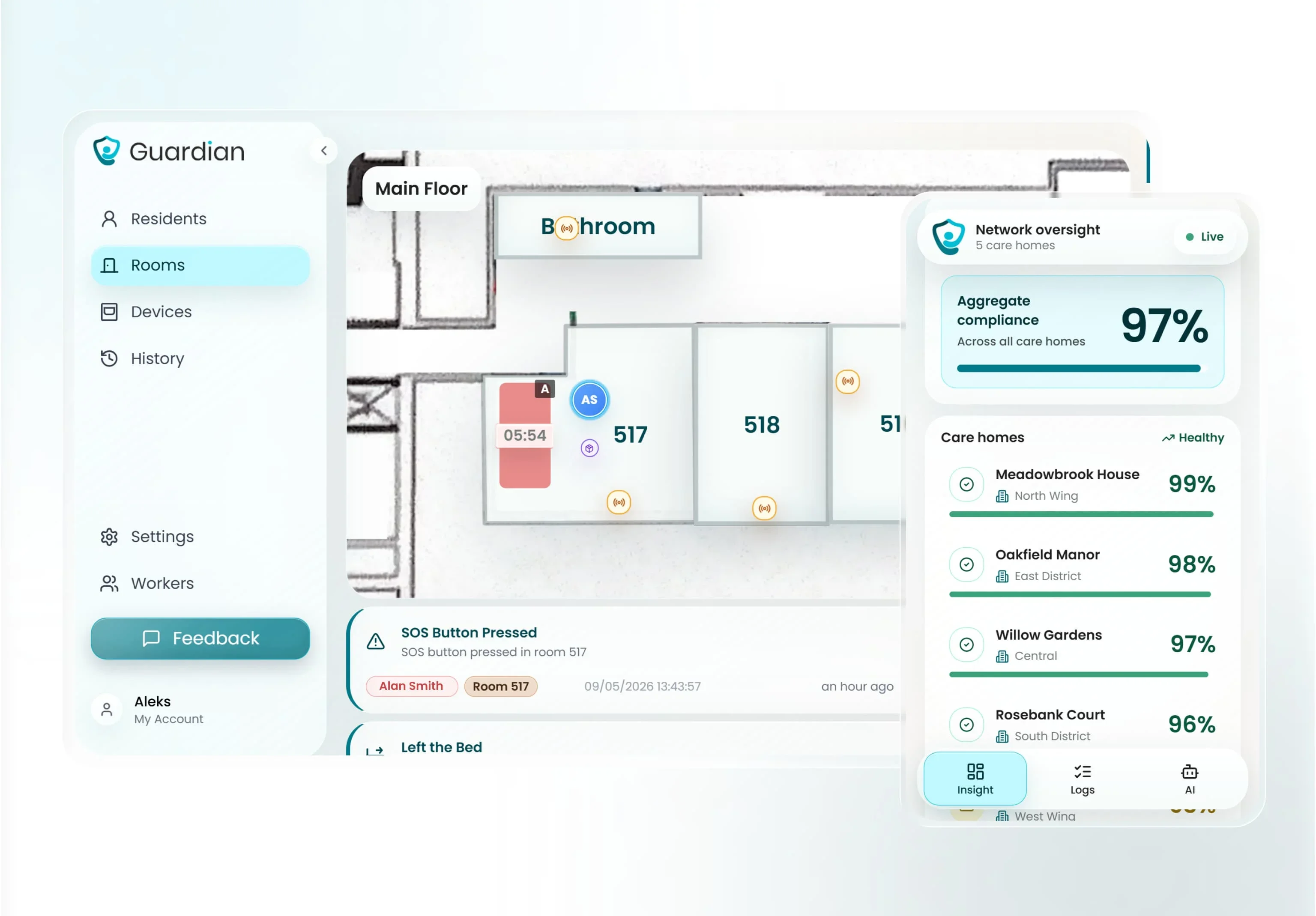
Five checks Guardian is built to support:
Room and bed context: every alert is tied to a real location on your floor plan.
Smart rules: teams can reduce noise by filtering for events that need action.
Camera-free monitoring: residents keep privacy in bedrooms, bathrooms, and shared spaces.
Wearable-optional coverage: wristbands can help, but bed, motion, and door sensors keep watching when wearables come off.
Automatic reporting: visits, response times, and incidents are written into the record as care happens.
The right mix depends on whether the risk is leaving a room, reaching an exit, going outside, or becoming inactive somewhere staff cannot see.
RFID or BLE wristbands alert staff when a resident approaches a monitored exit.
GPS watches help locate someone outside the building or home.
Door and window sensors send alerts when a protected exit opens.
Motion and bed sensors can flag movement, inactivity, or unusual night activity without cameras.
Dashboards put the active alert beside the resident location and event history.
AI can help flag changes in routine, but routing still matters. Staff need the resident name, room location, and event record after response.
WanderGuard is an access-control style wander-management system used to reduce elopement risk at monitored doors.
The workflow is door-focused:
The system checks a resident tag or risk profile.
The monitored door can lock, open, or trigger an alert, depending on setup.
Staff respond when the resident approaches the monitored point.
WanderGuard is not the same as a full indoor locating workflow unless it is paired with other location systems. After a door alert, staff still need a way to find the resident, record the response, and review what happened.
Fixed access-control projects can also be heavier rollouts for smaller UK and EU homes, especially when the home needs practical wander safety without a large installed system.
Residents with dementia, Alzheimer's, or other cognitive impairments are the primary candidates for a wander system.
Look for patterns such as:
Restlessness or repeated pacing.
Trying doors or moving toward exits.
Leaving rooms at unusual times.
Searching for something familiar.
Becoming unsafe during night-time routine changes.
The risk is not limited to a formal diagnosis. Any resident who becomes confused, disoriented, anxious, or unsafe around exits may need monitoring. When confused residents face exit and night-movement risk, the dementia-resident monitoring devices guide compares practical device choices.

Author
Aleks Timm
Aleks Timm leads Guardian and builds privacy-first operations technology for care homes and home care providers. Teams get location-aware alerts they can act on, clearer situational awareness, and measured insight into how care work actually runs.
Read MoreRecommended reads
Keep reading
Patient bed alarms for elderly & hospital care
Patient bed alarms help prevent falls in elderly and hospital care. Compare alarm types, choose the right sensor, and protect...
Read more
Smart Nurse Call Systems for Care Homes and Home Care Providers
Smart nurse call systems for care homes and home care providers: compare features, improve response times, and choose the right...
Read more
Remote patient monitoring: a complete guide
Remote patient monitoring: the complete guide to sensors, benefits, and buying tips for safer care homes and better resident...
Read more