


RTLS in Healthcare Improves Clinical Workflow
In this article
A real-time location system (RTLS) shows where people and equipment are inside a building as events happen. In care settings, the useful output is faster response and a cleaner incident record.
A hospital may use RTLS to find a lost infusion pump or tag a $250,000 C-arm. Care homes need proof that staff reached the right resident at the right time.
Proof in a care facility means answering three questions without cameras in resident rooms:
Who visited the resident?
When did the visit happen?
What triggered the alert?
This guide helps care teams choose an RTLS setup and plan a pilot. The pilot section shows how to measure response time without putting a camera in a resident room.
What is RTLS in healthcare?
In healthcare, a real-time location system tracks people and assets inside a facility, then connects care events to those locations.
The setup has three parts working together:
Wireless tags or sensors carried by people or attached to assets, or fixed to beds, doors, and rooms.
Fixed receivers placed in rooms, hallways, and bays that detect those signals.
Software that turns the signals into a live location view, alerts, and reports.
In a care home, tracking covers people and equipment, plus room events such as bed exits or door activity. Guardian uses camera-free sensors, so residents without wearables are still covered.
Hospitals use the same location layer for equipment and workflow events. In a care home, the priorities shift toward resident safety and accountable rounds.
Instead of chasing IV pumps, a care team needs to know who is where and what just happened. The location layer gives each alert an address.
How a real-time location system works
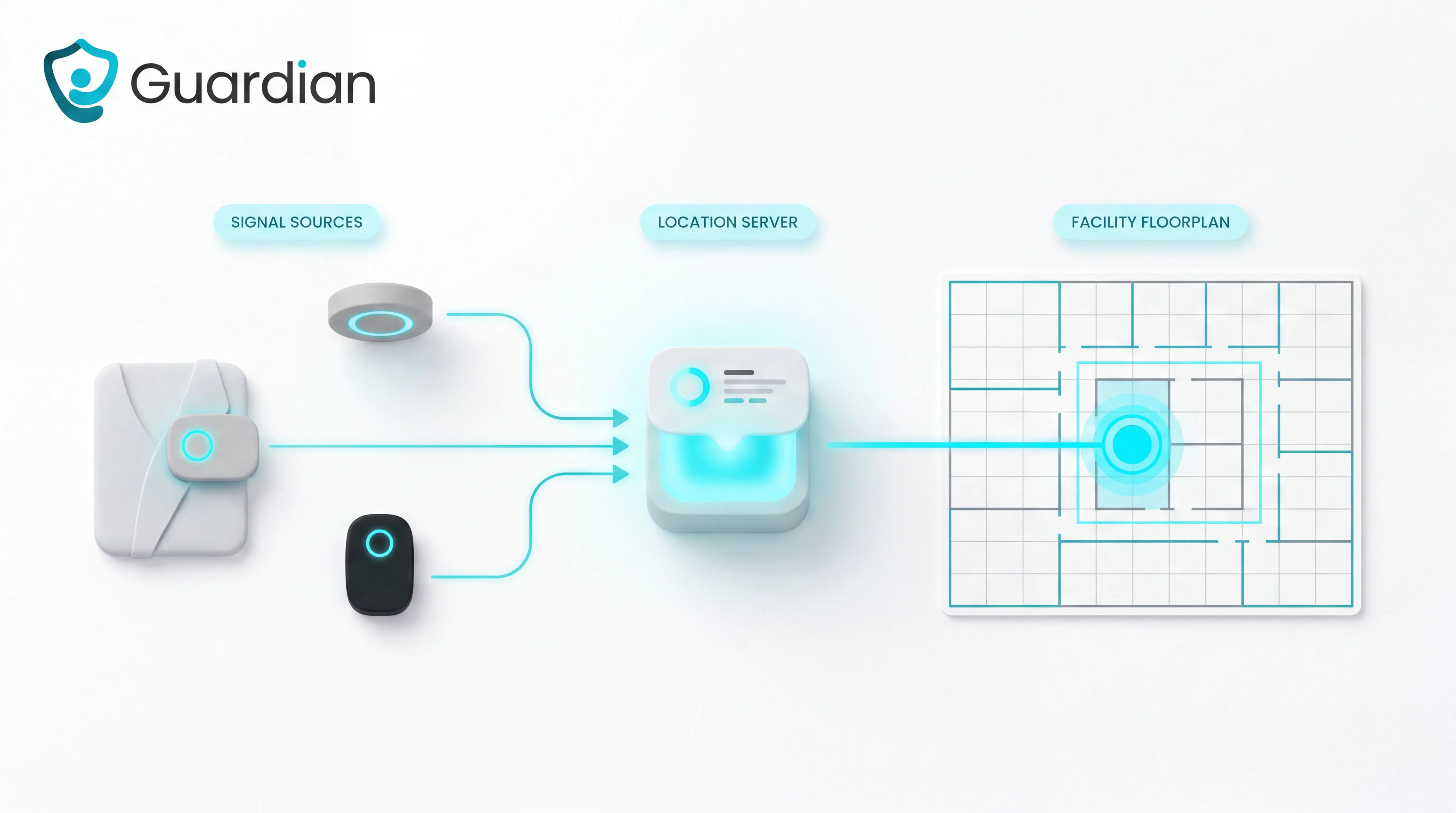
The system works by linking a tag or sensor ID to a known care location.
An RTLS setup has three moving parts:
Tags and sensors attached to residents, caregivers, or assets, plus fixed sensors in rooms, hallways, and bays.
A location server that receives each signal and matches it to a known space.
Software that displays the live location on dashboards and floor plans.
A tag reports its own ID and the space it is in. The server matches both IDs, then the software shows the result.
Precision comes from how each space is identified. A room beacon or bed sensor passes its space ID to the location server with the tag ID.
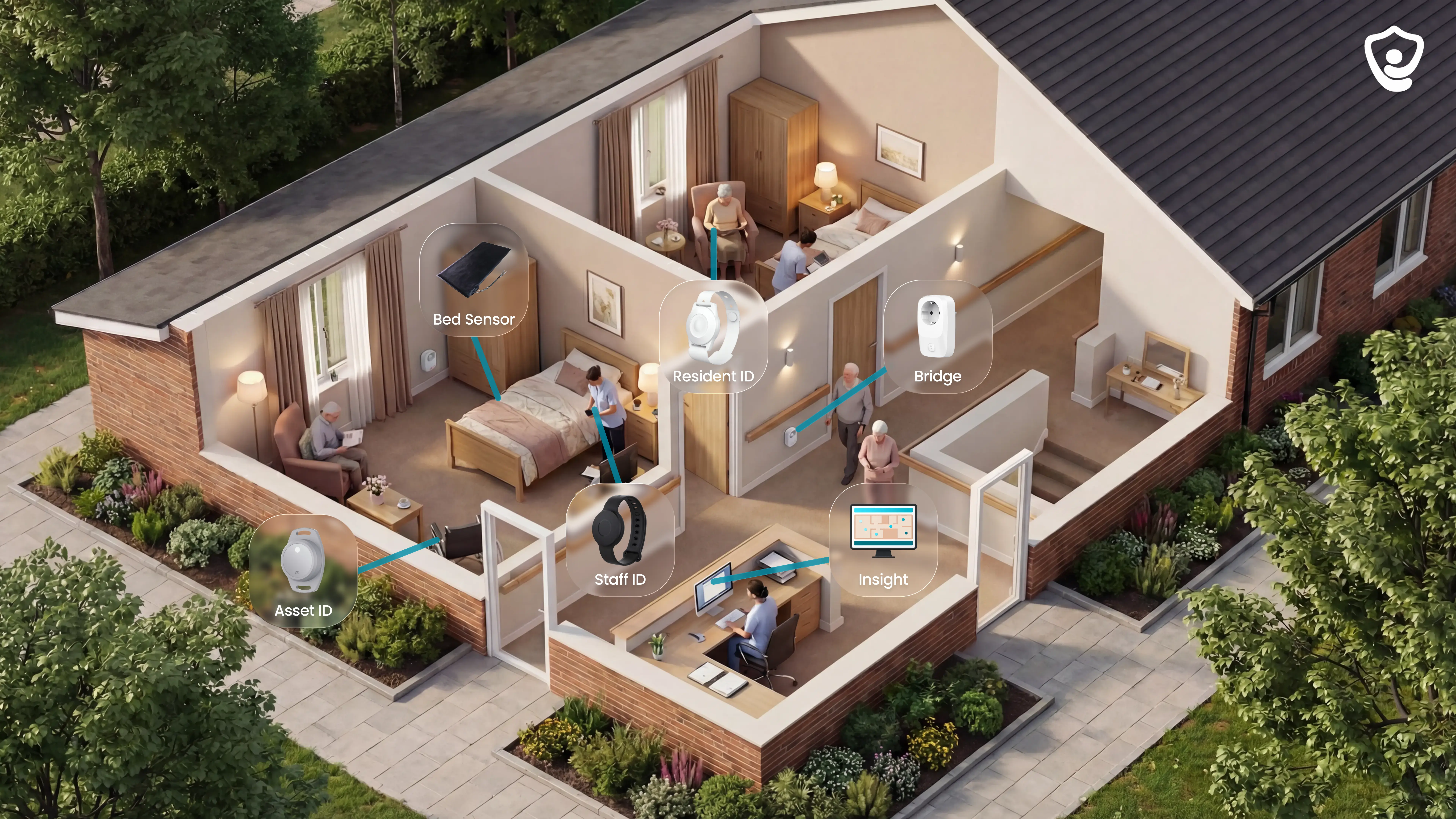
Guardian digitises the floor plan during setup and links each sensor to a specific room or bed. Each alert carries the location, so a caregiver can go straight to the right door.
How much accuracy do you need?
RTLS accuracy needs are the lowest location precision that still supports the workflow, from unit-level presence to sub-room positioning.
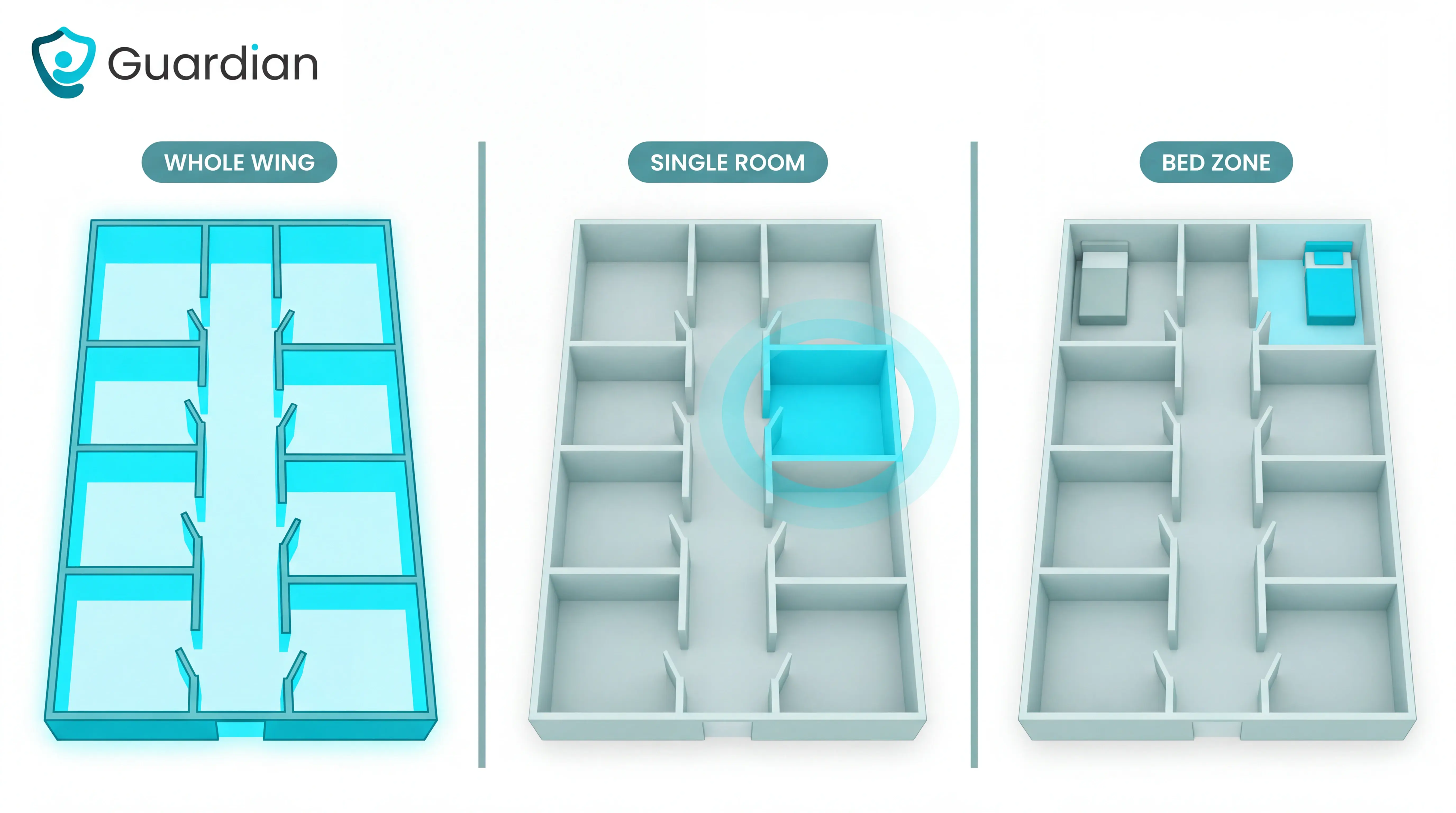
Accuracy is a spend decision, not a bragging right. Three levels cover almost every care and clinical workflow:
Unit-level presence works for basic asset retrieval in low-acuity areas, when staff only need to know the general wing.
Room-level is the standard for bed management, staff duress, and most tracking. Knowing the correct room is enough to act.
Sub-room matters in the OR, ICU, and dual-occupancy spaces where a specific bed or zone must be told apart.
For care homes, workflows live at room level. A fall alert that names the room and bed is actionable; sub-room precision rarely changes what the caregiver does next.
Higher precision costs more infrastructure, and the return drops off fast once you pass what the workflow needs. Sub-room accuracy earns its extra hardware only where beds or zones must be separated.
There is a second cost. Frequent inaccurate alerts create alarm fatigue and erode staff trust, and once staff stop trusting the system they stop responding to it.
Real-time operations work only when alerts stay tied to genuine events. That is a matter of good rules as much as raw precision.
Accuracy level | Typical use cases | When it is enough |
|---|---|---|
Unit-level | Basic asset retrieval in low-acuity environments | When staff only need to know the general area or unit |
Room-level | Bed management, staff duress, most tracking workflows | When knowing the correct room is enough to act |
Sub-room | OR, ICU, dual-occupancy rooms, bed or zone distinction | When staff must identify a specific bed, bay, or zone |
Where RTLS improves clinical workflow
RTLS affects workflow in two broad areas: operational coordination and risk control.
Assets, staff, patients, and flow
RTLS is a location system that reduces search time and exposes patient-flow bottlenecks across equipment, staff, and bed movement.
The first gain shows up in time. In hospitals, nurses lose time every shift searching for equipment, and RTLS cuts that by showing where each item is.
In a care home, the same effect lands on people and records. You stop calling around to find a caregiver or a wheelchair, and bottlenecks in the daily round become visible instead of anecdotal.
Safety, compliance, and monitoring
RTLS is a monitoring system that links location data to alerts, safety rules, and documented oversight for higher-risk events.
Real-time safety monitoring means the system watches for defined events and raises an alert the moment one happens, with a location attached. A patient approaching a restricted exit triggers an alert with exact coordinates, so staff can step in before an elopement.
Restricted-exit risk needs its own workflow; the restricted-exit wander systems guide compares door, wearable, passive, and RTLS options.
In a care home this covers the events that keep managers up at night: a fall, a night-time bed exit, a resident heading for an unsafe door. Guardian ties each to a room or bed, so the alert says where, not just what.
RTLS technologies compared
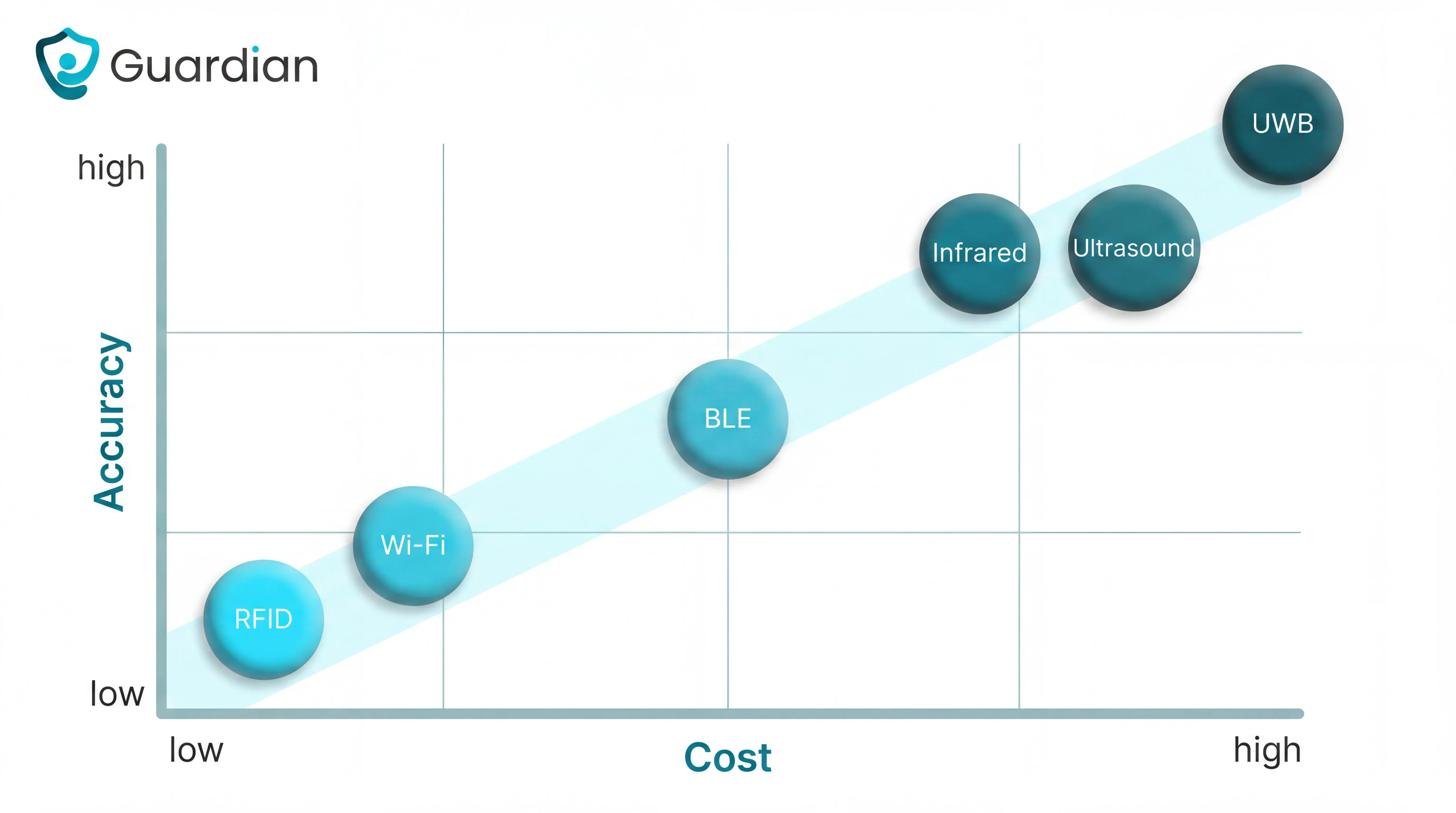
Healthcare RTLS is not one technology but a set of tradeoffs between accuracy, cost, and infrastructure fit.
Technology group | Typical tradeoff focus |
|---|---|
BLE, Wi-Fi, and RFID | Lower cost or existing infrastructure with room-level to zone-level tracking |
UWB, infrared, ultrasound, and hybrid setups | Higher precision or environmental control for workflow-critical locations |
BLE, Wi-Fi, and RFID
BLE, Wi-Fi, and RFID are RTLS technologies used for lower-cost room, zone, or infrastructure-based tracking with different accuracy limits.
The tradeoff is cost and existing infrastructure versus precision. Wi-Fi reuses the network you already run. BLE is cost-effective for room and zone tracking. RFID identifies tagged items at a reader. All three sit below UWB on accuracy, which is fine for most care workflows that only need the right room.
Technology | Typical strength | Typical limitation |
|---|---|---|
BLE | Lower-cost room or zone tracking | Less precise than UWB |
Wi-Fi | Uses existing wireless network | Accuracy depends on network density |
RFID | Tag-based identification and zone tracking | Precision varies by active vs passive setup |
UWB, infrared, ultrasound, and hybrid setups
UWB, infrared, ultrasound, and hybrid setups are RTLS options used when healthcare workflows need higher location certainty or sub-meter precision.
Hospitals reach for these when a workflow needs certainty a cheaper tag cannot give. UWB delivers sub-meter location for high-precision clinical work. Infrared gives room-level certainty by reading a unique room number, useful when exact-room identification is critical. Ultrasound and hybrid setups combine methods to balance precision, coverage, and future change.
For a care home, UWB, infrared, and ultrasound hardware is usually overkill. The workflows that matter (falls, exits, rounds, nurse calls) resolve at room level, so the extra cost buys precision the day-to-day never uses.
Technology | Typical precision use | Implementation note |
|---|---|---|
UWB | Sub-meter location tracking | Used for high-precision clinical workflows |
Infrared | Room-level certainty | Works well when exact room identification matters |
Ultrasound | Controlled indoor positioning | Compared on accuracy and infrastructure needs |
Hybrid | Combines multiple locating methods | Used to balance precision, coverage, and future changes |
Why tag strategy matters
Tag strategy is where budgets get wasted. Not every item needs the same device, and putting the most expensive tag on everything is how RTLS projects overrun before they prove anything.
The rule is simple: match the tag to what you are protecting, and tag the high-value or high-loss items first. In a care home the same rule applies across a shared hoist, a syringe driver, or a caregiver's SOS band.
The tag should be proportional to the value or risk of what it tracks. Putting a costly precision tag on a low-value item wastes budget; the same spend on a shared hoist or syringe driver is easier to justify.
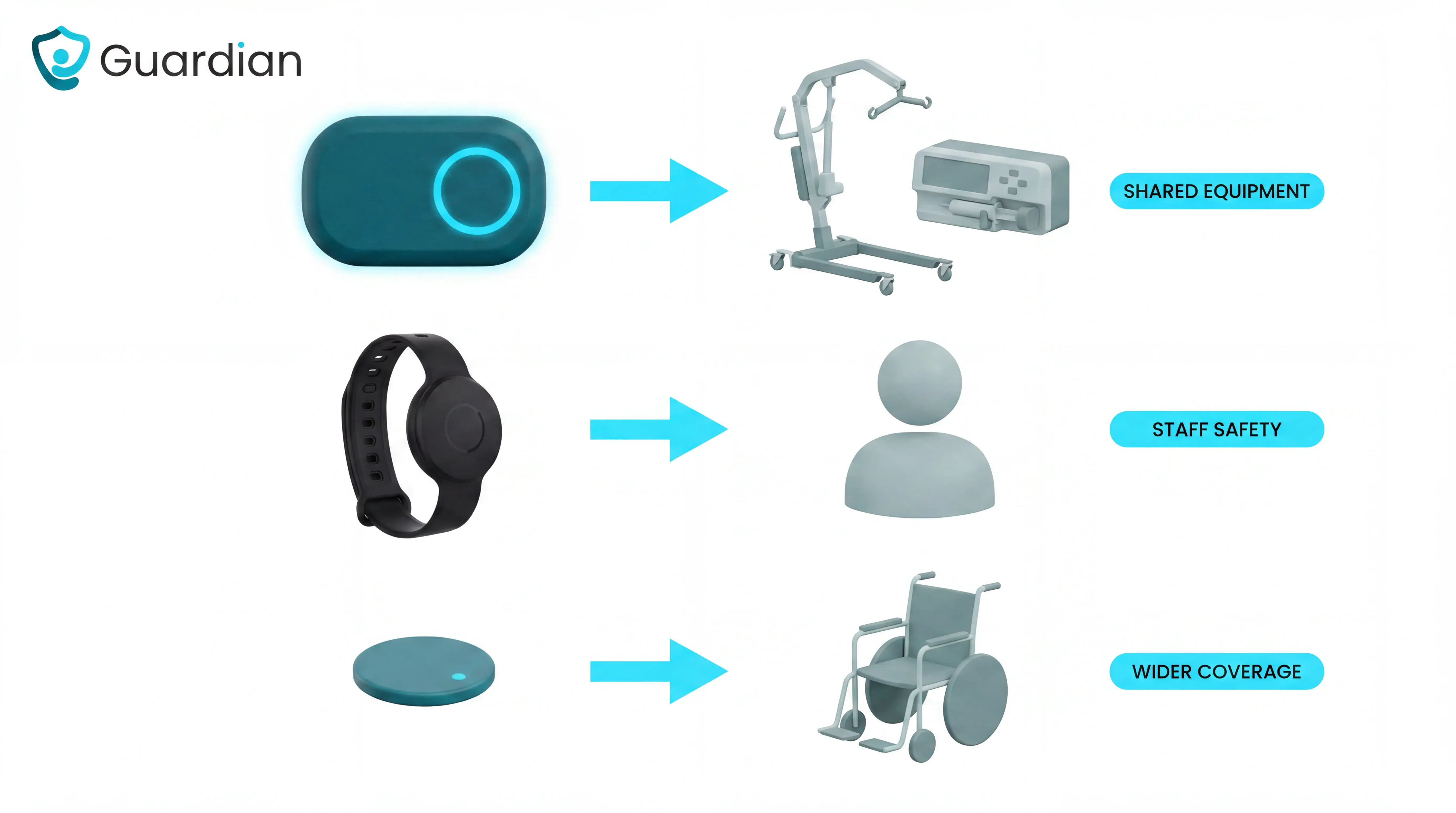
In a care home, prioritise coverage in this order:
Shared equipment that goes missing, such as hoists, wheelchairs, and syringe drivers.
People-safety devices with the highest stakes, such as fall-detection and SOS wearables.
Wider asset coverage once the first use cases have proved their value.
Battery life sets the ongoing maintenance load. Short-life tags mean a rolling replacement schedule; longer-life tags fade into the background.
Battery choices matter for wearables; the people-safety fall-alert roundup compares fall-detection devices by coverage and response workflow.
Guardian devices run 2 to 5 years depending on the sensor type. Replacement stays a predictable task rather than a weekly chore across a ward.
Two things decide whether a wearable actually helps: whether staff wear it, and whether its alerts can be trusted.
Comfort drives adoption. A badge or band that is bulky or awkward gets left in a drawer, and a device nobody wears provides no safety coverage at all. Ergonomics is a safety feature, not a nicety.
Alert accuracy drives trust. Room-level BLE or infrared is enough for most care workflows; sub-room UWB is only worth it in OR or ICU settings. Over-specifying wastes money, and under-specifying floods staff with false alerts that erode trust and feed alarm fatigue.
Tag strategy factor | Why it matters | Example from sources |
|---|---|---|
Cost proportionality | High-value assets justify higher tag spend | $60 tag on a $250,000 C-arm |
Battery life | Longer life reduces replacement workload | 18-month minimum target, 8+ years lowers overhead |
Ergonomics | Wearability affects staff adoption and safety coverage | Badges not worn do not provide coverage |
How to implement RTLS in a healthcare setting
RTLS implementation in healthcare is a staged process of defining the workflow problem, choosing the right location technology and system design, then piloting, training, and scaling based on measured results and operational fit.
Before any hardware arrives, four things need to be settled: leadership backing, a measurable goal, a clear picture of the setting, and a baseline to measure against.
Start with the operational problem, not the technology. Name the specific bottleneck you want gone (search time, missed rounds, slow fall response), then look at your layout and what you already run. The technology choice follows the problem, not the other way round.
Rollout is staged, never big-bang. The standard pattern is: align stakeholders and objectives, choose technology that scales, validate it in a limited area, then expand on evidence.
Guardian runs this as a 6 to 8 week pilot in one ward, home, or team. It ends with a written report covering response-time analysis, incident prevention, staff feedback, an ROI calculation, and a rollout plan for the next wards. You scale on your own numbers, not a vendor's promise.
Define the workflow problem
The best pilots start from one sharp problem, not a wish list. Pick one high-friction process, one measurable failure mode, and one group of people it affects.
Set a specific objective before implementation: reduce fall response time, cut asset search time, or stop missed night rounds. A vague goal like "improve safety" cannot be measured, so it cannot be proven.
Guardian maps your setting, priorities, and workflows first, usually in a one-hour walk-through. From that map it picks the highest-value use cases for the pilot, so the trial targets the problem that actually hurts.
A workable frame is one high-friction process plus one measurable failure mode plus one target group. For a care home that often looks like bed-exit response delays overnight, false or non-actionable alarms, or the time staff lose searching for people and equipment.
Good problem definition needs a baseline you can compare against later. You do not need exact numbers to start; you need an honest picture of how things run today.
Guardian captures that baseline during the workflow walk-through: how incidents are currently found, rough response times, and how many hours go into manual reporting.
The aim is your own numbers. You measure the admin load and response pattern in your own setting before the pilot changes anything.
Watch for two failure patterns while you scope. Visible bottlenecks (overcrowding, delays, bed shortages) point to flow problems, and raw sensor events sent as alerts for everything point straight to alarm fatigue. Both are baselines worth measuring before you change anything.
Problem-definition element | Manual or generic approach | Guardian method |
|---|---|---|
Starting point | List broad RTLS goals | Map the setting, priorities, and workflows |
Scope | Name a challenge such as asset search, workload, or theft prevention | Select the highest-value pilot use case from the workflow map |
Evidence | Use visible bottlenecks like wait times, overcrowding, or bed shortages | Tie the problem to response times, incident prevention, staff feedback, and ROI |
Match the use case to the right setup
Match each use case to the minimum accuracy it needs, then to the hardware and alert rule that deliver it. Overbuilding wastes money; underbuilding breaks the workflow.
Guardian maps each sensor to a specific room or bed on a digitised floor plan, then assigns hardware by workflow: SOS wristbands for staff distress, bed sensors for night-time exits, fall-detection wristbands for automatic incident alerts, and asset tags for equipment. Alert rules like "out of bed for more than 15 minutes at night" tune each device to the event threshold the workflow actually needs.
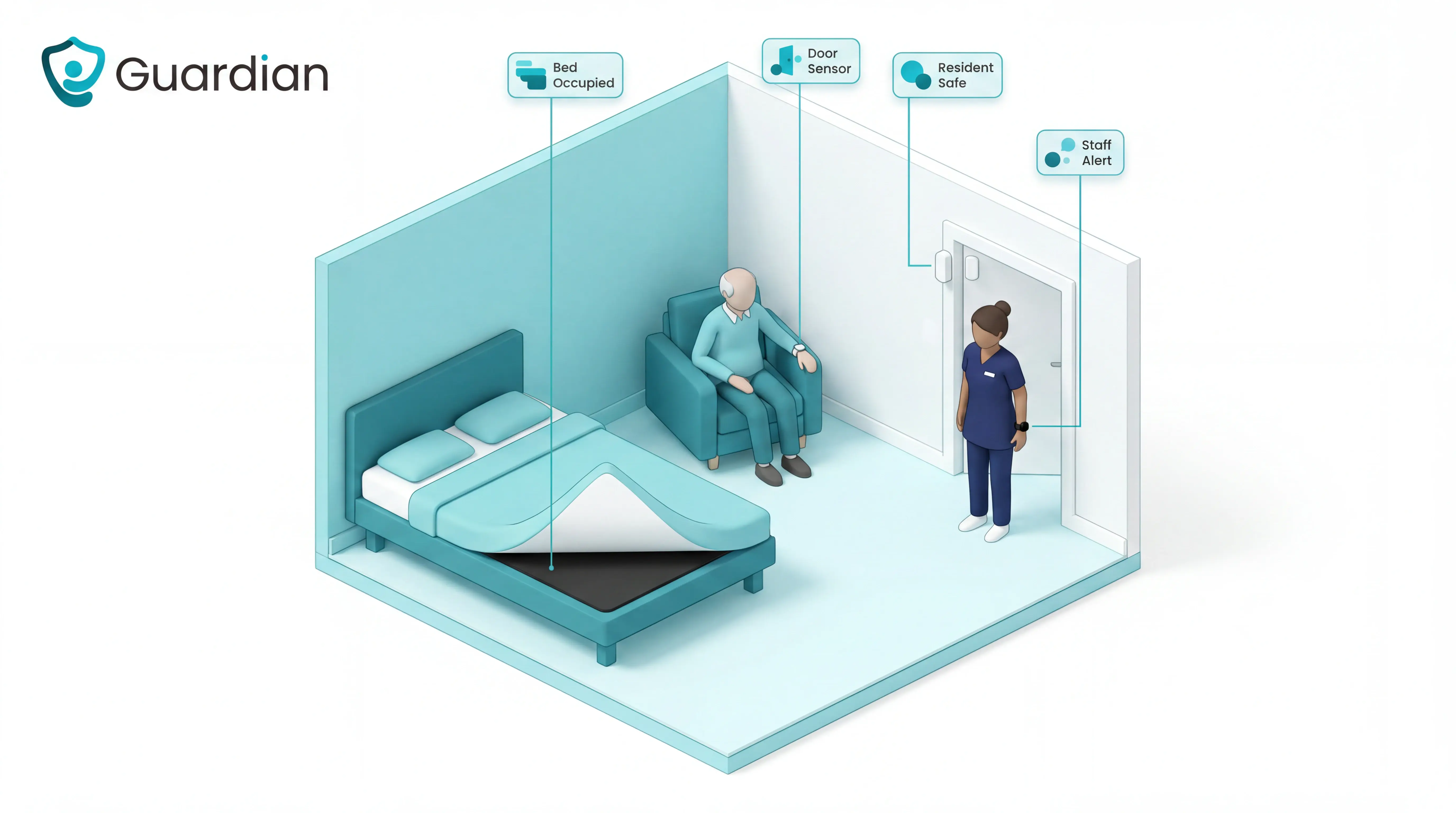
Once rooms, devices, and rules are mapped, the system should turn each event into a direct instruction. A nurse-call wristband sends an alert with the resident's name and live location to caregivers' phones, and the alert carries map-based context so staff see exactly where to go.
Because Guardian's devices are wireless and pre-configured, a ward can go live in about a week with no cabling. From there the system supports the wider care process, so a fall alert feeds straight into the falls pathway of injury assessment and review.
Use case | Minimum setup need | Guardian setup example |
|---|---|---|
Basic asset retrieval | Unit-level presence | Asset tags linked to the facility map |
Bed management or staff duress | Room-level locating | Room-mapped sensors and SOS wearables |
OR, ICU, or dual-occupancy areas | Sub-room or bed-level distinction | Devices linked to specific beds or zones on the floor plan |
Pilot, train, and scale
Pilot, train, and scale is validating RTLS in a limited care area, teaching each role the new workflow, then expanding with a documented rollout plan; Guardian handles this through workflow-mapped pilots and post-pilot scaling reports.
Run the pilot in one contained area first. The standard practice is to test in one or two departments, or with a pre-configured kit, before any facility-wide rollout.
Guardian scopes the pilot from the workflow map: it takes your setting, priorities, and workflows, then selects the highest-value use cases to trial in a single ward, home, or team.
Training works best in two passes: an initial session for everyone, then role-specific sessions for nursing, night staff, and anyone who acts on alerts. FAQ sheets left in visible spots reduce friction through the first 90 days.
Guardian keeps the learning curve short by sending alerts to the smartphones, tablets, and nurse-station computers staff already use. The floor-plan mapping does the heavy lifting: instead of decoding a generic zone, staff get the exact room or bed, so the new step is simply "read the alert, go to the room."
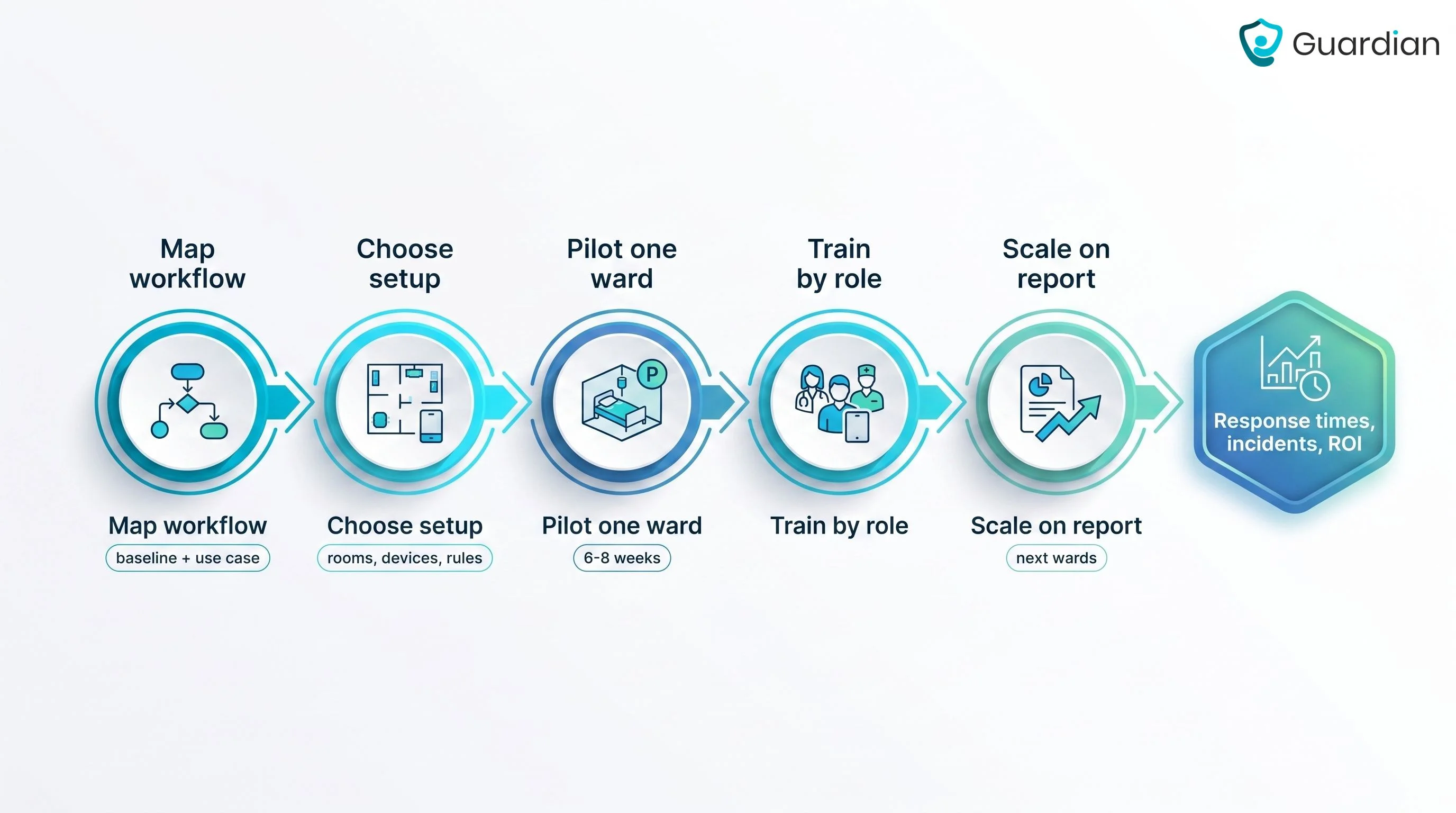
Do not scale on a good feeling. The post-pilot report should give you the evidence to decide, and account for where you plan to grow next.
Guardian's impact report includes:
Staff response times across the pilot.
Incident-prevention data and qualitative staff feedback.
An ROI calculation and a structured rollout plan for the next wards.
With that in hand, expanding to a second ward is a decision backed by your own numbers rather than a leap of faith.
Stage | Industry-standard pattern | Guardian method |
|---|---|---|
Pilot | Start in one or two departments or use a pre-configured kit to validate workflow | Map facility workflows and select highest-value pilot use cases |
Train | Run initial training, then role-specific sessions and first-90-day reinforcement | Train staff on room-linked alerts shown on existing phones, tablets, and nurse-station screens |
Scale | Expand after performance review and future-capacity planning | Use post-pilot reports with response times, incident data, ROI, and a ward rollout plan |
How to measure RTLS impact
Measure RTLS impact by setting baseline workflow and safety KPIs, tracking the same metrics during a pilot, then comparing changes in time saved, incidents prevented, and operating costs with ROI.
Impact is the same KPIs measured before and after, so pick metrics you can capture on both sides. Common ones include reduced equipment search time, lower asset loss, higher throughput, and faster incident response.
In a care home the headline metrics are response time and reporting time. Guardian records when a caregiver arrives at a resident's room and how long they stay, which turns "we think we responded quickly" into an actual timestamp you can compare against your baseline.
The point of RTLS is that the data collects itself. During the pilot, the system captures evidence as a byproduct of normal work, not as an extra reporting task.
Guardian does this four ways:
Nurse-call alerts reach caregivers' phones with the resident's name and live location.
Each sensor is tied to a specific room or bed on the digitised floor plan.
Smart rules such as "out of bed for more than 15 minutes at night" decide what counts as an event.
Incident, visit, and shift reports generate automatically in the background.
By the end of the pilot, the numbers are already written. Nobody reconstructs them from memory.
The impact report is what you take to a decision. It should compare the pilot against the baseline and cover four things: staff response times, incident-prevention data, qualitative staff feedback, and an ROI calculation with a rollout plan.
Those numbers are yours, generated in your own ward. That is the proof that carries weight with owners, families, and inspectors, because it comes from your own building.
Measurement stage | What to check | Typical RTLS evidence | Guardian evidence |
|---|---|---|---|
Before rollout | Baseline workflow and safety KPIs | Search time, asset loss, throughput, incident response time | Current visit timing, room arrival timing, incident logs |
During pilot | Event capture quality | Tracked alerts and location events | Live-location alerts, floor-plan event mapping, rule-based alert thresholds |
After pilot | Operational and financial change | Post-vs-baseline KPI comparison | Response-time analysis, incident prevention data, staff feedback, ROI report |
What to check before you commit
Use the buying conversation to test whether the system will change daily care on your floor before you judge the demo.
1. Does it match the workflow problem?
Name the exact workflow before you look at the vendor feature list. Bed-exit alerts on one dementia wing need different evidence than asset tracking in a storeroom.
Watch one shift before you agree the design. The workflow will fail during the 2 a.m. round if staff have to open a laptop after every alert.
2. Will the data be accurate and usable?
Ask for the accuracy your ward needs, not the highest number in a brochure. Room-level location covers bed exits and resident checks; sub-room accuracy only matters for side-of-bed decisions.
Decide whether the data must feed EHR or CMMS software before procurement. Guardian can run standalone by default, so a one-ward pilot does not need an EMR integration or IT project.
3. Can staff use it now and scale it later?
Ask the vendor to show the alert path on the device staff already use.
A caregiver should see 3 details at once:
Room or bed
Event type
Next action
Scale in phases. Start with one ward, review the pilot report, then decide which rooms or resident groups need the same setup.
Ask what the 6 to 8 week pilot report will contain before the pilot starts.
4. What long-term risks and costs should you pressure-test?
Price the system over 5 years, not by tag or sensor.
Ask for 6 lines in the quote:
Hardware replacement
Batteries
Staff training
Portal licences
Installation
Support
Confirm how the installation happens in your building. Hard-wired work and custom integrations can change the budget before the first ward is live.
Check the privacy design before residents or families ask. Guardian is EU-based and GDPR-aligned, with data encrypted in transit and at rest.
Guardian is camera-free by design, so a bedroom alert does not depend on a lens in the room.
Prove workflow gains in 6 to 8 weeks with Guardian
Guardian gives you a scoped way to test RTLS before a wider rollout. The pilot runs on one ward for 6 to 8 weeks, then ends with a report built from your own routine.
You choose the ward and the care problem. Guardian digitises your floor plan and links each sensor to a specific room or bed.
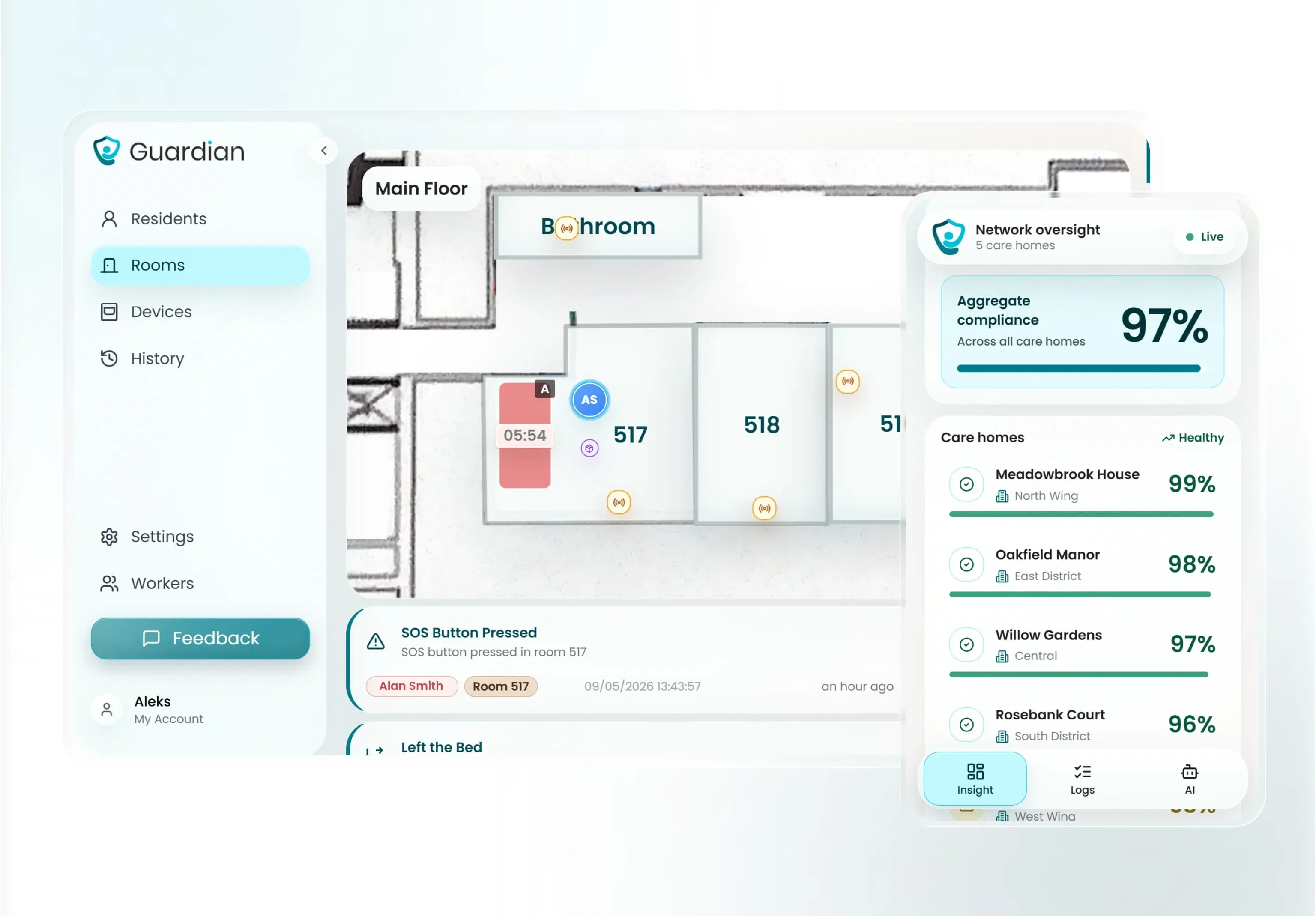
The Guardian Portal shows live events on your floor plan and logs response activity as the pilot runs.
A night team can see which room needs attention without walking the wing first. A manager can review patterns without asking staff to fill in extra forms.
At the end, Guardian turns the pilot into an impact report for your ward. The report is built from your data and staff feedback.
Average response times by room, bed, or alert type.
Incident-prevention records from bed-exit alerts attended before escalation.
Staff feedback on alert clarity and fit with daily rounds.
ROI calculation and rollout plan for the next ward.
Yes. RTLS is a healthcare location technology for tracking patients, staff, equipment, and workflow events inside care facilities.
It tracks four things: patients, staff, equipment, and workflow events. That covers staff duress and panic alerts, patient wandering, and events like a bed exit or a restricted-area entry.
It also extends to conditions, not just position. RTLS can monitor refrigerated assets such as vaccines and blood units with continuous temperature logging for compliance.
Location data becomes useful once it points somewhere specific. RTLS sends signals to a central platform for real-time visibility, mapping, and alerts.
Guardian links each installed sensor to a specific room or bed on the floor plan during setup, so an alert points a caregiver to the precise place the event is happening, not a vague zone.
GPS is satellite-based outdoor location tracking, while RTLS is facility-based indoor location tracking using local sensors, tags, or readers.
Each system suits a different environment. GPS works outdoors, so it fits ambulances, inter-facility transport, and community care.
Indoors, GPS falters as walls and ceilings block satellite signals. RTLS uses internal infrastructure to produce reliable location data within facility walls, which is why care homes and hospitals rely on it inside the building.
RTLS is built for indoor precision GPS cannot deliver. It uses on-site infrastructure such as Bluetooth LE, UWB, infrared, or active RFID.
Tags on assets, residents, or staff send short signals to nearby receivers, which pass them to the software. The software then places each tag on a floor plan in near real time.
Match the vendor to the clinical use case across five axes: accuracy, workflow fit, integration depth, compliance controls, and total deployment cost. Four questions get you there.
1. What accuracy does the use case actually need? Buy the precision the workflow uses, no more. Unit-level covers basic asset finding, room-level is the minimum for duress response and bed turnover, and sub-room is only required for OR and ICU work.
2. Will it fit existing workflows and remove manual steps? Assess your layout, infrastructure, and the problem you want solved before shortlisting. If you need it to connect, check for native links to EHR or ADT, CMMS, nurse call, and security, because every integration gap becomes a manual workaround your staff absorb. A system that ignores how caregivers actually work will not get used, however accurate it is.
3. Can the vendor pass security and governance review? Hospital procurement will ask for the standard controls: a signed BAA, encryption in transit and at rest, SSO, granular role permissions, configurable data retention, and certifications like SOC 2. Confirm which the vendor actually holds rather than which they plan to. Also weigh healthcare experience, scalability, and financial stability, since RTLS is a multi-year commitment. For a single-ward care pilot you do not need the full hospital procurement stack. Guardian is EU-based, GDPR-aligned, encrypted in transit and at rest, and camera-free by design.
4. What does value look like beyond the tag price? Ask for a five-year total cost of ownership, not a per-tag quote. Installation, licensing, battery replacement cycles, support SLAs, and refresh cadence all move the real number over time. The clearest value signal is a pilot that ends with an impact report: response times, incident-prevention data, staff feedback, ROI, and a rollout plan.
Yes. RTLS software is the platform layer that turns tag and sensor signals into real-time location views, alerts, analytics, and integrations. Tags and sensors produce raw signals; the software is what turns them into a live view, alerts, and reports. Without it you have hardware, not information.
Guardian's software layer is a web-based portal. It links each sensor to a specific room or bed on a digitised floor plan, then shows live facility visibility and delivers alerts with map-based location context, so staff see where an event is, not just that one happened.
When Guardian detects an event, it sends the alert straight to the smartphones, tablets, and nurse-station computers staff already use. No extra paging hardware, no new device to carry.
Smart rules decide what is worth an alert. A threshold like "out of bed for more than 15 minutes at night" filters normal activity, so the portal notifies staff only when intervention is needed and routine noise stays off the screen.
Yes. RTLS integration is connecting location data with hospital systems such as EHR, nurse call, CMMS, and security platforms.
In a hospital, RTLS commonly connects to the systems that already run the building: EHR or EMR, nurse call, CMMS and maintenance software, building automation, and security platforms. Larger platforms integrate with a hundred or more healthcare IT systems.
Guardian works standalone by default. It drops in with no EMR integration and no IT project, so you get value from day one; connecting it to other systems is an option, not a prerequisite.
When integration is wanted, open APIs are the usual route, connecting location data to EHR, nurse call, CMMS, and security systems. In health and social care, FHIR-compliant profiles and minimum viable datasets keep that exchange standardized and readable.
Infrastructure can be light, too. BLE-based platforms reuse existing Wi-Fi instead of requiring a separate network, which keeps the install simple.

Author
Aleks Timm
Aleks Timm leads Guardian and builds privacy-first operations technology for care homes and home care providers. Teams get location-aware alerts they can act on, clearer situational awareness, and measured insight into how care work actually runs.
Read MoreRecommended reads
Keep reading
Patient bed alarms for elderly & hospital care
Patient bed alarms help prevent falls in elderly and hospital care. Compare alarm types, choose the right sensor, and protect...
Read more
WiFi nurse call system guide for care homes
WiFi nurse call systems explained: alerts, clean records, and no wiring—compare options and choose the right setup for your care...
Read more
Remote patient monitoring: a complete guide
Remote patient monitoring: the complete guide to sensors, benefits, and buying tips for safer care homes and better resident...
Read more