

9 Best EVV Software Platforms Compared
In this article
Schedules show what was planned. Manual visit notes do not always give a clean answer when a regulator or family asks who delivered care, where, and when.
EVV software turns each visit into a verifiable record. This comparison weighs daily workflow alongside payer requirements, treating compliance as one part of a workable system.
You will see how the platforms differ on compatibility and pricing. The comparison then tests whether each record is useful beyond the claim, so you can build a practical shortlist.
The list includes Guardian for care homes, which extends visit records with live operational context. Guardian supports home care and suitable care facilities, including specialist and mental-health settings.
What EVV software does
EVV software verifies home care visits by electronically recording who received care, who delivered it, where, when, and what service occurred. Federal EVV guidance applies to Medicaid-funded personal care and home health services that require an in-home visit.
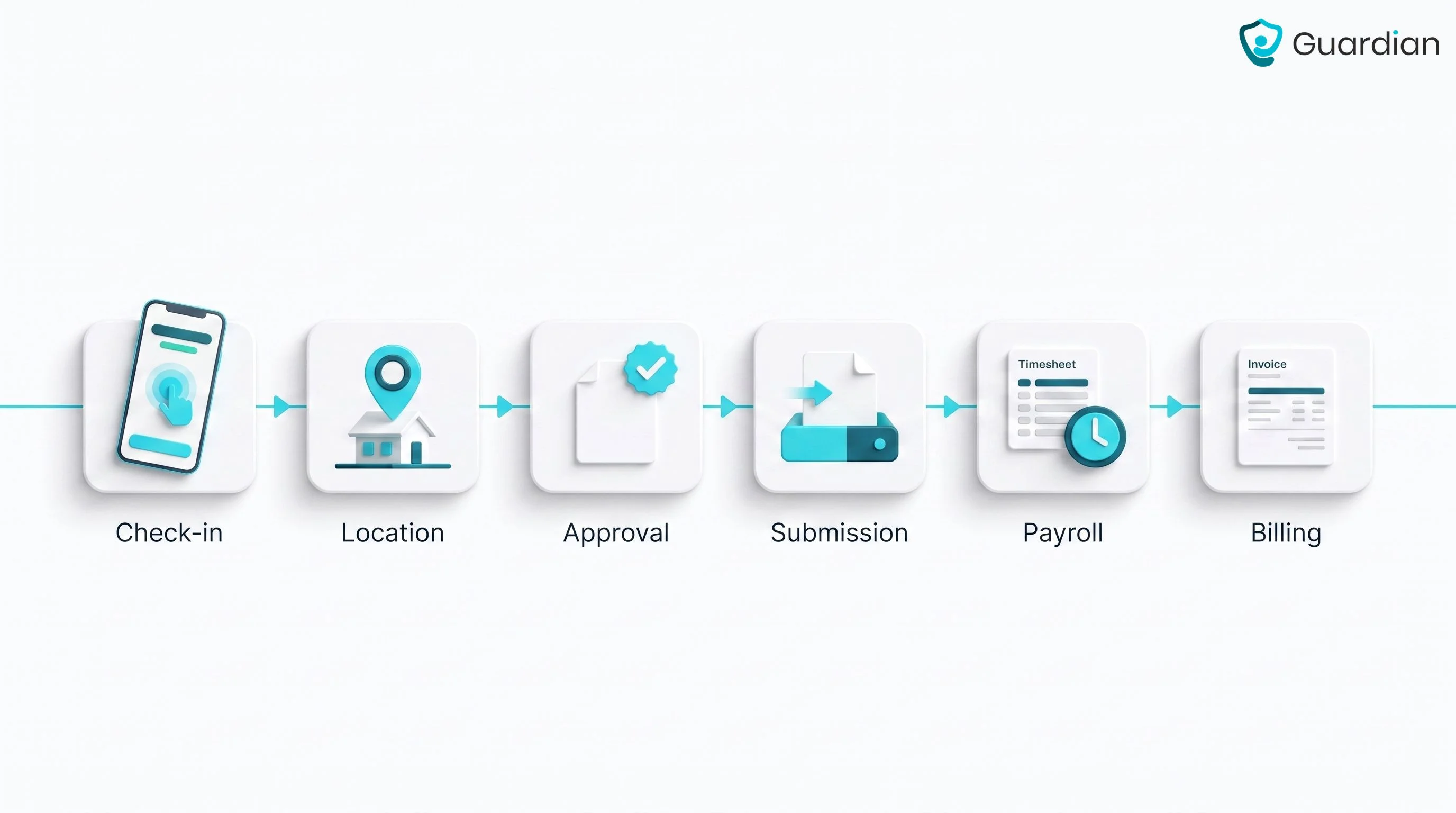
A complete EVV record keeps six details together:
Service: care provided
Client: identity of the person receiving care
Caregiver: identity of the person delivering care
Location: place where care was delivered
Date: day of service
Times: visit start and end
Verification happens when the caregiver checks in and out through the EVV system. A mobile workflow can pair those timestamps with location data, giving the agency evidence that the recorded visit occurred at the expected place.
Agencies use the verified record to compare delivered care with schedules, then support claims and payroll from the same source.
When EVV data connects with scheduling and billing systems, supervisors can answer audits or family questions without reconstructing each visit from handwritten notes.
State EVV, alternative EVV, and aggregators
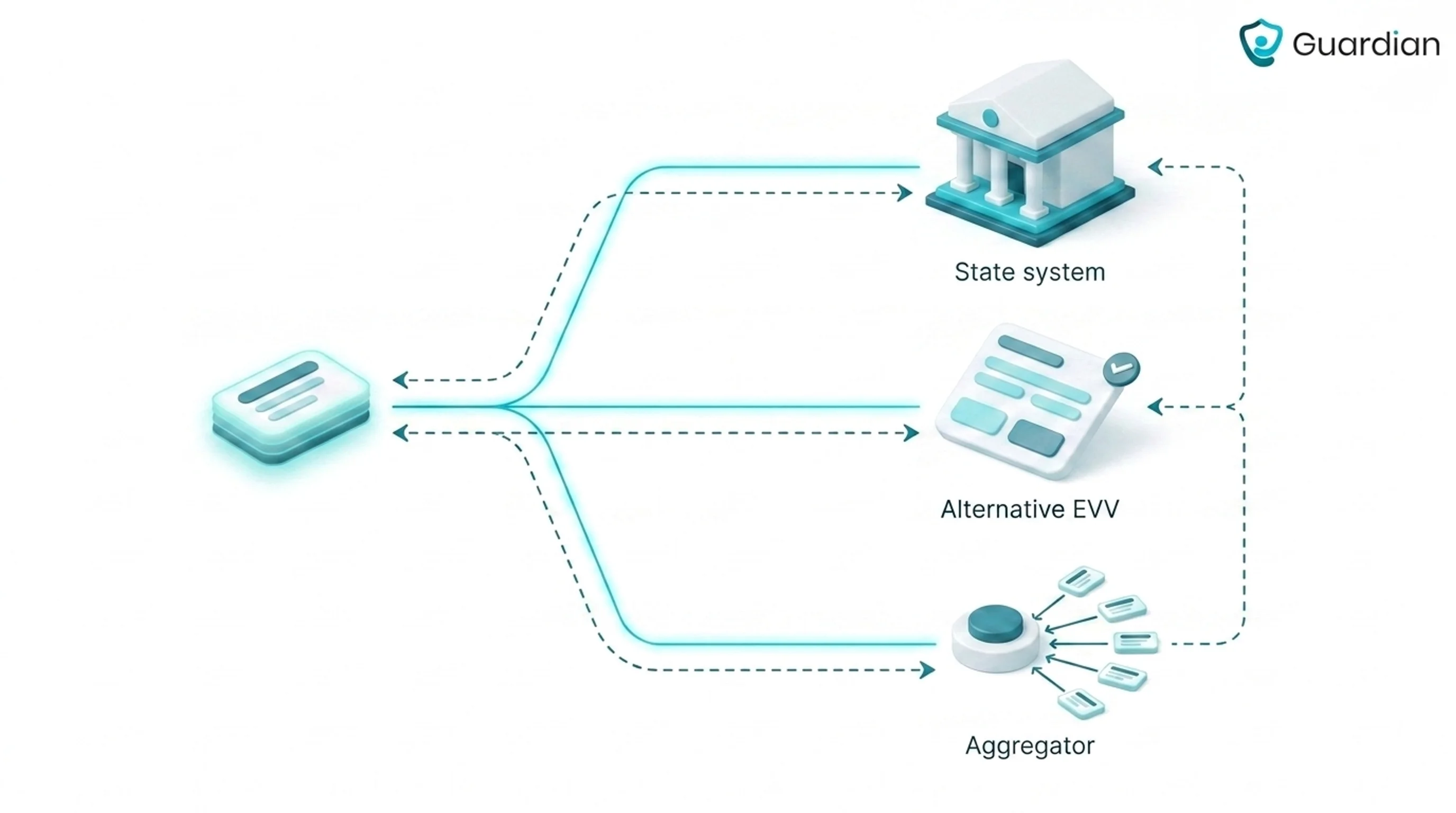
A state EVV system is selected or provided for a state program. Alternative EVV is a provider-selected system approved to send required data, while an aggregator receives EVV records for a state, payer, or MCO.
The applicable state, payer, MCO, and covered service determine which route an agency must use. In a state-selected model, the designated platform controls the required visit workflow.
Approval alone is incomplete for alternative EVV. Visit records still have to reach the designated destination in the required format, with rejected records returned for correction.
For each contract, confirm the designated receiving system before comparing product features. Some programs use Sandata or HHAeXchange; others use a state or payer endpoint.
Receiving system: the designated route for visit records
Submission rules: the required format and acknowledgements
Corrections: how rejected records return for review
How to choose EVV software
Choosing EVV software means matching verification reliability, compliance fit, and workflow fit to your payer mix, service model, and field conditions.
Start with six checks:
Offline reliability: A stored visit can still fail after reconnection. Compare retained timestamps, location evidence, sync status, and duplicate handling.
State and payer fit: State approval does not prove acceptance for every payer, MCO, service, or submission route.
Accepted verification methods: Match mobile GPS, telephony, fixed verification, and fallback options to program rules and real home environments.
Exception handling: Compare caregiver effort with supervisor cleanup, including ownership, approvals, reason codes, and the retained audit trail.
Downstream data flow: A clean clock-in is incomplete if the approved record fails in payroll, billing, claims, or the patient chart.
Total operational fit: Compare caregiver steps, office workload, implementation, interfaces, support, and contract terms alongside the software quote.
EVV software compared: workflow, compatibility, and pricing
Compare EVV software by following one visit from caregiver check-in through submission acceptance and downstream back-office use. For mixed-payer agencies, trace each contract separately, especially those requiring Sandata or HHAeXchange.
Tool set | Compared on |
|---|---|
The 9 EVV platforms below | Workflow, compatibility, and pricing |
The 9 best EVV platforms
The EVV platforms below all verify visits, but they differ in care setting fit, verification method, offline reliability, and state or aggregator connectivity. This list compares each one as an EVV system, not as generic agency software.
1. Guardian
Guardian combines sensor-based proof of service with safety alerts and operational oversight in Guardian Insight for home care and care facilities.
Best-fit care settings
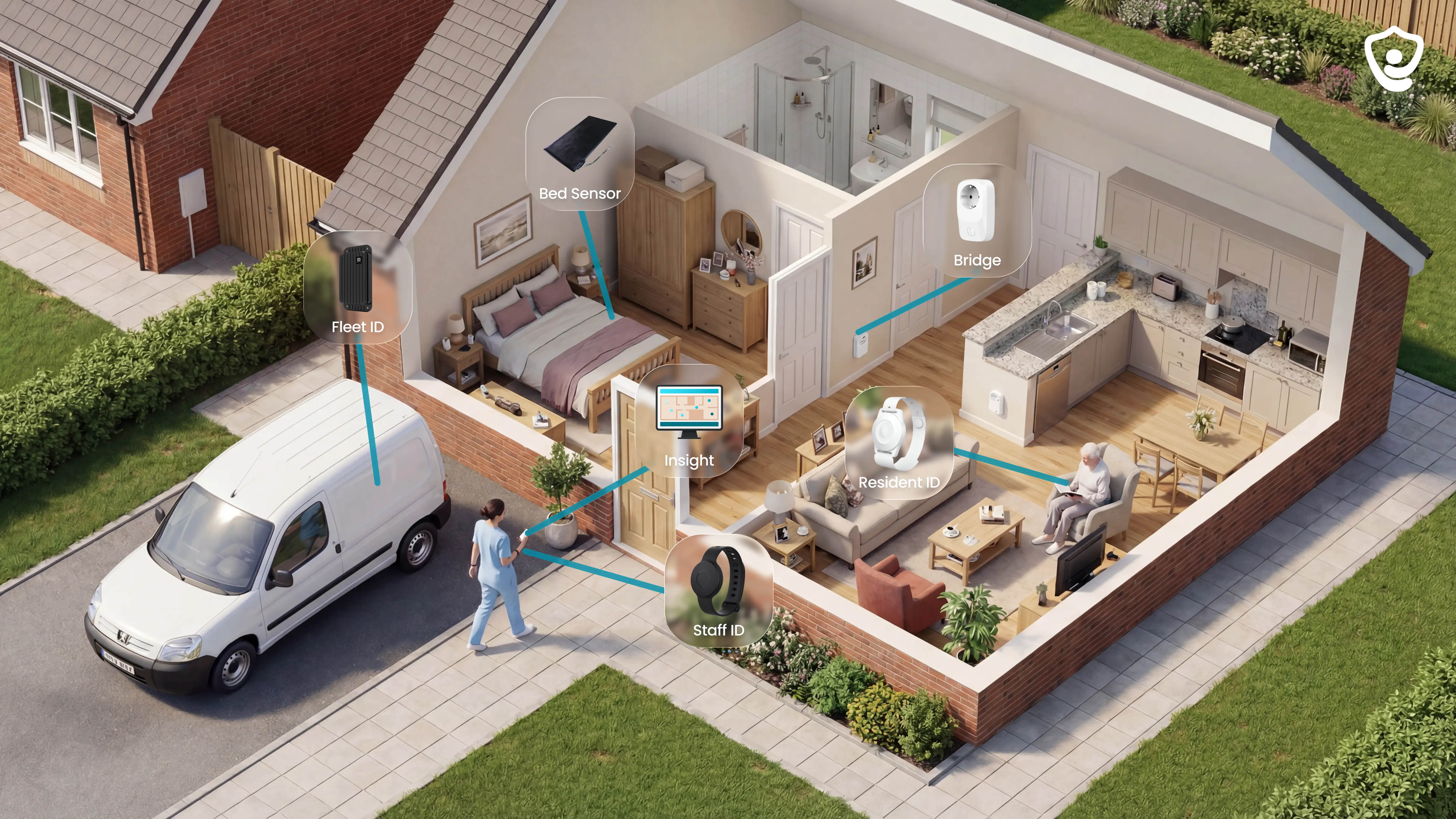
Home care and care home teams can use Guardian to tie visit proof to resident activity, safety monitoring, and low-interaction hardware.
The care model determines which sensors, wearables, and reporting rules belong in the deployment. Guardian can be scoped in the US or internationally, with local EVV and data requirements checked before rollout.
Guardian can suit:
Home care: automatic visit records, fleet visibility, and activity context between visits
Care homes: room-level rounds, bed-exit monitoring, and location-aware alerts
Specialist care: settings that need passive sensing and clear incident records
Mental-health services: selected environments where the care model supports camera-free monitoring
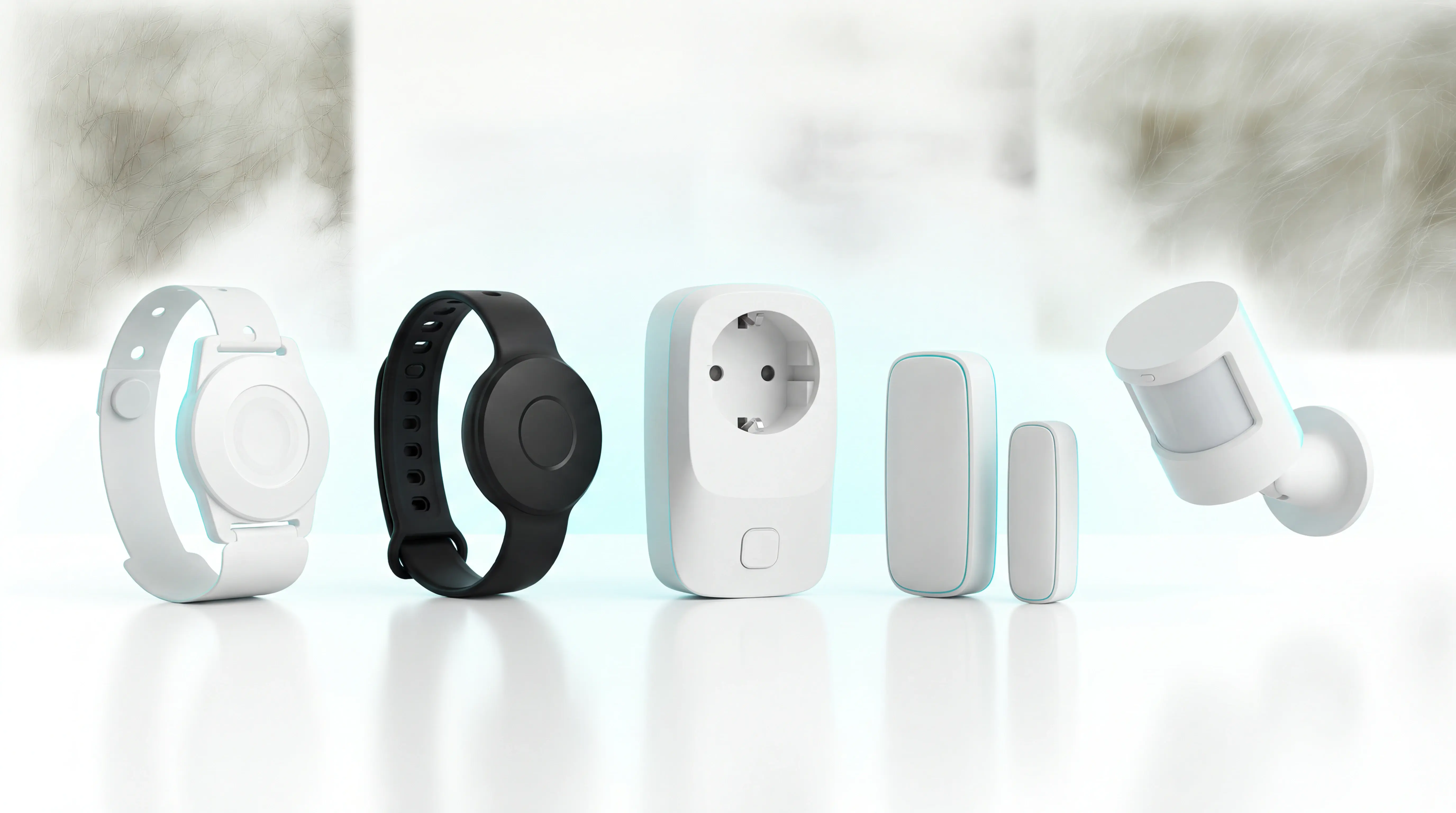
Passive sensing suits clients who may forget, remove, or avoid wearables. Guardian tracks movement and changes in daily routines without cameras or repeated client input.
Depending on the setting, Guardian combines passive room sensing with door and household-appliance activity. Bed sensors can track in-bed and out-of-bed status.
A wristband remains available for automatic fall detection, resident calls, and caregiver SOS. You can fit monitoring to the person rather than force every client into one interaction model.
Visit verification and proof of service
Sensor-based events establish proof of presence and activity. The resulting visit record links to alerts, routines, and device events rather than relying on GPS-only mobile check-in.
Guardian builds proof of service from the signals that establish a visit record:
Visit time: automatic arrival, duration, and departure records
Caregiver identity: the staff member associated with the visit event
Location: the home, room, or care area linked to the record
Care context: background activity from the sensors selected for that setting
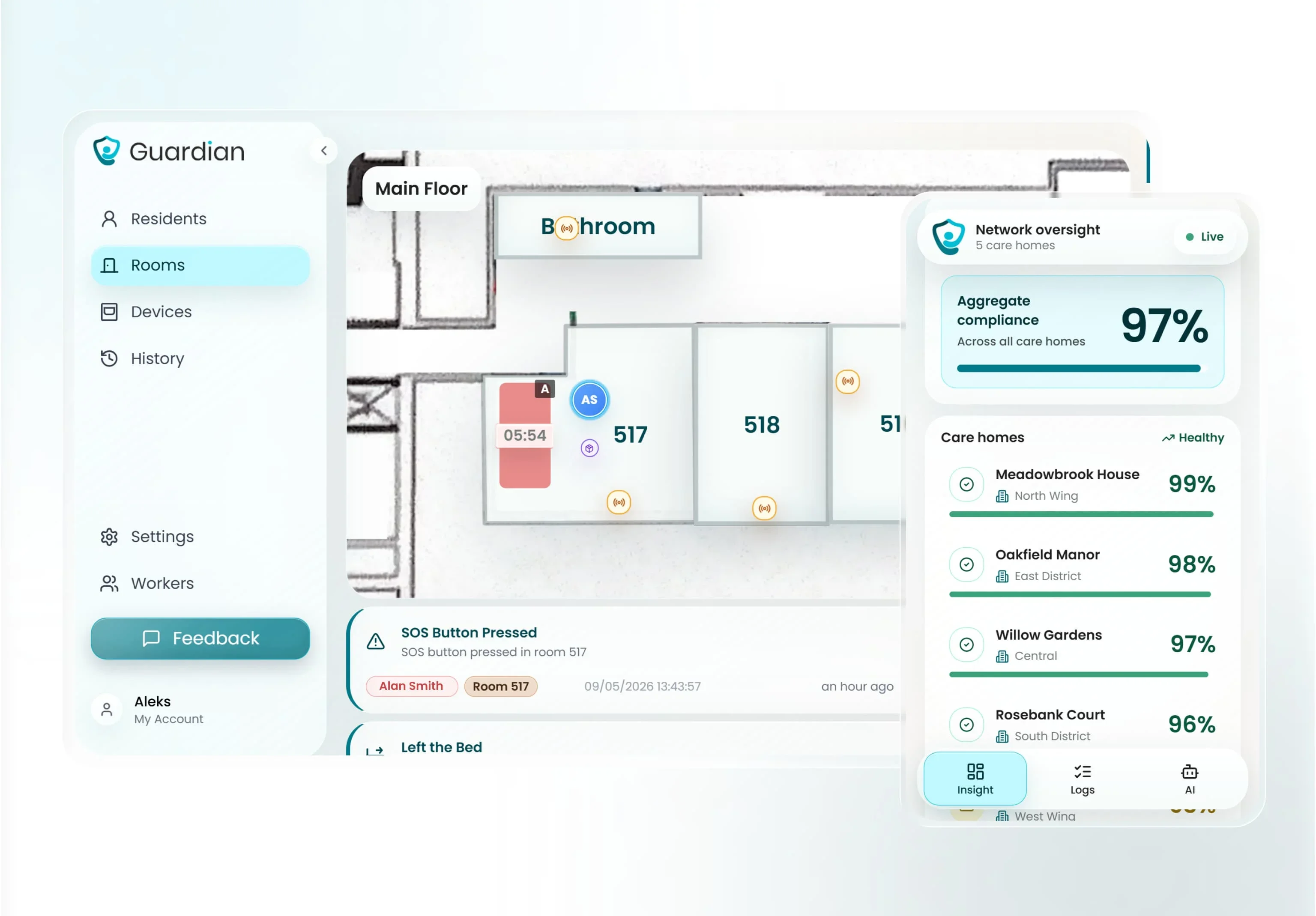
Guardian turns those signals into a chronological visit record in Guardian Insight, then filters sensor events against the alert rules you set. Staff receive an alert when a configured condition needs attention.
Each alert carries the resident's name and mapped location. It reaches Guardian Insight on phones, tablets, or nurse-station computers, so acknowledgement and response become part of the operational record.
What Guardian adds beyond EVV
Real-time safety monitoring extends Guardian beyond a verified visit. Sensor and wearable data trigger emergency alerts or flag routine-based exceptions with room-level location context.
Between verified visits, passive sensors and wearables can detect:
Bed exits: a resident gets up during a monitored period
Falls: the fall-detection wristband triggers an alert with location
Door events: a client leaves home or enters a restricted area
Routine changes: expected movement or household activity does not occur
Guardian connects attendance to resident safety by linking visit records with sensor events. A manager can see whether a caregiver reached the right room, how long the response took, and what activity preceded the alert.
Floor-plan mapping attaches each sensor to a room or bed, while configurable rules determine which events reach staff. Emergency contacts are managed in the same portal.
Workflow and reporting layer
Guardian Insight routes sensor-based alerts, maps incidents, manages contacts, and records activity in the background.
A configured event follows four steps:
Sensors or wearables capture the event.
Configured rules decide whether staff need an alert.
The portal shows the resident and mapped location.
The alert reaches existing phones, tablets, or nurse-station computers.
Guardian turns the workflow into records you can review:
Visit verification: timestamped arrivals, durations, and departures
Response performance: acknowledgement and response timing for configured events
Operations visibility: live status across residents, caregivers, vehicles, and tracked assets
Pilot evidence: agreed metrics, staff feedback, and an ROI calculation
The records give managers a factual basis for staffing, service reviews, and rollout decisions.
Buying considerations
A Guardian deployment brings EVV evidence together with passive safety monitoring and live operational visibility. Your local payer or state rules still determine whether Guardian's proof model satisfies the required EVV submission path.
Use this buying checklist before treating a Guardian deployment as audit-ready:
Visit time: confirm start time, end time, duration, edits, and the retained audit trail
Identity and location: confirm how Guardian records the caregiver and service location for each visit
EHR and patient chart: test whether documentation reaches the service record without manual re-entry
Payroll and claims: test how approved time flows into payroll, billing, and claims workflows
Eligibility and aggregator: confirm payer eligibility checks and any required state or payer aggregator connection
Guardian is wireless and pre-configured, with no drilling or cabling. A ward can go live in about a week, while commercial evaluation runs through a scoped 6–8 week pilot in one ward, home, or team.
The final report covers agreed operational metrics, an ROI calculation, and a rollout recommendation. Rollout terms are set after the pilot; Guardian has no public self-serve price.
2. HHAeXchange EVV
For Medicaid-funded home care, HHAeXchange records and validates care visits, retaining records for audit.
Best fit
Medicaid-funded home care agencies can assess HHAeXchange when a payer requires its visit-validation route and compliance controls.
For a mixed-payer agency, fit depends on how much visit volume follows Medicaid or payer-directed rules. Map every payer to its required capture, review, and submission route before comparing workflows.
The fit narrows in residential care settings that need room-level safety visibility between scheduled visits. Continuous resident monitoring and room-level safety alerts sit outside the scheduled-visit workflow evaluated here.
Private-duty agencies should compare HHAeXchange’s compliance structure with the scheduling flexibility and caregiver workflow they need.
EVV and workflow fit
Visits move from check-in proof through exception review to approval-ready records, with edits retained for audit.
Make exception cleanup and administrative review part of the demo. Test the four cases below end to end before judging the day-to-day workload.
Test the workflow with four cases:
Routine visit: Follow a complete record from check-in and check-out to acceptance.
Missing data: See what creates an exception and who must resolve it.
Edited visit: Check the approval path and retained audit history.
Rejected submission: Trace the correction, resubmission, and final status.
The EVV workflow evaluated here centers on scheduled visit verification. Continuous visibility into client activity between visits requires a separate monitoring layer.
Agencies that need live safety alerts, such as bed exits or falls, should plan a separate monitoring layer and define how those events reach staff.
State and aggregator compatibility
State-program compatibility depends on whether the Medicaid payer names HHAeXchange for the covered service and submission route.
Compatibility affects more than setup. A mismatched payer route can leave staff correcting records in one system while billing waits in another.
A mixed-payer agency still needs to confirm each route separately. HHAeXchange’s presence in one Medicaid workflow does not prove acceptance for every payer, service, or provider type.
Confirm five compatibility points before rollout:
Program scope: Which state program and service types accept HHAeXchange records?
Payer route: Does each payer receive data directly, through HHAeXchange, or through another required system?
Required fields: Which visit data must be complete before submission?
Correction rules: Who can edit a record, and what approval and audit history follow?
Offline contingency: What can a caregiver record without mobile signal, and when does the visit sync?
Pricing and buying considerations
Pricing is custom quoted. Program requirements and payer connectivity affect the implementation scope.
A useful quote mirrors the agency’s actual operating scenario. Give HHAeXchange the expected caregiver count and visit volume, then request separate line items for one-time and recurring work.
State-program configuration and payer connectivity should appear as named line items, so a mixed-payer agency can see which routes change the cost.
A short buyer check should cover the workflow details that affect daily administration:
Capture methods: Confirm whether mobile GPS, telephony, or a fixed device is included for each payer.
Offline behavior: Confirm what caregivers can record without signal and when the visit syncs.
Exceptions: Measure who reviews incomplete visits and how corrections move to approval.
Audit history: Check which edits, approvers, and timestamps remain exportable.
Submission: Test one accepted record and one rejection for every payer route.
Contract scope: List implementation, training, interfaces, and support separately.
3. Sandata EVV
For payer-required home care visits, Sandata records visit evidence and the compliance data needed for submission.
Best fit
The relevant buyer is an agency whose payer directs visits through a Sandata program.
Start with the payer and program named in the proposal. Requirements can differ by state and waiver.
Private-duty and mixed-payer agencies should map each payer separately. Confirm which visits require EVV, which approval flow applies, and where each completed visit must be submitted.
Sandata’s verified role is state EVV compliance and submission. Before treating it as a full agency platform, ask Sandata to document the operating model in the proposal:
Care settings: Which home care and home health services are supported?
Agency profile: Which deployment model and agency sizes does the quoted configuration cover?
Workflow scope: Which scheduling, billing, and care-management tasks sit outside EVV?
Program scope: Which payer programs are included in implementation and support?
EVV and workflow fit
Visit records move from check-in and check-out through exception review to approval, with edits retained for audit.
Capture methods and submission destinations depend on the state program and quoted configuration. Ask for a live demonstration of every method your caregivers will use:
Mobile: GPS capture, geofencing rules, and clock-in or clock-out steps
Telephony: Caller validation, accepted phone types, and failed-call handling
Fixed verification: FOB or fixed-device setup, assignment, and replacement
Backup: The approved process when the primary method fails
Treat offline behavior as an acceptance-test item. Ask a caregiver to complete this sequence during the demo:
Start a visit with the device in airplane mode.
End the visit before reconnecting.
Restore service and show when the record synchronizes.
Display the timestamps, location evidence, exception status, and duplicate protection.
Put the supported offline duration and any device restrictions into the contract.
Sandata’s compliance-first fit makes exception handling central to evaluation. Use a sample visit with a missing location or invalid time and inspect:
Exception queue: The reason code and assigned owner
Correction: Who can edit the record and which approval is required
History: The original value, corrected value, user, and timestamp
Submission: Rejection messages, resubmission steps, and final status
Controls: Rules for missed visits and invalid entries
State and aggregator compatibility
State and aggregator compatibility depends on the Medicaid program's required submission route, not a state name alone.
Verify the named Medicaid route before treating Sandata as a submission option:
State program: Which program names Sandata?
Payer: Which payer accepts the route?
Service: Which covered service codes use it?
Destination: Is Sandata required or an approved alternative-EVV route?
Obtain the program’s official EVV page or provider manual and match it to the proposal. Confirm the required system, covered services, submission destination, and approved alternative-EVV route.
Sandata can be the destination for EVV data from another agency system when a Medicaid program requires Sandata submission. The pathway varies by state and program.
Ask the program administrator and both vendors to confirm:
Route: Direct Sandata capture or third-party EVV submission
Exchange: Supported interface, file format, and transmission schedule
Data: Required visit fields and identifier mapping
Response: Acknowledgement, rejection, correction, and resubmission flow
Plan for state-specific configuration because accepted visit fields, exceptions, and submission rules can differ by program.
Require a written implementation plan that addresses:
Enrollment: Program registration, credentials, and trading-partner steps
Mapping: Payer, service code, caregiver, and client identifiers
Testing: Test cases, acceptance criteria, and required certification
Cutover: Launch sequence and responsibility for rejected records
Change control: Updates when the state changes its EVV rules
Pricing and buying considerations
Compare vendor-led quotes by the implementation and connectivity they cover, then by contract terms.
Sandata does not publish a public EVV rate card. Request an itemized proposal that separates:
Software: Recurring platform, user, visit, or agency fees
Implementation: Configuration, data migration, and project management
Connectivity: Interfaces, aggregator submission, and maintenance
Enablement: Training, documentation, and administrator support
Changes: New payer programs, state updates, and change-order rates
Put state-specific configuration and workflow flexibility into the proposal as contract questions before signing:
Who owns the visit data, and which export formats are available?
What are the initial term, renewal, termination, and early-exit terms?
Which implementation milestones and customer dependencies affect launch?
Which integrations are included, and what triggers a change order?
What support hours, escalation routes, and response commitments apply?
Who handles configuration changes after a state-program update?
4. EVV by AxisCare
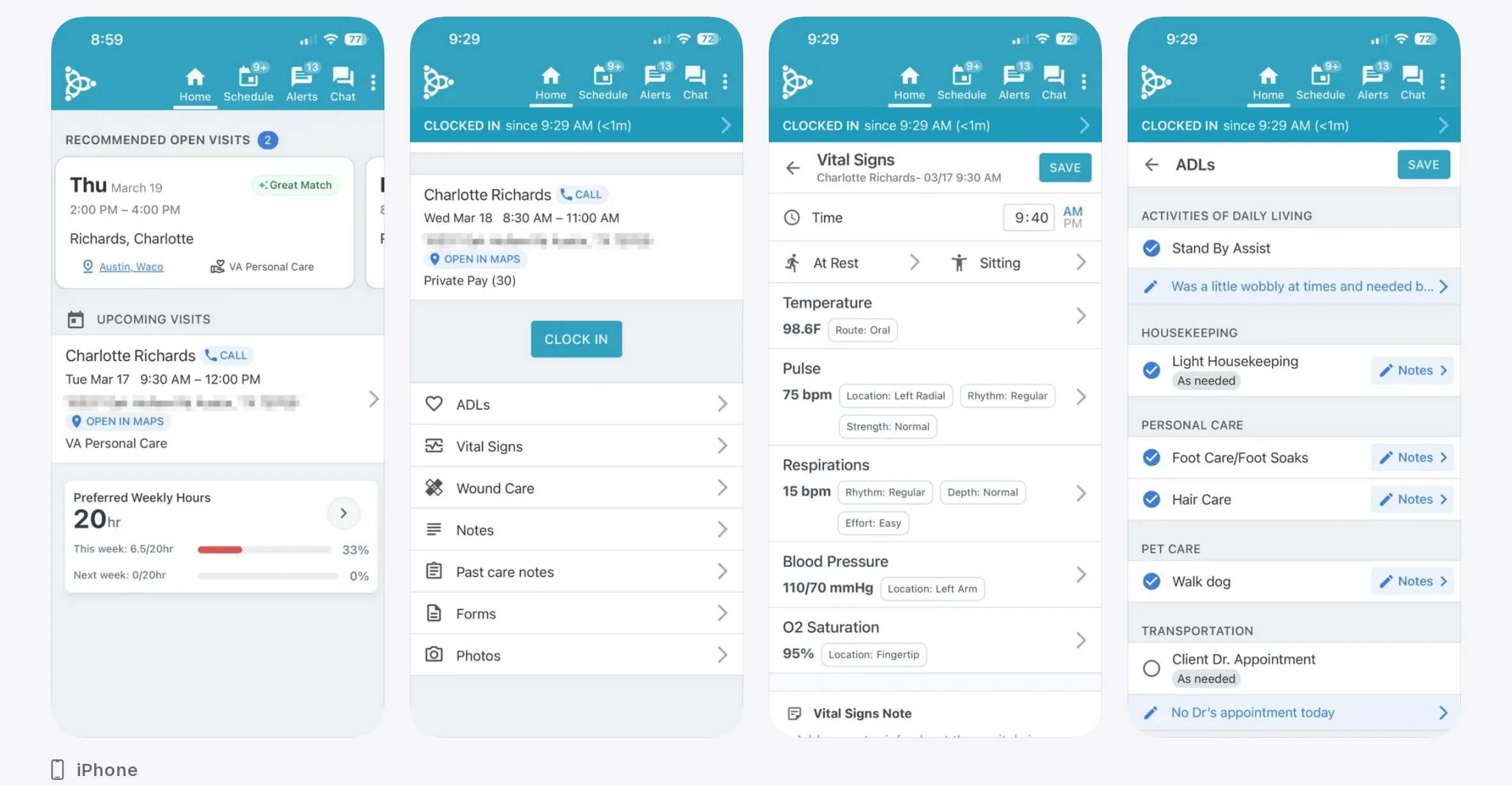
Built for home care, AxisCare EVV links scheduling to GPS-based visit verification. Billing and point-of-care documentation are part of the wider platform.
Best fit
EVV linked to scheduling makes AxisCare relevant to home care agencies whose work centres on caregiver visits.
The fit narrows for agencies serving mixed payers or low-service territories. These buyers need proof that required submissions, field exceptions, and connectivity gaps will be handled correctly.
EVV and workflow fit
The documented workflow links GPS-based EVV with scheduling. AxisCare also covers billing and point-of-care documentation at the wider platform level.
State and aggregator compatibility
Sandata and HHAeXchange appear in AxisCare's EVV integration documentation. State-program acceptance still depends on the named payer and covered service.
Validation should cover:
Program rules: required visit data for each state and payer
Submission path: direct connection or transfer through an aggregator
Corrections: rejected records, manual edits, and audit history
Offline synchronization: AxisCare documentation describes records that synchronize after the device reconnects. Test the timestamp and exception history.
Pricing and buying considerations
Pricing requires a direct quote that identifies the included plan, EVV scope, implementation work, and interface fees.
Request a written scope before comparing quotes:
Included modules: EVV, scheduling, billing, and documentation
Deployment costs: setup, training, support, and data migration
Connectivity costs: aggregator or state-interface fees
Field testing: check-ins, exceptions, and synchronization in low-service areas
5. Alora EVV
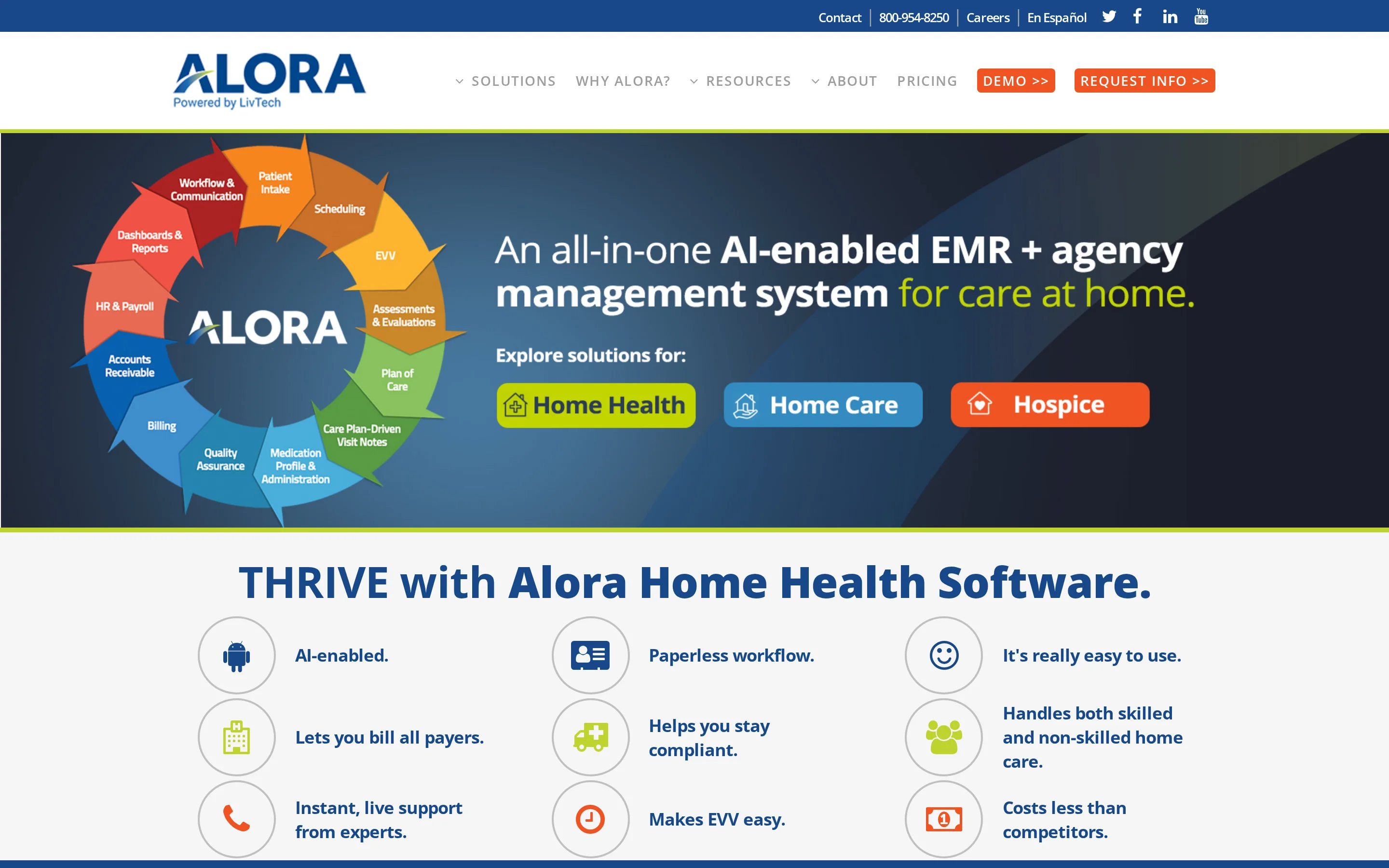
Alora's public materials describe EVV within its home health software. Buyers should still verify the Medicaid program, payer, and submission route used by their agency.
Best fit
Home health agencies are the relevant buyers to evaluate Alora's EVV workflow. For Medicaid, ask Alora to name the supported state program, payer or MCO, service type, and submission route.
A mixed-payer agency should test Medicaid and private-pay visits in the same schedule. The demonstration should show how payer type changes visit rules and the approval-to-export path.
EVV and workflow fit
Use a demonstration to confirm the visit-capture method, offline behavior, and documentation handoff in your agency's configured workflow.
Use one caregiver visit to test the complete workflow:
Visit method: Identify whether caregivers use a mobile app or an alternative, then demonstrate clock-in and clock-out.
Offline use: Complete a visit without connectivity. Restore service and show the retained timestamps.
Corrections: Edit an incorrect visit and show the approval trail, including the reason code.
Documentation handoff: Follow an approved visit into home health documentation and the payer-facing process.
Exceptions: Trigger a missed visit and show how supervisors receive and resolve it.
State and aggregator compatibility
Confirm Alora support for your agency's state program, payer or MCO, service type, and aggregator route.
The test should use your agency's actual state and required aggregator. Use a real Medicaid service code so routing and rejection handling are visible.
Pricing and buying considerations
Request a written quote that names included EVV components and package scope. The quote should also state the monthly cost.
Require the quote to separate:
Software scope: Core home health software and EVV inclusion or add-on status.
Implementation: One-time setup, including migration and training.
Usage charges: Per-seat limits and any visit-based fees.
Connectivity: State submission or aggregator charges.
Contract: Minimum term and renewal terms, with the included support level.
Data exit: Available exports and termination assistance.
Before signing, run one representative Medicaid visit from capture through accepted submission. Repeat the test offline and confirm that the contract names every required connector.
6. CareSmartz360 EVV
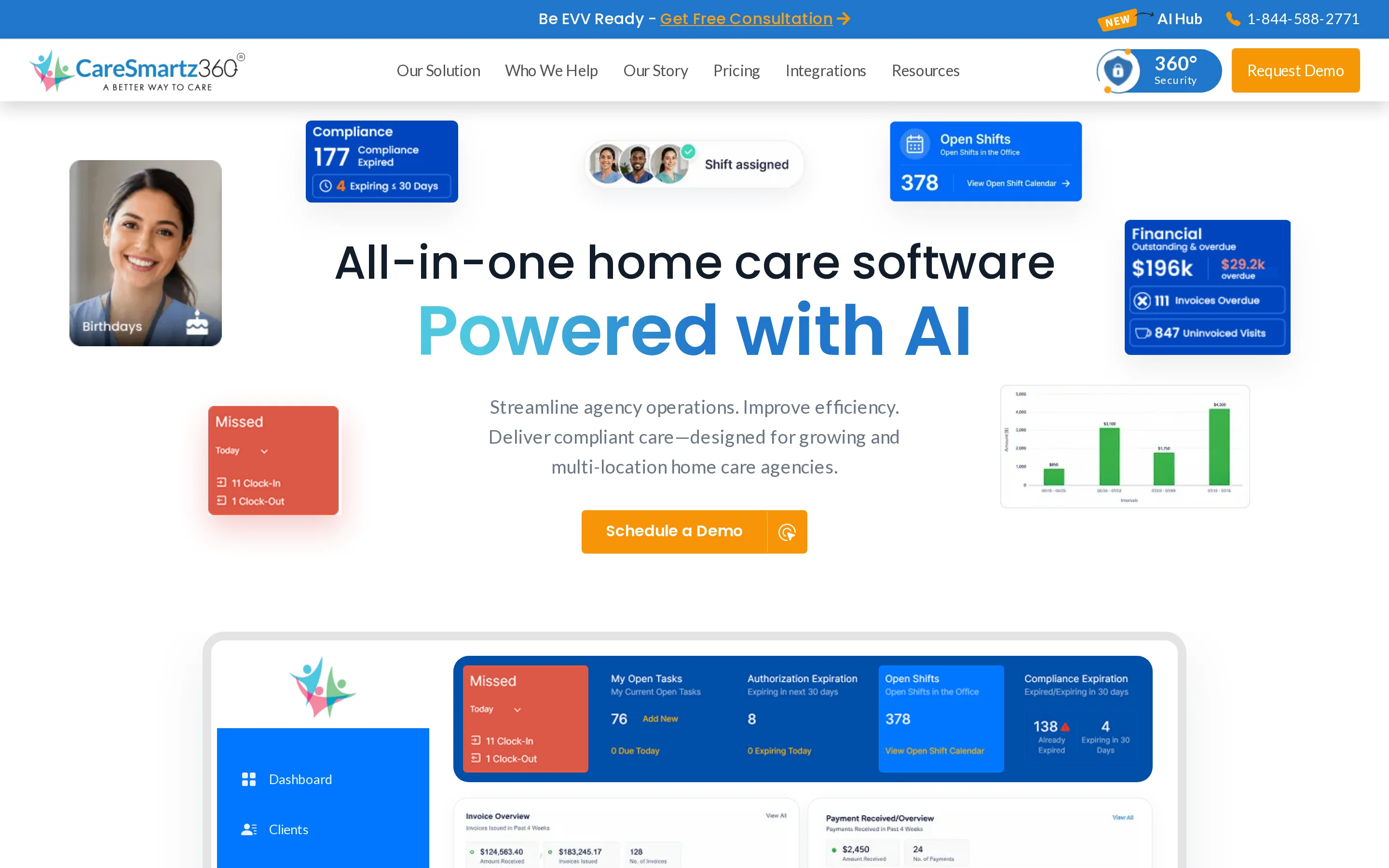
CareSmartz360 places EVV inside its home care management suite, linking it to scheduling and billing. Documentation and caregiver visit tracking are part of the same system.
Best fit
Home care agencies seeking EVV within their CareSmartz360 operating system should assess how it connects scheduled visits to billing and documentation.
Field reliability needs a route-level test. Run an assigned visit on the oldest supported phone and a weak-signal route, then check whether the visit syncs without missing or duplicate records.
EVV and workflow fit
Run a demo that follows a scheduled caregiver visit from assignment through payroll and billing, with documentation and approval along the way.
Test the workflow from assignment to approval:
Change a scheduled visit and confirm the update reaches the caregiver.
Clock in and out, then inspect the visit record and exception status.
Add a care note and confirm whether edits remain tied to the original visit.
Approve hours and trace what passes into payroll and billing.
State and aggregator compatibility
Acceptance depends on the particular state program and payer route. Require CareSmartz360 to identify the matching aggregator connection and service type.
Written confirmation should cover every operating state and payer. General EVV product claims do not establish acceptance by a named Medicaid program.
Validate compatibility in this order:
State approval: Obtain a current list of approved alternative EVV states.
Payer route: Map each Medicaid payer or MCO to its required submission path.
Aggregator connection: Confirm direct support for the required receiving system and its acknowledgement, correction, and resubmission workflow.
Exception handling: Submit an edited visit and a rejected record, then verify resubmission and status messages.
Pricing and buying considerations
Get CareSmartz360's billing unit and census rules in writing before comparing quotes.
The cost comparison depends on the billing unit and modules included in the quote. Mixed-payer agencies should use the same census period and implementation scope across proposals.
Use these questions to make quotes comparable:
Does billing use the monthly highest count or average census?
Are paused or discharged clients removed immediately?
Does the quote include EVV and scheduling?
Are the back-office modules bundled or itemized?
Which implementation and training charges apply?
How does the invoice change as census falls or rises?
What device and low-signal tests must pass before rollout?
7. WellSky Personal Care EVV
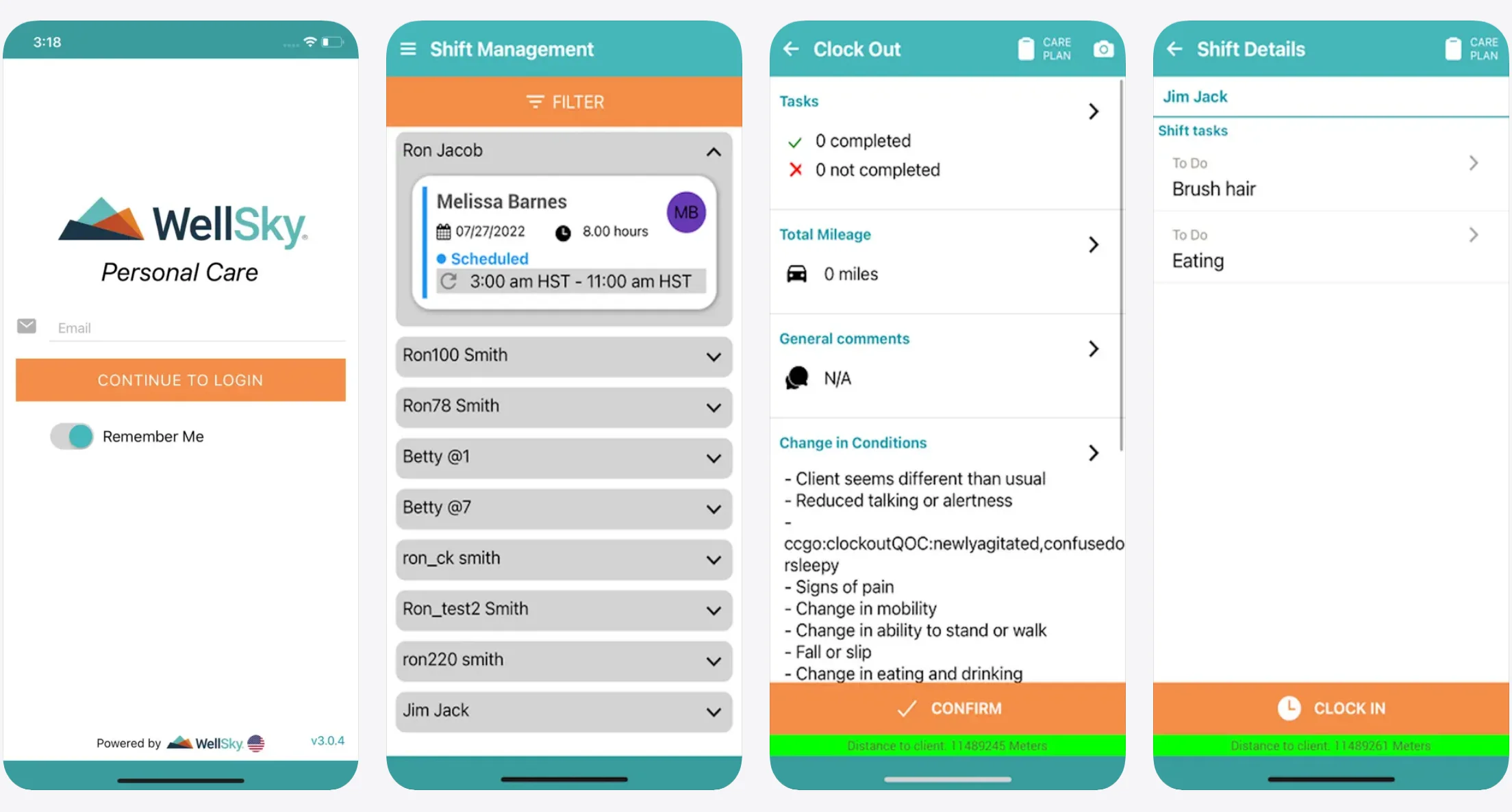
WellSky Personal Care EVV records home-based personal care visits and related workflow data for personal care agencies.
Match the quoted setup to each payer program. Test field connectivity and administrative workflow during the demonstration.
Best fit
Personal care agencies should assess whether WellSky's quoted setup fits their home-based care operations.
For a mixed Medicaid and private-duty agency, fit depends on how each payer workflow handles scheduling, documentation, and supervisory review.
Use these questions to define fit before requesting a quote:
Service scope: Does the quoted setup cover personal care only, or does it include your home health service lines?
Payer mix: How does WellSky separate Medicaid EVV requirements from private-duty visit records and billing?
Operating volume: Which limits or charges change with active caregivers, office users, clients, or monthly visits?
System boundaries: Which scheduling, documentation, billing, and payroll functions are included or connected?
EVV and workflow fit
A live demonstration should show how WellSky records in-home personal care visits and the records connected to each visit.
Treat the mobile, telephony, and offline paths as demo questions. Require a live demonstration using your visit types and a weak-connectivity scenario.
The workflow test should cover:
Caregiver arrival: Open an assigned visit and show the available check-in methods, captured time, caregiver identity, and location proof.
Offline visit: Disable cellular service, complete the record, reconnect, and inspect synchronization status plus conflict handling.
Missed visit: Show the alert, the staff member who receives it, and the steps taken before the visit is closed.
Correction: Edit a clock time or visit detail, enter a reason, and route the change for supervisor approval.
Audit record: Compare the original and revised entries, including timestamps, location, approver, and change history.
State and aggregator compatibility
Compatibility must be confirmed for each submission program used by the agency.
Begin with the agency's contracts. Confirm each state program and payer or MCO, then verify the service type and aggregator route.
Request written confirmation for each program, then test the full submission cycle:
Program: Name the state, payer, MCO, service code, and population covered by the confirmation.
Submission path: Confirm whether data goes directly to the state, payer, MCO, or another named receiving system.
Required fields: Map caregiver identity, visit time, location, service details, and exception codes to the receiving system.
Rejection handling: Submit one valid visit and one invalid visit, then correct and resubmit the rejected record.
Status evidence: Confirm where staff can see acceptance, rejection, edits, approvals, and resubmission history.
Pricing and buying considerations
A WellSky quote must state the billing unit and implementation scope before it supports a real comparison.
Ask for a written quote that separates:
Subscription: Base fee, billing unit, minimum commitment, and charges for caregivers or office users.
Implementation: Configuration, data migration, administrator setup, and caregiver training.
Connectivity: Fees for each state, payer, MCO, aggregator, interface, or export workflow.
Support: Included support level, response terms, and charges for added assistance.
Change costs: Fees for adding a program, service line, location, or integration after launch.
Admin workload: Have a coordinator correct a rejected visit and approve an edit, then record the steps and elapsed time.
8. Axxess EVV
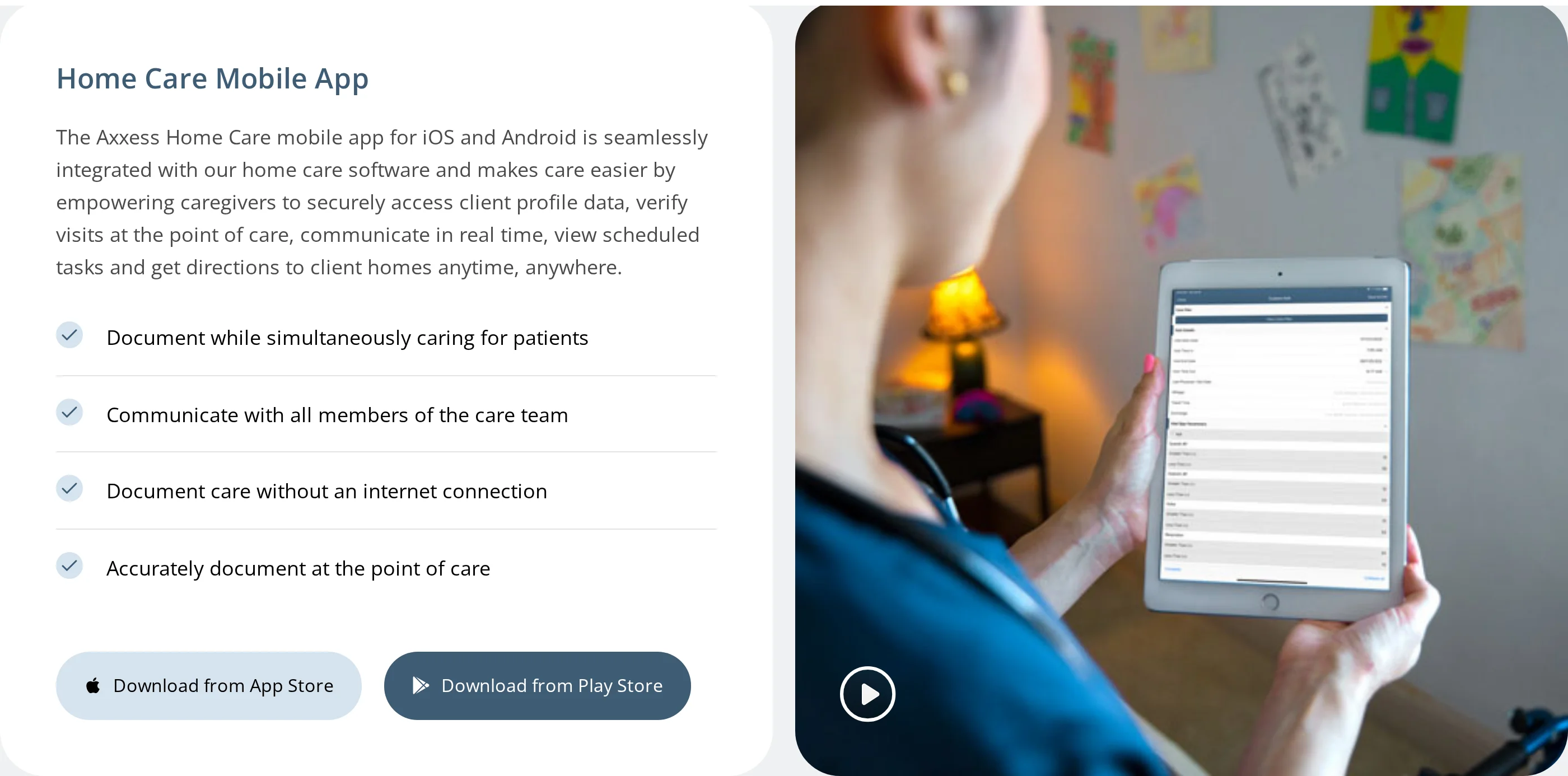
Within Axxess home-based care software, EVV ties verified visits to visit-task workflows.
Best fit
Consider Axxess when home care, home health, or hospice workflows need EVV within the same proposed software scope. Mixed-payer agencies should confirm the configured workflow for each Medicaid and non-Medicaid contract.
For a mixed-payer agency, the buying question is whether the proposed setup can support each contracted workflow without duplicate entry.
Map the setup against Medicaid EVV requirements and non-Medicaid visit documentation. Ask Axxess to show where payer-specific rules diverge and how staff manage those differences.
Agencies seeking only visit capture should compare the required modules, implementation work, and administration against standalone EVV products. The trade-off depends on how much of the broader suite the agency will use.
Request an EVV-specific scope before comparing quotes. For mixed payers, compare the administration required across Medicaid and non-Medicaid visits.
EVV and workflow fit
A complete demonstration should trace one visit from caregiver verification and visit tasks through supervisor approval and downstream records.
Ask Axxess to demonstrate one visit from start to finish:
Assignment: how the scheduled visit reaches the caregiver
Arrival: how the system verifies the visit
Care tasks: where required work is recorded
Review: how a supervisor handles edits and exceptions
Downstream use: how the approved record reaches payroll, billing, or claims
Manual re-entry between these stages changes the staffing burden, so the demonstration should use your agency's actual visit workflow.
Mixed urban and rural coverage makes offline behavior a buying requirement. Test the caregiver workflow in a weak-signal area, then inspect the supervisor record after connectivity returns.
Require clear answers on:
Verification method: GPS, geofencing, telephony, fixed device, or another accepted method
Offline capture: which events can be recorded without service
Delayed sync: when stored data uploads and how duplicates are prevented
Unsent visits: how supervisors identify records still waiting to sync
Corrections: who can edit a visit and what the audit trail retains
State and aggregator compatibility
Axxess publishes EVV information for state and aggregator workflows, but compatibility still requires confirmation for each Medicaid program, MCO contract, and aggregator route. Buyers should require a test submission through every contracted route before rollout.
Treat Axxess's published information as a starting point, then obtain confirmation for every state Medicaid program, payer, and aggregator route in your footprint.
For mixed payers, separate required Medicaid submissions from internal records for private-pay and home health visits.
Ask Axxess to identify the approved submission path for each contract before implementation.
Build the compatibility review around four questions:
Program coverage: Which state Medicaid programs and MCO contracts will the configured product support?
Submission route: Does data go directly to the payer or through the required receiving system?
Exception workflow: How are edits, approvals, rejected submissions, and resubmissions recorded?
Audit record: Which visit details remain available for payer review?
Run one test visit through every required submission route before rollout. A successful clock-in is incomplete if the record later fails the payer's acceptance rules.
Pricing and buying considerations
Axxess pricing is quote-based within its broader home-based care platform. Agencies should confirm EVV packaging and the full cost of required modules, implementation, interfaces, and support.
Ask the quote to separate:
EVV access: the verification functions included
Required modules: the broader platform components needed to run EVV
Implementation: configuration, data setup, and workflow mapping
Training and support: initial training and ongoing assistance
Commercial conditions: user, visit, location, or contract minimums
Connections: any cost tied to state or aggregator submission routes
Use the full quoted scope to calculate first-year cost. A headline software fee would omit implementation and required operating components.
Compare the total quote with the scope your agency will use across Medicaid and non-Medicaid visits. A broader platform can feel costly for EVV-only needs when required modules or implementation exceed the operational benefit.
Compare each quote against the same requirements:
Visit verification and weak-signal capture
Exception handling and visit edits
Supervisor approval and audit history
State, MCO, and aggregator submission routes
Onboarding, training, and ongoing support
Keep the agency assumptions consistent across quotes, including payer mix, operating locations, caregiver access, and required reporting.
9. MatrixCare EVV
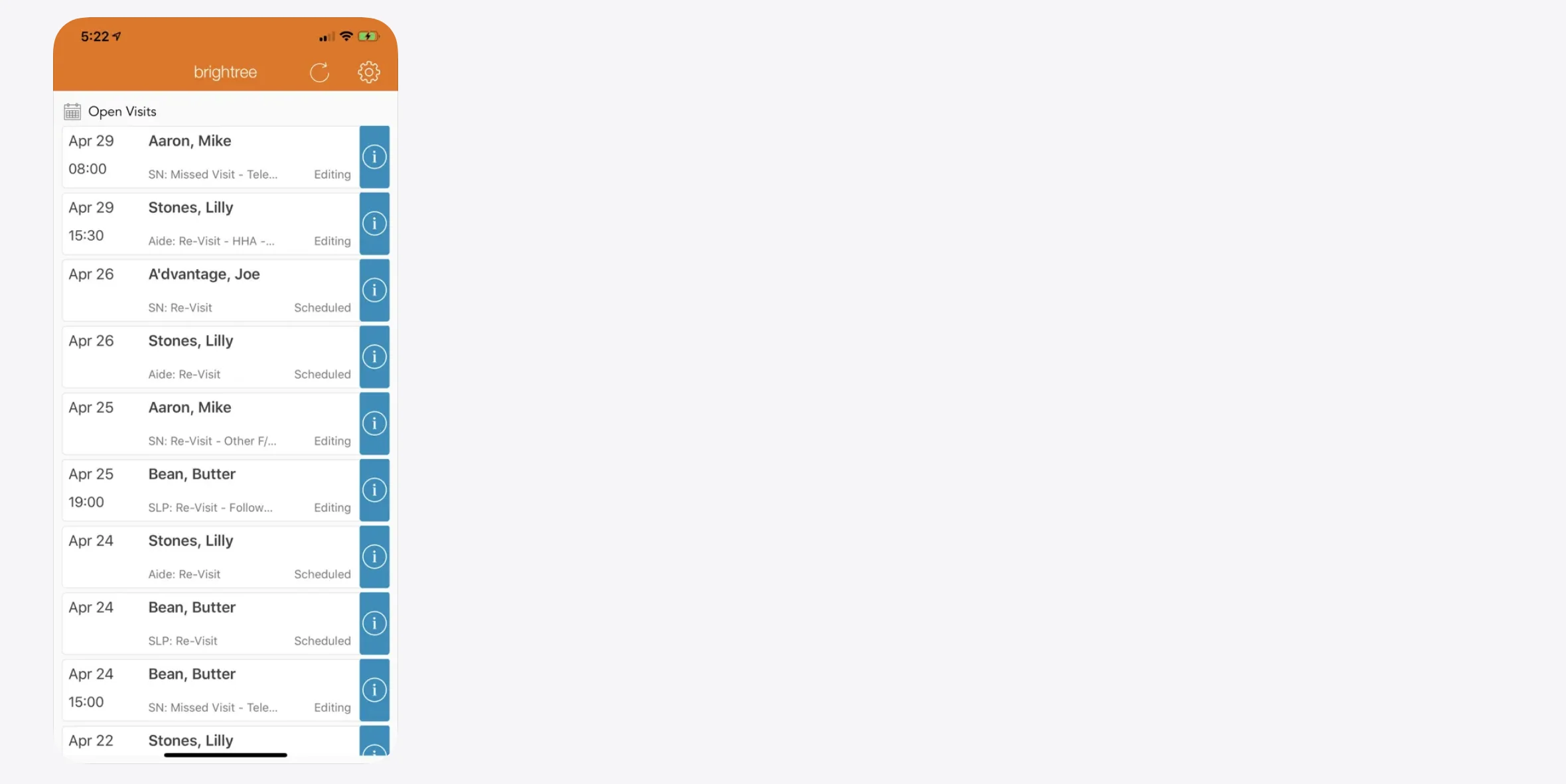
Within MatrixCare's home-based care software, EVV supports visit verification alongside operational or clinical workflows.
Best fit
Assess fit by testing whether the proposed configuration can run the agency's service lines and payer workflows without duplicate entry.
Before treating that stack fit as proven, ask MatrixCare to configure the demo around your service lines and payer mix:
Service lines: Show home care, home health, or mixed workflows.
Payers: Run Medicaid and private-duty visits through their actual approval paths.
Roles: Show distinct caregiver, scheduler, and supervisor views.
Click depth: Count taps and screens for documentation, missed visits, and approvals.
EVV and workflow fit
Start by tracing a verified visit into the operational record. Ask MatrixCare to demonstrate the configured path without manual re-entry.
Use a task-based demo instead of a feature tour:
Open a scheduled visit and count the taps required to check in.
Complete the care note, then check out.
Create an invalid or missed visit, correct it, and request approval.
Repeat the visit without a signal and inspect what survives synchronization.
Trace the approved record into one downstream system, such as payroll.
Test every capture method included in the proposed contract.
Compare the caregiver steps with the supervisor steps for each task. Ask how corrections preserve original timestamps and audit history.
State and aggregator compatibility
MatrixCare integration references do not establish support for a specific state program, payer, or transmission route. Confirm the configured route for every contracted service.
A general EVV reference is less useful than one using the same state program and payer model. Require the supported route in the order form or implementation scope.
Pricing and buying considerations
MatrixCare EVV pricing requires direct confirmation because no public rate card is available. Compare written quotes by scope rather than headline subscription cost.
Require the quote to separate these contract items:
Pricing basis: Per caregiver, client, branch, visit, or platform bundle.
Included modules: EVV alone or a wider MatrixCare agreement.
Upfront fees: Implementation, training, migration, and mobile access.
Connectivity fees: State interfaces and aggregator setup by program.
Contract terms: Initial term, renewal, minimums, and exit conditions.
Rule changes: Responsibility for updates after state requirements change.
Support: Escalation path and response targets for failed transmissions.
Run the timed demo before signing. Compare task timings and the corrected-visit workflow against the commercial terms in the same evaluation.
How to shortlist the right EVV system
The right EVV system matches your payer and state requirements, supports verification methods caregivers can use, stays reliable in weak-signal conditions, and reduces exception cleanup by fitting billing and audit workflows.
Pass every contract gate. Keep only vendors accepted for each required payer, MCO, state program, covered service, and submission route.
Match verification to field conditions. Keep only systems whose primary and fallback methods work across the homes, devices, and connectivity conditions caregivers face.
Pass offline synchronization. Require preserved event times and location evidence after one clean sync, with no duplicate visit or manual re-entry.
Keep corrections auditable. Require original values, reason codes, approvers, timestamps, and resubmission status.
Trace approved data downstream. Keep only systems that move the accepted visit into the required chart, payroll, billing, or claims workflow.
What to ask in an EVV demo
An EVV demo should show how the system captures visits, handles offline and fallback methods, routes approved data, and records exceptions, edits, and audit trails under your payer and state rules.
Verify a visit from check-in to check-out
Use a scheduled Medicaid visit. Have the caregiver check in through the primary method, record the required service, and check out.
Repeat the visit with the fallback method after forcing GPS drift or disabling the primary device. Pass if both records identify the method used and retain the required visit evidence.
Complete a visit in airplane mode
Turn on airplane mode before check-in, record the service, and check out while disconnected.
Restore the connection and inspect the synced record. Pass if event times, location evidence, and sync status survive without duplicate or conflicting data.
Follow approved data downstream
Approve one Medicaid visit and one private-duty visit. Trace each record into the caregiver timesheet and the correct billing workflow.
For the Medicaid visit, continue into the required submission queue. Pass if staff can see acceptance or rejection and correct a failed submission without rebuilding the visit.
Correct an exception and inspect the history
Seed four cases:
A late check-in
The wrong caregiver
An invalid location
An offline visit awaiting sync
Have a supervisor correct one case, reject another, and approve a third. Pass if the audit history preserves original and revised values, the person who changed them, timestamps, and approval status.
End the demo after the vendor shows the new submission status and the retained correction record.
When EVV alone is not enough
EVV alone provides verified visit proof, not the continuous safety, workflow, and between-visit context that higher-risk care operations need.
Visit verification is one part of the decision when managers need to understand between-visit activity and respond to live exceptions. Compare each platform’s live visibility and exception handling rather than treating the visit record as the whole system.
Between-visit visibility matters when passive signals must identify activity changes without asking the person to press a button or wear a device.
A broader operational layer can flag changes between caregiver visits:
Movement and bed activity: See whether expected activity continues; identify a bed exit or prolonged out-of-bed event.
Doors and household routines: Flag a configured exit or entry; spot a missed fridge or stove routine.
Guardian Insight combines caregiver arrival, visit duration, schedules, incident history, active alerts, and between-visit activity in one operational record.
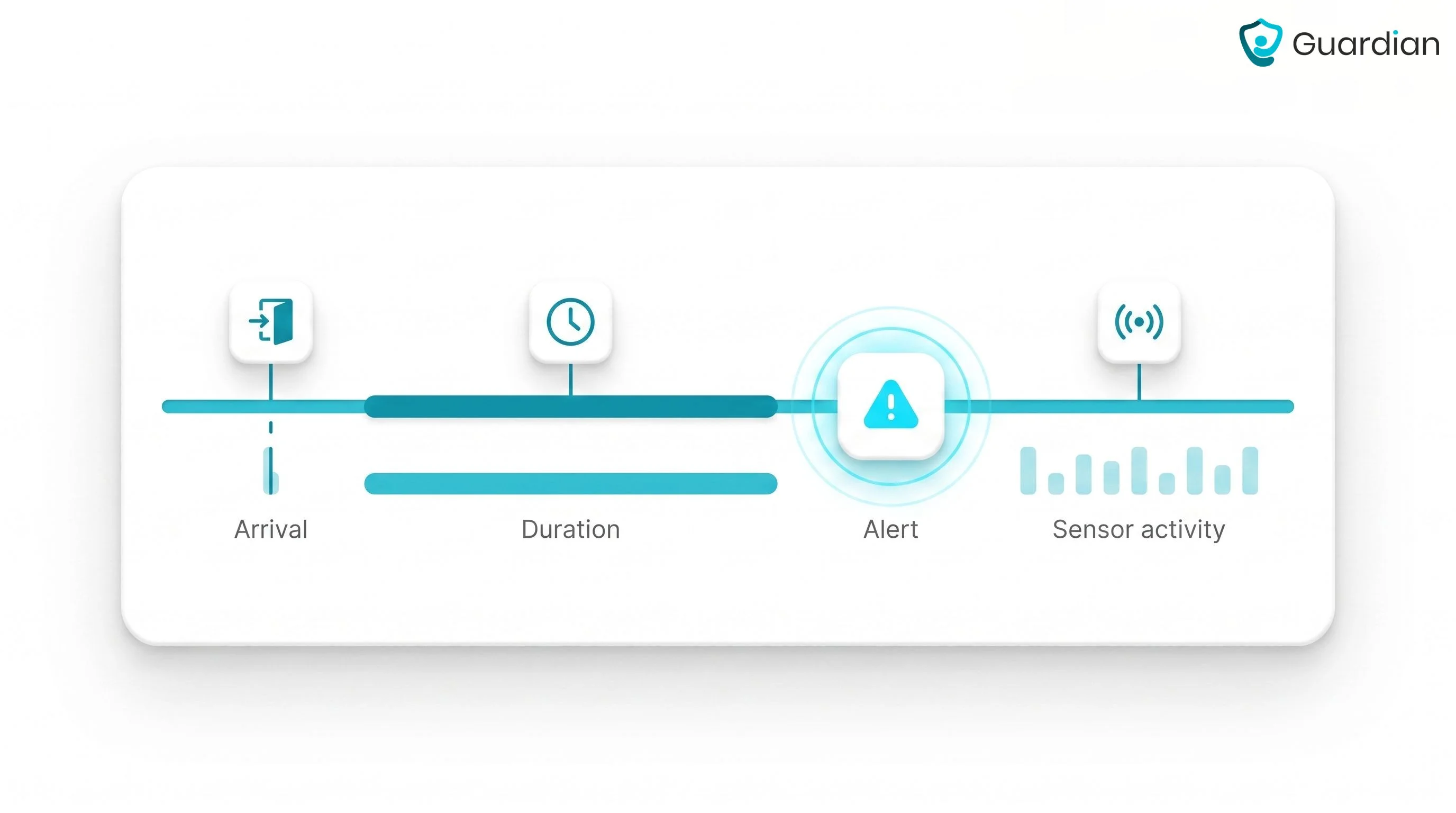
When something changes between visits, Guardian can surface the exception from passive sensor activity instead of waiting for the next scheduled check.
Configured rules can flag changes in daily routines or a person’s bed and location status:
Routine changes: Inactivity beyond the period your team sets, or missed expected fridge use.
Bed and location events: A bed exit, an extended out-of-bed period, a building exit, or a restricted-area entry.
Facility alerts can carry mapped room or bed context. In home care, the alert is tied to the monitored client's sensor activity.
See care operations, not just verified visits, with Guardian
Care-operations visibility puts resident activity and response context beside visit logs. Guardian adds both to the visit-verification workflow.
Passive sensors track daily activity across the care setting. Automatic visit records keep service history attached to the same operational picture.
Guardian filters sensor activity against rules your team configures, so staff receive alerts when a defined event needs attention.
Rules can cover daily routines and bed or location events:
Routine changes: No movement for a configured period, or expected fridge activity that does not occur.
Bed and location events: A resident remaining out of bed beyond the set limit, or an exit or restricted-area entry.
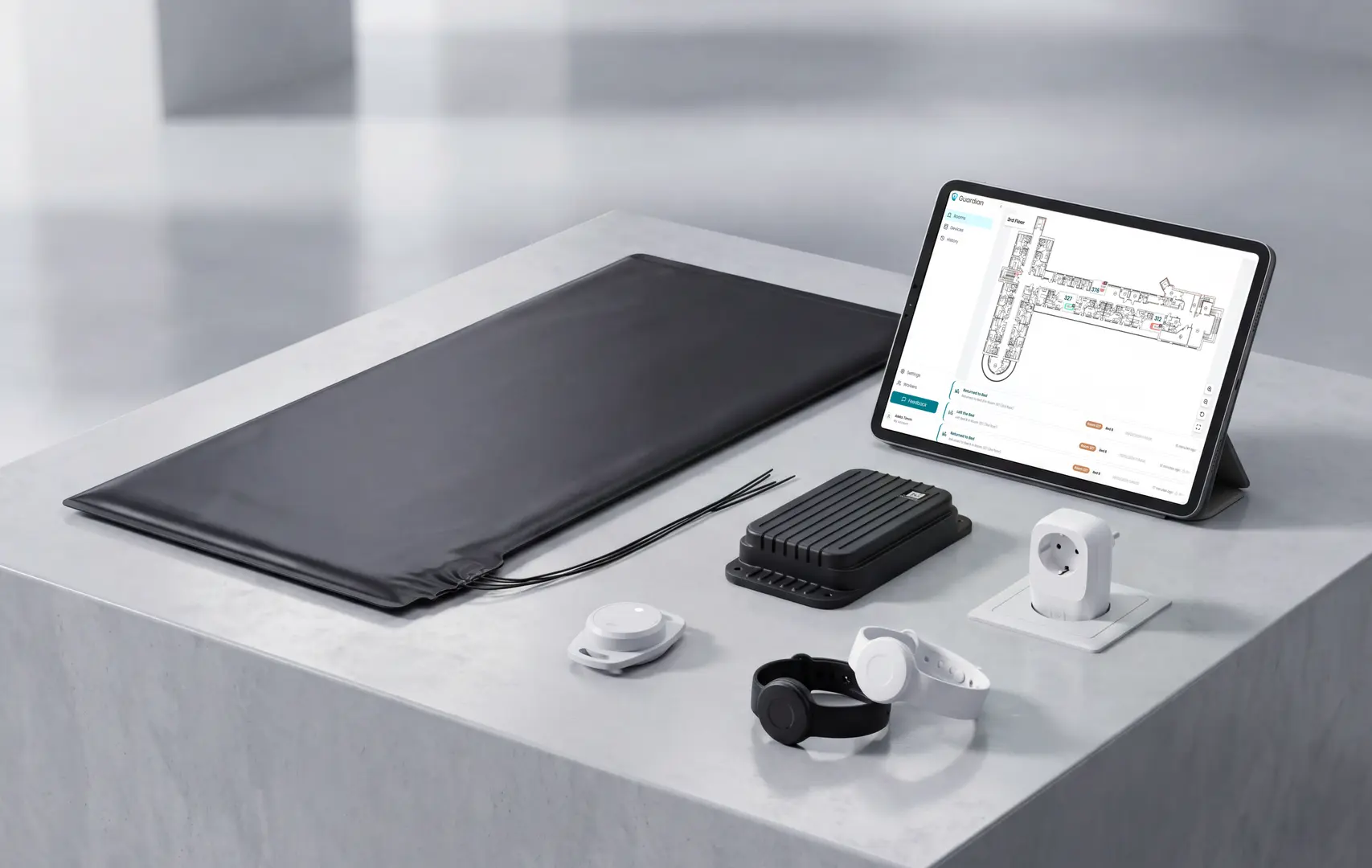
Guardian alerts tell staff where to respond. During setup, every facility sensor is linked to a room or bed on a digitised floor plan.
An alert can include the resident's name and mapped room context. The portal shows floor-level activity and live status, including return-to-bed events.
A 6–8 week pilot can test the workflow in one ward, home, or team:
Staff alerts: Guardian Insight sends alerts to existing smartphones, tablets, and nurse-station computers.
Automatic records: Visits, shift times, and incidents are recorded in the background.
Pilot evidence: The team tests agreed measures and produces an impact report.
Guardian maps your workflow and agrees the pilot use cases with you. The final report covers your operational measures, ROI, and a rollout recommendation.
EVV does not normally track caregivers throughout the workday. Location capture is tied to visit events, such as clock-in and clock-out, although exact collection depends on the system and program rules.
Caregivers can use mobile or non-mobile EVV devices, subject to vendor and program rules:
Mobile app: a caregiver smartphone records visit events and location evidence.
Telephony: a client landline or approved office phone records visit times.
Fixed verification: a dedicated device or on-site terminal confirms presence.
A mobile app records visit events on the caregiver's phone, while a FOB confirms presence through a fixed token in the client's home.
Visit evidence: a mobile app uses a phone-based timestamp plus GPS or geofencing; a FOB uses interaction with the in-home token.
Hardware: a mobile app needs a compatible caregiver phone; a FOB is a token kept in the client's home.
Offline use: a mobile app may store data locally and sync later; FOB behavior depends on the vendor's capture and upload workflow.
Program acceptance: confirm state, payer, and aggregator rules for either method.

Author
Aleks Timm
Aleks Timm leads Guardian and builds privacy-first operations technology for care homes and home care providers. Teams get location-aware alerts they can act on, clearer situational awareness, and measured insight into how care work actually runs.
Read MoreRecommended reads
Keep reading
Smart Nurse Call Systems for Care Homes and Home Care Providers
Smart nurse call systems for care homes and home care providers: compare features, improve response times, and choose the right...
Read more
Remote patient monitoring: a complete guide
Remote patient monitoring: the complete guide to sensors, benefits, and buying tips for safer care homes and better resident...
Read more
WiFi nurse call system guide for care homes
WiFi nurse call systems explained: alerts, clean records, and no wiring—compare options and choose the right setup for your care...
Read more