

8 Best Home Care Scheduling Software for Agencies
In this article
A filled rota says who should arrive. It cannot prove who did, how long the visit lasted, or what changed before the next caregiver arrived. When that proof is weak, managers reconstruct visits while payroll waits for clean hours.
Compare eight core care platforms, workforce orchestration tools, and monitoring systems used around home care schedules. The review covers scheduling depth, visit verification, mobile access, and stack fit.
Home care scheduling software: quick picks
Start with the system role. A core care platform, workforce orchestration layer, and live monitoring layer solve different operational problems.
Tool | Care focus | Workflow and automation | EVV or visit verification | Stack fit |
|---|---|---|---|---|
Guardian | Home care agencies and existing care stacks | Data-informed planning from resident activity patterns and caregiver tracking | Passive home sensors and GPS wearables | Monitoring layer separate from payroll or EMR |
WellSky Home Health | Skilled home health | AI referral management and capacity optimization for episode-based visits | Mobile GPS and clinician clock-in or out | Native part of WellSky Home Health EHR |
AxisCare | Private-duty and non-medical home care | Drag-and-drop scheduling and AI caregiver-client matching | GPS mobile check-in or landline telephony | Core module tied to billing and payroll |
AlayaCare | Aged care, disability support, multi-state Medicaid home care | Visit Optimizer for routing and assignment | GPS, telephony, and offline time tracking | API-based SaaS connected to external systems |
CareSmartz360 | Non-medical agencies and multi-location groups | Smart Scheduler with centralized oversight and admin review | GPS and telephony EVV | Built-in billing, payroll, and 45 plus state EVV links |
Skedulo | Deskless pediatric and behavioral health teams | Dispatching and route clustering for mobile workforces | Mobile geo-tracking and status updates | Salesforce-centered orchestration layer |
Teambridge | Distributed hourly care teams | AI availability, credential checks, and exception handling | Mobile geofencing and arrival checks | Exports to ADP and QuickBooks |
Enginehire | Staffing-led care agencies and temp placements | Shift broadcasting, recruitment, and white-label mobile apps | GPS mobile clock-in and geofencing | Connects with Stripe, QuickBooks, and Zapier |
Compare the tools at a glance
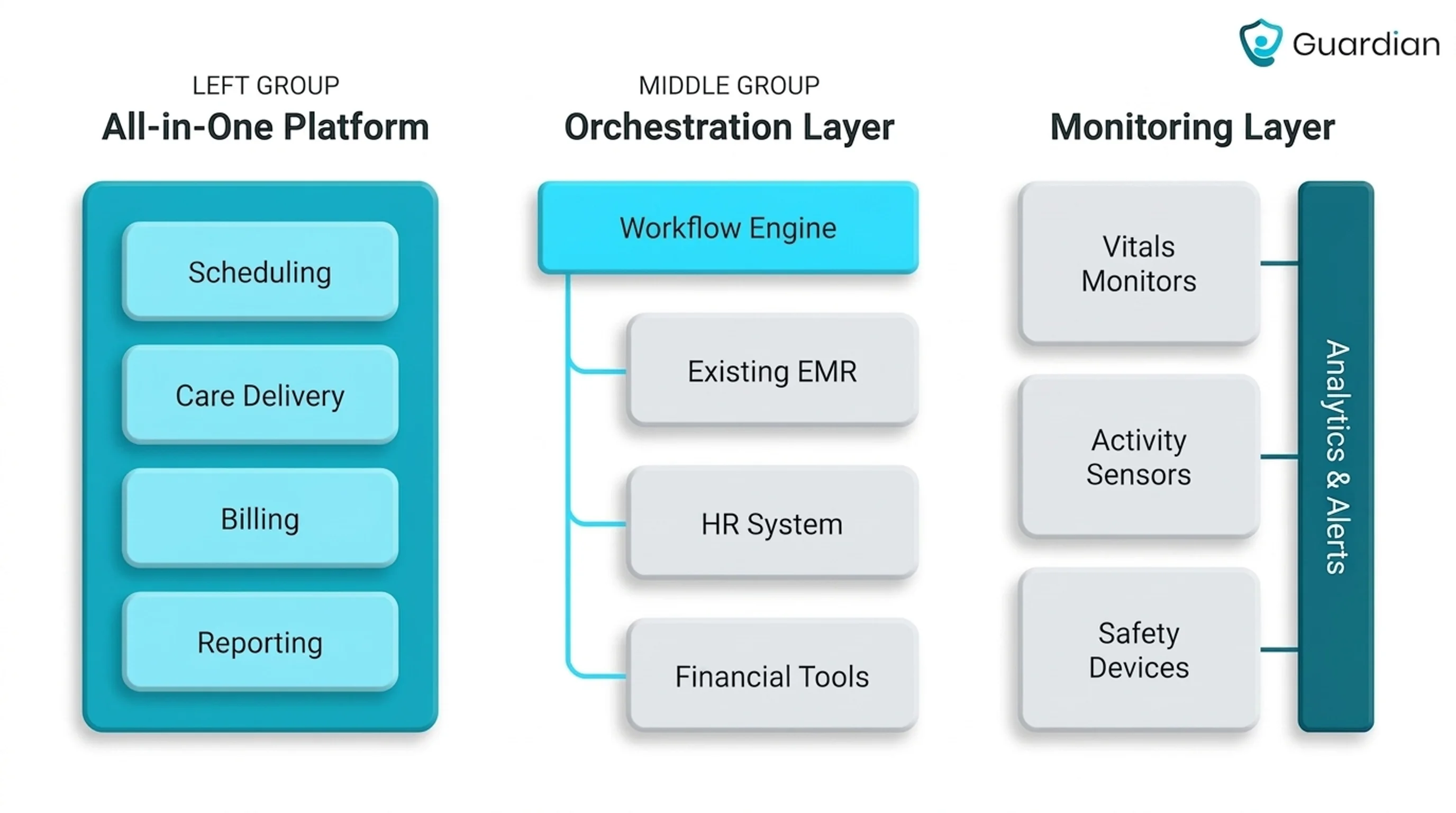
The tools divide into three groups: core care platforms, workforce orchestration systems, and operational monitoring layers. Choose the system role before comparing individual features.
Choose the stack role first. That avoids buying a second core platform when the missing piece is live visibility or mobile coordination.
The three types of scheduling software
Home care scheduling software falls into three architectural categories. The choice determines where the rota lives and how visit data reaches the rest of your stack.
[Image: architecture diagram comparing an all-in-one care platform, a workforce orchestration layer, and an operational monitoring layer around the existing care stack]
All-in-one care platforms
All-in-one care platforms keep scheduling inside the system that holds care and agency records. WellSky ties the rota to its EHR and point-of-care environment.
AxisCare and CareSmartz360 connect schedules with billing and payroll workflows. This architecture matters when each rota change must flow into EVV and financial records without a separate orchestration layer.
Workforce orchestration platforms
These tools coordinate mobile staff against demand and availability, then adjust assignments as field conditions change. They control dispatch and coverage rather than the clinical or financial record.
Skedulo sits above Salesforce-centered operations. Teambridge and Enginehire pass verified work data into finance or payroll systems after shifts are filled.
This architecture matters when same-day callouts or a distributed workforce create more pressure than the core care system can absorb. The orchestration layer changes assignments while source systems keep their existing roles.
Operational layers for existing systems
Operational layers add live visibility, alerts, or visit evidence around an existing core system. The system of record remains in place.
Guardian captures live operational evidence, including visit proof and incident records. Managers can plan from observed activity and pass clean records into established workflows.
Guardian can complement WellSky while WellSky retains its administrative role, including finance and Medicare claims workflows. This architecture matters when you need operational evidence without migrating core records.
How to choose a scheduling tool
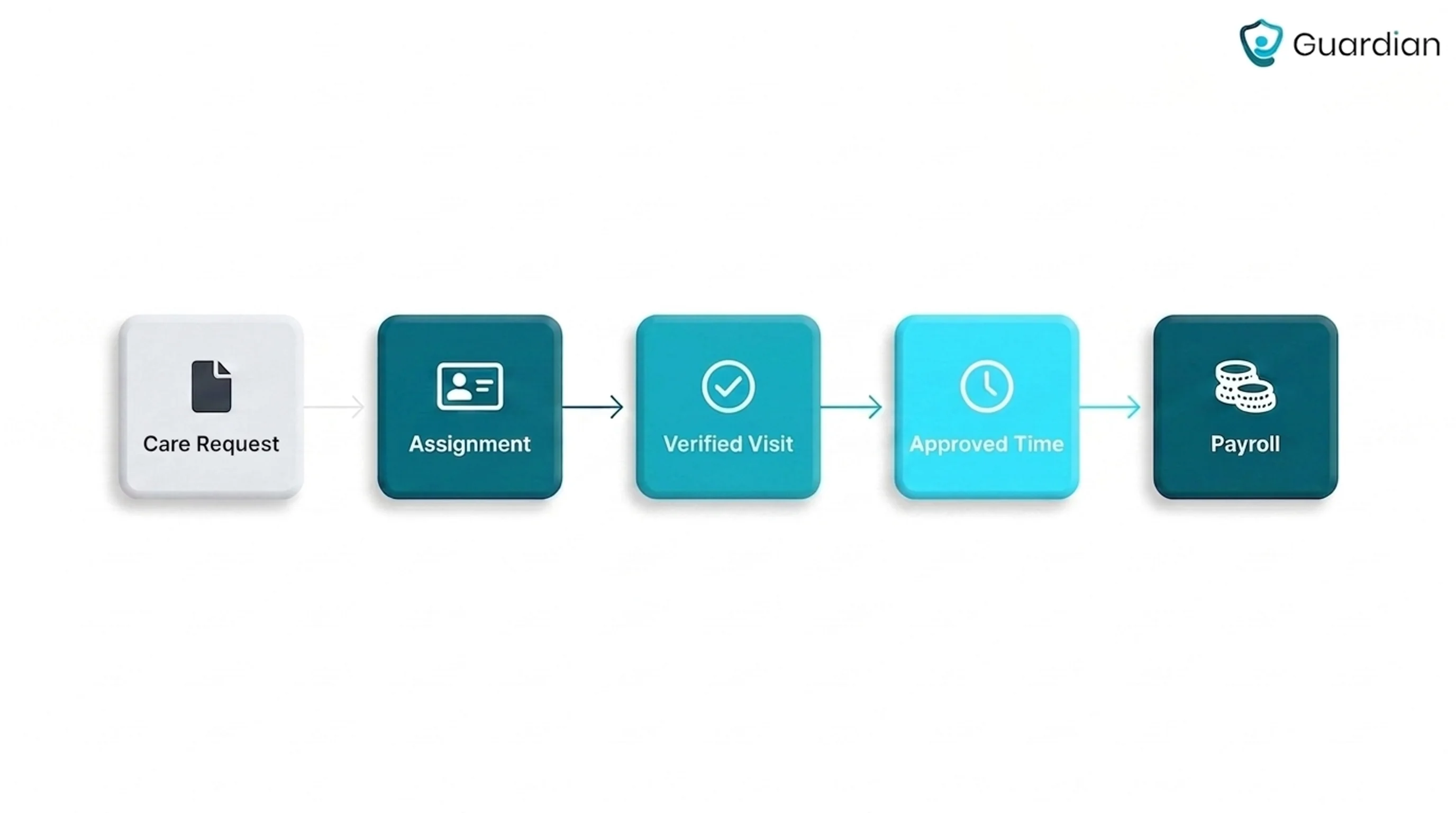
Choose a tool by tracing a care request through assignment, visit proof, and payroll. The criteria below show where each tool fits.
From demand to payroll
Scheduling needs to connect a care request to an assigned, verified visit and approved time.
Demand becomes an assignment, then a completed visit, and verified time feeds payroll or billing. A calendar is insufficient unless managers see status live and trace completed work into approved records.
What we looked for in each tool
Scheduling depth, visit proof, live visibility, care-setting fit, mobile use, and stack integration carried equal weight. The aim was to show both how planned work is assigned and how completed work is evidenced.
Visit proof: Confirm that each completed visit produces a usable record linking the caregiver and work completed to arrival and departure times.
Live visibility: Check whether managers can see visit status and exceptions as they unfold, rather than waiting for end-of-day reports.
Care-setting fit: Match the platform to your service model and documentation requirements.
Scheduling depth: Test recurring schedules and same-day changes against the rules that make an assignment valid.
Matching and coverage: See how the system identifies suitable caregivers and fills callouts without breaking continuity or assignment rules.
EVV controls: Check whether EVV records attendance, preserves every correction, and requires approval before time moves downstream.
Mobile use: Confirm caregivers can view assignments, record attendance, and complete required documentation from the phone used in the field.
Stack integration: Trace one verified visit into approved time and the systems handling payroll, billing, or clinical records.
Prioritize tools that show exceptions while staff can respond and preserve a clear record for review. Extra features matter when they improve assignment, visit proof, or payroll handoff.
The 8 best tools
These eight products cover three buying paths: core care platforms, workforce orchestration systems, and monitoring layers used around an existing schedule. Each entry explains the product's role, workflow, stack position, and tool-specific demo checks.
1. Guardian
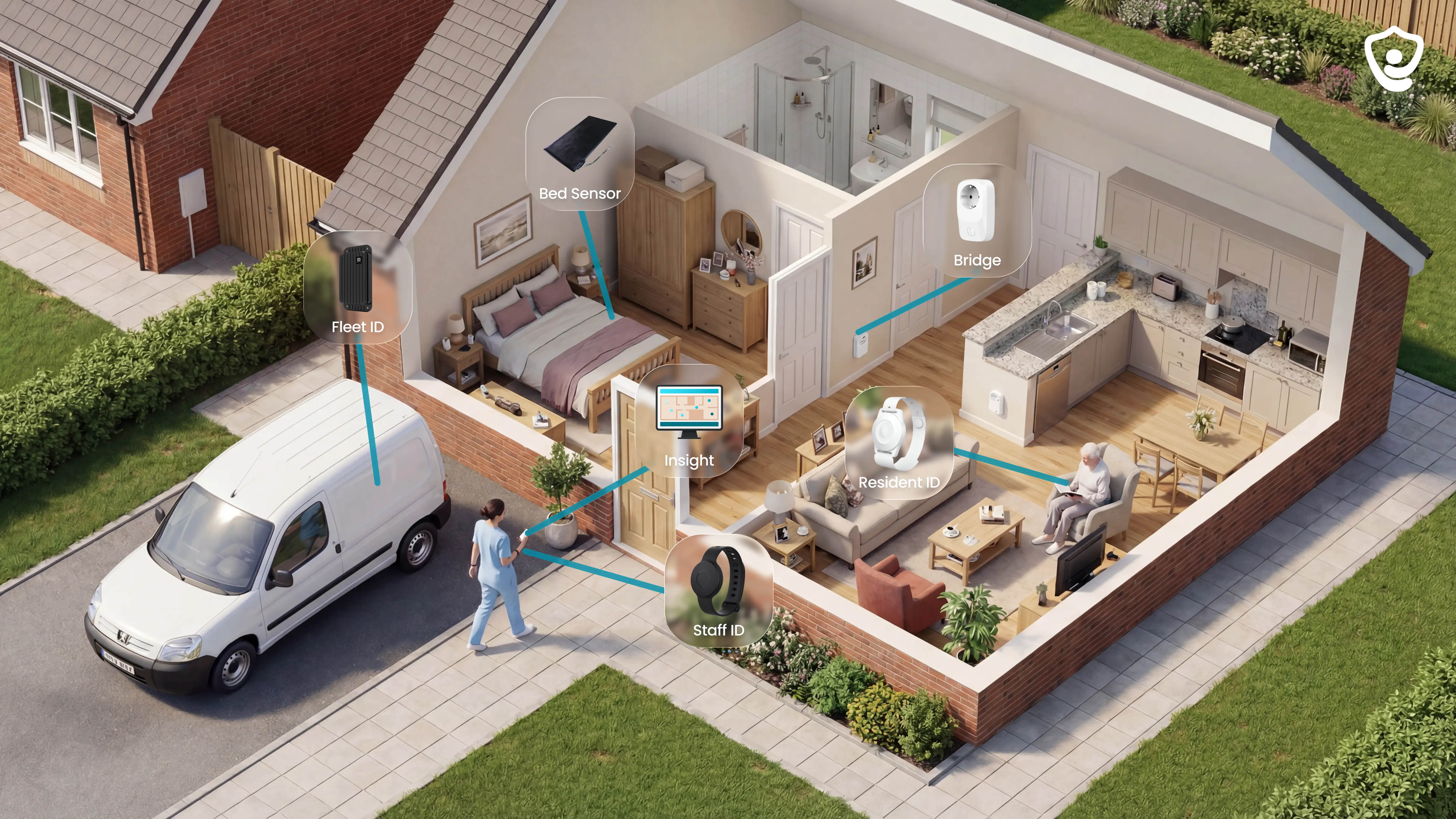
Guardian is an operations and safety monitoring layer for home care agencies. It adds live alerts, activity context, visit evidence, and automatic records after the roster is published, with the same platform available for residential and specialist care settings.
Staff see location-aware alert context and an automatic record of monitored activity. The monitoring setup is camera-free.
Care setting and agency fit
Home care agencies can use Guardian for camera-free monitoring and safety oversight between visits.
Passive home sensors and optional wearables record activity in the background. An older person does not need to press a button or wear a device for sensor monitoring to continue.
Bed and motion sensors: record bed exits and room activity.
Door and household sensors: flag routine changes; wristbands support SOS and fall alerts.
Camera-free sensors record events and routine changes. Configurable rules determine which events alert staff.
A missing refrigerator event can trigger an alert. Guardian runs beside the agency's scheduling, payroll, and clinical systems; confirm any required handoff during the pilot scope.
Scheduling and live operations view
Guardian Insight brings caregiver visits, connected home sensors, GPS wearables, vehicles, and alerts into one live web view.
Managers can scan live visit status and active alerts while caregivers move between clients.
Guardian Insight sends live alerts to the devices staff already use:
Smartphones
Tablets
Nurse-station computers
Rules filter routine sensor events. An SOS press or a resident remaining out of bed past the configured interval triggers an alert.
Caregivers do not need an extra pager to receive Guardian alerts.
Visit verification and automatic records
Guardian records arrival and departure, then calculates visit duration. Sensor activity and alerts stay with that visit in the web dashboard.
Guardian verifies a visit by recording when a caregiver arrives and leaves, then calculating visit duration automatically. Passive home sensors and location signals add context without cameras.
For agencies that schedule elsewhere, Guardian adds an operational record alongside the existing scheduling system. Confirm how Guardian records should enter payroll, EMR, or reporting workflows.
Routine context: Device activity and routine exceptions stay with the care period.
Alert record: Alert and response history stay linked to the resident or location.
The dashboard record helps agencies answer family or payer questions without rebuilding a visit from timesheets.
Location, fleet, and field visibility
Guardian adds GPS wearable and vehicle context to home care field operations.
An SOS, exit, or routine exception appears against the relevant client and monitored location.
Active alert view: shows the client, alert category, and connected device.
Home activity history: keeps prior sensor events and alerts with the client record.
GPS wearables and live fleet tracking let managers locate a person or care vehicle in the Guardian web view.

Scheduling software continues to assign the planned work. Guardian adds live location and visit evidence once the day is underway.
Deployment, adoption, and proof
Guardian starts with a 6–8 week pilot for one home care team or defined service area. The pilot includes monitoring hardware and live operations, then ends with a written impact report.
The pilot follows four practical steps:
Map the care workflows and operational priorities.
Select the highest-value monitoring use cases.
Install preconfigured wireless devices and connect the staff portal.
Measure response, incident, and visit data during the pilot.
Full-rollout terms follow the pilot's measured results and agreed scope.
The written impact report records the pilot's response and incident data.
It includes an ROI calculation and the next rollout scope.
2. WellSky Home Health’s Scheduling
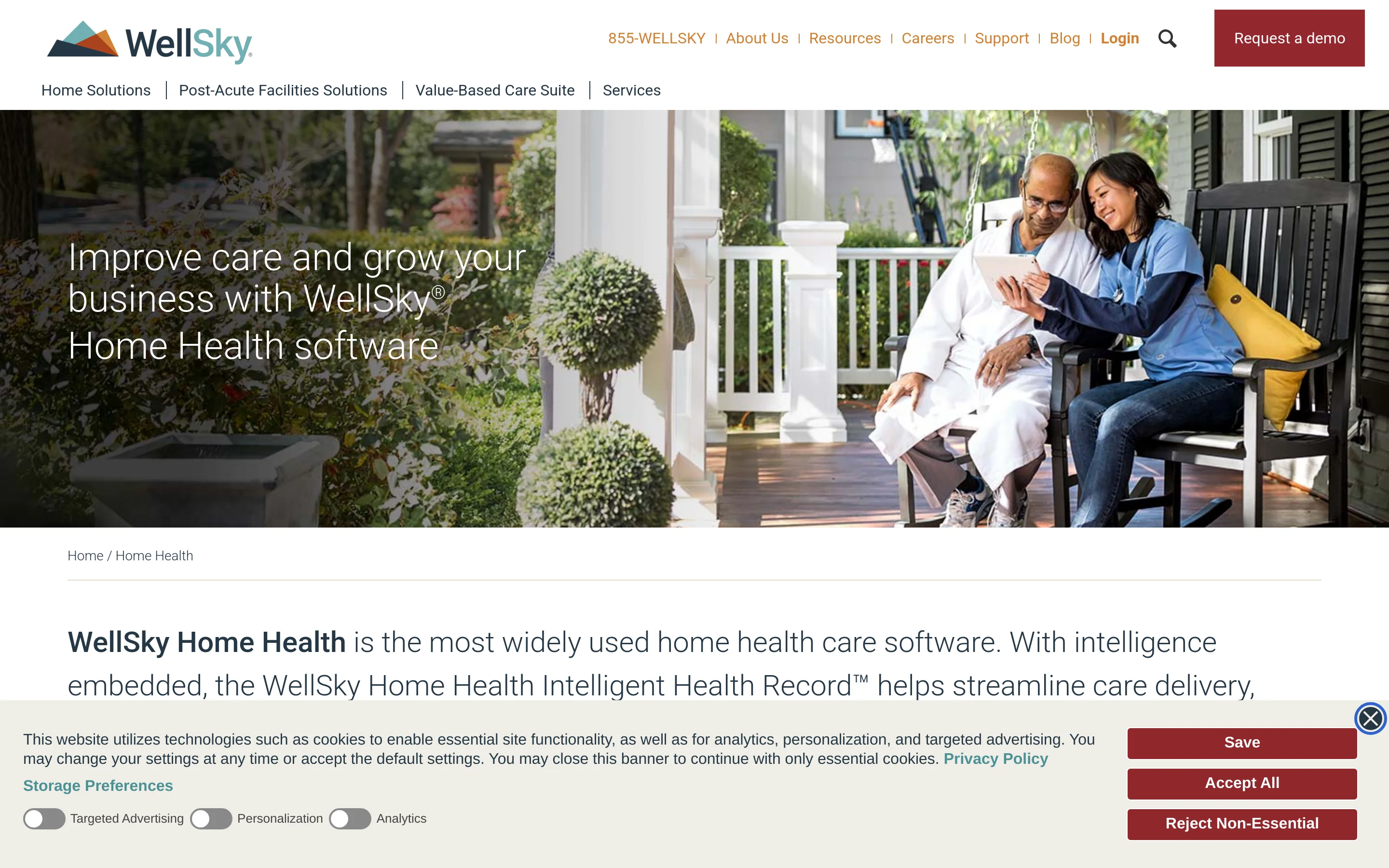
WellSky Home Health is a clinical home health platform that connects intake, authorizations, episode scheduling, EVV, documentation, and claims workflows.
WellSky Home Health is built around skilled clinical operations, with scheduling tied to documentation, billing, and Medicare workflows. Its scope is broader than the scheduling-first and monitoring tools elsewhere in this list.
An agency that mainly needs scheduling and visit proof should test the implementation scope, office workflow, and required modules before committing to the broader clinical platform.
Care model and scope
Skilled home health and hospice agencies can use WellSky to coordinate nurse and therapist visits within Medicare-governed episode workflows.
WellSky’s best fit is a skilled home health or hospice agency coordinating nurses and therapists across clinically governed episodes.
That setting usually requires:
Discipline-specific visit frequencies
Appointments tied to the clinical record
Documentation linked to each completed visit
Medicare billing administration
WellSky sells through a vendor quote, so ask for the software, implementation, and support costs separately.
Ask the quote to separate:
Licensed modules
Implementation and data migration
Interfaces with current systems
Training and ongoing support
How its scheduling workflow works
Daily appointments, assigned tasks, documentation, and EVV status are kept in the same visit workflow.
The schedule is presented as the working point for:
Daily caregiver appointments
Assigned visit tasks
Documentation connected to caregiver activity
For example, a nurse's Tuesday wound-care visit may need a same-day move. The demo should show whether its task and documentation stay connected to the corrected visit.
WellSky uses EVV to give the office status around field visits. For skilled care, that proof needs to remain connected to documentation and the billing path.
Follow four points during an exception:
Original visit capture
Corrected record and reason
Approval history
Downstream claim evidence
Ask the rep to demonstrate three same-day controls that are not clear from the standard workflow:
Drag-and-drop rescheduling
Open-shift broadcasting
Automated callout replacement
Those gaps matter during a same-day clinical reassignment, so require the rep to show the workflow live.
Where it sits in your stack
Within WellSky's home health environment, scheduling sits alongside clinical records and billing.
WellSky is a core clinical and administrative platform. Its official Home Health page connects scheduling with billing, Medicare claims, and clinical documentation.
Billing
Medicare claims
Clinical documentation
A combined stack therefore needs a defined owner for resident identity, alert history, and visit records.
What to verify in a demo
Run the demo against a real skilled visit and follow every change into its documentation and billing record.
Use a recurring wound-care visit instead of a clean sample schedule:
Create the full series for a named nurse.
Move one occurrence later on the same day.
Reassign it and observe any invalid-assignment warning.
Confirm the changed time reaches the task list and visit documentation.
Test Medicaid EVV with a visit that starts correctly but needs a same-day correction. Ask the rep to produce the exact proof your state or EVV aggregator accepts.
Trace the corrected visit through:
Original capture
Correction reason
Approval history
Billing or claim output
Finish with a stack decision using the systems your agency already runs:
EHR: identify the source record for the episode and care plan
Payroll: show how approved visit time reaches pay
Documentation: count every field staff must enter twice
Before signing, ask WellSky to map the episode, visit, EVV, and billing records your agency will keep in each system.
3. AxisCare’s Scheduling
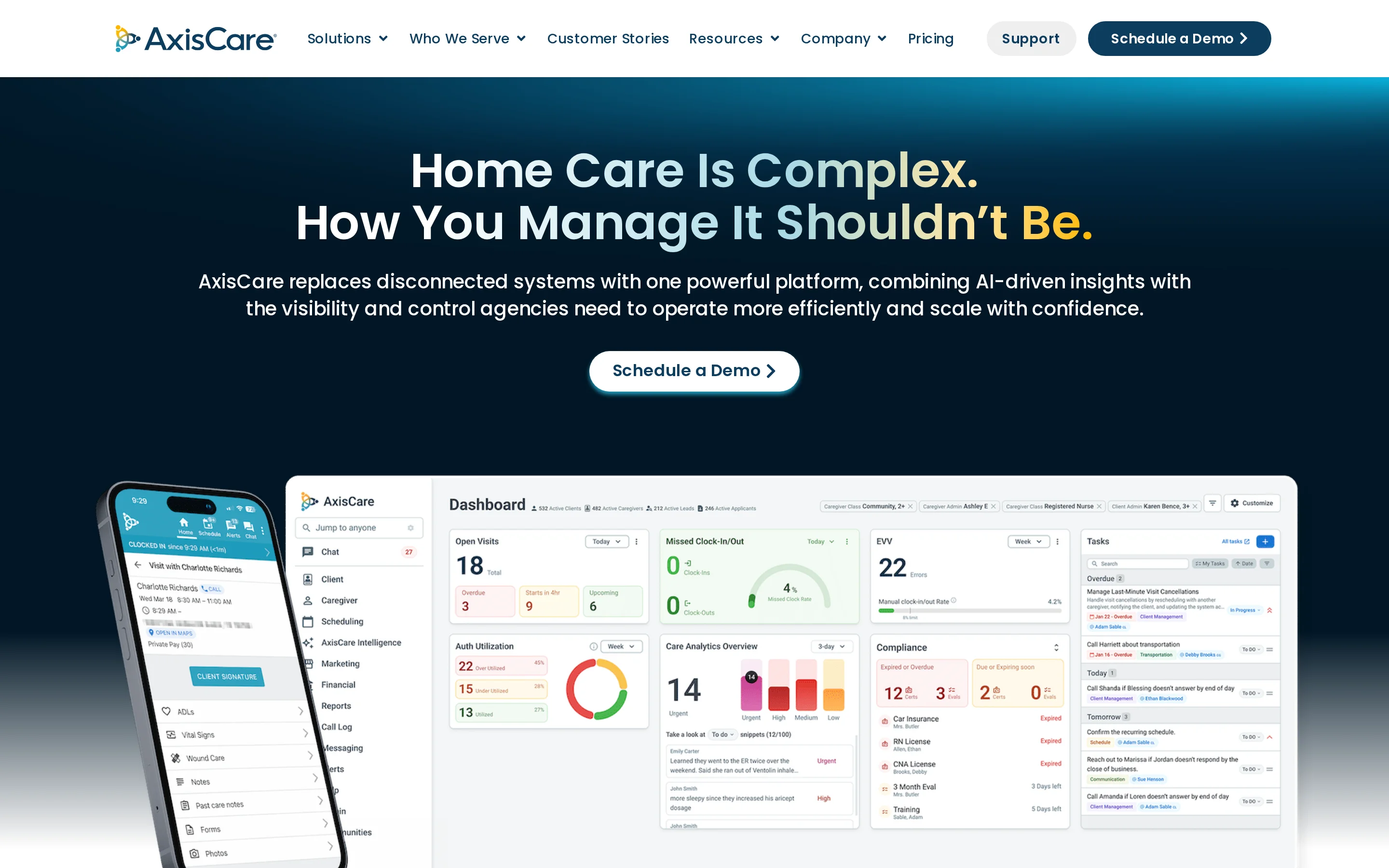
AxisCare Scheduling combines drag-and-drop calendars with AI caregiver matching based on availability, distance, skills, hours, overtime, and client preferences.
AxisCare is a non-medical home care platform centered on scheduling and billing, with point-of-care documentation in the same system. Its key test is whether recurring assignments survive rescheduling and payroll handoff under pressure.
Care model and scope
AxisCare centers on recurring non-medical caregiver visits, including schedules across single or multiple locations.
AxisCare uses quote-based pricing, so ask the vendor to separate the platform, implementation, interfaces, and support costs.
Ask the quote to separate:
Platform fees
Implementation and data migration
EVV or payer interfaces
Training and support
How its scheduling workflow works
Drag-and-drop scheduling and caregiver matching shape AxisCare's stated visit workflow, with GPS-based EVV capture through its mobile app.
AxisCare’s scheduling workflow is described as drag-and-drop, which suits recurring assignments that need quick changes. A meaningful demo moves an existing visit because creating a clean new shift avoids the hard cases.
Caregiver matching brings skills and client preference into the assignment decision. Driving distance needs equal scrutiny when the day is already tight.
The demo needs to reveal which factors block an assignment and which only affect ranking.
Caregiver skills
Client preferences
Driving distance
The useful test combines a same-caregiver preference, required dementia experience, and a practical travel window after the previous visit.
AxisCare’s GPS mobile workflow is described as capturing four parts of a visit:
Date
Time
Location
Services delivered
Add a disputed entry and a connectivity-loss scenario to the demo. Check the correction record, approval path, offline capture, and sync behaviour.
Where it sits in your stack
AxisCare’s Scheduling is a core private-duty scheduling layer tied to EVV, billing rules, and caregiver mobile records.
AxisCare connects schedule data to billing and payroll rules. Product descriptions further state that formatted visit information can be sent to third-party payors.
The handoff matters when scheduled time and payable time differ.
What to verify in a demo
Pressure-test a recurring AxisCare assignment from a short-notice move through matching and the payroll handoff.
Start with a recurring non-medical visit assigned to the same caregiver. Move one occurrence on short notice, then check:
The remaining series stays unchanged
Caregiver availability and travel remain practical
Client instructions stay attached
The change reaches the downstream time record
For example, move one Tuesday morning visit after the usual caregiver calls out. Check whether the replacement still meets the client's stated care requirement and travel window.
For AxisCare, compare the GPS time record and service details with the payer fields that staff would otherwise need to rekey.
Let the replacement visit run longer than scheduled. Follow the overrun through:
Payable-hours calculation
Payroll handoff
Billing exception
Generated payer claim
For a claim requiring exact verified details, compare every generated field with the payer’s requirement list. Record any value staff must rekey or correct.
4. AlayaCare’s Scheduling
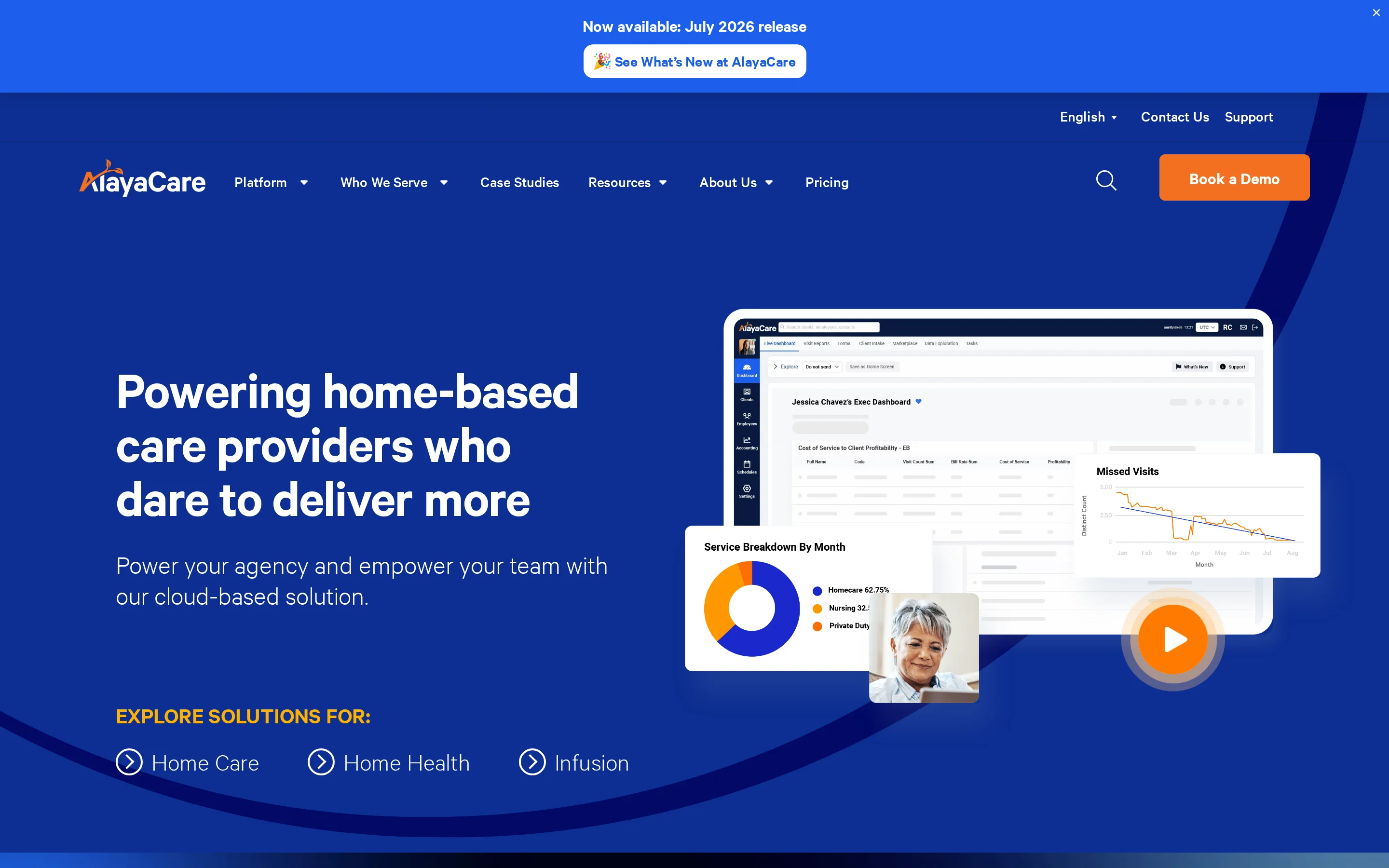
AlayaCare is a cloud home care platform that connects scheduling, care management, billing, payroll, mobile work, and data in one system.
Routing and field reliability need to work as one chain. Visit Optimizer can shape the assignment and route, while offline time tracking preserves the visit event when coverage drops.
The decisive test is whether that record reaches the agency's actual EVV, payroll, eligibility, and claims systems without manual repair.
Care model and scope
AlayaCare is used where route planning, credential-based matching, and EVV rules must work across multi-state home care.
The fit becomes clearest in four operating conditions:
Aged care: recurring visits across community locations
Disability support: assignments shaped by staff qualifications
Medicaid home care: state-specific EVV and audit requirements
Rural services: visits where mobile coverage can drop
The platform suits complex assignment rules because Employee Finder filters candidates, while Visit Optimizer plans visits and routes.
That combination matters when a scheduler must balance credentials and availability without treating travel time as an afterthought.
Geography matters because AlayaCare carries the visit workflow beyond the office. Test the field methods your service area requires:
Mobile GPS: capture location with the visit event
Telephony: record visits without relying on an app
Offline time tracking: continue capture during signal loss
Route details: give field staff the next visit context
How its scheduling workflow works
Employee Finder and Visit Optimizer link caregiver eligibility with route planning, while field staff record time through GPS, telephony, or offline tracking.
For example, a caregiver can meet the required credential yet leave too little time to reach the next visit. Employee Finder and Visit Optimizer should be tested together against that case.
The useful distinction is between eligibility and optimization. A caregiver can meet the assignment rules yet create an impractical route, so both stages need to work together.
Field recording should preserve the same visit trail across connected and offline work:
The caregiver opens the assigned visit and route details.
GPS or telephony records arrival and departure.
Offline time tracking retains the event during signal loss.
The record syncs after connectivity returns.
Coordinators need schedules and route details during the day, while field staff need time tracking and care documentation in the mobile workflow.
The operations view should make four exceptions easy to find:
Unfilled visits: work still awaiting assignment
Late visits: arrivals outside the expected window
Offline records: events waiting to sync
Changed routes: updates affecting the field schedule
Where it sits in your stack
Schedules sit within AlayaCare's wider home care platform, with API connections to external systems.
That broader platform scope puts schedules beside clinical and client records inside AlayaCare.
Payroll, EVV, eligibility, or claims can still sit elsewhere. Every API-connected handoff needs a named owner and exception path.
Schedules sit beside care and client records within AlayaCare. For each external handoff, name the system owner and its exception path.
Connection type: native module, connector, API, or export
Data direction: inbound, outbound, or two-way
Error owner: AlayaCare, the other vendor, or your team
Update timing: real-time, scheduled, or manual
API access does not guarantee a ready-made connector for your current payroll, EVV, eligibility, or claims product.
Confirm the exact connection and data owner early, because a custom interface changes implementation work and exception handling.
What to verify in a demo
Use the demo to test optimizer logic, offline visit capture, EVV rules, and one downstream handoff.
Ask AlayaCare to optimize one unassigned visit using your real assignment rules:
License: require the credential needed for that service
Availability: exclude staff already booked or unavailable
Client preference: apply a stated caregiver preference
Travel radius: limit candidates to a workable distance
Then change one rule and rerun the match. The updated result should show whether Visit Optimizer recalculates the candidate pool and route.
Test offline capture as a failure scenario, not a checkbox:
Open an assigned visit while the device has service.
Remove connectivity before clock-in.
Record arrival and departure, then add required visit data.
Restore service and inspect sync time, original timestamps, and any conflict warning.
Repeat the visit through telephony so the audit trails can be compared.
Bring the names of your payroll, EVV, eligibility, and claims tools to the demo. Trace one completed visit through the full stack:
Complete the scheduled visit through GPS or telephony.
Confirm the EVV record reaches the correct state or payer route.
Show approved time entering the payroll workflow.
Show eligibility or claims data reaching the named downstream system.
Correct the visit and verify that every affected record updates.
The final correction test reveals who owns rejected records and reconciliation work.
5. CareSmartz360’s Scheduling
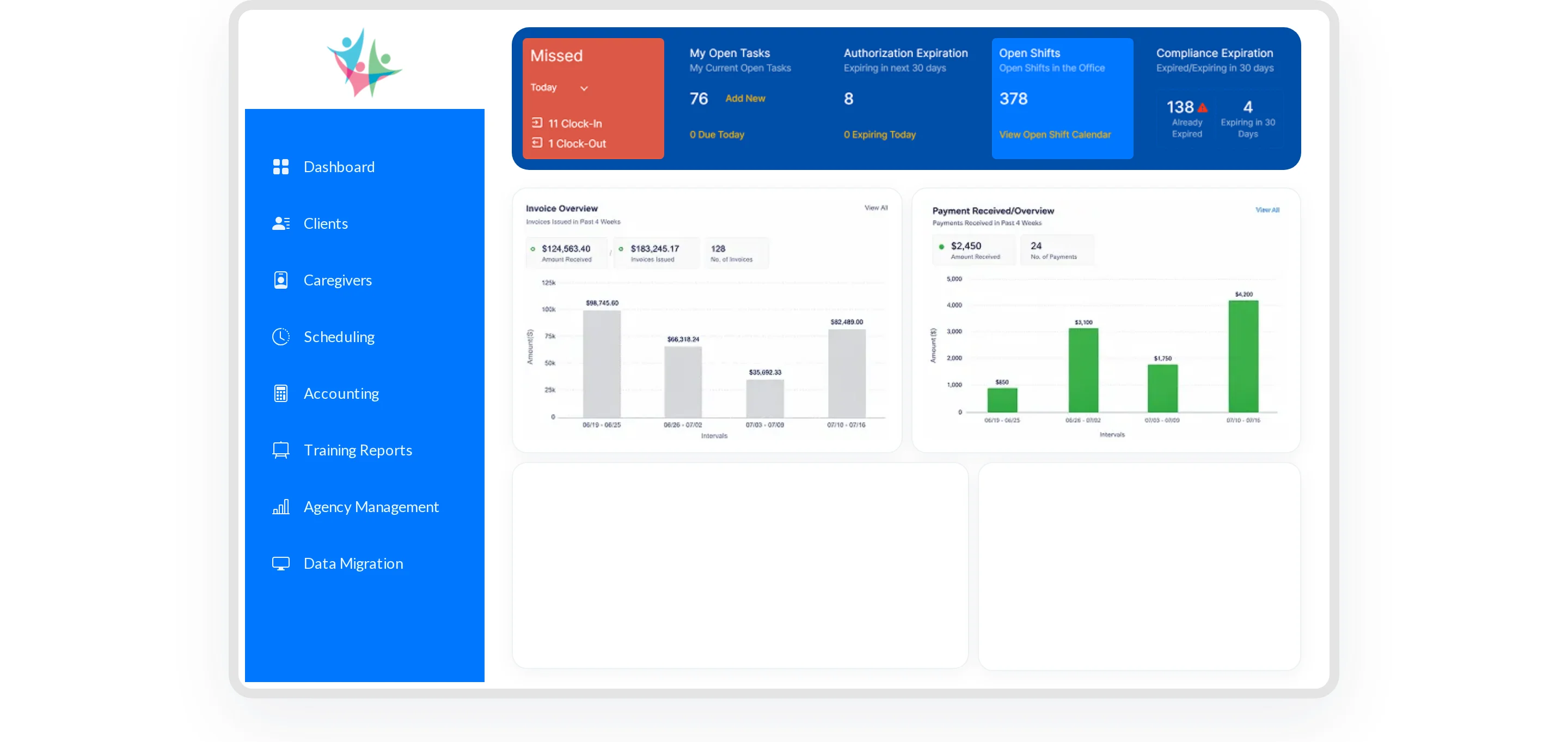
CareSmartz360 connects scheduling, EVV, care records, billing, and payroll. Its AI Smart Scheduler suggests matches that agency staff can review, edit, and publish.
Because assignments wait for approval, the demo should show the coordinator effort behind exceptions, EVV review, billing, and payroll.
For multiple offices, check how calendars, permissions, and exception queues move between central administrators and local coordinators.
Care model and scope
Recurring visits, EVV, billing, and payroll sit in the same CareSmartz360 workflow for growing non-medical agencies.
Recurring and shift-based visits are the core workflow, from caregiver assignment through clock-in and approved time.
Billing and payroll depend on that visit record, so coordinators need a clear view of every exception before office processing continues.
Growing and franchised agencies should test how CareSmartz360 handles multi-office governance:
Calendars: central view versus office-specific schedules
Permissions: who can assign or approve each office
Queues: where unfilled visits and EVV exceptions appear
Reporting: whether results can be viewed by office and across the agency
Medicaid EVV routing matters because every verified arrival and departure can affect billing and payroll.
A multi-state agency should confirm the route used for each payer, where rejected records appear, and who corrects them before claims or pay are finalized.
How its scheduling workflow works
Smart Scheduler recommends caregivers from match criteria, while an administrator approves each final assignment.
Run one recurring visit through the suggestion and approval screens, then change the caregiver or visit time to see what requires another review.
The matching test should follow four steps:
Filter candidates by the required compliance document.
Review the suggested caregiver and supporting match fields.
Edit or approve the suggestion.
Confirm the final assignment reaches the caregiver schedule.
CareSmartz360 verifies arrival and departure through GPS or telephony-based EVV. The resulting visit record feeds the billing and payroll workflow after review.
Ask to inspect the timestamped record, location or call data, approval status, and any edit history. A summary screen alone does not show how a disputed visit is resolved.
The coordinator remains responsible for reviewing Smart Scheduler suggestions and handling changes after assignment.
That approval model creates four recurring tasks to measure:
Accept: approve a suggested match
Edit: change the caregiver or visit time
Resolve: correct an EVV exception
Reapprove: release updated time to billing or payroll
Where it sits in your stack
A verified visit should show whether billing and payroll can proceed or whether an exception still holds the record.
Once a visit is verified, office staff need to see whether it is ready for billing and payroll or held by an exception.
The shared-record model depends on visible ownership. Staff should be able to identify the blocked step, correction owner, and reapproval status.
Map each EVV connection against your payer mix and office structure before relying on the billing and payroll flow.
Treat applicant tracking, background checks, credential renewal, and onboarding as separate requirements until each workflow is demonstrated.
What to verify in a demo
Use the CareSmartz360 demo to watch one assignment move through matching rules, EVV review, multi-office controls, and coordinator approval.
Use a deliberately invalid assignment to test the guardrail:
Create a visit that requires a named credential.
Select a caregiver whose document is missing or expired.
Open the Smart Scheduler suggestion and inspect the warning or block.
Attempt approval and record where the coordinator must intervene.
The result should distinguish a visible warning from a rule that prevents assignment.
Trace one visit from schedule to pay with the state and payer you use:
Assign the caregiver and publish the visit.
Record arrival and departure through GPS or telephony.
Inspect the timestamped EVV submission and response.
Approve the visit for billing and payroll.
Correct one timestamp and follow the updated record downstream.
The correction step shows whether staff must repair the same exception in more than one place.
Measure coordinator effort by counting approvals, screens, and repeated data entry during four common changes:
Recurring visit: change the time for one occurrence and the series
Caregiver replacement: swap staff and recheck credentials
EVV exception: correct a missed or disputed clock event
Office switch: move between local and central views
Record the approvals, screens, and repeated entries required after each change, especially when an EVV correction must reach billing and payroll.
6. Skedulo
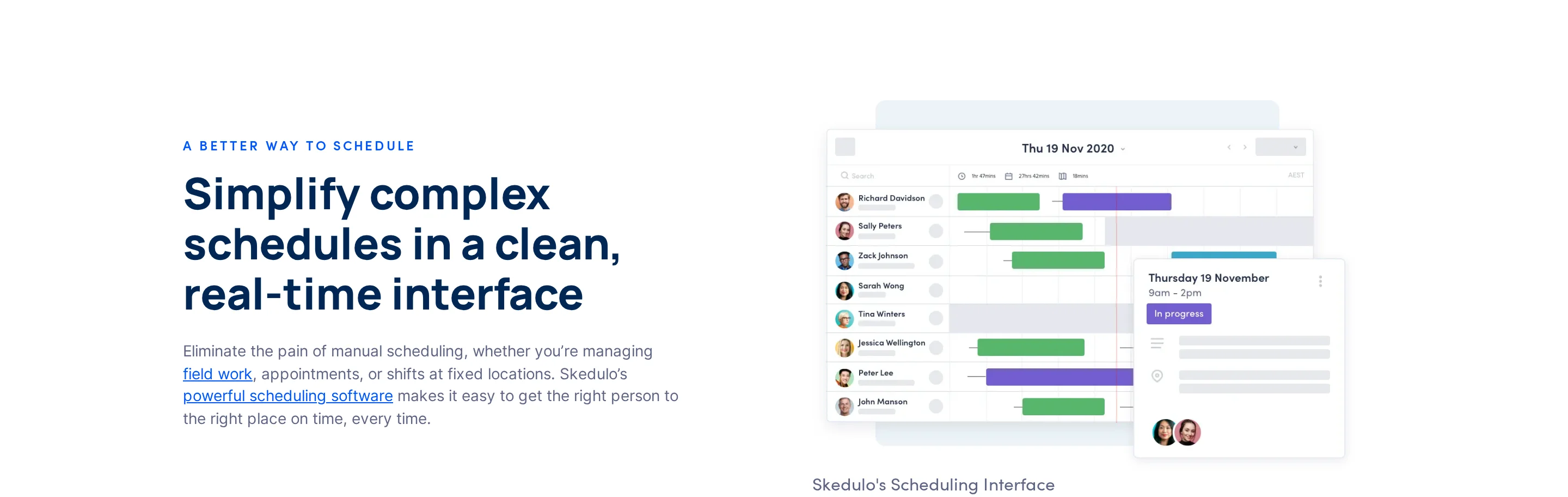
Skedulo coordinates skills-based scheduling, dispatch, routing, and mobile field work for healthcare teams, including Salesforce-centered operations.
Care model and scope
Skedulo is geared toward high-volume field teams operating from a Salesforce-centered stack.
Its mobile workflow matters when caregivers move between multiple client visits in one day.
Agencies that need a care-native record, EVV path, or live safety monitoring may need adjacent systems. Confirm licensing, implementation scope, and annual terms against the workforce and integrations required.
How its scheduling workflow works
Skedulo coordinates dispatch and routing for deskless caregivers through a mobile workforce workflow.
Change one visit in Salesforce, then check that the scheduler and caregiver mobile view update without duplicate entry.
Dispatch work from the scheduling layer
Route caregivers between visits
Send assignment details to field staff
Salesforce remains the operating center for the stack.
Where it sits in your stack
In a Salesforce-centered stack, Skedulo handles scheduling orchestration while other systems retain their existing roles.
Treat Salesforce as the system of record in your stack map, then document which data Skedulo writes back after a reassignment or completed visit.
Map adjacent systems before rollout:
EVV and payer reporting
Payroll and compliant time records
Safety alerts between visits
Vehicle and field visibility
What to verify in a demo
Test a same-day callout by removing a caregiver two hours before a visit, then follow the replacement through Salesforce, Skedulo, and downstream records.
First, confirm which Salesforce records create and update the visit. Change the client, time, or service requirement and check whether Skedulo reflects the change without duplicate entry.
Next, ask the scheduler to reassign the visit. The replacement screen should expose:
Current availability
Required credentials
Travel time from the prior visit
Feasibility of later assignments
Finish by tracing the completed visit into EVV status and reporting.
Trigger a safety alert between visits, then record where staff see it:
Skedulo
Salesforce
Guardian
Another monitoring system
Document which system receives the event, who acts on it, and whether the result returns to the visit record.
7. Teambridge
Teambridge puts availability, credentials, labour rules, and policy checks into assignment and exception workflows for distributed frontline teams.
These assignment controls apply before a shift is confirmed, so the demo should show blocked shifts and exception handling.
Teambridge publishes a free Starter plan, a Growth plan at $7 per user, and custom Enterprise pricing. Confirm which integrations and AI specialists the agency needs.
Teambridge: Starter is free; Growth is $7 per user; Enterprise uses custom pricing.
Care model and scope
Distributed caregiver teams with frequent credential or labor-rule exceptions are the clearest fit for Teambridge’s assignment workflow.
During frequent callouts, coordinators need to resolve an exception quickly and understand why a candidate was blocked.
Assess client records and live care operations as separate stack questions when reviewing Teambridge.
Teambridge: workforce orchestration and assignment compliance
Guardian: monitoring source and live care visibility
How its scheduling workflow works
Before a shift is confirmed, the assignment flow checks availability, credentials, breaks, and labor-law rules.
Test the assignment flow as a sequence:
Submit a candidate.
Inspect the rule result.
Correct one failure.
Run the search again.
The screen should distinguish a hard block from a warning.
Is the caregiver available?
Are required credentials current?
Does the shift comply with labor rules?
Are mandated breaks preserved?
Use payer-specific qualifications as an additional blocking rule during the demo.
Pre-assignment checks reduce manual roster checking during callouts. Measure how quickly a coordinator can find an eligible replacement without opening separate credential and timekeeping records.
Where it sits in your stack
In a home care stack, Teambridge sits as a workforce-orchestration layer rather than the live-operations system for care delivery monitoring.
Starter and Growth prices make the entry point visible. Ask which modules, integrations, and caregiver-access requirements change the plan scope.
Trace each data handoff before purchase:
Core client or care record
Payroll and timekeeping
EVV submission and exception status
Live monitoring or safety-alert layer
The test should identify which system owns each record and where coordinators resolve failures.
What to verify in a demo
Run one blocked-assignment scenario from start to finish. Use a same-day callout and require the coordinator to replace the caregiver without bypassing compliance rules.
Configure the scenario with:
An expired credential
A required break
An overtime threshold
A missing payer qualification
An EVV compliance requirement
Each rule should either block the assignment or show a clear warning, based on your policy.
After the block, update only the expired credential and rerun the search. Check whether Teambridge refreshes eligibility immediately and explains every remaining restriction.
Override path: Force an override, cancel it, and require an audit note before approval.
Replacement path: Measure how many screens separate the blocked shift from an eligible caregiver.
Set an internal usability target for reaching a valid replacement from the blocked assignment. Count every detour into credential or labour-rule screens.
Complete the shift and trace its data through EVV status and compliant time tracking.
8. Enginehire
Enginehire combines recruitment, onboarding, matching, shift broadcasting, time tracking, and branded mobile access in a staffing-led platform.
The custom-branded caregiver app connects the agency's staffing workflow to caregivers. Agencies can publish the app under their own brand in app stores.
The platform brings four staffing functions into one system:
Recruitment: ATS records, background-check automation, and credential tracking
Scheduling: Rule-based matching and shift broadcasting
Caregiver access: A branded mobile app that agencies can publish in app stores
Operations: GPS-enabled clock-in, geofencing, and EVV tracking
The branded caregiver app is the clearest distinction. It keeps agency identity visible when caregivers receive and accept shifts.
Care model and scope
Staffing-led agencies managing shift-based care, recruitment pipelines, and caregiver communication can assess Enginehire as one connected workflow.
Temporary and placement work shape Enginehire’s operating context. Candidate records and credentials stay connected to open-shift distribution.
Ask the demo team to show recurring visit templates and patient-specific scheduling controls. A staffing workflow alone does not answer those care-planning questions.
How its scheduling workflow works
Enginehire moves an open shift through matching and broadcast before the caregiver clocks in. GPS and geofencing feed the EVV record.
For a practical test, create an open shift after a caregiver callout and follow it to the completed EVV record. The flow exposes the handoff between coordinator rules and the caregiver app.
A scheduling review should trace four stages:
Create an open shift and apply the agency's matching rules.
Broadcast the shift to the eligible caregiver group.
Record mobile clock-in against the configured geofence.
Complete the shift and inspect the resulting EVV record.
The workflow names AI agents for profile polishing and communication. Use the demo to inspect calendar editing and the reassignment sequence after a callout.
AxisCare, AlayaCare, and CareSmartz360 each name a scheduling workflow. Ask Enginehire to demonstrate whether route planning belongs in the same replacement search.
Where it sits in your stack
Enginehire sits beside the agency’s care record system, with QuickBooks, Stripe, and Zapier connections supporting the staffing workflow.
Map system ownership before implementation. Enginehire can handle the staffing workflow while the agency defines where clinical documentation and care-plan data remain authoritative.
QuickBooks: Confirm which completed-shift fields transfer and in which direction
Stripe: Confirm the transaction workflow tied to agency operations
Zapier: Confirm available triggers, actions, and field mappings
Existing care systems: Map where client, visit, and clinical records remain authoritative
Enginehire’s published integration list names QuickBooks, Stripe, and Zapier. Confirm native EMR, point-of-care, and state EVV network connections in the demo.
Before rollout, make the subscription and implementation scope clear. Ask whether branded app publication, onboarding, or selected integrations change the quote.
What to verify in a demo
Start by cancelling an assigned shift while the coordinator and caregiver views are both open. Continue until the replacement shift produces a completed EVV record and downstream export.
Cancel an assigned shift and confirm that the open shift updates.
Broadcast the replacement and keep eligibility filters visible.
Attempt an invalid assignment and inspect the recorded block reason.
Accept the shift in the caregiver app and test alerts and permissions.
Complete the visit and confirm that time and location persist.
Export the completed data to QuickBooks or Zapier and inspect the fields.
Trigger one credential failure, one availability conflict, and one geography mismatch separately. The coordinator should see each exclusion reason before another caregiver accepts.
On the caregiver side, inspect agency branding, shift alerts, acceptance steps, and location permissions. Check what happens when permission is denied or the caregiver clocks in outside the geofence.
Close with a correction: amend a completed EVV record, then follow that change into the timesheet and export. Check which actions remain visible to coordinators and caregivers.
Assignment logic: Show caregiver matching on a live open shift.
Visit verification: Follow GPS clock-in and geofencing into the EVV record.
Stack behavior: Inspect the completed-work sync to QuickBooks, Stripe, or Zapier.
Caregiver app: Test the agency-branded acceptance flow on a caregiver device.
Which type of platform fits your agency?
The best-fit home care scheduling platform depends on whether you need a core system for non-medical home care, a clinical platform for skilled home health, or a lighter orchestration or monitoring layer that works alongside existing payroll, billing, or EMR systems.
[Image: decision tree for choosing between a non-medical home care platform, a skilled home health platform, and an operations layer for an existing system]
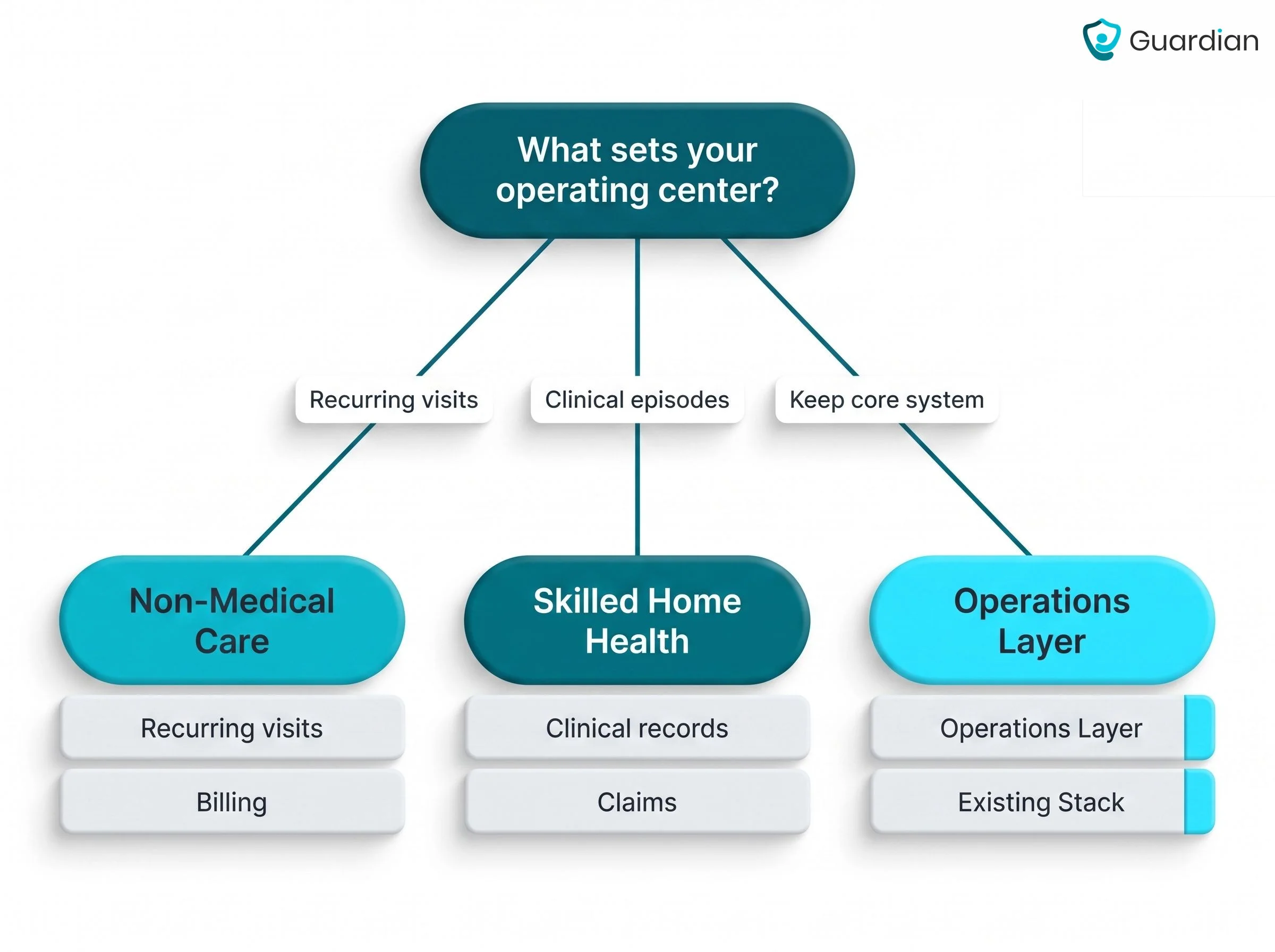
If you run non-medical home care
Run non-medical home care from a recurring-visit operations platform when personal care and household support make up most of your workload.
A basic calendar stops being enough when schedule changes and proof questions shape the coordinator’s day:
Proof: Families ask whether the visit happened and how long it lasted.
Same-day changes: Coordinators must replace a caregiver without losing the recurring plan.
Between visits: Managers need visibility after the caregiver leaves, not another empty calendar block.
Care plans: Recurring support must follow each client’s physical, emotional, and cognitive needs.
For a mixed-service agency, keep recurring visits at the operating centre while sending skilled or clinically supervised work through the EHR path.
Your operational decision is whether recurring service delivery or clinically governed episodes sets the operating center.
If you run skilled home health
WellSky Home Health’s Scheduling is a clinical scheduling platform for skilled home health agencies managing disciplines, visit frequencies, referrals, and Medicare-linked workflows.
Once a referral is accepted, the clinical EHR should carry its authorization and care-plan rules into the schedule. Each completed visit must remain connected to documentation and billing.
The clinical path should stay connected from referral to payment:
Capture the referral and patient intake in the EHR.
Schedule the ordered discipline and visit frequency.
Check authorization and episode limits before assignment.
Document the visit where care occurs.
Release billing after the record passes the required checks.
For a mixed agency, keep skilled visits in this clinical path even when they are the smaller service line. The EHR must preserve how authorization and documentation determine billing.
Your operational decision is whether scheduling assigns a worker or controls a clinical episode from intake through billable completion.
Keep your core system, add an operations layer
An operations layer adds live visibility, visit proof, and replanning signals without replacing payroll, billing, scheduling, or EMR systems.
Your scheduling, billing, payroll, or EMR remains the system of record. Guardian sits beside that stack and adds live monitoring, alerts, and automatic operational records.
Guardian Insight puts live alerts and timestamped visit records beside the systems your agency already uses. Rollout focuses on alert rules and staff response responsibilities.
Guardian records caregiver arrival, departure, and visit duration automatically. Managers can answer service questions from a timestamped record instead of reconciling timesheets and staff messages.
Passive sensors and GPS wearables add context to the visit record without cameras. The record remains available after the shift, so a manager can trace the visit, related alerts, and staff response without rebuilding the timeline.
Routine signals: Guardian can flag a changed routine or inactivity between visits from passive-sensor activity.
Guardian uses the activity pattern to inform planning, not to assign caregivers automatically. Agency managers can move a check or add support when observed activity changes, while the scheduling platform continues to manage skills, availability, and credentials.
A layer is lighter than a platform swap when your core system already handles scheduling and records. Guardian adds live alerts, activity records, and visit evidence without moving those records.
The monitoring-layer approach fits home care agencies that need live evidence around an established system. The table below shows how that stack position differs from WellSky, AxisCare, and AlayaCare.
Six workflows to request in every demo
Run each test: Use your own client rules and caregiver profiles, plus the EVV policy and connected systems your agency uses.
Judge the result: Use the final operational record, not the first screen the rep opens.
Same-day callout: Remove today's assigned caregiver and restore covered, acknowledged status.
Recurring reschedule: Move one visit without changing the rest of the series.
Invalid assignment: Force a conflict and require a block or documented override.
EVV exception: Correct an incomplete visit while retaining approval and history.
Time and pay: Follow one completed visit until payable time matches approval.
Integration handoff: Change a synced visit and confirm the destination updates without duplication.
Fill a same-day callout
Ask the rep to remove the assigned caregiver from a visit due later that day. The scheduler should mark the visit as uncovered immediately.
Keep these details visible while coverage is open:
Time window: the client’s permitted arrival range
Care requirements: skills and credentials attached to the visit
Location: enough context to judge travel feasibility
Status: who was contacted, accepted, or declined
Next, produce a replacement shortlist without clearing the visit’s rules. Exclude committed caregivers, flag expired requirements, preserve client preferences, and account for travel.
Pass only when one caregiver accepts the visit, staff notifications update, and the audit trail records the reassignment. Duplicate alerts or an unacknowledged visit fail the test.
Reschedule a recurring visit
Ask the rep to move one occurrence in a recurring series, then assign a new caregiver to that occurrence only. The system should state which visits will change before saving.
Reopen the series and check the result:
Pass when the changed occurrence reaches the caregiver’s mobile schedule and opens the correct EVV record. The audit trail should identify the editor without changing billing rules for untouched visits.
Block an invalid assignment
Create four conflicts on purpose: overlapping visits, an expired requirement, a broken client rule, and impossible travel under the configured schedule.
Overlapping visits: Block the assignment or require a documented override.
Expired requirement: Remove the caregiver and name the failed requirement.
Client-rule mismatch: Identify the exact rule before publication.
Travel conflict: Warn the scheduler before the visit is assigned.
Require the warning before publication, with the failed rule and permitted override role visible to the scheduler.
Trace a visit into time and pay
Trace one visit from the schedule into time and pay:
Schedule a test visit with the normal service details.
Clock in and out through the agency’s usual EVV method.
Approve the completed visit record.
Follow the approved duration into payable time and billing.
Compare the source visit with each downstream record:
Visit ID and assigned caregiver
Service date and approved duration
Client and service code
Approval status and audit history
The demo fails when staff must rekey data or when rounding changes payable time without an explicit review.
Correct an EVV exception
Ask the rep to end a visit without a valid clock-out, then correct the resulting EVV exception through the agency’s normal approval path.
The EVV exception passes when:
The queue identifies the affected visit and exception reason
The correction records who changed what and why
Original and corrected values remain in the audit history
Approval releases the corrected duration to time and pay
A correction that bypasses approval or leaves the payable record stale fails the test.
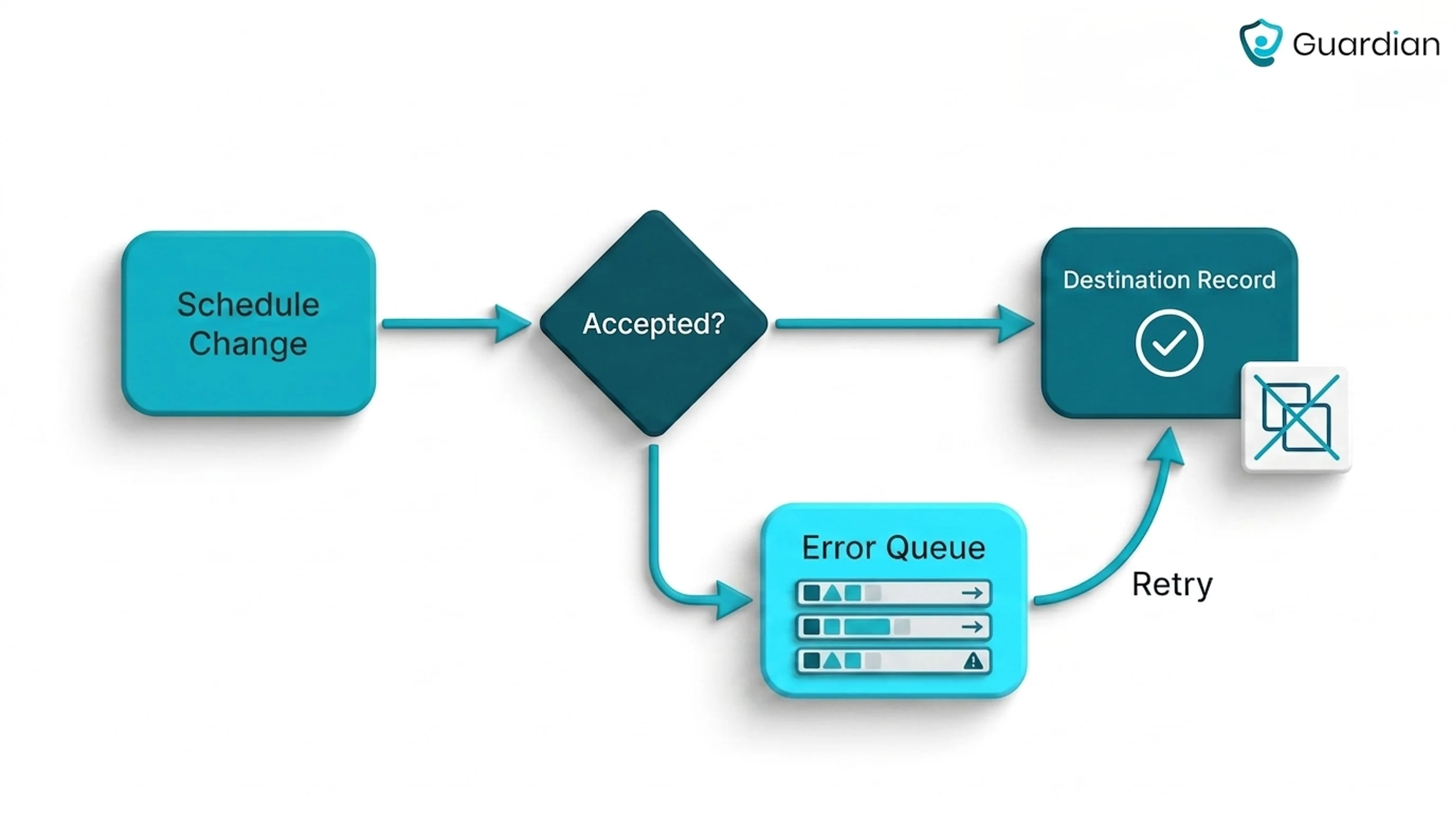
Test an integration handoff
Send one scheduled visit to a connected downstream system, then change its caregiver or start time. Use a connection your agency already depends on.
Track the handoff at four points:
Required fields map to the correct destination fields.
The change reaches the destination record.
Rejected updates appear with a named owner or queue.
A retry updates the record without creating a duplicate.
Pass when the destination shows the correct final state and the source records success or failure. Require the destination record itself as proof; a connection badge only confirms setup.
What to check before you commit
Before you commit, verify visit proof and live visibility first. Then test whether the platform fits your workflows from scheduling through payroll as the agency grows.
Data ownership and exit: Confirm export formats, retention periods, deletion responsibilities, and how the agency retrieves records when the contract ends.
Permissions and audit history: Test role-based access, approval rights, override controls, and the history retained after a correction.
Security and service commitments: Review hosting, privacy, incident response, uptime commitments, support hours, and escalation ownership.
Commercial and implementation scope: Separate contract term, migration, configuration, training, interfaces, and ongoing support in the quote.
Offline and integration recovery: Test failed syncs, rejected updates, retries, duplicate prevention, and who owns each error queue.
Measure what happens after the rota is published
Pilot Guardian with one home care team or defined service area. Over 6–8 weeks, the team measures response times, visit evidence, alert outcomes, staff feedback, and the operating changes worth scaling.
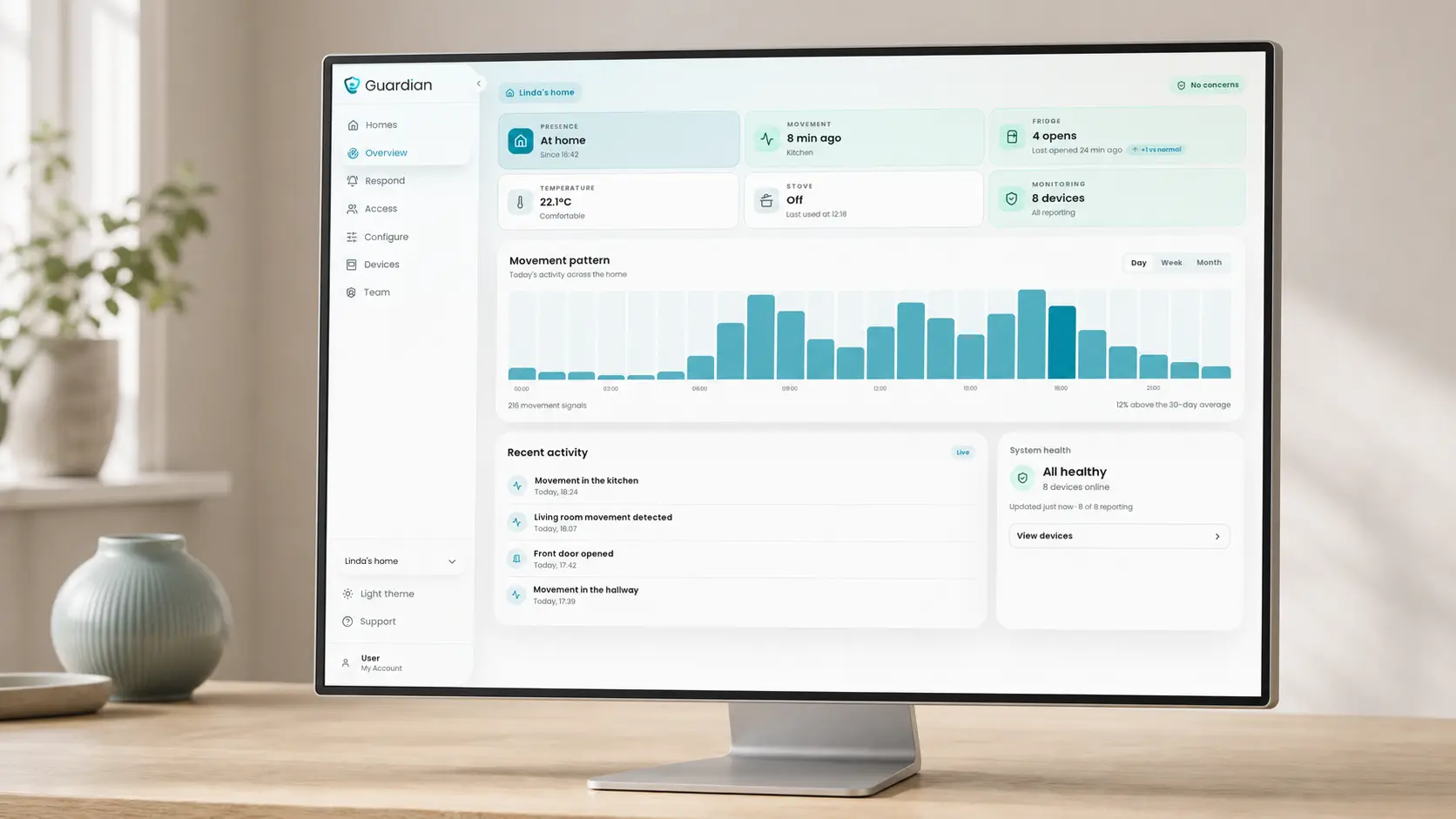
Each care setting’s routines determine alert rules. Guardian can flag prolonged inactivity or a missed refrigerator opening.
Guardian uses configured rules to filter routine sensor activity before it creates an alert. Guardian Insight still shows active events that staff need to respond to.
Planning record: Managers can compare scheduled visits with Guardian’s activity record, then adjust checks or support around observed routines.
After setup, your team confirms that Guardian is live from the dashboard:
Check that every sensor and connected device shows active status.
Review recent device activity to confirm monitored locations are reporting.
Check system status, signal range, and battery information before relying on live alerts.
The 6–8 week pilot records response times, alert outcomes, visit evidence, and staff feedback. The impact report includes an ROI calculation and rollout recommendation.
Home care scheduling software may use per-user pricing, client-volume tiers, or a scoped vendor quote. Compare the total cost of implementation, migration, integrations, training, and support.
Teambridge publishes a free Starter plan and a Growth plan at $7 per user. Guardian uses a scoped 6–8 week pilot, then sets rollout terms from the agreed scope and measured results.
Implementation can range from a short hardware activation to a longer core-platform rollout. The timeline depends on migration, workflow configuration, integrations, training, and EVV scope.
Guardian's preconfigured wireless hardware can go live in about a week. Its 6–8 week period measures pilot impact rather than installation time.
Home care scheduling software can connect with payroll or EMR systems through native modules, APIs, connectors, or exports. Confirm the exact systems, data direction, update timing, and exception owner.
Test the full flow from schedule to verified visit to chart to claim. Confirm which system owns each step, what syncs automatically, and where staff resolve errors.
EVV may be built into the platform or connected through an external service. Check the capture method, correction workflow, audit history, payer route, and destination for approved time.
CareSmartz360 connects EVV with scheduling, billing, and payroll workflows. AxisCare also offers built-in EVV, while AlayaCare supports mobile and offline field workflows; test each system with the payer route your agency uses.

Author
Aleks Timm
Aleks Timm leads Guardian and builds privacy-first operations technology for care homes and home care providers. Teams get location-aware alerts they can act on, clearer situational awareness, and measured insight into how care work actually runs.
Read MoreRecommended reads
Keep reading
WiFi nurse call system guide for care homes
WiFi nurse call systems explained: alerts, clean records, and no wiring—compare options and choose the right setup for your care...
Read more
Smart Nurse Call Systems for Care Homes and Home Care Providers
Smart nurse call systems for care homes and home care providers: compare features, improve response times, and choose the right...
Read more
How to install a nurse call system: a step-by-step guide
How to install a nurse call system with less disruption: plan devices, wiring, testing, and handover step by step for a smoother...
Read more