


Healthcare Workflow Automation for Clearer Care Operations
In this article
Manual reporting pulls managers away from active care. When records are scattered, a missed visit or slow response becomes a reconstruction job after the event.
Care homes need clear handovers, while home care teams need a reliable record of each visit and escalation. Hospitals and clinics face the same problem when a result or referral loses its owner.
Use this guide to choose a first workflow, design its controls, and decide from pilot evidence whether it should scale.
What is healthcare workflow automation?
Healthcare workflow automation uses a recorded trigger to check rules, assign the next action, and track completion. For example, a discharge form can be checked for required fields before the task goes to its named owner.
Start with work where the trigger is clear and one role owns the next action:
Clinical: Route routine charting or follow-up tasks while clinicians retain decisions that change care.
Administrative: Send forms and approvals to the named owner.
Finance: Process invoices or claims against defined rules, then route discrepancies for review.
Monitoring: Turn a device or system event into an alert for a named responder.
Operational: Update assignments or handovers when recorded conditions change.
Every automated workflow needs an audit trail that shows who received the task and when. That record matters when a visit, referral, or escalation needs review.
Digitisation puts a paper form or clinical note into a searchable system. Automation starts the next step, decision support flags information for review, and monitoring automation responds to a recorded event.
Avoid sending every incomplete form to one queue. For a missed visit, name the owner and escalation route so staff work the exception instead of rebuilding the timeline from notes and calls.
Which kinds of automation are used in healthcare?
A scanning tool, a rule, and an alert engine do different jobs. Choose the mechanism by the work in front of you, not by the software label.
These five mechanisms cover the work teams automate most often:
Rule-based workflows: Apply fixed conditions to routing, approval, and escalation.
Robotic process automation (RPA): Repeat screen-based data transfer and status updates across older systems.
AI: Classify or draft from unstructured input; staff retain consequential decisions.
Data capture: Extract structured fields from forms or scans before validation and routing.
Monitoring automation: Watch device or system events, then create an alert or task for a named responder.
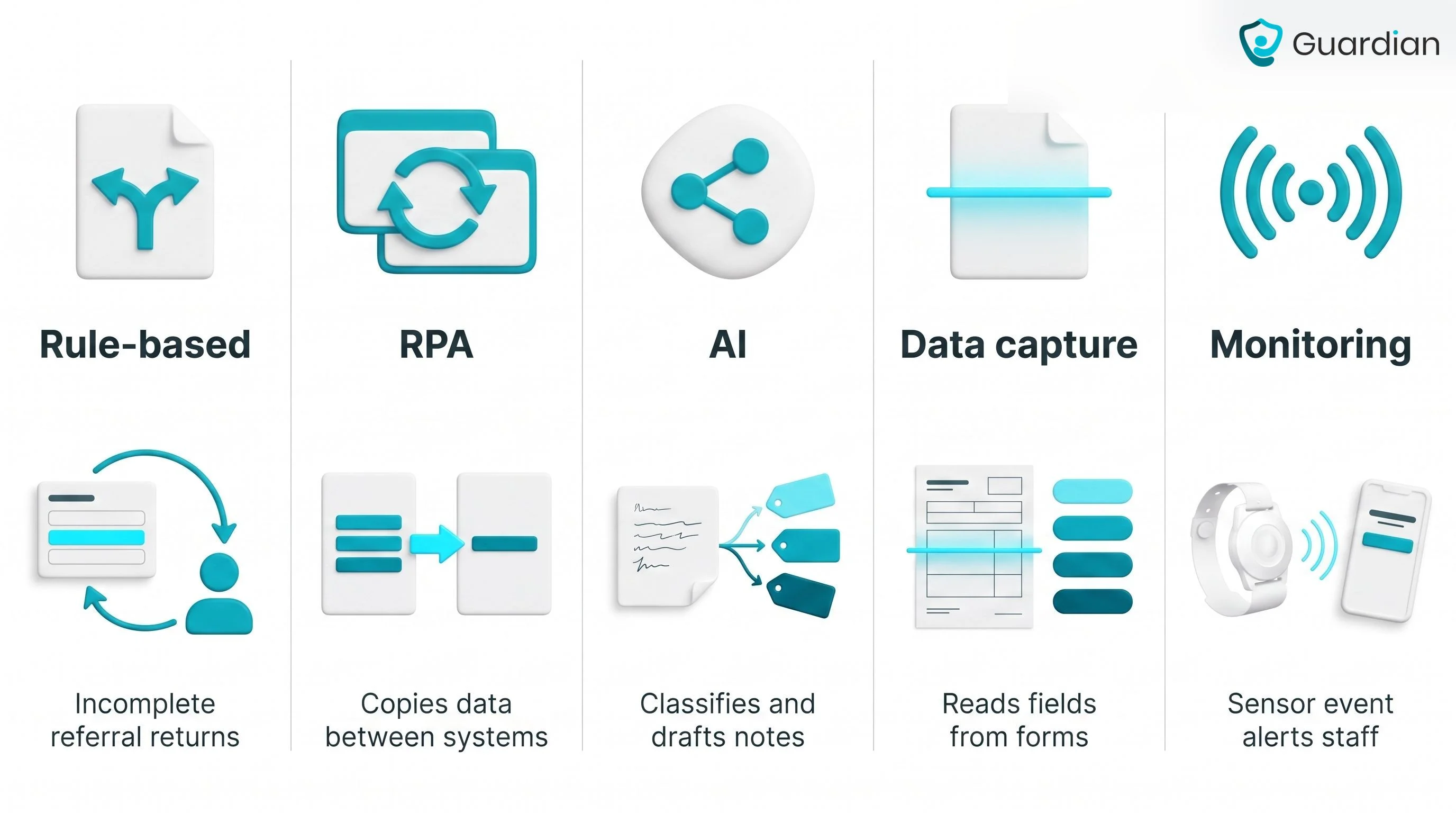
Rules and RPA fit work with fixed steps. A referral missing a field can return to the submitting team, while an approved invoice can move to finance without a new email chain.
Clinical automation needs a clear stop point. Data capture can assemble a referral and AI can flag an incomplete note; an authorised clinician makes decisions that change care.
Monitoring automation reacts when a device or system changes state. In a care home, Guardian turns a location-aware safety event into an alert for the responsible staff member.
Where automation helps most
Automation pays off where a routine handoff creates a queue, duplicate entry, or a stale record. Start with the place staff repeatedly chase missing information.
Care operations and safety monitoring: This category connects physical events and daily activity to a named response and a clean operating record.
Record visits, rounds, shift timing, and handovers.
Send location-aware alerts with acknowledgement and escalation paths.
Track residents, caregivers, vehicles, and assets in one live view.
Use response and activity records to tune staffing and alert rules.
Guardian supports these workflows across care homes, home care, and other care settings.
Patient access and intake
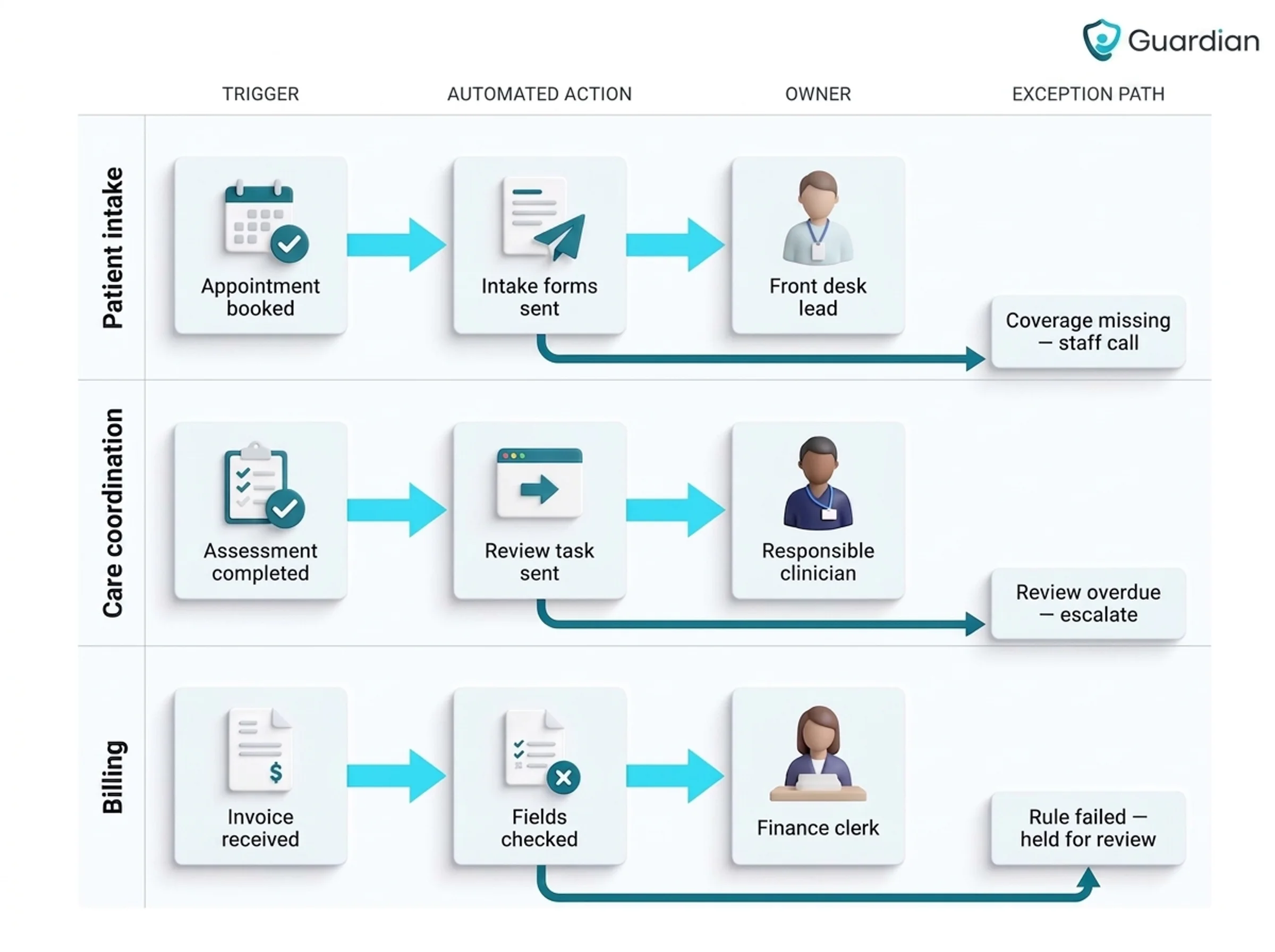
At a booked outpatient appointment, every missing item becomes a front-desk call. Automation sends the routine work forward and leaves staff with exceptions.
A booking can move the routine intake work in sequence:
Start with booking. The appointment or referral sends the correct digital forms automatically, removing a manual handoff at the front desk.
Capture information once. Registration and consent details enter structured fields, so clinicians and access teams can use them without rekeying.
Run pre-visit checks. Coverage or referral checks flag missing details early, giving staff time to resolve them before arrival.
Send reminders and confirmations. Patients receive both before the appointment, while staff spend less time on outbound calls.
Continue after the visit. Follow-up instructions or a portal invitation can go out automatically, closing the loop without another queue.
Automate the booking trigger before expanding to every form.
Start with one appointment type, then add other referrals or admissions after staff can resolve exceptions reliably.
Clinical documentation and care coordination
Care teams need the next owner to see an observation while it is still useful. Structured documentation records the event once and routes the next action to the responsible team.
Common routes connect the point of care to the next owner:
During care. Staff record the observation once with a timestamp, so the shared record reflects what happened without a second entry task.
After an assessment. A completed form updates the record and sends a review task to the responsible clinician, reducing handoff delay.
At transfer or discharge. The latest summary moves to the receiving service, so staff begin with recorded context rather than rebuilding it from calls.
Across community care. Residential and home-care updates reach the coordinating team, keeping changes visible beyond one site or shift.
Structured capture makes incomplete fields and overdue reviews visible. That gives managers a clear exception list while the care team works from the same record.
Billing, authorizations, and back-office work
Billing and authorization automation belongs to the administrative system, where explicit rules can check records and route exceptions.
Keep each automated step narrow and give staff authority over discrepancies:
Record intake: Check required fields, then send missing or conflicting data to staff.
Queue routing: Send complete records to a fixed queue, with exceptions assigned for review.
Work item creation: Attach an owner and timestamp so the task can be completed or reassigned.
Exception handling: Flag a failed rule; staff decide whether to correct, hold, or escalate.
Clean intake prevents duplicate patient and payer details from reaching administrative queues. Staff and back-office systems still make billing and coverage decisions.
Routine records can move through administrative queues with timestamps and ownership. Staff still review discrepancies and any authorization or decision that affects coverage or care.
Which workflow should you automate first?
Start where staff already know the handoff by heart, yet it still creates a queue. The best first project is high-volume, rule-based, low-risk, and easy to measure.
Score value, feasibility, and risk
This 12-question screen scores value, feasibility, and risk. The adjusted score ranks candidate workflows; it is not a universal pass mark.
Start with value: award 1 point for each yes answer, up to 4.
Does the task recur often enough to create a visible queue?
Can you measure the staff time spent on it?
Do missing fields or re-entry create repeat work?
Does delay affect payment, access, or care continuity?
Score feasibility next, awarding 1 point for each yes answer, up to 4:
Is the trigger stable and recorded?
Does the workflow start with structured input?
Are the routing rules explicit?
Does every exception have a named owner?
Score risk from 0 to 4. Add one point for each yes answer:
Can the output approve, deny, or delay care?
Does the workflow interpret clinical information?
Would an error be hard to reverse or trace?
Could staff act before reviewing the output?
Care or coverage decisions stay under human approval, regardless of score. Calculate each candidate as value + feasibility - risk.
Use the adjusted score to rank workflows that route information or generate records. Before piloting the highest-ranked option, confirm its fallback path and accountable owner.
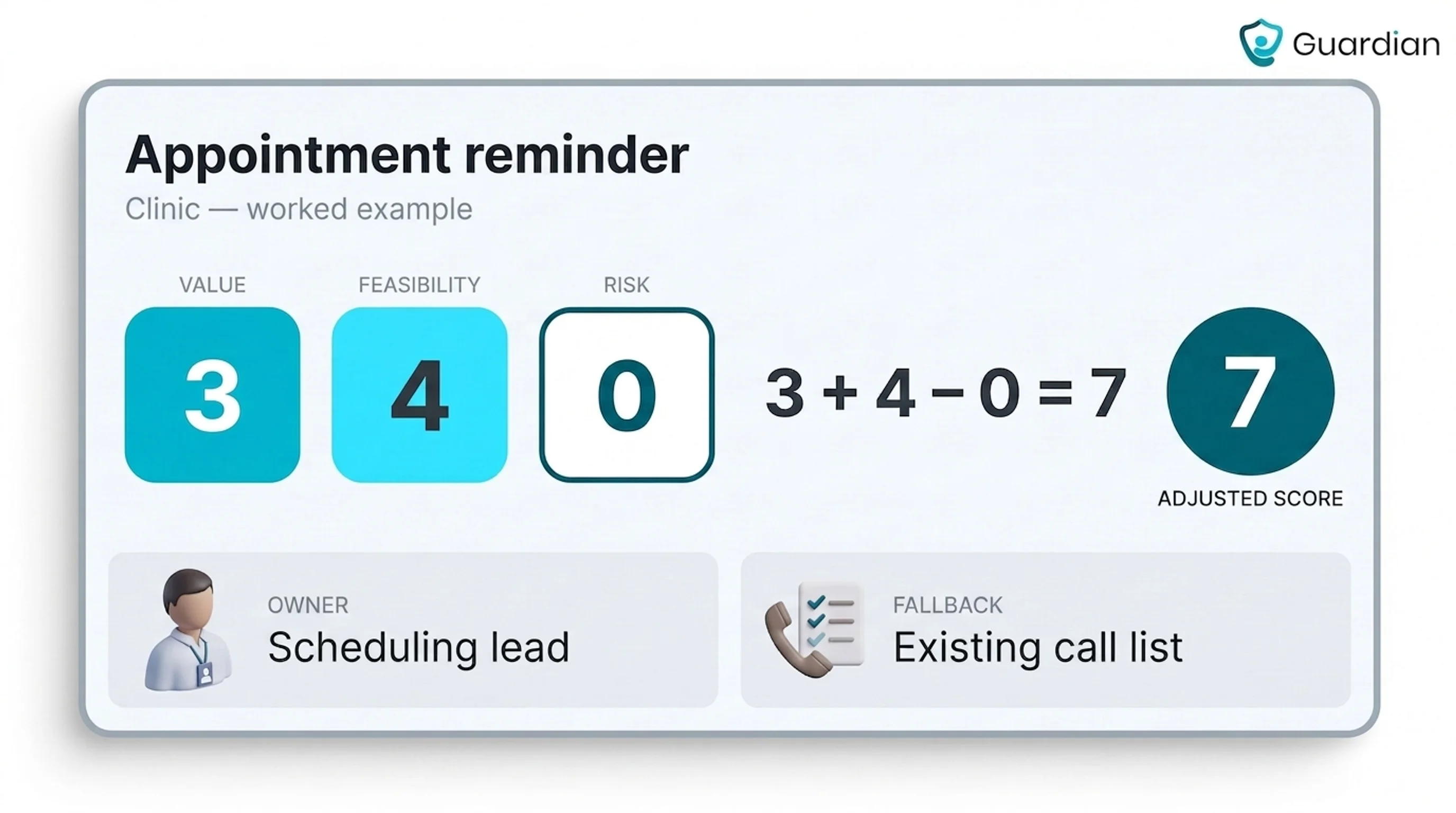
Worked example: A clinic appointment reminder scores 3 for value when staff chase a visible call queue, can measure call time, and missed appointments delay access.
Booking is the trigger; a phone number is the structured input; the reminder text follows fixed rules; and the scheduling lead owns exceptions. That makes feasibility 4.
The reminder has 0 risk points because it sends a scheduled message without interpreting clinical information or deciding eligibility or care. Its adjusted score is 3 + 4 - 0 = 7, used to compare it with other candidates rather than declare an automatic pass.
By contrast, a workflow that interprets clinical information and could change care collects more risk points. Even with high value and feasibility, it ranks lower for a first pilot and keeps qualified staff in control.
Good first candidates by care setting
Compare first candidates by setting, then choose the option with the highest adjusted score, a named owner, and a workable fallback path:
Hospitals and clinics: Appointment reminders or note drafting, owned by scheduling staff or the signing clinician, with the existing call list or documentation process as fallback.
Care homes and specialist facilities: Visit records or targeted safety alerts, owned by the manager or on-shift caregiver, with existing rounds and records as fallback.
Home care and social care: Visit logging or care-plan access, owned by the assigned worker or coordinator, with phone coordination and offline records as fallback.
How an automated healthcare workflow works
An automated healthcare workflow turns a recorded trigger into a rule, action, owner, and reviewable record. Guardian provides one worked example: a sensor event becomes a defined staff task with a human review path for exceptions.
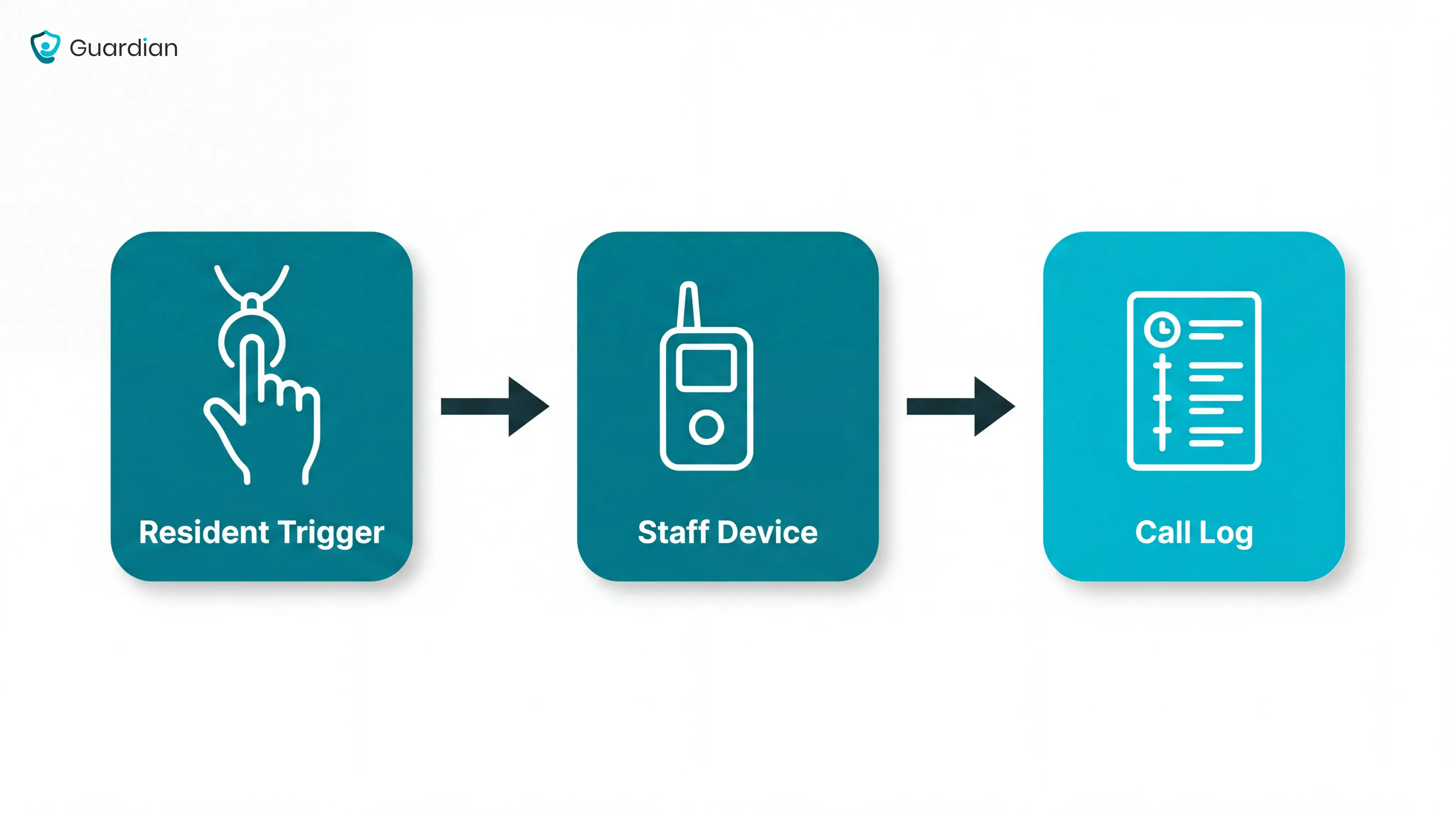
Map the trigger, logic, action, and owner
Use four fields to make the workflow accountable:
Name the trigger. Choose one recorded event, such as a submitted intake form or a Guardian sensor rule. The workflow lead owns source setup; capture failure moves the item to the existing manual intake or round log.
Write the logic. Define the conditions using data already captured. A clinical or service lead approves the rule; unmatched cases go to that role’s existing review queue.
Define the action. State what the system sends and who receives it. For Guardian, a room-level alert goes to the caregiver on shift; delivery failure returns the home to its existing call or round process.
Assign the accountable owner. Name one role that closes the task and records the outcome. A department manager maintains the map; unavailable owners are handled through the named backup role or manual queue.
Design the exception path
The exception path is the fifth design requirement. It removes unusual events and missed acknowledgements from normal handling, then sends each case to a person with authority to decide.
Use a short decision path:
Continue automatically: Routine activity stays within the expected threshold and needs no approval.
Route for review: Send the case to a named caregiver or clinician when policy, clinical judgement, or incomplete information requires a person.
Escalate: Notify the named backup owner when the facility’s acknowledgement target passes without a response. Each facility sets that target in Guardian.
Confirm action: Record the acknowledgement and next step. Supervisor sign-off applies only when the facility's workflow requires it.
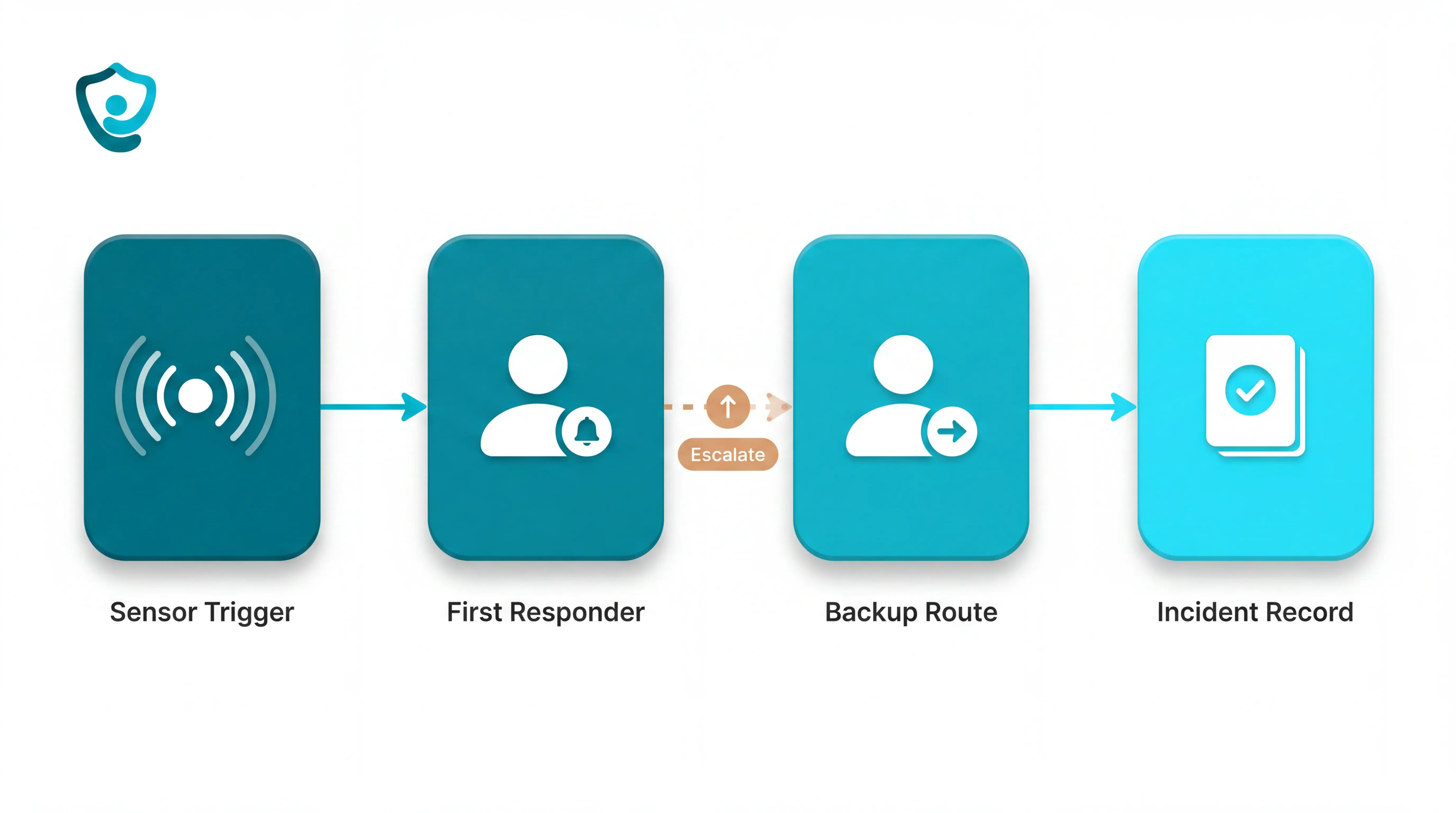
Set each Guardian rule around the resident’s routine rather than applying one threshold to everyone. A short bed exit can be logged without an alert while a longer absence reaches staff.
For every escalated Guardian alert, record:
Event: What happened and which rule triggered
Person or location: Resident, room, bed, or care area
Owner: The person responsible for the first response
Response target: The acknowledgement time set by the facility
Acknowledgement state: Unseen, received, accepted, or escalated
Next step: Review, attend, approve, document, or hand over
How to implement it without disrupting care
Implement one workflow in controlled stages, keeping a manual fallback until staff can handle routine cases and exceptions. Guardian provides the worked example for care-operations alerts.
A phased rollout changes one ward, team, or workflow first. Staff keep the existing process as fallback while training, rule tuning, and ownership issues surface before wider expansion.
Map one care setting’s workflow before changing daily routines. Keep the existing round, call, or record process available until the pilot path works reliably.
Start with one pilot
Use one high-friction monitoring workflow in one ward, home, or care team for 6–8 weeks. The fixed scope gives staff time to correct alert rules and ownership before rollout expands.
Map the current workflow. Record the trigger, first responder, acknowledgement point, backup route, and required sign-off.
Fix the scope. Choose one ward and one use case, with a named operational owner.
Prepare the setting. Guardian maps the floor plan and priorities, then installs wireless, pre-configured hardware without drilling or cabling. Facility setup can take about one week.
Use familiar devices. Send alerts to supported smartphones, tablets, or nurse-station computers that staff already use.
Train and rehearse. Staff practise receiving, acknowledging, and escalating alerts on each shift. Keep the existing process available, and add supervisor sign-off only where the local workflow requires it.
Run and review. Keep the scope stable for 6–8 weeks, then use Guardian's final impact report to decide whether rollout should expand.
At the review, mark the pilot pass, revise, or stop. A pass needs repeatable results and staff adoption; revise names the rule, training, or ownership change to retest; stop keeps the existing process.
Connect systems before you scale
Before adding wards or teams, connect the parts of one Guardian path: mapped location, sensor or wearable, rule, staff device, acknowledgement, and operating record.
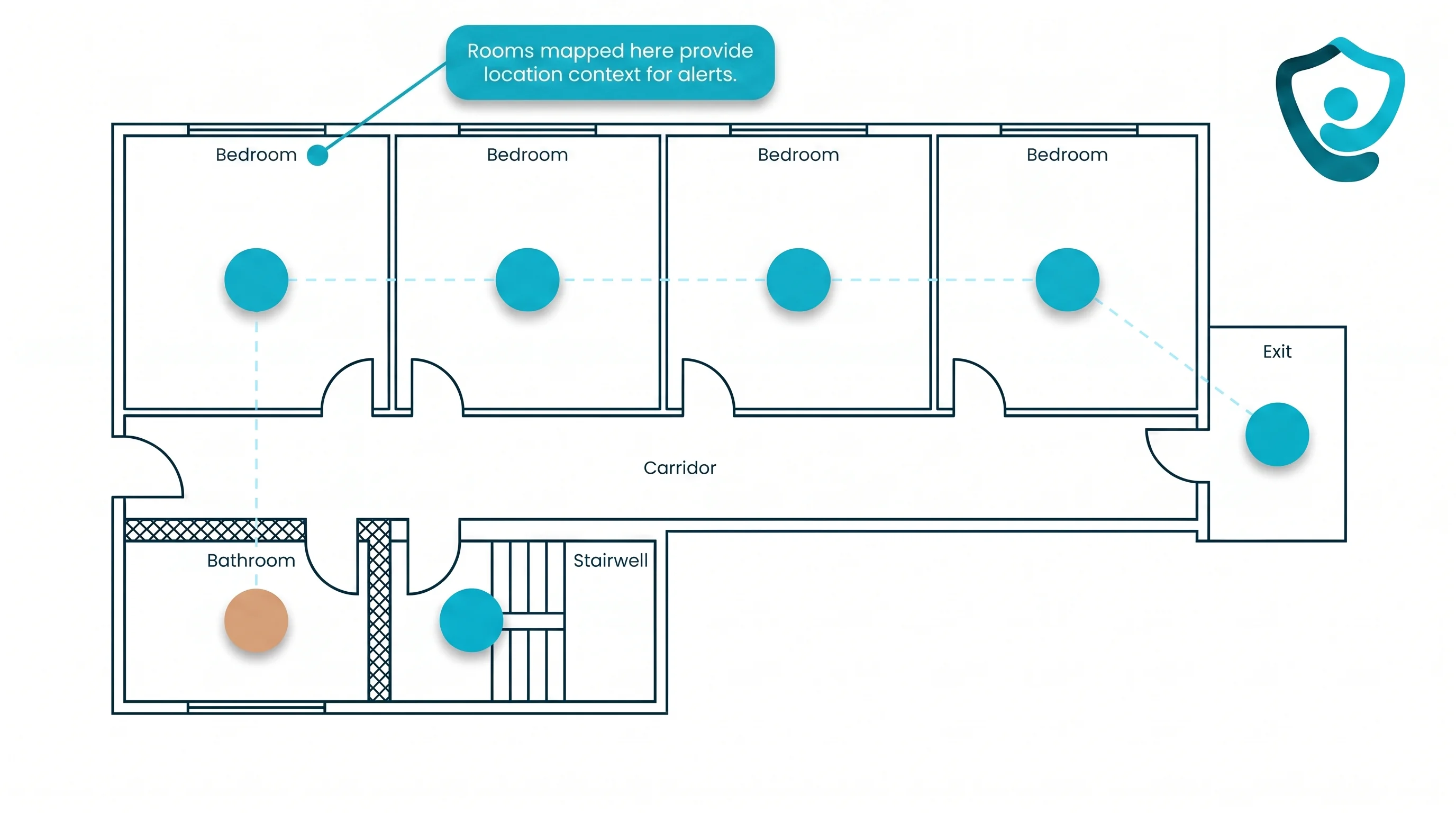
Map locations. Digitise the floor plan or service map, then assign every Guardian sensor to the correct room or bed.
Link devices and rules. Assign each wireless, camera-free sensor or wearable to its agreed threshold, named response owner, and backup escalation route.
Route alerts into work. Send intervention-needed alerts through Guardian to supported staff phones, tablets, or nurse-station computers, with the resident and room attached.
Create the Guardian record. Capture the event, delivery, acknowledgement, and response in the operating record for later review.
Run the full alert chain during a normal shift before adding another ward or team. Verify that staff receive resident and room context, use the backup route, and can retrieve the operating record.
What controls matter in healthcare automation?
Use two control sets: supplier due diligence for hosting, security, and contracts, plus day-to-day controls for access, decisions, exceptions, and audit records. Check both before expanding a pilot.
Privacy, access, and auditability
Buyers need clear answers to two questions: who can see a record, and can the care home trace a change later?
Guardian's camera-free monitoring avoids collecting video footage. Buyers still need written evidence for the data the system does collect.
Minimum access: Document the minimum data needed to trigger the workflow and support its record; disable every unrelated field or feed.
Role permissions: Define what caregivers, managers, administrators, and vendor support can view or change, then remove access when a person's role ends.
Encryption and hosting: Get written confirmation of encryption in transit and at rest, hosting location, backup protection, and every organisation that processes the data.
Data ownership: Put ownership, permitted use, retention, export, and deletion terms in the contract so records remain available when a supplier relationship ends.
Audit logs: Confirm logs show who accessed or changed a record, what they did, and when; test search, export, and retention before rollout.
Review evidence: Keep dated access reviews, security documentation, resolved exceptions, and incident follow-up where managers can retrieve them for governance reviews.
When humans need to stay in the loop
Qualified staff should retain authority whenever automation could change care, access, consent, or emergency action. The system can recommend or escalate, but a person decides what happens next.
Common mistake: Treating an unacknowledged safety alert as a resolved case. A named staff member must review the event and choose the next response.
Care or coverage decisions: approving, denying, or changing care, services, eligibility, or access
Rights and consent: interpreting capacity, preferences, privacy choices, or permission to proceed
Emergencies: assessing urgency and selecting the safest response when delay or error could cause harm
Ambiguous communication: resolving unclear language, conflicting information, translation concerns, or unusual behaviour
Unacknowledged safety events: checking whether the alert reached the right person and escalating when nobody responds
Before handoff, the automated workflow should assemble the relevant record, event location, rule that fired, and recent actions. The workflow should route the case to an accountable role and timestamp delivery, acknowledgement, and decision.
How to measure success
Measure the burden the pilot is meant to remove, using the same workload definition before and during the test. For a care-alert workflow, focus on delivery, acknowledgement, alert relevance, and recorded incidents.
Record the baseline before the pilot and normalise results by the relevant unit, such as shifts, residents, visits, tasks, or alert volume. Compare like periods and keep the rules unchanged unless the revision is documented.
Prefer data the workflow already produces, such as timestamps, corrections, acknowledgements, and case costs. Add an adoption measure so an unused workflow cannot appear successful on speed alone.
Choose metrics that match the workflow
Choose one primary outcome for each workflow. Add one safety or quality check so faster processing does not hide a mistake.
Match the primary outcome and guardrail to the workflow:
Invoice processing: Cycle time, cost per completed invoice, and correction rate.
Clinical documentation: Clinician time, completion rate, and corrections or claim denials.
Care alerts and monitoring: Delivery-to-acknowledgement time, unacknowledged events, alert relevance, and observed incident rate.
Use pilot results to decide what scales
Scale only where a pilot has repeatable gains and staff will keep using the workflow. Bring the scorecard to the review meeting and compare baseline with pilot results before naming the next ward, team, or workflow.
Use one before-and-after evidence record with the same workload definition, measurement rules, and comparable observation periods.
Example ROI calculation: If a task takes 10 fewer minutes across 12 occurrences per shift, it frees two staff hours per comparable shift. Multiply by the number of measured shifts and the organisation’s loaded hourly cost, then subtract pilot and implementation costs.
Mark each gate pass, revise, or stop. A pass needs documented results and consistent staff use; revise needs a named change and another test; stop retains the existing process.
Carry proof forward only with the workflow that produced it. The rollout record must name the next ward or workflow and its owner. It must also specify which measures will be repeated.
What to look for before you commit
Run a scoped pilot before you commit. A product earns wider rollout only when staff can use it in the care routine, managers can verify the result, and support responsibilities are clear.
Workflow fit: Map the product against current roles and handoffs; reject any design that creates extra checking or duplicate records.
Interoperability: If the selected workflow requires an EHR, practice-management, or other data handoff, test it and document recovery from a failed exchange. Do not require integration where the workflow can run independently.
Privacy and human oversight: Verify access controls and retention rules against legal obligations. Before a care-critical exception closes, name the person who approves or overrides the automated workflow, then confirm audit logs identify each change.
Alert quality: Test routine and urgent scenarios; staff should receive events that need intervention while background activity stays quiet.
Implementation load: Count the setup and maintenance hours your own staff must supply, including training time.
Pilot proof and scope: Define the workflow, setting, timeline, baseline, support responsibilities, and evidence required before wider rollout. Separate observed staff hours from forecasts and include every pilot cost.
Vendor maturity and exit: Confirm who supports staff, who maintains rules after launch, how records are exported at exit, and whether the vendor can support the planned rollout.
Prove workflow gains in 6–8 weeks with Guardian
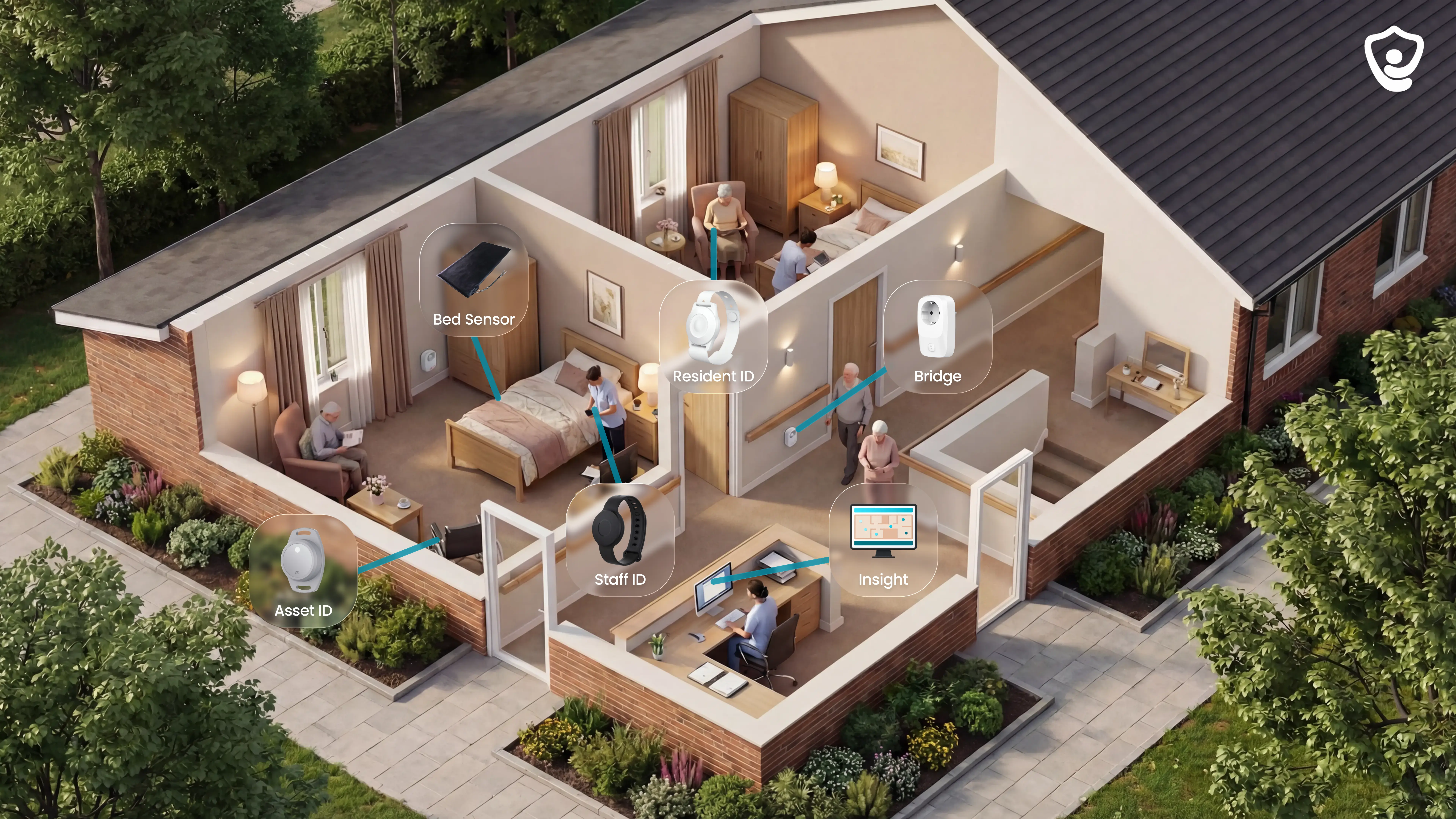
A Guardian pilot tests location-aware safety alerting and its operating record in one ward, home, or care team over 6–8 weeks.
Guardian pilots can be scoped around safety-alert workflows in care homes, home care, specialist-care facilities, and mental-health facilities.
Agree the baseline. Choose historical incident logs and available response records to compare with Guardian's pilot record.
Install the alerting setup. Guardian's camera-free wireless system sends location-aware alerts to staff devices, with wearables available where the care plan calls for them.
Monitor and tune live alerts. For 6–8 weeks, staff review alert relevance while agreed rules filter routine activity. Guardian records room-level events, delivery, acknowledgements, and response times.
Decide what follows. The impact report combines Guardian records with facility baseline data and staff feedback. Mark the pilot pass, revise, or stop, then name any rule changes and the next deployment scope.
Alarm counts alone are not proof. Guardian records each event with a room and time, allowing managers to compare facility-supplied historical incidents with the pilot record.
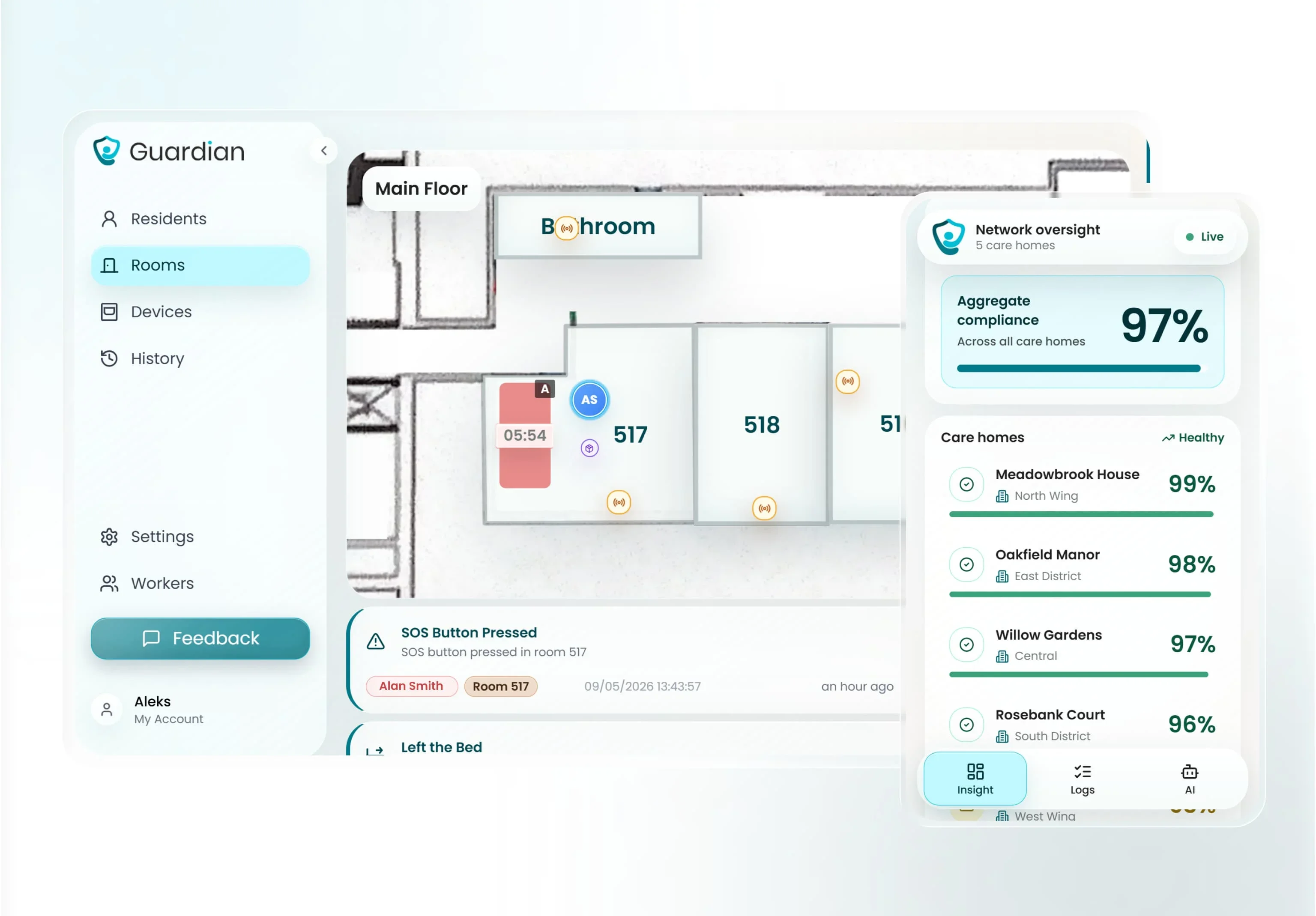
The impact report separates facility-supplied baseline evidence from records produced during the Guardian pilot:
Historical baseline: Facility incident logs and available response records for the selected workflow.
Room-level activity: automatic records showing where and when events occurred
Response times: measured intervals for nurse calls, falls and SOS events
Incident records: events captured during monitored operation
Staff feedback: caregiver input on alert relevance and workflow fit
ROI: A local calculation using observed staff time, operating effects, pilot costs, and proposed rollout costs.
Decision record: Pass, revise, or stop, with any rule changes, ownership changes, and rollout recommendation named.
A narrow, wireless care-home alert deployment can be live in about one week. A project that connects an alert system to an electronic health record needs additional time for integration and testing.
Yes. A small hospital or clinic can start with one high-friction administrative or documentation workflow, then compare the result with its baseline.
Choose a workflow with a stable trigger, clear owner, measurable workload, and manual fallback. Train the affected team before the pilot, then use time, quality, and adoption results to decide whether to expand.
No universal ranking is useful. Match the product category to the workflow, then verify the proposed setup, integrations, review path, and evidence in your own environment.
Freed: Clinical documentation and front-desk workflows; test note review, coding suggestions, and any required EHR handoff.
Dental Intelligence: Dental analytics, scheduling, patient communication, and payments; confirm support for the practice-management system already in use.
Oracle Health: Enterprise EHR, cloud, and healthcare data workflows; require clear governance, interoperability, and support responsibilities.
Aidoc: Clinical imaging AI and care-team activation; define the exact use case, integration path, and clinician review point.
Staple AI: Document intake, extraction, verification, and audit trails; test how reconciliation exceptions reach staff.
Guardian: Care operations, visit records, and location-aware safety monitoring; test alert relevance, acknowledgement, escalation, and the operating record in one care setting.
Request vendor documentation that supports every claim made in the demonstration. Test the target workflow in a pilot against your current baseline.
ROI is positive when documented gains from the pilot exceed every deployment and operating cost.
ROI = (documented gains - total automation costs) / total automation costs
For example, documented gains of 12,000 against total costs of 10,000 in the same currency produce a 20% ROI. Use baseline and pilot data for each term:
Staff time: Paid hours demonstrably removed from manual work during the pilot.
Quality and flow: Fewer documented errors or shorter response times, converted to a cost only when records support it.
Avoided operational cost: Spending demonstrably removed or deferred; report forecasts separately from realised gains.
Total cost: One-off deployment costs plus recurring operating costs, including exception handling.
Count only observed gains in realised ROI and report projected savings separately. Keep one-off deployment costs separate from recurring operating and exception-handling costs.

Author
Aleks Timm
Aleks Timm leads Guardian and builds privacy-first operations technology for care homes and home care providers. Teams get location-aware alerts they can act on, clearer situational awareness, and measured insight into how care work actually runs.
Read MoreRecommended reads
Keep reading
Smart Nurse Call Systems for Care Homes and Home Care Providers
Smart nurse call systems for care homes and home care providers: compare features, improve response times, and choose the right...
Read more
Indoor positioning systems for care homes
Indoor positioning systems for care homes help staff locate falls, exits, and nurse calls by room or bed, improving response,...
Read more
WiFi nurse call system guide for care homes
WiFi nurse call systems explained: alerts, clean records, and no wiring—compare options and choose the right setup for your care...
Read more