

9 Best Senior Safety Devices for Caregivers
In this article
Up to 80% of older adults who fall when alone and have a call alarm do not use it to summon help, according to Fleming et al. (2008). That single gap undoes a safety strategy built on manual SOS buttons, for any care home or agency relying on them.
This guide evaluates senior safety devices the way an operator does, not a family shopping for one pendant. The lens is professional: how each device fits real care workflows, whether it cuts alert fatigue instead of adding to it, and whether it produces the verifiable records a compliance audit needs.
Consumer panic-button roundups often rank pendants and wall buttons side by side. We weigh active and passive monitoring together, because the residents most at risk are often the ones who cannot or will not press a button. By the end you will know which devices give you room-level response and automatic proof of care, and which stop at the emergency button.
Key takeaways
Senior safety devices include monitored medical alert systems, unmonitored emergency buttons, and passive sensor-based monitoring tools, with major trade-offs in response model, fall-detection coverage, caregiver visibility, device type, and total monthly cost.
This category is wider than wearable panic buttons. Devices range from wearables to passive sensors, and the monitoring model matters as much as the hardware.
Medical alert devices span wearables, in-home base units, and passive room sensors.
Monitored systems like Lifeline and Medical Guardian route an alert to a live agent who calls for help.
Unmonitored systems skip the agent and alert chosen emergency contacts directly.
Response model and price vary more than the device labels suggest. Two systems that both call themselves "medical alert" can differ by tens of seconds and tens of dollars.
Response times ranged from about 10 seconds to just under a minute in testing across the systems here.
In-home plans in this roundup start around $24.95 to $34.95 per month.
Fall detection, mobile hardware, and caregiver apps push the real monthly cost above the advertised base.
Button-only devices have clear limits for non-wearers, falls, and passive monitoring. They depend on the resident being conscious, able, and willing to press for help.
Between 50% and 75% of UK care home residents fall at least once a year. Studies show roughly 16% to 25% of care home falls occur on night shifts, while about three-quarters occur inside residents' rooms, such as bedrooms or bathrooms.
A manual emergency button does nothing when the person is unconscious, immobile, or not wearing the device.
Passive sensors fill this gap by detecting events the resident cannot report.
What to scan for | Why it matters |
|---|---|
System type | Wearables, in-home base units, and passive sensors solve different safety problems |
Monitoring workflow | Some devices connect to live agents, while others alert family contacts |
Fall and passive coverage | Button-only systems depend on the user being conscious and able to press for help |
Best device types by need
Best device types by need are in-home base units for homebound users, GPS wearables for active seniors, wall buttons for fixed-risk spots, and passive sensors for non-wearers.
Seniors who won't wear an alert are still covered. Pendants, tracking devices, and smartwatches only work when the person keeps them on. Passive fall detection using radar or infrared can call for help without anyone wearing a thing.
Guardian runs this passive layer in the background, with no action required from the resident. Motion, door, fridge, stove, and bed sensors show how someone is managing between visits, without cameras.
A device alert only helps if it tells staff where to go. Guardian links each sensor to a specific room or bed on a digitised floor plan during setup.
When a nurse call or fall fires, the alert reaches caregivers' phones with the resident's name and live location. Staff act on it through the same web portal, on the smartphones, tablets, and nurse-station computers they already use, and they can tune alerts to daily routines or inactivity.
Need | Device type | Why it fits |
|---|---|---|
Mostly at home | In-home base unit with pendant | Works around the house with a fixed emergency response hub |
Active outside the home | Mobile GPS pendant or smartwatch | Supports location tracking away from the house |
High-risk fixed areas | Wall button | Places a manual help trigger near beds or bathrooms |
Will not wear or press a button | Passive room sensors | Detects activity changes or falls without user action |
How we evaluated these devices
Our evaluation is a practical review of medical alert systems based on response speed, fall detection, caregiver features, setup, and total cost.
We scored for how devices behave in a real emergency, not on spec sheets. Response times were tested repeatedly per system, and only providers with 24/7 professional monitoring and sub-minute average response made the cut.
Caregiver workflow fit carried equal weight. A device is only as reliable as the response it triggers, so how staff or family actually act on an alert is part of the score.
Criterion | What we checked |
|---|---|
Emergency response | 24/7 monitoring, response speed, dispatch workflow |
Fall detection | Availability, add-on cost, reliability trade-offs |
Caregiver features | Apps, SMS alerts, location sharing, escalation contacts |
Usability | Setup time, ease of wearing, ease of placing test calls |
Total cost | Monthly fee, equipment fees, activation fees, discounts |
Senior safety devices compared: features, pricing, and limits
These senior safety devices are medical alert systems with different monthly costs, fall detection fees, caregiver tools, and monitoring limits.
System | Starting price | Fall detection | GPS | Caregiver tools | Battery or range | Notable limit |
|---|---|---|---|---|---|---|
Guardian | Not specified | Not specified | Not specified | Not specified in provided data | Facility sensor network. Mobile battery not specified | Consumer-plan pricing and battery details are not confirmed in provided research |
Bay Alarm Medical | $39.95/mo | $10/mo | Yes | Caregiver tracking app with location history and low-battery alerts | 6 to 8 hours on smartwatch. Up to 72 hours on SOS All-In-One 2 | Mobile devices require one-time equipment purchase |
Medical Guardian | $46.95/mo | $10/mo | Yes | Not specified in provided data | Not specified in provided data | Caregiver tools and battery details are not confirmed in provided research |
ADT Health | $29.99/mo plus $49.50 activation | Available. Price often bundled or pendant-based | Yes on mobile units | Caregiver app access is limited to Medical Alert Plus | Battery life and in-home range test below category leaders in provided research | Activation fee adds upfront cost |
Medical Alert | $29.95/mo home. $34.95/mo mobile | Available. Exact add-on price not specified | Yes on mobile units | Medical Alert Connect app sends battery and location alerts | Up to 4 days on mobile battery. Up to 800 feet in-home range | Home systems are cellular-based in provided research |
Lifeline | $34.95/mo HomeSafe. Up to $44.95/mo On the Go Mini | About $15/mo | Yes on mobile units | My Lifeline app for status tracking and family notifications | Up to 4 days mobile battery. Up to 1,000 feet in-home range | Setup and hardware fees apply at activation |
MobileHelp | $24.95/mo | $10 to $11/mo | No on Classic. Yes on some mobile models | No deep caregiver-sharing features noted in provided research | Advertised 1,400 feet in-home range. Real-world testing closer to 300 feet | Range claims vary from real-world testing |
LifeFone | $24.95/mo landline. $37.95 to $43.95/mo mobile | $5/mo | Yes on mobile units | VIPx2 caregiver app only. Other models use text-to-locate | Up to 16 days on VIPx2 and VIP Active | App features depend on model |
LifeStation | Around $30/mo | Available | Mobile duration not specified | Free real-time SMS alerts to caregivers without an app | Up to 1,300 feet in-home range. 24-hour backup battery on Sidekick Home | Mobile battery duration is not specified |
The 9 best senior safety devices for caregivers
The best senior safety devices for caregivers are medical alert systems that differ by where they work, how alerts escalate, and how much caregiver visibility they give beyond an emergency button. The list below compares each option through that caregiver lens so you can see which devices fit home use, mobile use, or broader monitoring needs.
1. Guardian
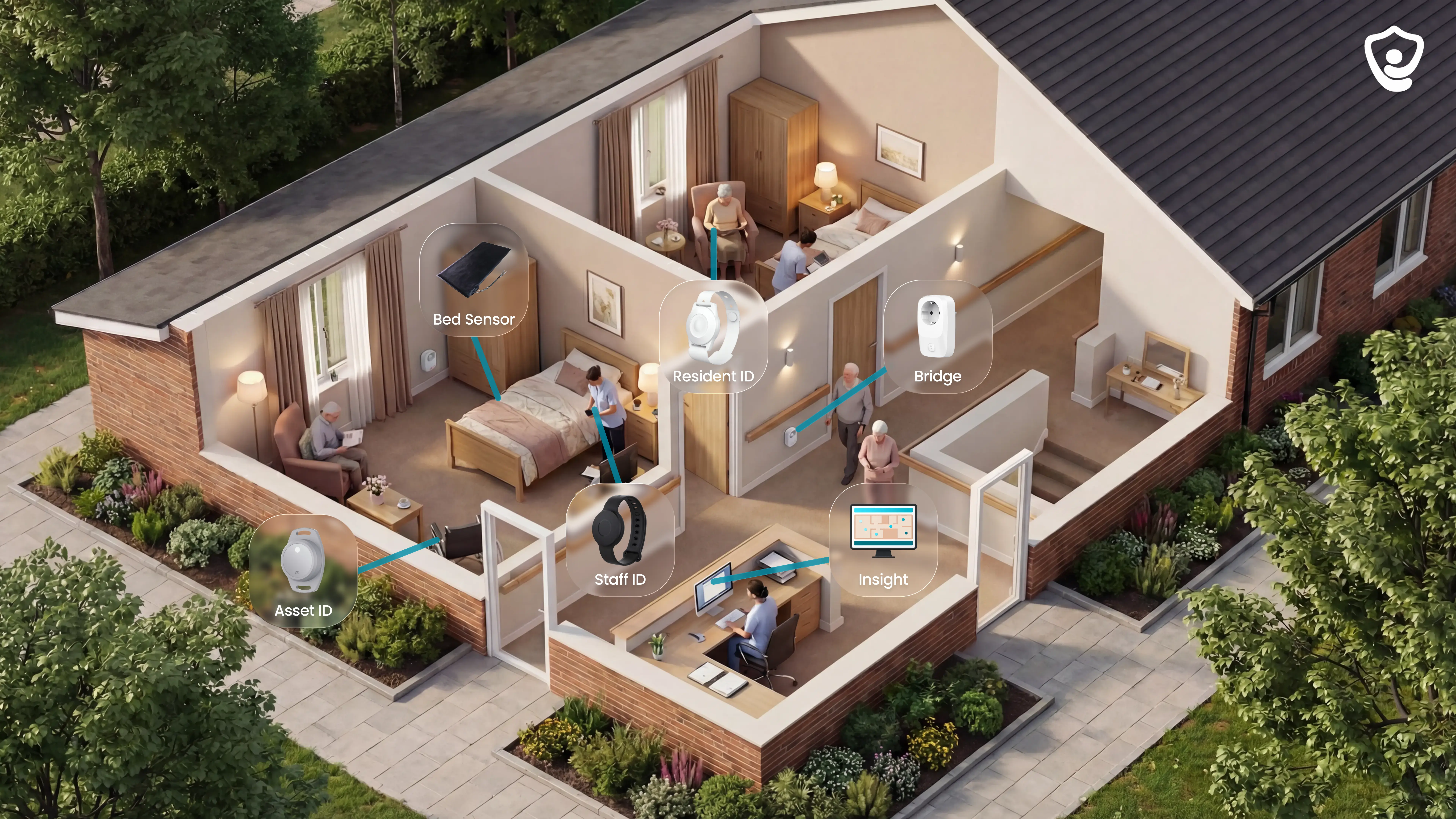
Guardian is a camera-free monitoring platform for care homes and home care teams. The platform connects passive room sensors with optional wearables and live alerts in one dashboard.
The main difference from a consumer pendant is scope. Guardian monitors the care environment as well as the resident, so staff can respond to routine breaks without waiting for a button press.
A floor-plan view shows where a safety event happened, who responded, and which record was created. Managers can review response times and incident records without asking staff to rebuild the timeline.
Who it is best for
Guardian is best for organisations responsible for safety across managed care settings. The system suits teams that need passive monitoring plus records showing staff response and proof of care.
Care homes: Monitor bed exits, room movement, doors, and daily routines without cameras or microphones.
Home care teams: Track visits, shift timing, caregiver SOS alerts, vehicles, and assets from the same portal.
Operations managers: Review response times, incident records, visit verification, and pilot ROI evidence.
Key safety features and device options
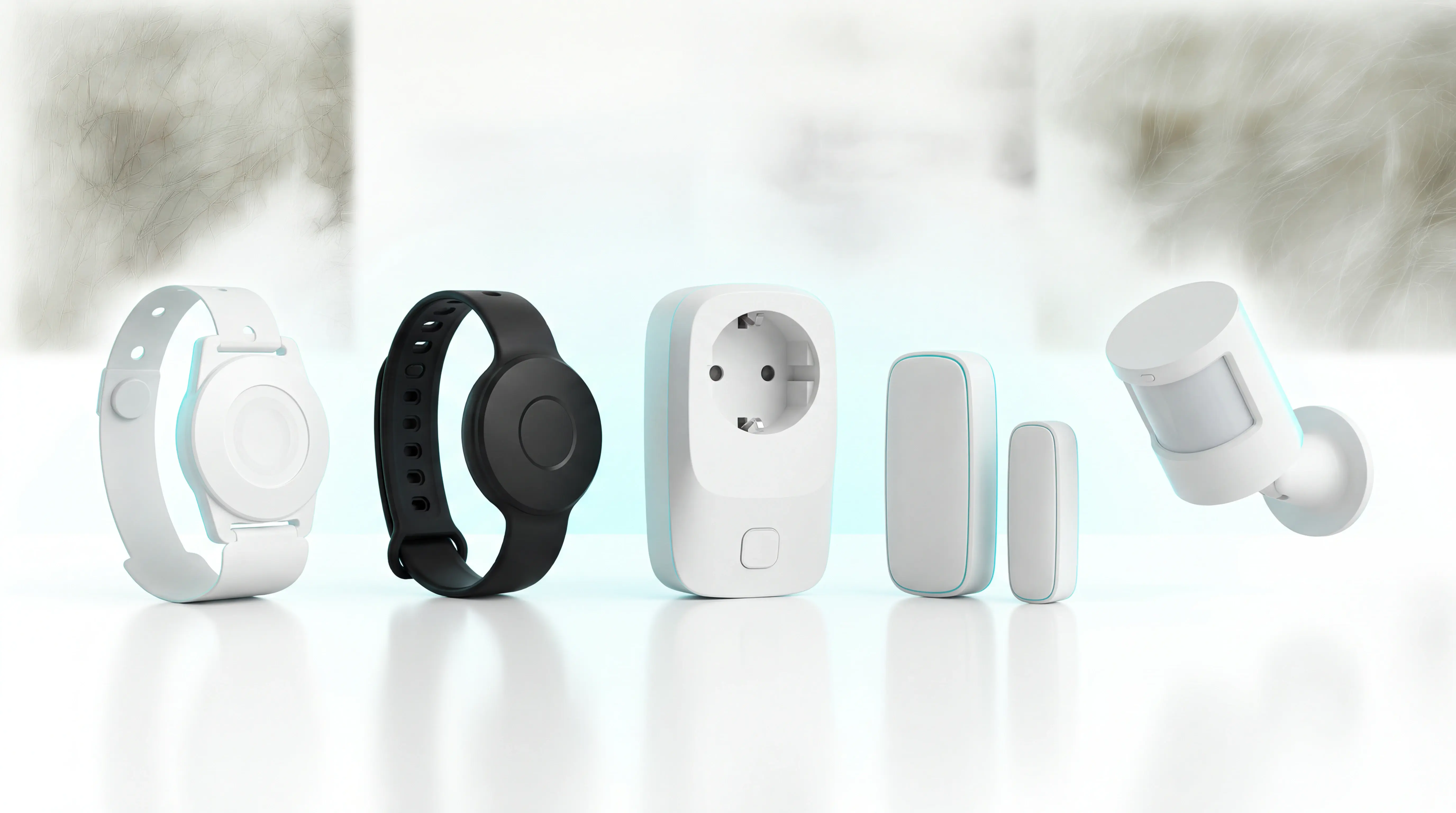
Guardian connects installed sensors, optional wearables, staff alerts, and reporting records through one portal.
Each sensor is mapped to a specific room or bed during setup. Mobile assets and vehicles are mapped to live locations.
Passive detection matters because button alarms depend on activation. LeLaurin et al. (2019) found 80% of older adults who fell did not use their medical alert system to call for help.
Passive room sensors: Bed, motion, door, fridge, and stove sensors can flag routine breaks without a button press.
Wearable options: Resident wristbands, GPS safety watches, and caregiver SOS bands add mobile coverage where a wearable makes sense.
Alert delivery: Browser push notifications or mobile app alerts reach smartphones, tablets, and nurse-station computers.
Rule tuning: A rule such as "out of bed for more than 15 minutes at night" keeps routine movement from becoming an alert.
Cost and commitment
Guardian does not publish a self-serve consumer price. The commercial entry point is a scoped pilot for one ward, one home, or one home care team.
The first week starts with the facility floor plan and priority rooms. Guardian digitises the floor plan and installs sensors in the 5 to 10 highest-priority rooms.
A ward can go live in about a week without drilling or cabling. Operations leaders typically spend 1 to 2 hours mapping workflows during the pilot.
After 6 to 8 weeks, the pilot ends with a written impact report.
Report contents include:
Response times and visit verification
Incident prevention and alert quality
ROI and rollout planning
Main trade-offs to verify
Guardian is built for managed care settings, with facility-wide monitoring as the core use case. A single older adult who only wants a pendant and a call centre plan may not need Guardian.
Before the pilot, verify:
Room scope: which 5 to 10 rooms or residents should be monitored first.
Alert rules: which night-time, inactivity, door, fridge, or stove events should notify staff.
Staff devices: whether alerts should go to phones, tablets, nurse-station screens, or all three.
Reporting baseline: which current metrics Guardian should compare against pilot results, such as response times and incident counts.
2. Bay Alarm Medical

For families comparing monitored alert devices, Bay Alarm Medical covers the standard home-and-mobile setup: in-home base units, mobile GPS devices, and a wearable SOS smartwatch.
What stands out here: Bay Alarm Medical adds designer Bella Buttons for pendant wearability and a caregiver tracking app for location history and low-battery alerts.
System | Notable difference in this article |
|---|---|
Bay Alarm Medical | Designer Bella Buttons and caregiver app with location history |
MobileHelp | No comparable caregiver app depth in current research |
LifeStation | Free SMS caregiver alerts without an app |
Who it is best for
A senior who leaves home regularly gets the clearest value from Bay Alarm Medical's mobile GPS device or SOS smartwatch, while relatives can check location history and battery status through the caregiver app.
Bay Alarm Medical suits these caregiving situations:
Both in-home base units and mobile GPS devices, covering seniors who stay home and those who go out regularly.
A caregiver app with real-time location history and low-battery alerts.
Customer service seven days a week by phone, chat, and email.
The caregiver-notification path differs from nearby options:
LifeStation sends free real-time SMS alerts to caregivers without a mobile app.
ADT Health does not list a caregiver app for its medical alert systems, so Bay Alarm Medical has the clearer family location-viewing path.
Care situation | Bay Alarm Medical detail |
|---|---|
Home-based user | In-home base unit with about 1,000-foot range |
Active senior | Mobile GPS device or SOS smartwatch |
Remote family oversight | Caregiver app with location history and low-battery alerts |
Key safety features and device options
The device lineup includes home units, mobile GPS devices, a smartwatch, fall detection, and caregiver tracking tools.
Three device formats are available:
In-home base units, mobile GPS devices, and a wearable SOS smartwatch.
The SOS Smartwatch works without a paired smartphone.
Bella Charms let the pendant look more like jewelry.
The monitoring and safety functions include:
24/7 professional monitoring.
Reported average response times ranging from about 10 to 51 seconds across published tests.
Automatic fall detection as an add-on at about $10 per month.
Range and battery sit mid-pack:
In-home range around 1,000 feet.
Mobile battery life from 6 to 8 hours on the smartwatch up to 72 hours on the SOS All-In-One 2.
For comparison, Lifeline mobile devices run up to 4 days and LifeFone VIPx up to 16 days without the caregiver app.
Cost and commitment
Pricing starts at $27.95 per month for Bay Alarm Medical monitoring, with some mobile devices requiring a one-time equipment purchase.
Two things raise the real monthly cost above the base plan:
Automatic fall detection adds about $10 per month.
Mobile devices require a one-time equipment purchase on top of the subscription.
Commitment terms are relatively light for the category:
A 15-day free trial, which the comparison brands here do not advertise.
By comparison, Lifeline starts around $35 per month plus roughly $100 in upfront fees.
ADT Health does not list a caregiver app for its medical alert systems, so compare ADT on monitoring, devices, and current checkout pricing instead.
Cost element | Bay Alarm Medical | Comparison in this article |
|---|---|---|
Starting monthly price | $27.95 per month | Lifeline: about $35 per month |
Upfront hardware | Mobile devices require one-time equipment purchase | Lifeline: about $100 upfront fees |
Trial period | 15-day free trial | Not noted for most peers in supplied sources |
Fall detection | About $10 per month add-on | LifeFone: $5 per month add-on |
Main trade-offs to verify
Before buying, verify Bay Alarm Medical's false-alarm handling, mobile battery limits, shipping terms, and device purchase requirements.
Accidental alerts are worth checking. Published reviews note no option to cancel a false alarm once triggered. For households that want a simpler path, LifeStation sends real-time SMS alerts to caregivers without an app.
Battery is the main hardware limit:
The smartwatch runs about 6 to 8 hours; published testing lists a 3-day maximum across mobile models.
LifeFone mobile devices reach up to 16 days, a materially longer runtime.
Two purchase frictions to confirm before buying:
Check whether the selected device qualifies for free shipping.
Mobile devices require one-time equipment purchases, so the starting monthly price is not the full entry cost.
3. Medical Guardian
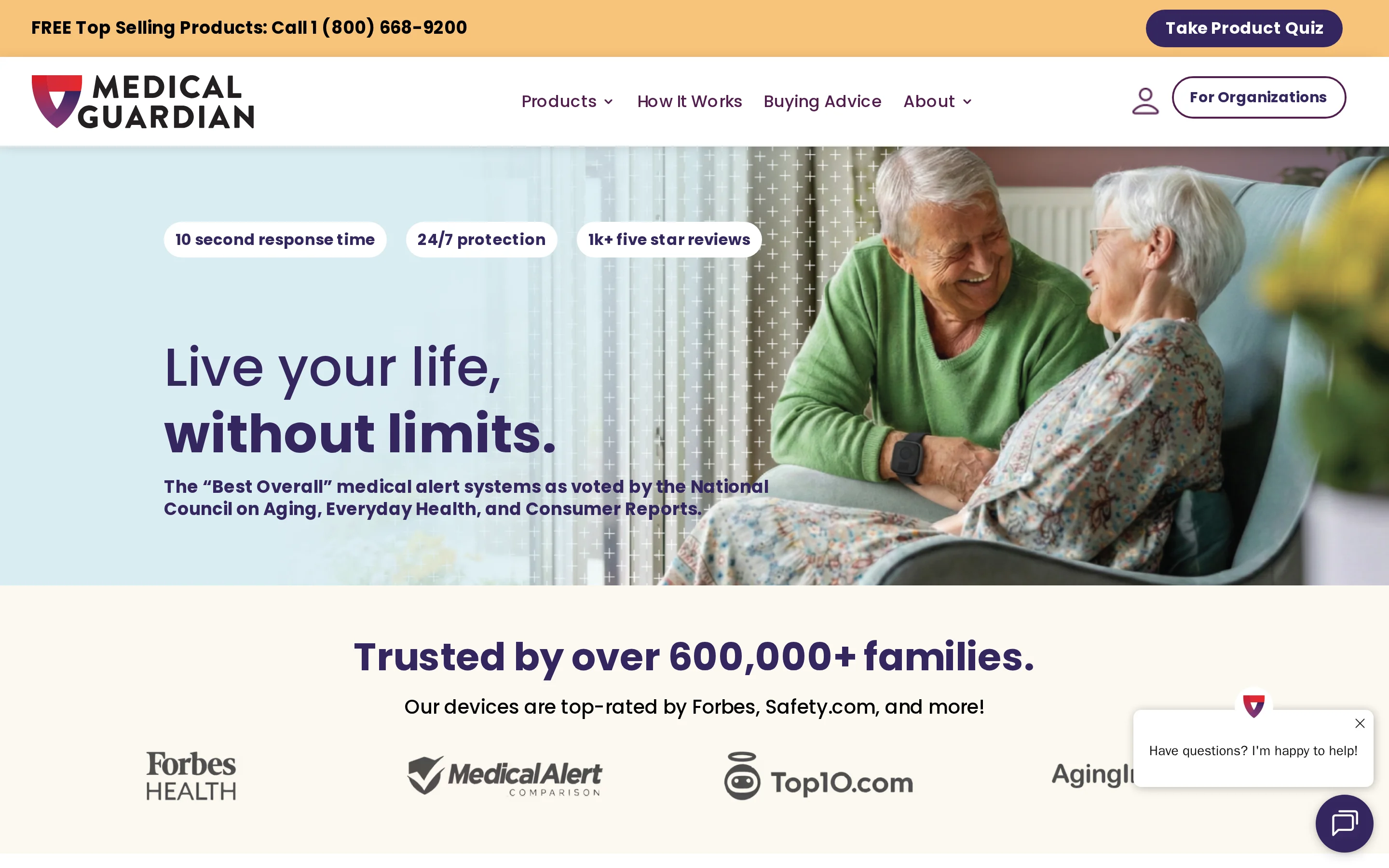
For a single household that wants monitored SOS coverage at home and on the go, Medical Guardian offers in-home, mobile, and smartwatch devices with optional fall detection.
What stands out here: Medical Guardian runs one of the broader single-user device menus in this list, from a home base unit up to a GPS smartwatch.
Who it is best for
Medical Guardian suits a private household where one person needs monitored SOS coverage at home or outside. A care home needs Guardian when staff must see alerts by room, bed, and resident across a shared floor plan.
For care homes and agencies, Medical Guardian's single-user model is the constraint. Guardian adds passive coverage across rooms, live floor-plan visibility, and proof-of-care records for staff managing multiple residents.
Key safety features and device options
A different safety model from button-only devices. Guardian pairs passive bed, motion, door, fridge, and stove sensors with wearables where needed, then ties each alert to a room-level location on a live floor plan.
Cost and commitment
Medical Guardian plans commonly start around $32.95 per month for home monitoring, with mobile and smartwatch options priced higher and fall detection treated as an add-on.
Confirm the current plan price, activation fee, and fall-detection cost directly before committing, since exact figures vary by plan and promotion.
Main trade-offs to verify
The current device menu, detection modes, and accessory lineup should be verified against Medical Guardian's own product pages before purchase, as they change over time.
For an operator, Medical Guardian's single-household design is the main limitation. It does not provide multi-resident visibility or automatic proof-of-care records for a care team.
4. ADT Health
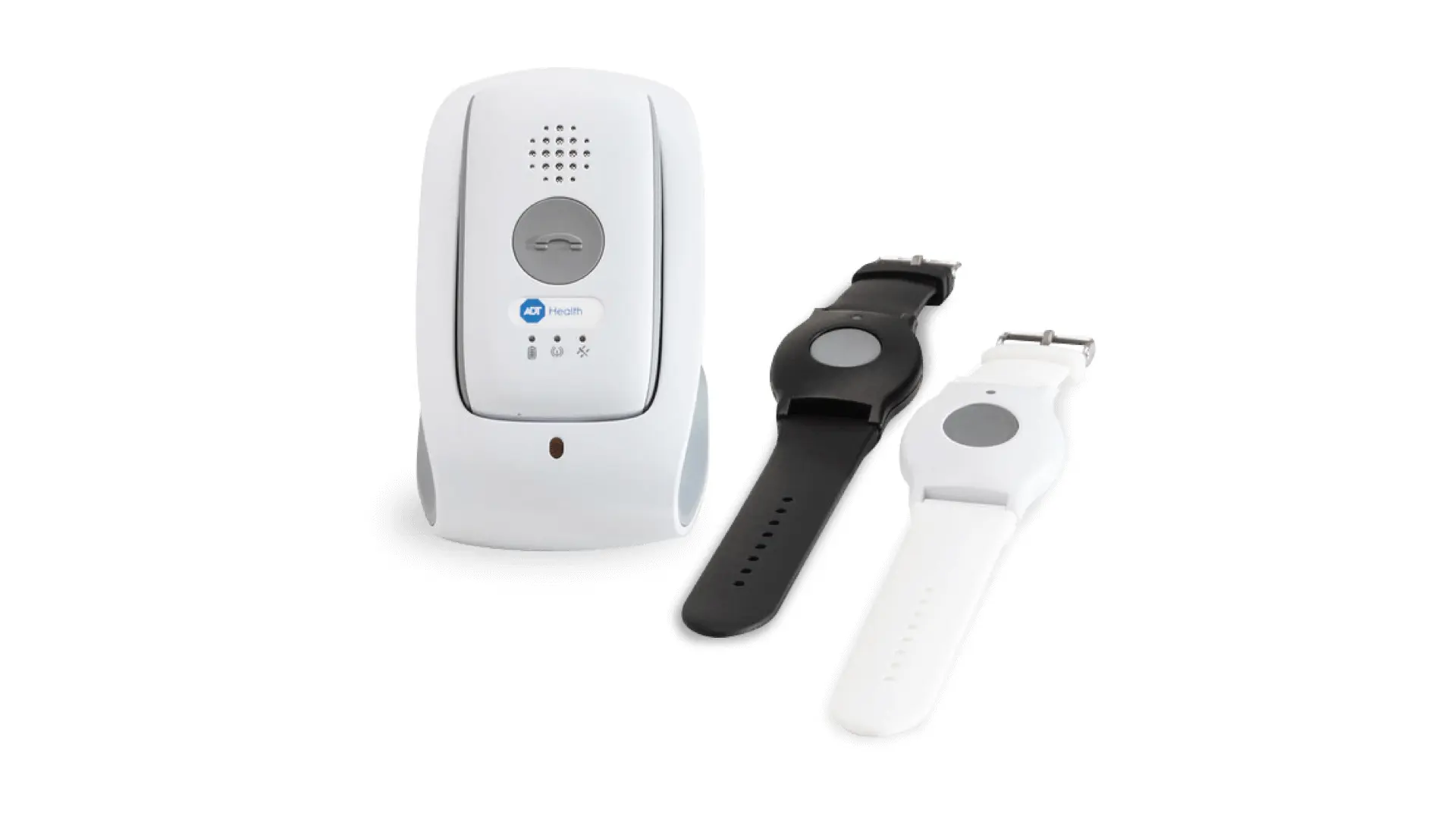
For a simple monitored alert setup, ADT Health offers in-home landline or cellular units, mobile GPS devices, and monitoring staff trained for senior-safety calls.
What stands out here: ADT Health's base station includes ambient temperature monitoring, which can flag unsafe home conditions. The trade-off is caregiver visibility: ADT Health does not list a caregiver app for its medical alert systems.
System | In-home setup | Mobile option | Caregiver tooling | Environmental alert |
|---|---|---|---|---|
ADT Health | Landline or cellular base | GPS mobile unit | App access only on Medical Alert Plus | Ambient temperature monitoring |
Bay Alarm Medical | In-home base | GPS mobile units and smartwatch | Caregiver app with location history | No temperature-monitoring note in matrix |
Lifeline | In-home base | On the Go mobile unit | My Lifeline caregiver app | No temperature-monitoring note in matrix |
Who it is best for
The best ADT Health user wants monitored SOS coverage at home, a mobile GPS option for errands, and no need for a caregiver location-history app.
ADT Health lines up with these user needs:
Landline and cellular in-home systems plus mobile GPS units.
Monitoring staff trained in senior sensitivity and aging-related concerns.
No caregiver app is listed for ADT Health medical alert systems, so family app visibility is thinner than Bay Alarm Medical's location-history app.
Need | ADT Health fact |
|---|---|
Simple monitored alerting | Senior-trained monitoring staff |
Home installation options | Landline and cellular in-home systems |
Outside-the-home coverage | Mobile GPS units |
Family app depth | Limited compared with Bay Alarm Medical and Lifeline |
Key safety features and device options
The ADT Health lineup centers on in-home base stations, mobile GPS units, fall detection pendants, and base-station temperature alerts.
The most concrete features here:
Fall detection pendants, usually bundled or priced with a separate pendant.
No caregiver app is listed for ADT Health medical alert systems, so caregivers should verify how family notifications and emergency contacts are handled.
No licensed-nurse guidance feature, which Lifeline offers via CareCompass.
Capability | ADT Health | Named comparison |
|---|---|---|
Environmental alert | Ambient temperature monitoring in base station | Unique to ADT Health in this article |
Caregiver app | Medical Alert Plus only | Bay Alarm Medical and Lifeline have broader caregiver app coverage |
Fall detection | Pendant add-on or bundle | LifeFone lists a lower $5 monthly add-on |
Monitoring support | Senior-trained staff | Lifeline adds licensed nurse guidance via CareCompass |
Cost and commitment
ADT Health's basic plan starts at $29.99/month with a $49.50 activation fee, and Medical Alert Plus starts at $31.99/month. Confirm current prices, fees, and fall-detection charges at checkout, since they change over time.
Confirm these cost items before comparing ADT Health with Bay Alarm Medical, Lifeline, or LifeFone:
Current monthly monitoring price for the selected ADT Health device.
Any activation, shipping, equipment, or fall-detection charge shown at checkout.
For reference, Lifeline HomeSafe starts at $34.95 per month on an annual plan before setup and hardware fees.
System | Starting monthly price | Upfront fee note |
|---|---|---|
ADT Health basic plan | $29.99 | $49.50 activation fee |
ADT Health Medical Alert Plus | $31.99 | Activation fee not specified in cited source |
Lifeline HomeSafe | $34.95 on annual plan | Setup and hardware fees apply |
Main trade-offs to verify
Verify ADT Health's caregiver notification path, mobile battery life, and in-home range before choosing it over Bay Alarm Medical, LifeFone, or LifeStation.
Three limits are worth verifying:
No caregiver app is listed for ADT Health medical alert systems; compare that with Bay Alarm Medical's location-history app and Lifeline's My Lifeline app.
Independent testing gave the On-The-Go model lower battery marks than LifeFone VIPx, which lists up to 16 days without the caregiver app.
Tested in-home range came in below advertised coverage, where Bay Alarm Medical lists about 1,000 feet and LifeStation up to 1,300 feet.
Trade-off | ADT Health | Named alternatives in this article |
|---|---|---|
Caregiver alerts | App tied to Medical Alert Plus | Medical Alert and Lifeline have broader caregiver apps |
Mobile battery life | Lower marks in independent testing | LifeFone lists up to 16 days on VIPx2 and VIP Active |
In-home range | Lower tested range than advertised | Bay Alarm Medical lists about 1,000 feet; LifeStation lists up to 1,300 feet |
5. Medical Alert
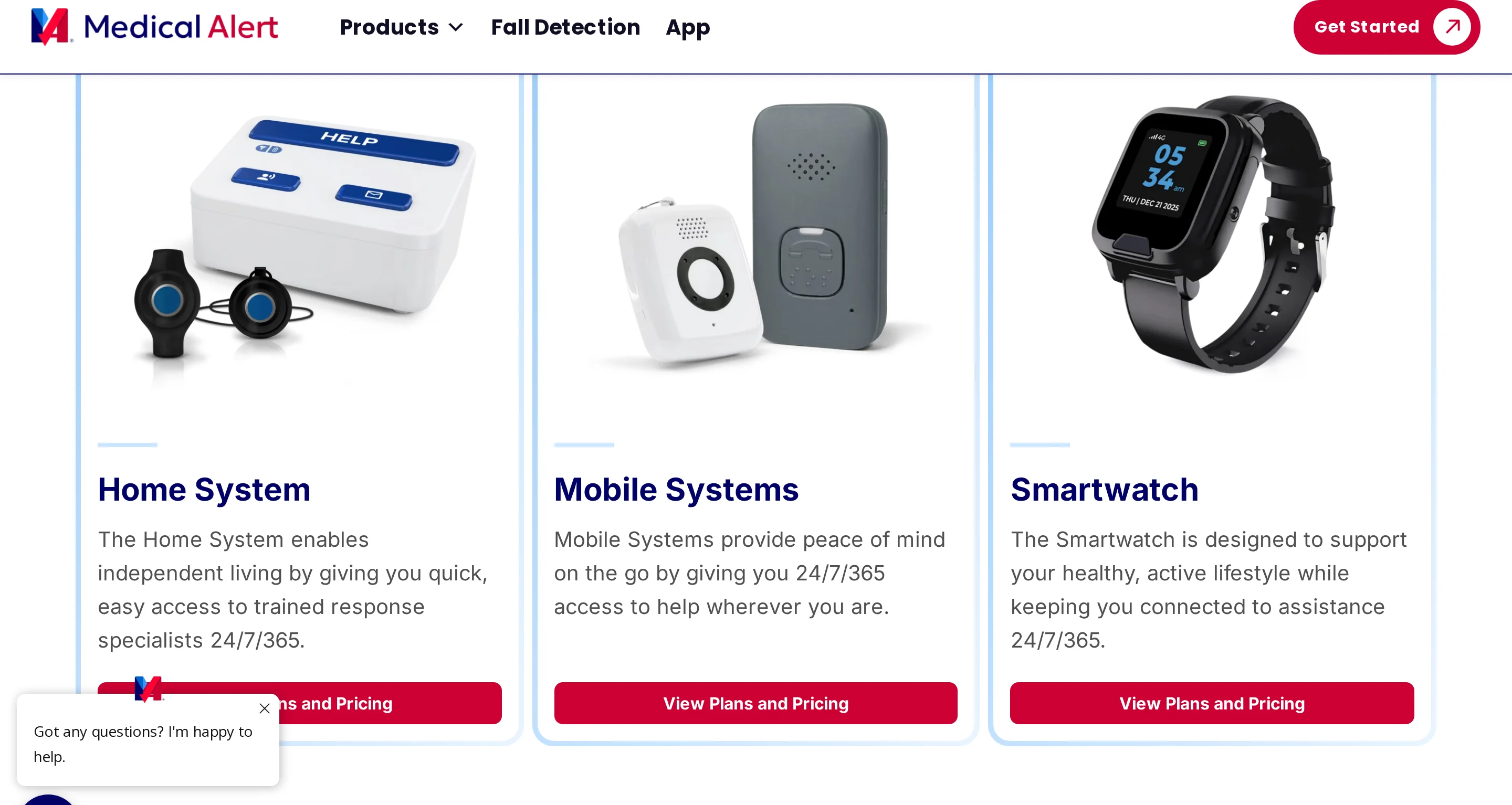
Medical Alert pairs monitored home and mobile devices with GPS tracking, optional fall detection, and caregiver app notifications. The language-access detail is specific: monitoring can use an International Language Line covering 140 languages.
What stands out here: Language access is the clearest differentiator. Medical Alert uses an International Language Line for 140 languages, while Medical Alert Connect can send caregivers battery and location alerts.
Who it is best for
Households with non-English speakers and caregivers who want location or battery notifications are the clearest audience for Medical Alert.
Clear visual instructions reduce setup guesswork. The device verbally confirms charging and vibrates when it connects to the call center.
The practical fit signals are language support and caregiver visibility:
Multilingual monitoring through an International Language Line covering 140 languages.
Medical Alert Connect sends caregivers battery and location notifications, similar to Lifeline's caregiver app.
Key safety features and device options
The core lineup covers home use and mobile use, with fall detection and caregiver notifications available as add-ons.
Emergency coverage starts with three basics:
GPS tracking on mobile units.
Optional fall detection.
A reported average response time around 42 seconds.
For day-to-day use, check range, battery life, and caregiver alerts:
The cellular home system supports up to 800 feet between pendant and base.
Mobile systems are rated for up to 4 days of battery.
Connect sends battery and location alerts, comparable to Bay Alarm Medical's caregiver tracking.
Capability | Medical Alert | Named comparison |
|---|---|---|
In-home range | Up to 800 feet | Lifeline: up to 1,000 feet |
Mobile battery | Up to 4 days | LifeFone: up to 16 days |
Caregiver notifications | Battery and location alerts in Connect app | Bay Alarm Medical: location history and low-battery alerts |
Cost and commitment
Subscriptions start at $29.95/month for home cellular service and $34.95/month for mobile GPS.
A 30-day risk-free trial is documented for the at-home cellular system. Monthly pricing varies by plan and promotion, so confirm the live plan rate directly.
Price points to confirm before buying:
$29.95 per month for home cellular and $34.95 per month for mobile GPS.
Lifeline HomeSafe starts at $34.95 per month on an annual plan, with setup and hardware fees on higher tiers.
A lower $19.95/month plan with no setup fee has also been advertised, so confirm the current plan directly.
Main trade-offs to verify
Check three areas before choosing Medical Alert: mobile battery duration, in-home range, and mobile call canceling.
Mobile battery life runs up to 4 days depending on the device. LifeFone lists up to 16 days on VIPx2 and VIP Active.
Confirm two device limits before relying on mobile alerts:
In-home range tops out around 800 feet, below Lifeline's 1,000 feet and LifeStation's 1,300 feet.
Mobile devices have no call-canceling option noted in current testing, so accidental alerts cannot be stopped once sent.
6. Lifeline
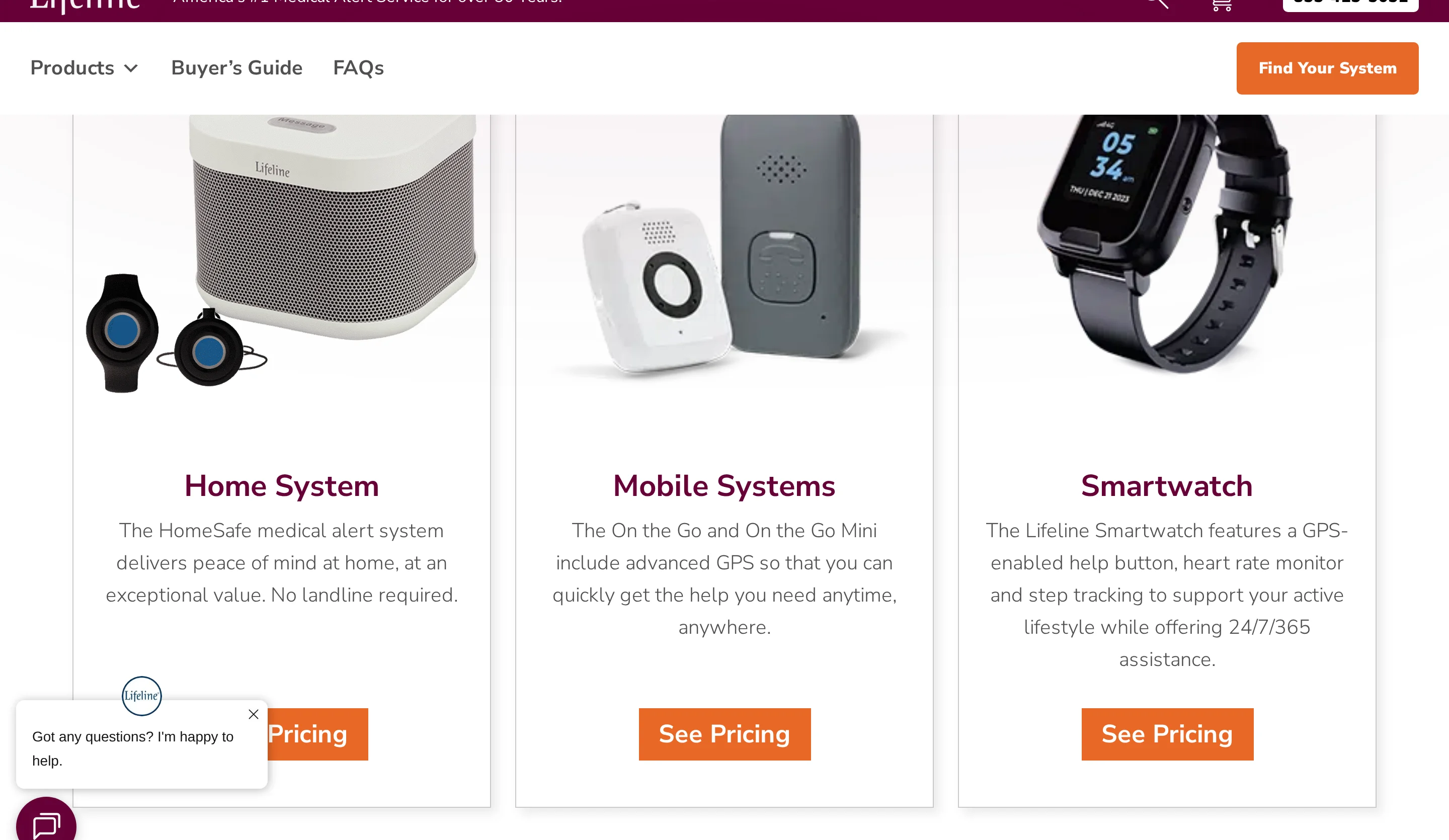
The Lifeline line covers in-home, mobile, and smartwatch medical alert options tied to 24/7 monitored emergency response.
What stands out here: CareCompass is the distinction to notice because it adds licensed-nurse guidance to monitored response. The My Lifeline app handles status tracking, alerts, and family notifications.
System | Monitoring support | Caregiver access | Notable distinction |
|---|---|---|---|
Lifeline | 24/7 monitored response | My Lifeline app | CareCompass nurse guidance |
Medical Alert | 24/7 monitored response | Medical Alert Connect app | 140-language line |
LifeStation | 24/7 monitored response | SMS alerts | Spanish-language option |
Who it is best for
Households managing non-English emergency calls, family visibility, and mixed home or out-of-home routines are the clearest audience for Lifeline.
Lifeline's response service covers more than 140 languages. Bay Alarm Medical lists 170+ languages, so multilingual households should compare both options directly.
Coverage can stay home-only or travel with the user:
HomeSafe comes in landline and cellular base-station versions for in-home use.
Mobile devices use GPS and WiFi positioning for location tracking outside the home.
LifeStation covers the same range of use but routes caregiver notifications through SMS instead of an app.
Key safety features and device options
Device choices span home units, mobile GPS devices, and a smartwatch, with caregiver app access and fall detection available across relevant tiers.
Device options are split by where the person spends time:
HomeSafe in-home system over landline or cellular.
On the Go mobile devices and a smartwatch tier, priced separately from the home system.
Medical Alert offers home cellular and mobile GPS units but no nurse-guidance service.
Emergency features to compare before buying:
AutoAlert automatic fall detection calls the response center without a button press.
Mobile devices use cellular GPS triangulation plus WiFi positioning for location.
The My Lifeline app gives caregivers status tracking, alerts, and family notifications.
LifeStation, by contrast, uses SMS caregiver alerts with no app.
Cost and commitment
Home plans start at $34.95/month on annual billing. Mobile and smartwatch plans sit around $39.95-$49.95/month before add-ons.
The plan tiers break down as:
HomeSafe from $34.95 per month on an annual plan.
On the Go mobile monitoring from $39.95 to $49.95 per month.
Smartwatch at about $49.95 per month.
Budget for add-ons and upfront charges:
AutoAlert fall detection runs about $15 per month, higher than LifeFone's $5.
Complaint records cite monthly fees above $50, plus equipment and activation charges above $100 upfront.
Medical Alert starts lower, at $29.95 per month for a home cellular system.
Lifeline plan or charge | Price |
|---|---|
HomeSafe in-home | From $34.95/month |
On the Go mobile | $39.95 to $49.95/month |
Smartwatch | About $49.95/month |
AutoAlert fall detection | About $15/month |
Activation and equipment | Upfront charges can exceed $100 |
Main trade-offs to verify
Complaint records point to issues that should be tested directly before purchase.
Complaint records name three reliability areas:
Fall-detection sensors triggered false positives during routine movement, with complaint records also citing missed falls.
Pendant battery life was reported under 24 hours in complaint records.
Signal loss inside the home despite the advertised 1,000-foot range (MobileHelp advertises 1,400 feet but tested closer to 300).
Support and compatibility issues to confirm:
Complaint records describe customer-support hold times above 1 hour and issues unresolved for weeks.
Some complaints report hardware interfering with pacemakers.
LifeStation, for comparison, owns its monitoring centers in New Jersey and Texas.
7. MobileHelp
For seniors who want cellular monitoring without a landline, MobileHelp offers in-home, mobile, and bundled device options tied to monitored emergency response.
What stands out here: The range claim is the detail to test. MobileHelp advertises 1,400 feet for in-home coverage, but independent testing reported closer to 300 feet in real homes.
Dimension | MobileHelp | Named comparison |
|---|---|---|
In-home range | Advertised 1,400 feet | Bay Alarm Medical: about 1,000 feet |
Caregiver app depth | Limited in current research | Medical Alert: caregiver app with location and battery alerts |
Who it is best for
Seniors who want one monitored account for home use, mobile use, or both are the clearest audience.
Caregiver notification details need a direct product check:
MobileHelp does not list multi-caregiver account sharing.
Medical Alert includes the Connect app with real-time battery and location notifications.
Lifeline includes the My Lifeline caregiver app for status tracking and family notifications.
Key safety features and device options
At the device level, MobileHelp covers home use and mobile use, with fall detection available as an add-on.
Documented device options include:
MobileHelp Classic as an in-home system.
The Home Duo Bundle as a two-for-one setup.
24/7 U.S.-based monitoring centers with two-way voice.
The range spec needs testing in the actual home. MobileHelp advertises 1,400 feet, while independent tests reported closer to 300 feet in real use.
Fall detection is an optional add-on at about $10 to $11 per month depending on the system, compared with LifeFone's $5 across models.
Feature area | MobileHelp | Named comparison |
|---|---|---|
In-home system | Classic | Bay Alarm Medical and Lifeline also have home systems |
Bundled setup | Home Duo Bundle | LifeStation can manage up to 55 assignable devices on Sidekick Home |
Fall detection | Optional add-on, about $10 to $11 per month | LifeFone: $5 per month |
Monitoring | 24/7 U.S.-based centers with two-way voice | ADT Health also uses professional monitoring |
Cost and commitment
The fall-detection add-on price is set, but contract length, activation fees, and cancellation terms need direct confirmation.
MobileHelp in-home monitoring starts around $24.95/month. Confirm the current rate when reviewing quotes, since plan prices change.
The main add-on is fall detection at about $10 to $11 per month, in line with Bay Alarm Medical's roughly $10.
Confirm contract length, activation fees, and cancellation terms directly before purchase.
Main trade-offs to verify
Confirm caregiver-app depth, mobile battery duration, and in-home range before relying on MobileHelp for daily safety coverage.
Caregiver notification details need confirmation:
MobileHelp does not list multi-caregiver account sharing.
LifeStation sends real-time SMS alerts to caregivers with no app fee.
Medical Alert uses a caregiver app for battery and location notifications.
Mobile hardware details are unclear:
MobileHelp does not publish mobile-device battery duration.
Medical Alert rates its mobile batteries up to 4 days.
LifeFone lists up to 16 days on VIPx without the caregiver app, while VIP Active runs up to 5 days.
Test range inside the actual home. The 1,400-foot advertising claim dropped closer to 300 feet in independent testing.
Trade-off | MobileHelp | Named comparison |
|---|---|---|
Caregiver alert tooling | Limited detail in current research | LifeStation: SMS alerts. Medical Alert: caregiver app |
Mobile battery life | Not specified in current research | Medical Alert: up to 4 days. LifeFone: up to 16 days |
In-home range reliability | Advertised 1,400 feet. Reported closer to 300 feet in tests | Bay Alarm Medical: about 1,000 feet listed |
8. LifeFone

LifeFone is a medical alert system with in-home and mobile devices, GPS tracking, optional fall detection, and extended battery life.
LifeFone's battery life stands out. The VIPx can run up to 16 days without the caregiver app, while VIP Active runs up to 5 days. Its fall-detection add-on is also the lowest in this list at $5 per month.
Dimension | LifeFone | Medical Alert | Bay Alarm Medical |
|---|---|---|---|
Mobile battery life | Up to 10 days | Up to 4 days | 6 to 8 hours smartwatch, up to 72 hours SOS All-In-One 2 |
Fall detection add-on | $5 per month | Optional add-on, price not listed in snippet | About $10 per month |
Who it is best for
LifeFone is a medical alert option for seniors who need long mobile battery life and extra monitoring services like daily check-ins.
It suits seniors who want long mobile runtime and extra check-in services:
VIPx battery life reaches up to 16 days without the caregiver app; VIP Active runs up to 5 days.
Daily check-in calls available as a paid add-on.
Need | LifeFone fact | Another tool in this article |
|---|---|---|
Long mobile runtime | Up to 10-day mobile battery life | Medical Alert: up to 4 days |
Routine wellness check-ins | Daily check-in calls available as extra service | Medical Alert: language support in 140-plus languages for a different household need |
Key safety features and device options
LifeFone is a monitored alert system with GPS mobile devices, a 1,300-foot in-home range, and optional fall detection.
The most concrete safety features:
A reported average response time around 22 seconds.
GPS tracking on mobile devices.
In-home range up to 1,300 feet, against Lifeline's 1,000 feet.
Optional fall detection.
Feature | LifeFone | Lifeline |
|---|---|---|
In-home range | 1,300 feet | 1,000 feet |
GPS tracking | Yes | GPS plus WiFi positioning |
Fall detection | Optional | Optional AutoAlert add-on |
Cost and commitment
LifeFone cost is monthly monitoring with a $5 fall-detection add-on and a 30-day money-back period.
On cost, LifeFone lands at the low end:
Fall detection at $5 per month, versus about $10 for Bay Alarm Medical and $15 for Lifeline.
A 30-day money-back period.
Cost factor | LifeFone | Bay Alarm Medical | Lifeline |
|---|---|---|---|
Fall detection add-on | $5 per month | About $10 per month | About $15 per month |
Money-back period | 30 days | Not cited in supplied data | Not cited in supplied data |
Main trade-offs to verify
LifeFone trade-offs are extra caregiver-app fees and warranty limits that exclude wear and tear without added protection.
Two limits affect caregiver use:
The caregiver app is an extra-cost item, where LifeStation includes free SMS alerts and Medical Alert bundles a caregiver app.
The lifetime warranty covers manufacturing defects only; wear and tear needs a separate protection plan.
Trade-off | LifeFone | Named alternative in this article |
|---|---|---|
Caregiver notifications | App costs extra | LifeStation: SMS alerts without app fee |
Caregiver app visibility | Extra-cost app | Medical Alert: caregiver app with battery and location notifications |
Device protection | Wear and tear needs added protection plan | No equivalent comparison cited in supplied data |
9. LifeStation
LifeStation is a medical alert system line with in-home and mobile devices, GPS tracking, fall detection, and caregiver text alerts.
What stands out here: LifeStation sends free real-time SMS alerts to caregivers with no app and no extra fee. Medical Alert and Lifeline both route caregiver notifications through a dedicated app instead.
System | Caregiver notification model | In-home range |
|---|---|---|
LifeStation | Free SMS text alerts | Up to 1,300 feet |
Medical Alert | Mobile app alerts | Up to 800 feet |
Lifeline | Mobile app alerts | Up to 1,000 feet |
Who it is best for
LifeStation is a fit for households that want caregiver text alerts without an app, long home range, or Spanish-language monitoring.
The no-app caregiver path matters for households that don't want everyone installing software. Alerts arrive by text to designated caregivers. Medical Alert, by contrast, requires its app for battery and location updates, and MobileHelp lists limited multi-caregiver depth.
A few household situations line up well:
In-home range up to 1,300 feet, wider than Medical Alert's 800 feet.
A full Spanish-language option through monitoring centers LifeStation owns in New Jersey and Texas.
For broader language needs, Bay Alarm Medical supports 170-plus languages and Medical Alert 140.
Household need | LifeStation fact | Named comparison |
|---|---|---|
Caregiver notices without an app | Free SMS alerts | Medical Alert uses caregiver app |
Large home coverage | 1,300-foot range | Medical Alert: 800 feet |
Spanish monitoring | Full Spanish option | Bay Alarm Medical: 170-plus languages |
Key safety features and device options
LifeStation is a medical alert system with in-home and mobile devices, GPS location tracking, optional fall detection, and Alexa-linked location updates.
The core emergency features included:
GPS tracking on mobile devices.
Fall detection available.
A reported average response time around 27 seconds.
The Sidekick Home console with a 24-hour backup battery, managing up to 55 assignable devices.
Device specs compared with peers:
In-home range of 1,300 feet, against MobileHelp's advertised 1,400 feet (tested closer to 300).
Pairs with Amazon Alexa for location updates.
Mobile battery life of five days, short of LifeFone's up to 16.
Feature | LifeStation | Named comparison |
|---|---|---|
In-home range | 1,300 feet | MobileHelp: 1,400 feet claimed |
Mobile battery life | 5 days | LifeFone: up to 16 days |
Caregiver notifications | Free SMS alerts | Medical Alert and Lifeline use apps |
Cost and commitment
LifeStation is a higher-cost medical alert system with unclear plan pricing online and possible insurance discounts of nearly 30 percent.
The cost picture is hard to pin down. LifeStation is listed among the more expensive options, and its plans are not clearly published online. For contrast, Medical Alert starts at $29.95 per month for home cellular, and ADT Health's Medical Alert Plus starts at $31.99.
There are cost offsets to ask about. LifeStation advertises insurance discounts of up to nearly 30 percent on monitoring. Its fall-detection cost is not published clearly, unlike LifeFone's $5 per month, the lowest add-on in this list.
Pricing factor | LifeStation | Named comparisons |
|---|---|---|
Public starting price | Unclear on website | Medical Alert: $29.95 home, $34.95 mobile |
General cost position | One of the most expensive options | ADT Health Medical Alert Plus: $31.99 start |
Discounts | Up to nearly 30 percent via insurance | LifeFone fall detection add-on: $5 per month |
Main trade-offs to verify
LifeStation is a medical alert system with strong range and text alerts, but buyers should verify app expectations, battery needs, and final pricing.
Decide first whether you need a caregiver app or only texts. LifeStation has no mobile app, which some buyers see as a drawback. Lifeline and Medical Alert both offer caregiver apps for status, battery, and location.
Two more things to confirm before committing:
Mobile battery life is five days, short of LifeFone VIPx's up to 16 days without the caregiver app.
Plans are unclear on the website, so verify monthly fees and add-ons before signup.
Trade-off to verify | LifeStation | Named comparison |
|---|---|---|
Caregiver interface | SMS alerts, no mobile app | Lifeline and Medical Alert use caregiver apps |
Mobile battery | 5 days | LifeFone: up to 16 days |
Price visibility | Plans unclear on website | Medical Alert publishes starting prices |
How to choose the right one
The right device matches the senior's mobility, communication ability, and fall risk to your caregiver response setup and monthly budget. Weigh three criteria first: caregiver visibility, proof of care, and response speed.
Match the device to daily movement. Choose an in-home base unit for a mostly-homebound senior, or a mobile GPS device for someone active in the community. Location tracking matters most for dementia-related wandering. In-home range varies widely here, from 800 feet up to 1,300 feet, and mobile battery from about 4 to 16 days.
Decide who responds. Pick between monitored (a 24/7 call center) and unmonitored (alerts to your own contacts) before comparing products. Check that the senior can actually communicate with a call center, including hearing, speech, and volume needs, and whether caregiver alerts arrive by app or text.
Test usability during a real fall. Automatic fall detection is a separate choice, not a standard feature, and it is usually a paid add-on ($5 to $15 per month here). Assess fine motor skills, since pressing a button or putting a device on can be hard, and confirm the charging routine is manageable.
Decide how much caregiver visibility you need. Options range from a location-history app to free SMS alerts to a full operations view. More notifications are not automatically better: false alerts erode trust and create alarm fatigue, so what you want is actionable alerts, not all of them.
Work out the real monthly cost. Judge price alongside GPS and fall detection, not on the base plan alone. Base rates here run from about $24.95 to $34.95 per month, and extras stack up: ADT Health adds a $49.50 activation fee, fall detection adds $5 to $15, and insurance discounts (up to 30 percent at LifeStation) are uneven across brands.
Criterion | What to verify | Why it matters |
|---|---|---|
System type | In-home base station, mobile GPS pendant, smartwatch, or hybrid | The device has to match where the senior spends time and where emergencies are most likely |
Response setup | 24/7 professional monitoring, caregiver-only alerts, speaker volume, language support | An alert only helps if the right person can hear, understand, and act on it |
Fall usability | Automatic fall detection, button size, wearability, charging routine | A device that is not worn, charged, or easy to trigger is unavailable during a real emergency |
Caregiver visibility | App alerts, SMS alerts, low-battery notices, location sharing | Families and staff often need status updates beyond one emergency call |
Total cost | Monthly fee, activation fee, equipment cost, fall-detection add-on | The real monthly spend is usually higher than the advertised base plan |
What these devices really cost
Medical alert device cost includes monthly monitoring, optional fall detection or caregiver-app fees, and possible one-time equipment, activation, shipping, or processing charges.
Medical alert pricing has three charge types in this comparison:
Monthly monitoring typically runs $20 to $60 for 24/7 professional response.
One-time equipment, activation, or processing fees can reach $200.
Membership fees can apply; Lifeline runs $34.95 to about $49.95 per month, with setup and hardware billed separately.
Three add-on categories can raise the monthly bill:
Fall detection, typically about $10 per month (range $5 to $12).
Protection plans for loss, damage, or theft, around $3 to $8 per month.
Caregiver apps or extra caregiver contacts, up to about $8 per month on some plans.
Cost component | Typical range | What it covers |
|---|---|---|
Monthly monitoring | $20 to $60 per month | 24/7 professional emergency response |
One-time setup or equipment fees | Up to $200 | Device, activation, or processing charges |
Fall detection add-on | $5 to $12 per month | Automatic fall-triggered alerting |
Protection plan | $3 to $8 per month | Loss, damage, or theft coverage |
Caregiver app or extra contacts | Up to $8 per month | Family notifications or added caregiver access |
What to pair with a medical alert
A medical alert is strongest when paired with home-access tools, caregiver notifications, and passive bed or activity sensors; Guardian handles the passive-monitoring layer.
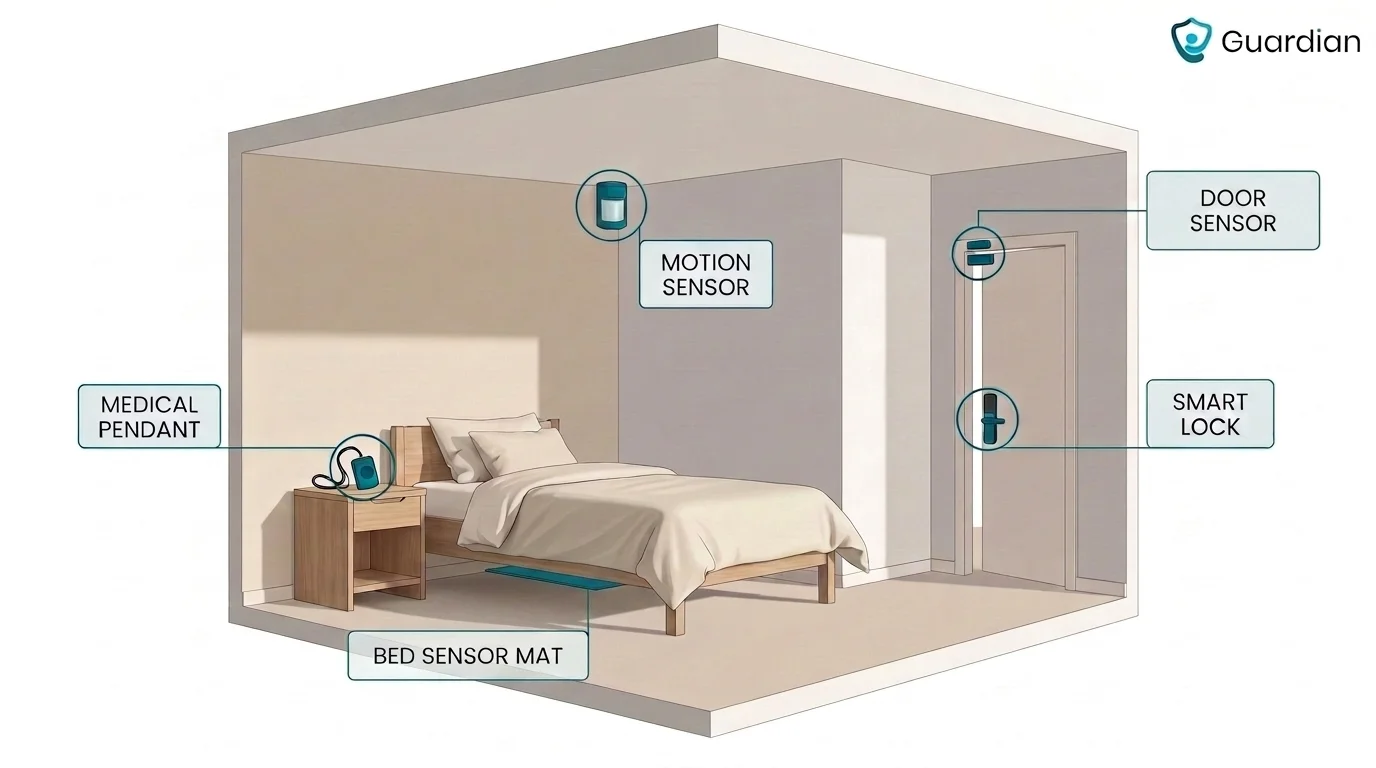
Guardian adds the passive-monitoring layer beside a wearable alert. A standalone bed pad, like Smart Caregiver's, sends a signal to a pager when pressure leaves the bed. Guardian covers that and more:
Bed sensors track in-bed and out-of-bed status without cameras.
Activity sensors flag unusual movement levels or extended absences.
Configurable inactivity rules, such as no movement for a set period or a fridge left unopened.
Each sensor tied to a specific room or bed on a digitised floor plan.
Two pairing needs still sit outside Guardian and are worth adding:
A smart lock, lock box, or Knox Box so emergency services can get in.
Independence equipment such as a stair lift.
What you don't need to bolt on is caregiver visibility: Guardian already sends alerts through a web portal to the phones, tablets, and nurse-station computers staff use.
Pairing need | Typical add-on | Guardian role |
|---|---|---|
Passive bed or activity monitoring | Standalone bed pad or room sensor | Guardian covers this with bed sensors, activity sensors, and custom inactivity alerts |
Emergency home entry | Smart lock, lock box, or Knox Box | External add-on |
Caregiver visibility | Caregiver mobile app or text alerts | Guardian uses portal-based alerts on staff phones, tablets, and nurse-station screens |
Mobility or home access support | Stair lift or other independence equipment | External add-on |
When a standard alert device is not enough
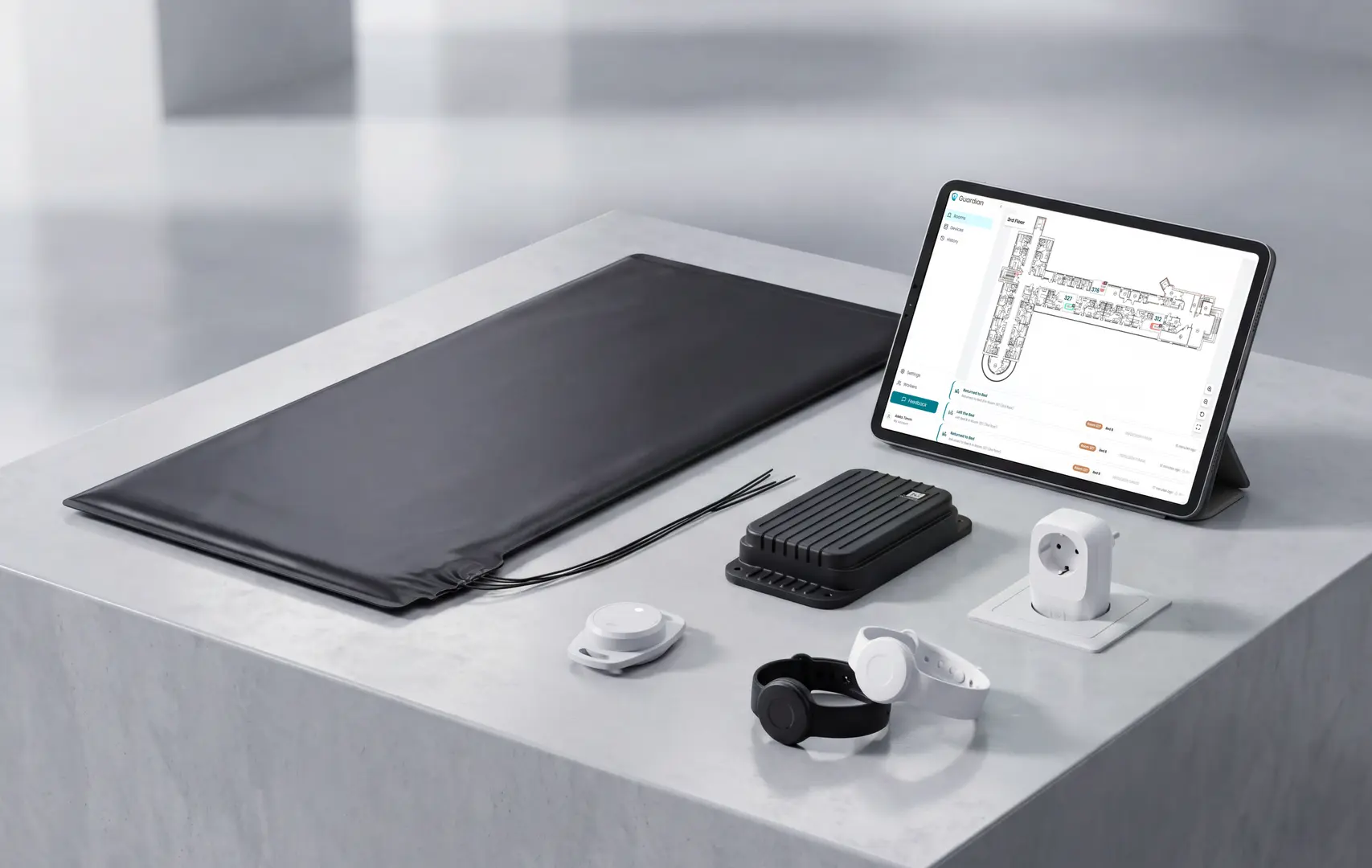
A standard alert device is not enough when the person may not wear, reach, or press it; Guardian handles this through passive sensors and automatic alerts.
A button-only setup breaks when the person can't use it. Standard devices fall short when someone refuses to wear a pendant, or is unconscious, immobile, or simply forgets it. That is the moment passive fall detection and activity sensors take over.
Guardian's monitoring runs in the background with no action from the resident, and automatically notifies caregivers or relatives when its sensors detect a problem.
Guardian monitors safety without constant button presses:
Motion, door, fridge, and stove sensors track daily patterns between visits, without cameras.
Bed sensors track in-bed and out-of-bed status and routine changes over time.
Each sensor is tied to a room or bed on a digitised floor plan, so alerts show exactly where to go.
Alerts arrive through a web portal on the phones, tablets, and nurse-station computers staff already use.
Passive monitoring only helps if it doesn't become noise. False alerts erode staff trust and desensitise teams to real emergencies, so the aim is to notify only when someone needs to act.
Guardian keeps signal high with smart rules, like "out of bed for more than 15 minutes at night," and maps every active alert on a live view. Staff get the alert and the location together, not a context-free buzz.
Standard alert device | When it stops being enough | What Guardian adds |
|---|---|---|
Manual pendant or button | User does not wear, reach, or press it | Passive sensors and automatic alerts |
Basic in-home base unit | Risk happens between rounds or overnight | Bed activity and in-home routine monitoring |
Generic alert buzzer | Staff need room-level context to respond fast | Floor-plan mapped alerts on existing devices |
See senior safety in one live view with Guardian
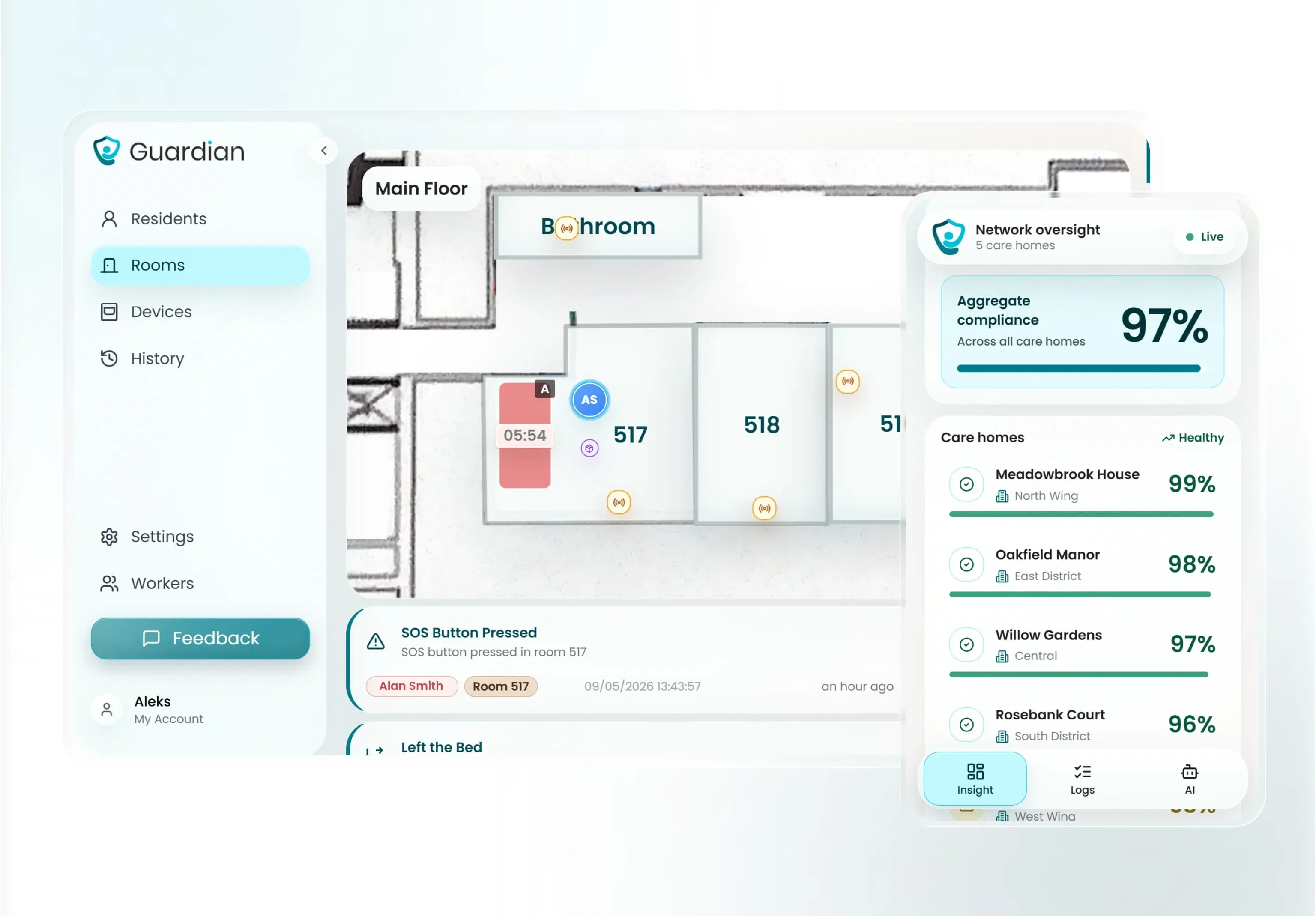
Seeing senior safety in one live view is centralized, real-time activity and alert monitoring, and Guardian does this through a web-based portal tied to sensors.
Guardian's live view puts the whole operation on one screen. The portal maps sensor activity onto facility floor plans and shows location-aware alerts on a web dashboard.
In one interface, caregivers see active alerts, resident check-ins, average response times, live room status, and connected-device status. They can also manage emergency contacts and set custom rules tied to daily routines or inactivity.
It routes alerts without extra wearables or cameras. Guardian uses privacy-first motion, bed-exit, and SOS sensors instead of video surveillance.
Alerts reach staff through a web portal on the smartphones, tablets, and nurse-station computers they already use, and relatives can be notified automatically when sensors detect a problem. Because smart rules filter routine activity, what lands is worth acting on, not one more buzz in an already noisy shift.
Live-view dimension | Typical monitored alert portal | Guardian live view |
|---|---|---|
What caregivers see | Device location, battery, and signal status | Floor-plan activity, live alerts, device activity, emergency contacts, and custom routine alerts |
Monitoring method | Wearable or device-status tracking | Camera-free sensor network with motion, bed exit, and SOS inputs |
Alert destination | Caregiver portal or app | Web portal on staff smartphones, tablets, and nurse station computers |
Original Medicare does not cover medical alert systems. Neither Part A nor Part B pays for them.
Some Medicare Advantage plans may cover all or part of the cost. Check the plan contract or ask the insurer to confirm current coverage.
Yes. No-monthly-fee devices are usually unmonitored systems that connect the user directly to 911 or chosen caregivers instead of a 24/7 monitoring centre.
Check the alert destination and upfront device cost. Confirm that a separate monitoring or connectivity fee does not apply.
No. Standard in-home base stations can reach the monitoring centre over a landline or built-in cellular connection. Mobile devices generally use cellular service and GPS.
Wi-Fi is only required for models that rely on it. Check the selected device connection requirements before setup.
No. Consumer medical alert providers usually sell automatic fall detection as an optional add-on rather than including it in every plan.
The examples in this guide range from $5 per month with LifeFone to about $15 per month with Lifeline AutoAlert. Bay Alarm Medical lists it at about $10 per month.
Detection depends on wearing position and provider algorithms. Confirm how the device should be worn and run a supervised test call after setup.

Author
Aleks Timm
Aleks Timm leads Guardian and builds privacy-first operations technology for care homes and home care providers. Teams get location-aware alerts they can act on, clearer situational awareness, and measured insight into how care work actually runs.
Read MoreRecommended reads
Keep reading
Smart Nurse Call Systems for Care Homes and Home Care Providers
Smart nurse call systems for care homes and home care providers: compare features, improve response times, and choose the right...
Read more
WiFi nurse call system guide for care homes
WiFi nurse call systems explained: alerts, clean records, and no wiring—compare options and choose the right setup for your care...
Read more
Remote patient monitoring: a complete guide
Remote patient monitoring: the complete guide to sensors, benefits, and buying tips for safer care homes and better resident...
Read more