


Australian Care Minutes Guide: Targets, Calculations and Reporting
In this article
Australian residential aged care providers must meet a home-specific care-minutes target each quarter. Use that target to calculate required care, delivered care and any shortfall.
Keep total care minutes, RN-target performance and 24/7 RN coverage as separate tests. Each uses different evidence, and a pass in one does not prove compliance with another.
What are care minutes, and what's the target?
Care minutes are the mandatory Australian measure of eligible direct care delivered per resident per day in a government-funded residential aged care home. The requirement sits under the Aged Care Act 2024 and Aged Care Rules 2025.
The 215 total care minutes and 44 RN minutes per resident per day are sector-wide averages, not universal targets. Reconcile each home against its published quarterly target.
The requirement covers permanent and respite residents in Australian residential aged care homes.
Finding your home's actual target
A home's published quarterly target is calculated from residents' AN-ACC and respite classes in a reference period. Find the current figure in the Department's published individual-home target dataset, not the provider portal.
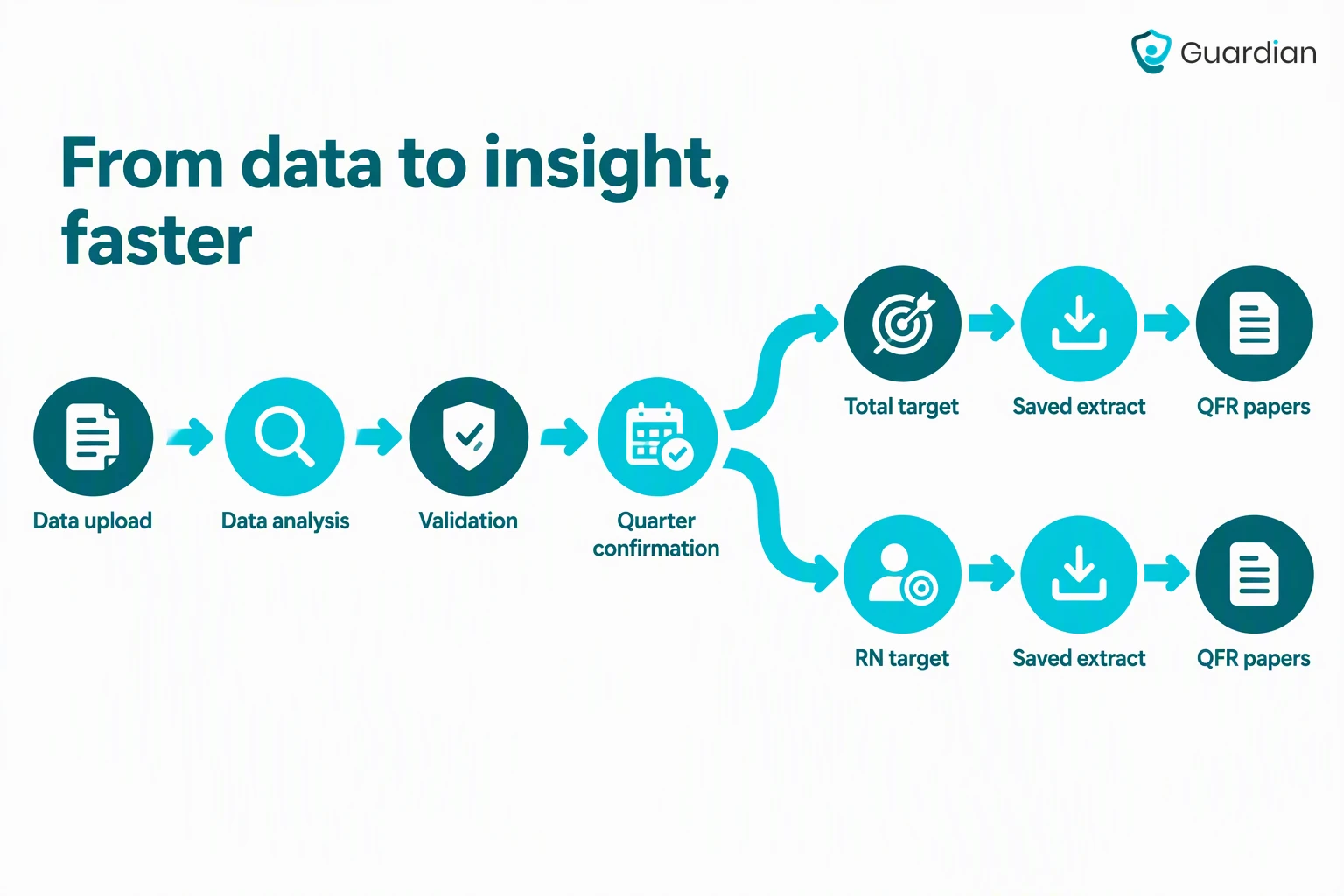
Use this process to find the target and retain the quarter's evidence:
Open the current individual-home target dataset.
Find the home by legal service name or service ID.
Confirm that the dataset covers the reporting quarter.
Record the total care-minutes target and RN target separately.
Save the relevant spreadsheet version or extract with the quarter's QFR working papers.
Use the care-minutes target calculator or contact the Department if the published target needs clarification.
AN-ACC replaced ACFI for residential aged care funding in October 2022. The target uses classified residents' AN-ACC and respite classes from a reference period. Residents without an AN-ACC class are excluded from target-setting but still count toward delivered-care performance when they receive residential care.
Changes in AN-ACC mix, respite mix or resident movements can change the target even when headcount stays similar.
Target construction and EN attribution answer separate questions:
Target basis: Residents' AN-ACC and respite classes shape the home-specific target for the applicable quarter.
EN attribution: The RN target stays unchanged. The Department may attribute eligible EN care up to 10% of that target, while EN hours remain in the EN category in the QFR.
Which workers and activities count toward care minutes?
Care minutes count eligible direct care delivered by specified workers. Classify the worker under the Act and Rules first, then test whether the recorded activity qualifies.
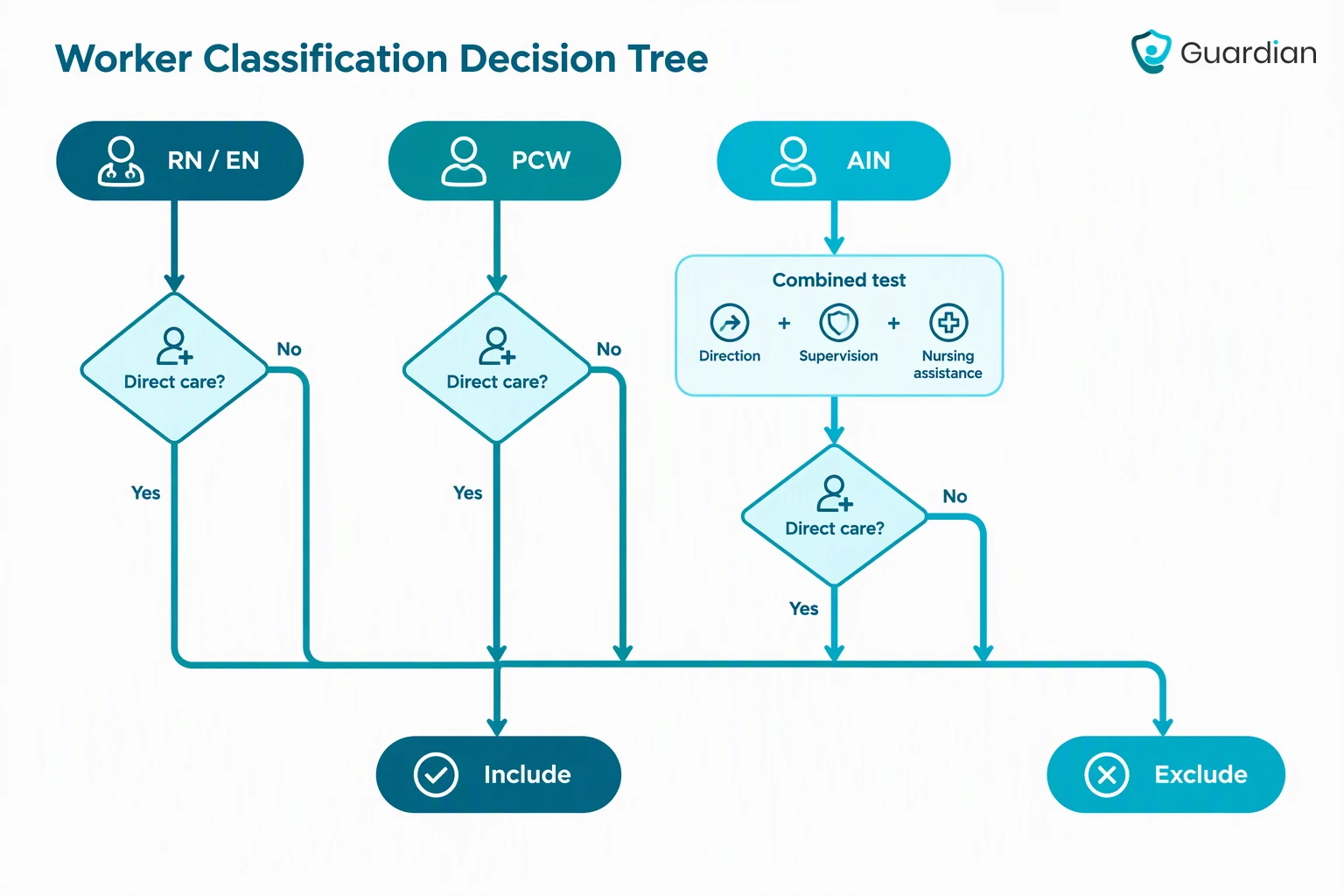
Build a quarter worksheet with one row per worker or role allocation, then apply the current Care Minutes Guide consistently.
Use these categories when preparing the quarter:
Category | Count when |
|---|---|
RNs and ENs | Worked hours are recorded against an eligible nursing role and activity under the care definition. |
PCWs and AINs | The worker’s role involves personal care for more than half of their work time; assess genuinely separate role allocations separately. |
Personal care and mobility | Eligible assistance is delivered by a qualifying worker. |
Clinical care | Clinical care |
Mealtime and emotional support | Mealtime assistance and emotional support are part of eligible care delivered by a qualifying worker. |
EN flexibility | EN minutes may be credited against up to 10% of the home’s RN care-minutes target under the Department rules. This permitted credit does not reset the RN target. |
Once the worker qualifies, count only eligible direct care activities. The worker must generally deliver them on site, although time accompanying a resident off site can qualify:
Personal care and mobility: Include qualifying assistance with daily living, hygiene and movement.
Clinical care: Include medication administration, wound care and other qualifying clinical activity within the worker's role.
Mealtime and emotional support: Include qualifying assistance delivered by an eligible worker.
One-on-one social and emotional support can count as direct care once the worker qualifies, but it does not help satisfy the PCW primary-responsibility definition.
Exclude time when either the worker category or the activity falls outside the official definition.
Common exclusions are:
Allied health: Exclude allied-health staff time, such as physiotherapy or occupational therapy.
Lifestyle services: Exclude lifestyle or leisure staff time and group activities.
Hotel services: Exclude hotel-service roles, including catering and laundry.
Administration: Exclude facility administration and corporate staff time.
Leave and training: Remove both from worked-hour totals.
On-call time: Exclude periods when no eligible work is performed.
Higher Everyday Living Fee: Exclude additional care delivered through a Higher Everyday Living Fee arrangement.
Treat the job title as a starting point. Workforce shortages can lead to mixed rosters, but each role allocation still needs the same worker and activity test.
Give these roles an extra check against the current guide:
Nurse practitioners: Count eligible on-site direct care only when the engagement and payment conditions are met.
Paid trainees: Count hours only when the trainee independently meets the PCW or AIN definition and pay conditions.
RUSONs: Count paid hours as PCW time only when registration, study and RN-supervision conditions are met.
Religious-order members: Count rostered direct care only when the worker is suitably qualified and meets the RN, EN, PCW or AIN definition.
Agency staff: Apply the same worker and activity tests, then retain records supporting the reported hours and costs.
Mixed duties and non-face-to-face time
Count only eligible direct care within a mixed-duty shift. Apportion hybrid roles accurately and keep the roster, payroll or timekeeping evidence used for the split.
Classify the worker before allocating a mixed-duty shift. Apply the more than half primary-responsibility test only to PCWs; assess AINs against their separate direction, supervision and nursing-assistance definition.
Prepare each mixed-duty record in four steps:
Record actual worked hours rather than scheduled hours.
Allocate hours between separate roles using roster or payroll evidence.
Apply the more than half test to each PCW allocation, and test each AIN allocation against the separate AIN definition.
Retain eligible care time and note the rule used for inclusion.
Count non-face-to-face time only when the current guide lists it as direct care and a qualifying worker performs it. Allocate care planning, documentation, handover and supervision from records rather than assuming all time away from a resident counts.
Exclude time assigned to a separate ineligible role. Use the categories above and record the reason instead of relying on an “away from the resident” rule.
How to calculate required care minutes
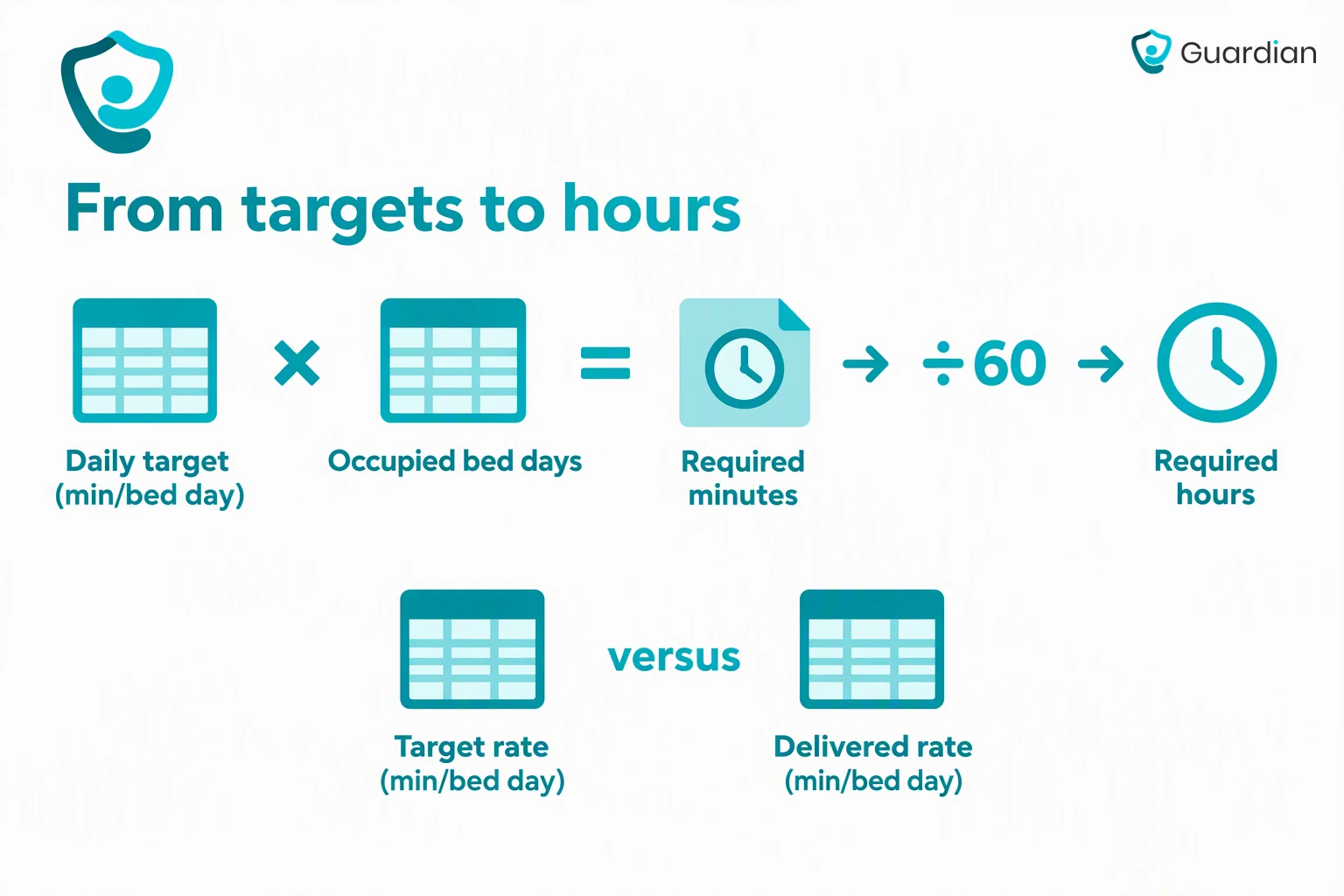
Once you have the home's published daily target, convert it into quarterly required minutes and hours using occupied bed days.
Converting occupied bed days into required minutes and hours
Required minutes = published daily target *(minutes per occupied bed day)* × occupied bed days
Required hours = unrounded required minutes ÷ 60
Build occupied bed days from quarter-matched occupancy records, not licensed capacity or quarter-end headcount. Include permanent and respite residents, including those without an AN-ACC class. For extended hospital leave, count the first 28 consecutive days and exclude day 29 onward.
Illustrative calculation: If the published target is 215 minutes and the quarter contains 100 occupied bed days, required care is 21,500 minutes, or 358.333... hours.
Use the home's published target. The 215-minute figure is only an example unless it matches the listed target.
Keep the unrounded minutes result in the worksheet so the conversion to hours does not create avoidable rounding differences.
How to calculate delivered minutes and check for a shortfall
Sum eligible recorded care time for the period, divide by occupied bed days for delivered minutes per occupied bed day, then subtract that rate from the home's target.
Use actual worked-time records for delivered minutes. A roster records planned staffing, so use it to investigate differences rather than prove that eligible care was delivered.
Lock the reporting period and use one cut-off across every source system.
Extract approved worked time from timekeeping and payroll records.
Reconcile approved hours to payroll and validated agency records.
Compare the final roster with actual attendance for unfilled or changed shifts.
Resolve missing entries and backdated corrections through documented approval.
Confirm occupied bed days cover the same reporting period.
Apply the formulas only after the records reconcile.
Delivered care minutes per occupied bed day = (total eligible direct care worked hours × 60) ÷ occupied bed days
Shortfall minutes per occupied bed day = max(0, applicable target − delivered care minutes)
Total shortfall hours = (shortfall minutes per occupied bed day × occupied bed days) ÷ 60
Illustrative check: With 1,000 eligible hours and 300 occupied bed days, delivered care is 200 minutes per occupied bed day. Against a 215-minute target, the shortfall is 15 minutes per day, or 75 hours in total.
A delivered rate below the target creates a shortfall. A rate at or above the target does not. Recalculate after every approved correction, then preserve the version used for reporting.
RN care minutes vs 24/7 RN coverage: two separate tests
RN care minutes measure eligible RN-delivered care and performance against the RN target. Separately, a home must have an RN onsite and on duty at all times unless an approved exemption applies.
Test | What it measures | Primary evidence | Pass condition |
|---|---|---|---|
RN care minutes | Eligible RN care delivered per resident day across the reporting period | Approved RN worked-time records | Delivered RN minutes meet the applicable RN target |
24/7 RN coverage | Whether an RN was physically on site and on duty across each day and overnight period | On-site presence logs and coverage records | Continuous coverage is evidenced, or an approved exemption is retained with its conditions and review record |
Use the same occupied-bed-day denominator as the total care-minutes calculation:
RN-delivered minutes per occupied bed day = (eligible RN direct-care worked hours × 60) ÷ occupied bed days
RN-target performance may include Department-attributed eligible EN care, capped at 10% of the RN target. Keep those hours in the EN category when completing the QFR.
Review the two tests in this order:
Calculate RN-delivered minutes from approved RN records, keep EN hours separate, and verify any Department attribution against the 10% cap.
Build a continuous coverage timeline from on-site presence records.
Investigate every handover gap. Report each period of 30 minutes or more with its planned status, delegated responsibility, on-call arrangements and access to clinical records.
Record and approve each outcome separately. For an exemption, retain evidence of MMM 5–7 location, no more than 30 operational beds, the approval period and continued monthly reporting.
A gap at a handover needs its own review, even where the RN care-minutes calculation meets target.
Reconciling and reporting your results
Treat the QFR, monthly 24/7 RN report and annual CMPS as separate but reconciled obligations. Retain records that trace every submitted total to its source.
Quarterly: Report direct-care labour hours and costs through the Quarterly Financial Report.
Monthly: Submit the 24/7 RN report, including each absence of 30 minutes or more.
Annually: Submit the externally audited Care Minutes Performance Statement through the ACFR under ASAE 3000.
Records to keep as evidence
Evidence ties each QFR total to approved worked-time records. Retain the role classifications and approvals used to allocate those hours.
Keep one controlled evidence pack linking the calculation, source records and lodged figures. It supports governance under the Strengthened Aged Care Quality Standards.
Guardian can timestamp monitored events, alert acknowledgements and staff responses to corroborate event timing. These records remain supplementary and do not replace approved worked-time evidence.
Map approved worked hours to the QFR categories for RNs, ENs, PCWs and AINs.
Compare each category total with the calculation workbook and payroll control totals.
Confirm every adjustment has an owner, approval and traceable reason.
Verify that occupied bed days match the calculation period.
Complete a second-person review and retain the sign-off.
Lodge the QFR labour hours and costs through GPMS, then save the submitted version and receipt.
The CMPS is the audited annual view submitted with the ACFR. For the 2025–26 ACFR only, it covers quarters 3 and 4 plus RN coverage data from November 2025.
Retain these records for the reporting period:
Worked time: approved timesheets, clock records or equivalent attendance data
Payroll: final payroll reports and control totals used in the reconciliation
Agency care: validated agency time records matched to invoices
Roster: the final roster and change history, kept as planning and exception evidence rather than proof of delivered care
Classification: the role mapping and allocation records behind each QFR category
Occupied bed days: the occupancy or census extract used as the denominator, including the documented treatment of respite care and long-term leave
RN coverage: on-site presence records, handovers and approved gap reviews
Reporting trail: the locked workbook, submitted QFR and receipt, monthly RN reports, audited CMPS and ACFR submission records
Common mistakes and what to check when numbers look off
Off numbers usually come from the wrong home target, ineligible time, occupied-bed-day errors or mixing RN minutes with 24/7 coverage.
Check inputs in this order so the first error does not get buried under formula changes:
Published target: Match the target to the same home and reporting period as the roster extract. Quick check: save the published target beside the extract, then compare the home name and period before recalculating.
Occupied-bed-day denominator: Use occupied bed days, not licensed beds or assumed full occupancy. Worked check: a vacancy lowers the denominator even when bed capacity is unchanged; include STRC activity only after confirming its treatment.
Worker and activity coding: Recheck eligible worker types and qualifying direct care, then split mixed duties and verify last-minute cover. Worked check: for a shift with care and non-care tasks, add only the documented qualifying time.
Feed completeness: Reconcile roster, payroll, and QFR extract totals before reporting. Quick check: if payroll contains a shift absent from the roster export, resolve the record before calling the variance a shortfall.
If source totals agree but delivered minutes still look wrong: inspect the worker classifications and mixed-duty allocations behind the QFR categories. A correctly paid shift can still contain time that does not qualify as direct care.
Add Guardian response evidence alongside care-minutes records
Guardian is a camera-free monitoring platform for professional care teams. It records monitored events, alert acknowledgements and staff response times, giving managers a timestamped account to review alongside their care-minutes records.
Guardian Insight links camera-free sensor and wearable alerts to a resident and room on a digitised floor plan. Managers can review the event and response timestamps alongside the home's care-minutes evidence, while using approved worked-time records to calculate eligible care hours.
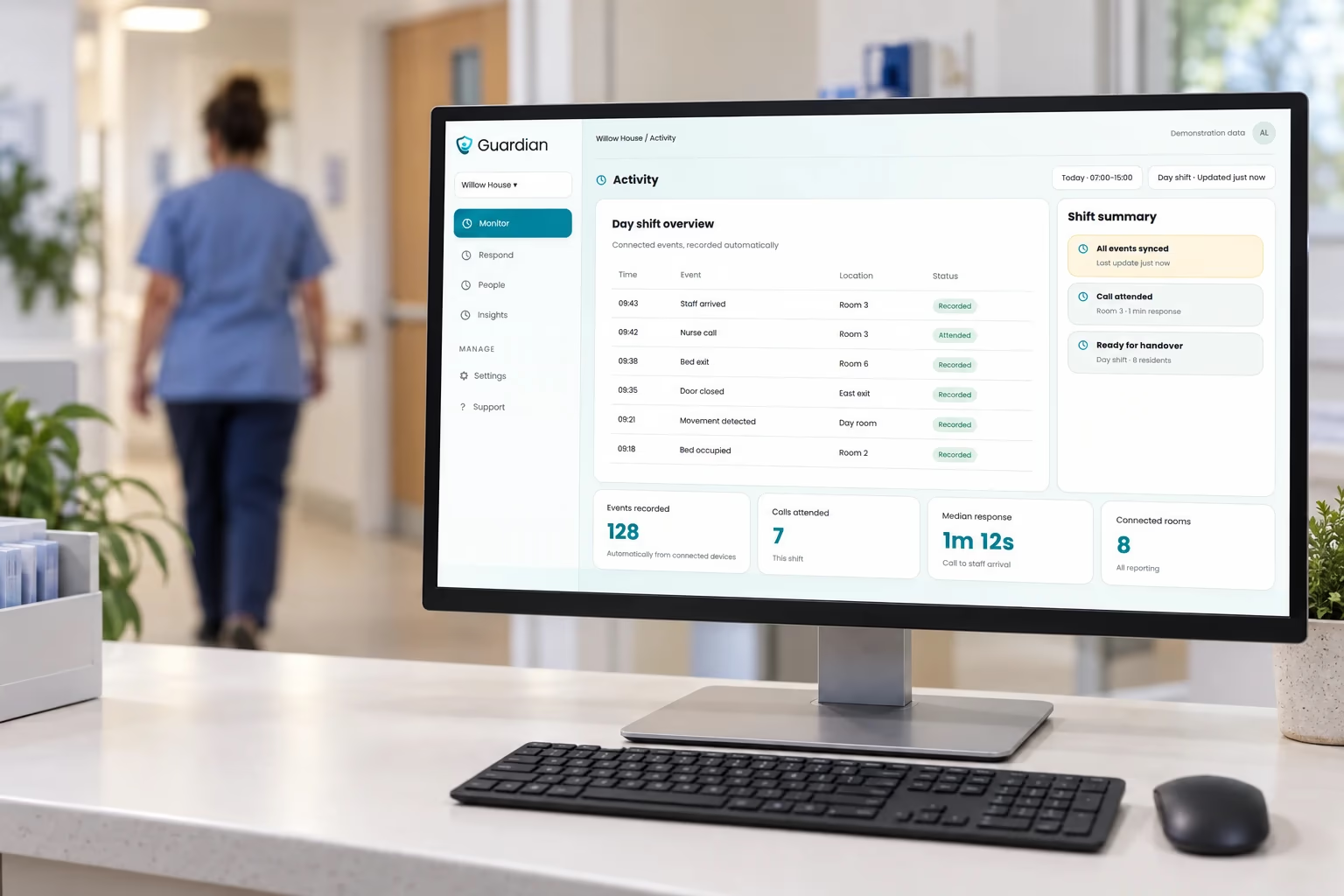
Scope: Guardian adds operational response evidence. It does not replace payroll, rosters, worker classification, occupied bed days, QFR submissions or the audited CMPS.
A shortfall means the home did not meet its mandatory care-minutes target for the quarter. The Aged Care Quality and Safety Commission may take action to address non-compliance.
For eligible non-specialised MM1 homes, the care-minutes supplement is linked to reported performance and may be recalculated after audited CMPS figures are submitted.
No. Each quarter is assessed separately, so extra care delivered later does not change a closed quarter's performance. Correct approved records when necessary, but do not transfer minutes between quarters.
Yes. Agency hours can count when an eligible worker provides qualifying onsite direct care under the current care-minutes rules. Report the hours and costs in the applicable QFR categories and retain validated agency records.
Exclude breaks, travel and any invoiced time that was not worked as eligible direct care.
Targets can change between quarters; they do not follow a simple automatic annual increase. Changes in AN-ACC mix, respite classes or the reference-period population can move the home-specific figure.
Check the current individual-home dataset for the applicable quarter. Target construction uses resident classification data, while delivered performance uses occupied bed days, with long-term leave handled under the current rules.

Author
Aleks Timm
Aleks Timm leads Guardian and builds privacy-first operations technology for care homes and home care providers. Teams get location-aware alerts they can act on, clearer situational awareness, and measured insight into how care work actually runs.
Read MoreRecommended reads
Keep reading
Smart Nurse Call Systems for Care Homes and Home Care Providers
Smart nurse call systems for care homes and home care providers: compare features, improve response times, and choose the right...
Read more
WiFi nurse call system guide for care homes
WiFi nurse call systems explained: alerts, clean records, and no wiring—compare options and choose the right setup for your care...
Read more
Wireless Patient Monitoring Systems for Care Homes
A complete guide to wireless patient monitoring systems, connected sensors, alert logic, care-home deployment, privacy, and...
Read more