

Call Light Systems for Home: How to Choose and Test One
In this article
The right home call light system reliably reaches someone who can respond, whether the caregiver is down the hall or away from the house.
This guide helps family members and home caregivers choose who receives the alert, compare five system types, test range and backup, and recognise when a button needs added support.
What counts as a call light system for home use?
A home call light system uses a button or pull cord to alert a nearby caregiver through a receiver, hallway light, or phone notification.
A typical home kit pairs a wireless call button with a local receiver. Portable or wearable buttons keep activation within reach as the person moves around the house.
Home kits may include a pull cord and reset control. Some add a hallway alarm that lights and sounds.
A monitored medical alert also counts, but its signal goes to a remote dispatch centre. Manual systems require the person to be conscious and able to press the button; wearable buttons must also be worn.
Decide who needs to get the alert
Send the first alert to the person most likely to notice and respond. Match the channel to that person's location and routine.
Write the route down before installing the system:
First line: Name one person who can respond immediately; use a local receiver at home and a phone route for someone off-site.
Noticeable channel: Use an alert the recipient already checks.
Backup: Name a second responder. Set how long to wait for acknowledgement and confirm whether escalation is automatic or manual.
Overnight: Choose a system with a staffed monitoring service when nobody in the household can reliably respond overnight; a standalone pager cannot route calls to a monitoring centre.
Keep broad family group chats off the first-alert list. Add a neighbour only when they have agreed to respond and can reach the home quickly.
Types of home call light and alert systems
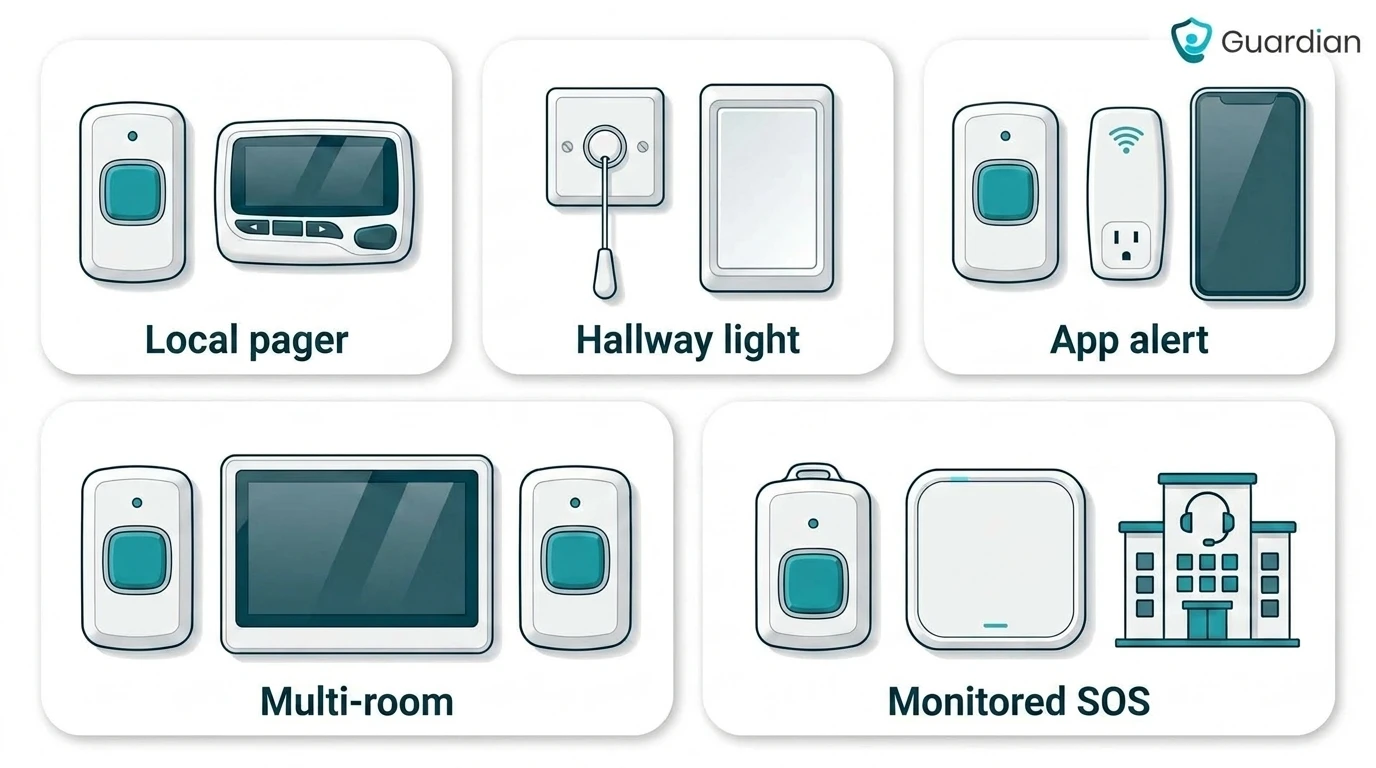
Home call lights differ mainly by who receives the alert and how far the signal travels. The options below move from an in-home caregiver to an outside emergency response centre.
Setup | Best when | Main limit |
|---|---|---|
Local caregiver pager | A caregiver stays inside the home | Stops helping when the caregiver leaves its tested range |
Hallway call light | Someone nearby can see or hear the corridor alarm | Depends on a person being close enough to notice it |
App-based alert button | A chosen contact may be outside the home | Relies on internet, phone access, and notification settings |
Multi-room display | Several rooms or people need clearly labelled call points | Still depends on an intentional button press |
Monitored medical alert | Nobody can guarantee an immediate local response | Requires an ongoing monitoring service |
Local caregiver pager (button + portable receiver)
A local caregiver pager is a wireless call button paired with a portable receiver the caregiver carries inside the home.
Depending on the model, the portable receiver sounds, vibrates, or identifies the button or room that called. The caregiver must carry it and remain within the system's radio range.
Check whether the receiver supports remote reset and identifies the calling button or room. A reset control does not necessarily include a display or source identification.
Works well for: one resident and an on-site caregiver who wants a personal alert
Depends on: the caregiver carrying the receiver and staying within radio range
Falls short when: the caregiver leaves the property
Emergency limit: the pager does not contact emergency dispatch
Hallway call light with visible/audible alarm
A hallway call light is a corridor or door unit that flashes and sounds when someone presses a room button or pull cord.
The light-and-tone unit typically sits outside the room, where a nearby caregiver can notice the call from the corridor. The same type of unit can cover bathroom and hallway calls.
A typical kit has two core parts:
Alarm unit: A call-alert light that flashes and sounds.
Activation control: A wireless pull cord, sometimes replaced by a wall button.
The person receiving care does not need to wear a pendant.
Kits with a dedicated reset button keep the light and tone active until a caregiver cancels the call. The latched alert remains visible and audible while the call is unanswered.
A standalone hallway setup depends on someone nearby noticing the alert:
Strength: the corridor light and tone give nearby caregivers visible and audible notice
Depends on: someone staying close enough to the corridor unit to notice the call
Fails at distance: a standalone corridor unit may not reach a caregiver elsewhere in the building or outside it
Household trade-off: a loud tone may disturb other people; check whether the volume and tone are adjustable
Wi-Fi or app-based alert button
A Wi-Fi or app-based alert button is a wearable or wall trigger that sends push notifications to a caregiver phone over home internet.
Depending on the product, a press travels through a Wi-Fi hub or router to an app, SMS service, or vendor cloud. The caregiver uses a phone rather than a dedicated in-home receiver.
Remote delivery depends on the home connection, the recipient's phone connection, and notification settings. Some products add a separate local fallback:
Home connection: if the hub loses internet, the remote notification may not arrive
Phone connection: if the caregiver's phone is offline or signed out, the notification may not arrive
Notification settings: do-not-disturb mode, muted alerts, or blocked app permissions can leave the alert unseen
Local fallback: some kits include an in-home chime when the cloud path is unavailable
Shared-contact apps can send the same press to more than one family member or paid caregiver, including people outside the home.
This setup fits households that want phone-based sharing across locations. Emergency services are contacted only when the product includes separate monitored dispatch.
It still relies on an intentional press. A fall or sudden medical event may leave the person unable to activate the button, even when the internet and app work.
Multi-room system with caregiver display
A multi-room call light system is wireless buttons in several rooms plus a central display that names which room called.
Capacity varies by model. Check the maker’s maximum number of paired call buttons and monitoring devices before planning coverage for several rooms.
Check three details during setup:
Clear labels: Use room, bed, or person labels that remain clear during an urgent call.
Overlapping calls: Confirm separate calls remain visible until acknowledged, and check whether the system records call history.
Practical placement: Put the display where the on-duty caregiver can hear the alarm and read the source.
A central display fits homes with several bedrooms or more than one person receiving care, where a generic alarm could delay the response. Manual call points still require an intentional press.
Monitored medical alert with emergency dispatch
A monitored medical alert is a wearable or in-home SOS button that routes calls to a 24/7 centre that can contact emergency services.
Dispatch typically follows three steps:
The button opens a voice connection to the monitoring centre.
An operator follows the response plan on file and tries to confirm what happened.
If the person cannot respond or needs urgent help, the centre can contact emergency services and share the registered address.
Professional monitoring carries an ongoing service fee in addition to any hardware cost. Check the connection, power backup, cancellation terms, and process for updating the address or emergency contacts.
This setup fits households where help cannot depend on someone being awake and nearby:
Living alone: The person lives alone or spends long periods alone.
Overnight cover: Family or neighbours cannot reliably answer overnight.
Staffed escalation: The household wants a staffed centre to handle escalation.
Contact backup: The response plan must work when the primary contact is unavailable.
Manual activation remains the main limitation. A person who loses consciousness, cannot move, or forgets the wearable may never open the call.
Treat automatic fall detection as a second route to help, not a replacement for the response plan. Ask which events the product detects and how the monitoring centre or chosen contact handles each alert.
Which setup fits your household?
The right setup depends on who can respond and whether the person at risk can reliably request help. Start with the simplest system that still covers the household's likely failure case.
Identify that failure case before comparing products:
No caregiver nearby: The alert must reach someone outside the home or a staffed monitoring centre.
No reliable button press: Automatic detection or passive sensors need to provide a second route to help.
More than one room: The alert must identify where it came from.
Power or connection loss: The household needs a tested backup plan.
If a button press is unreliable, choose automatic detection around the specific event you need to notice. Confirm which events the product detects and where it sends each alert.
Daily use can rule out an otherwise suitable kit. Consider whether the person will wear the button and whether someone can manage charging, battery changes, and routine tests.
Care needs can change before the hardware wears out. Check which extra call points, receivers, sensors, or monitoring services the chosen system supports and whether expansion requires replacement equipment.
How the alert travels from button to caregiver
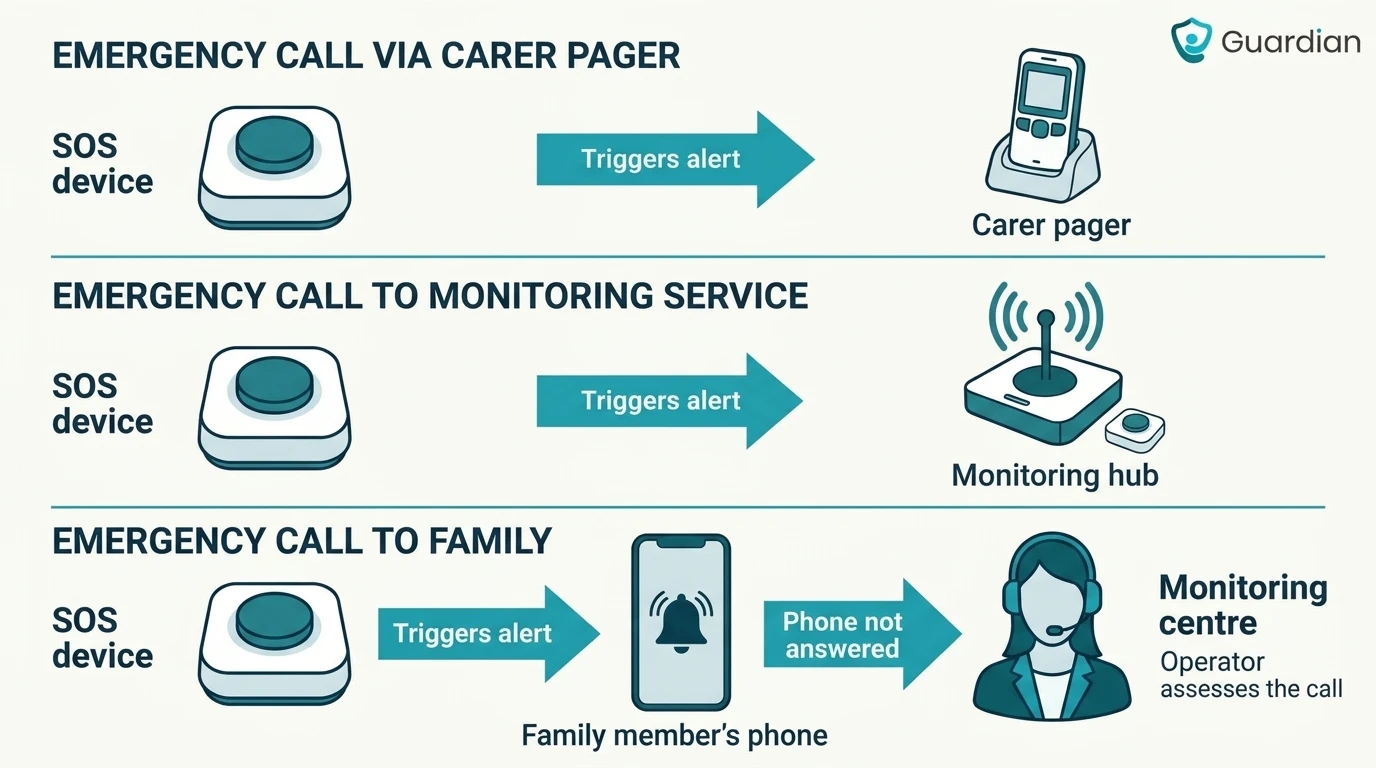
A button press can reach a local receiver, a remote contact, or a staffed monitoring centre. The route depends on the system; these are alternatives, not consecutive stages of every call.
Match your system to its route:
Local alert: Call button → paired radio receiver, hallway alarm, or caregiver display → nearby caregiver.
Connected alert: Call button → compatible hub or network connection → app or messaging service → chosen contact's phone.
Monitored alert: SOS button → compatible base unit or the device's own connection → staffed monitoring centre → response under the agreed plan.
Check what the recipient sees: a generic alert, a button label, a room, or a person's name. Source identification depends on the product and its setup.
Confirm how calls are acknowledged and what happens if nobody responds. Automatic escalation requires explicit support from the system or monitoring service.
Features that decide whether an alert actually gets through
A pressed button is useless if the signal fails or the unit has no power. Range, water rating, power, acknowledgement, fault warnings, and receiver volume determine whether the alert gets through.
Real-world range vs advertised range
Manufacturers may quote open-air or line-of-sight range. Walls, floors, appliances, and radio interference can reduce the usable indoor distance.
Treat the maker’s advertised range as a starting point for a home test, not a guarantee of indoor coverage.
Check whether the quoted range assumes open space and whether the maker supports additional receivers or repeaters. Plan to test closed doors, another floor, and any outdoor area the person uses.
Treat any missed alert as a failed location, regardless of the range printed on the box.
Waterproof, water-resistant, and shower-safe are not the same
Water-resistant, shower-safe, and waterproof labels are not interchangeable. Shower suitability depends on the maker’s documentation and any stated IP rating.
Check the maker's documentation before treating any control as suitable for the shower:
Water-resistant: Usually covers limited splashes, but use it in a shower only when the documentation explicitly permits it.
Shower-safe: Suitable for shower spray only within the maker's stated conditions.
Waterproof or IP-rated: Check the exact rating, exposure limit, and permitted use for that control.
For the wet-zone control, verify two points:
Permitted use: The manufacturer explicitly approves the control for shower use.
Reach: The user can press the wearable or fixed button while standing or after a fall.
If the user showers alone, a dry-only bedside pendant leaves the wet zone without a working call path.
Power, backup, and accessible activation
Use the documented power requirements for each device, and confirm how the system reports low power or loss of service. Never assume a button, hub, or app will continue through an outage.
Check each part of the system separately:
Plug-in receiver or hub: Use an outlet that will not be switched off, and keep the adapter where it cannot be unplugged accidentally.
Battery-powered button: Record the battery type, replacement method, and low-battery warning; add a calendar check if the device has no warning.
Power or internet loss: Ask what remains active, how long documented backup lasts, and how the system reports a fault.
Accessible activation: Let the person test the control from safe, supported positions. Assess floor-level reach separately without asking them to get down onto the floor.
Keep the correct spare batteries beside the receiver and label the last change date. For sealed batteries, record who supplies the replacement and what the low-battery alert looks like.
Raised edges can reduce accidental presses while preserving a clear target. The person should still be able to activate the control with their weaker hand and without standing or reaching overhead.
Where to place buttons and receivers in the home
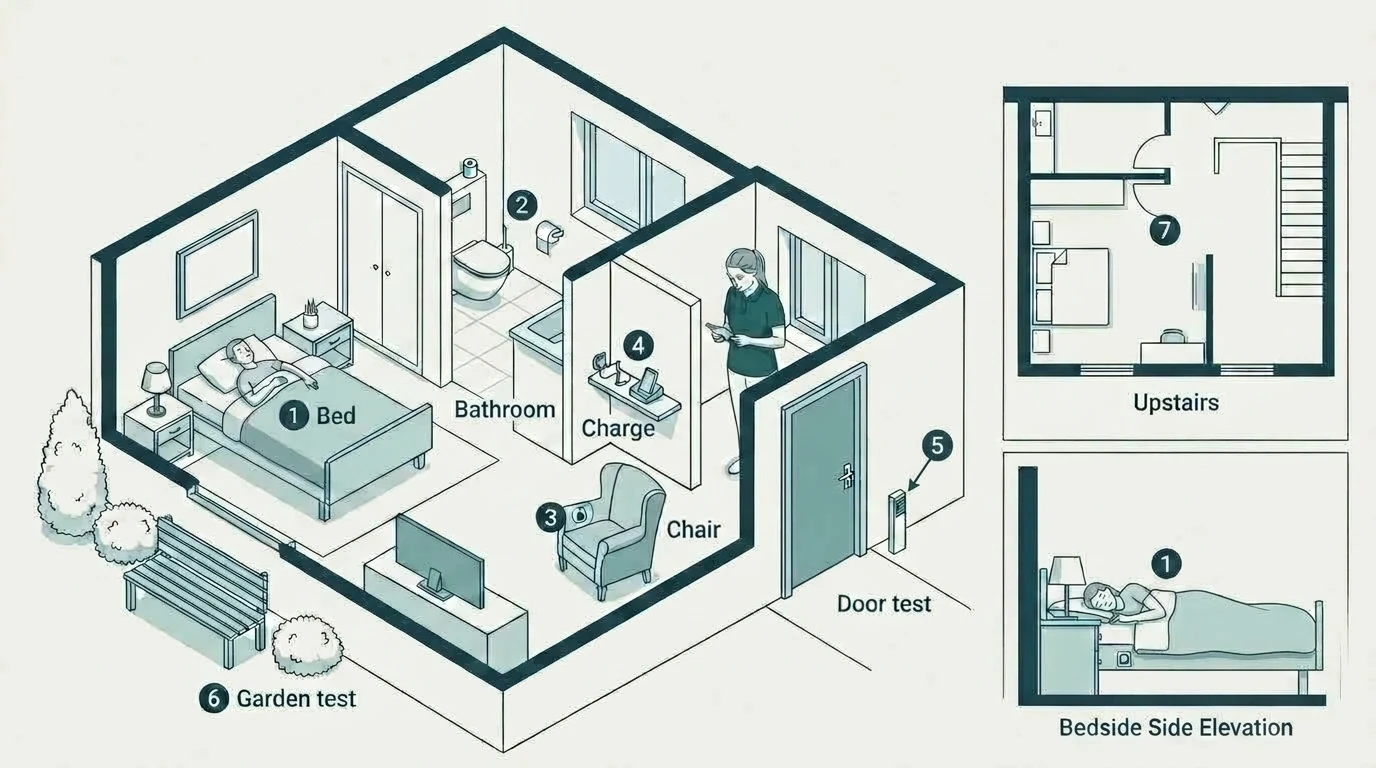
Put fixed buttons within reach from the bed, toilet, favourite chair, and floor. Cover stairs and outdoor areas where relevant, then keep the receiver and charging point where the caregiver actually stays.
Map the routes between bed, bathroom, chair, and outside door. Have someone who can safely kneel assess floor-level access; ask an occupational therapist if reach or positioning is uncertain.
Use this table to mark the actual locations in the home:
Item | Detail |
|---|---|
Bed | Reachable while lying down and from the floor beside the bed |
Bathroom | Approved for the wet area and reachable from the toilet, shower, and floor |
Favourite chair | Reachable without standing or leaning across furniture |
Stairs and main route | Available where help may be needed during movement |
Garden or yard | Included only after the alert passes an outdoor range test |
Caregiver receiver | Kept where the caregiver spends time, with volume or vibration tested |
Charging point | Easy to access without leaving the receiver or phone out of service |
Testing your system and planning for failures
Test the installed system from activation through to response. For monitored devices, follow the provider's test procedure before pressing a button so a practice call does not trigger an unnecessary emergency response.
Pair and label every control. Press each button once and confirm the correct receiver, light, or app responds.
Run a walk test. Test each planned call point with doors closed, including other floors and outdoor areas. Have someone who can safely reach floor level test low positions.
Check the response plan. Confirm who receives the first alert, where it appears, and who takes over. Test the secondary contact or monitoring route as well.
Check failures safely. Keep another way to request help available. Follow manufacturer instructions to test notification, connection, and power failures; confirm low-battery warnings without deliberately draining a device needed for care.
Record and retest. Mark weak zones, schedule a recurring press-check, and repeat the walk test after moving furniture, changing Wi-Fi, or adding a large metal appliance.
Count a test as passed only when the intended caregiver or monitoring centre receives the alert and can identify who needs help. Confirm the location too when the system supports it.
When a caregiver pager or call light isn't enough
Add automatic detection when the person may be unable to press a button. If the caregiver may miss an alert, arrange another delivery channel or responder, or choose a staffed monitoring service.
Check both whether a call can start and whether someone will answer:
The device is elsewhere: A pendant may be on a bedside table or a wristband may have been removed.
The person cannot activate it: A fall, faint, or loss of movement can prevent an intentional press.
The control is out of reach: A wall button that works when standing may be unreachable from the floor.
The alert goes unheard: A portable receiver can be in another room, behind a closed door, or competing with household noise.
Choose sensors for a defined event: a bed sensor for getting up, a door contact for opening an exit, or motion sensing for activity changes. Confirm the alert rules and recipient before relying on them.
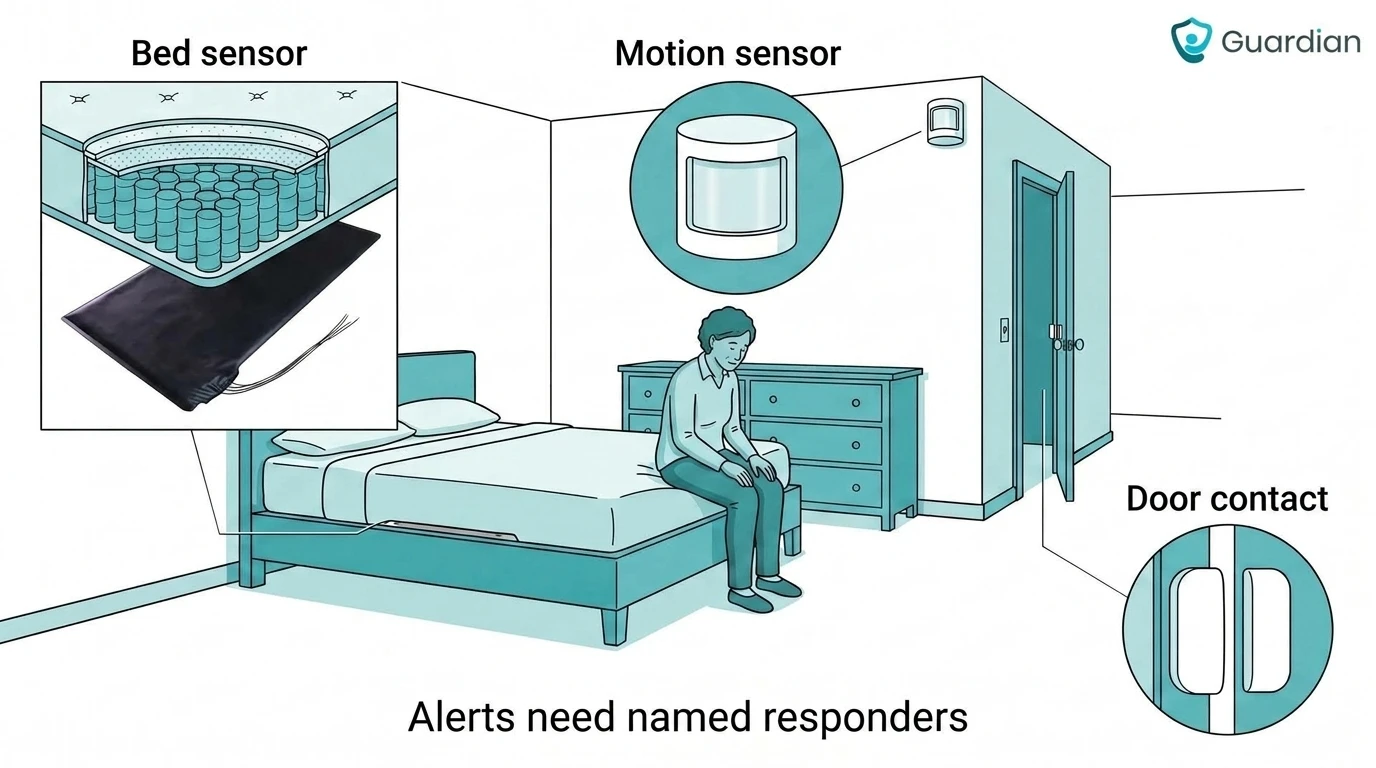
Configure alerts around events that need a check, such as an unexpected bed exit or unusual inactivity. Each alert still needs a named responder and a backup plan; more sensors cannot fix an unanswered call.
Keep the manual button for requests the person can make. Separately, relatives supporting someone from another home may want everyday phone updates to help decide when to check in.
Beyond a button: the Hey Mom app
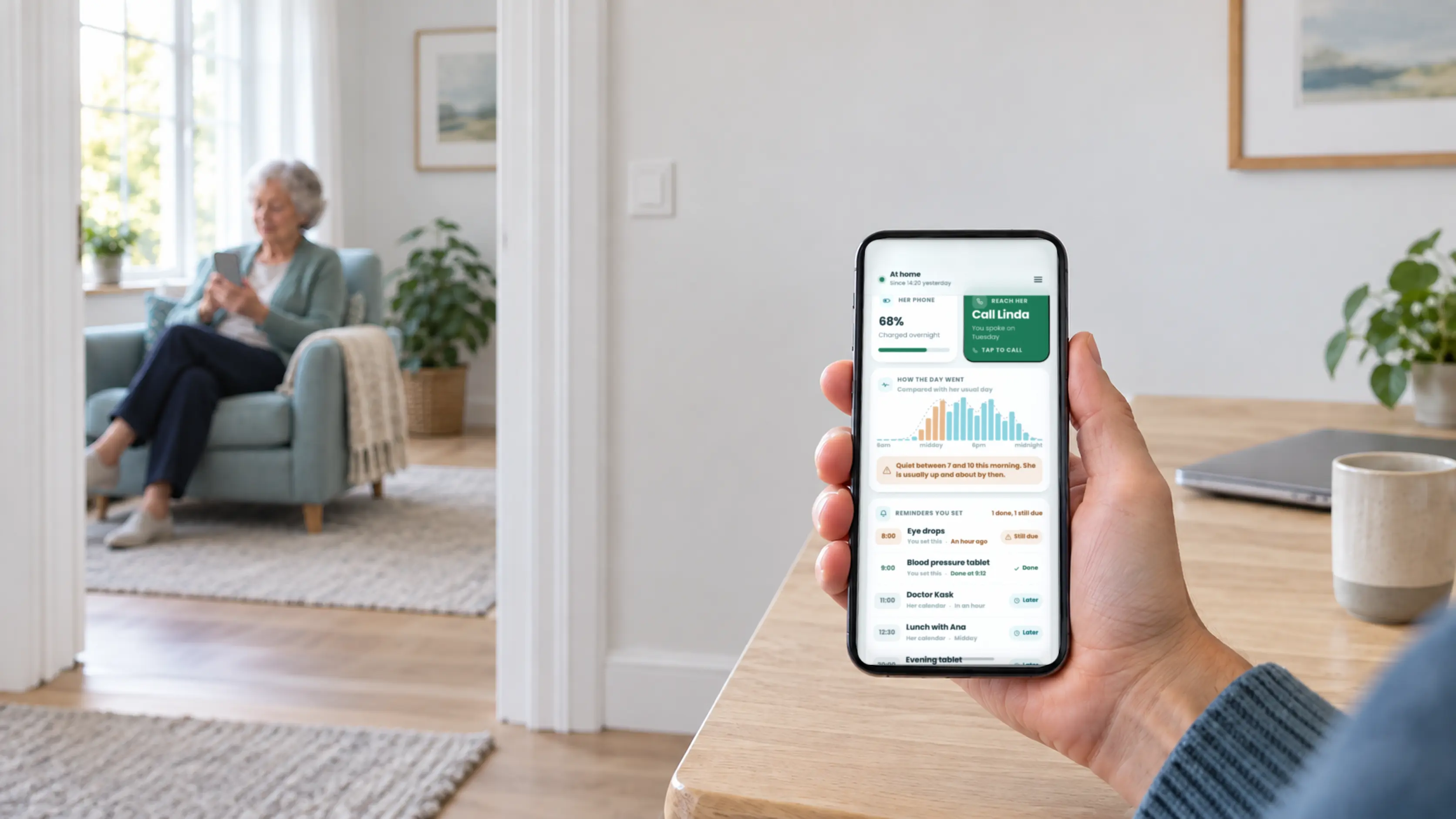
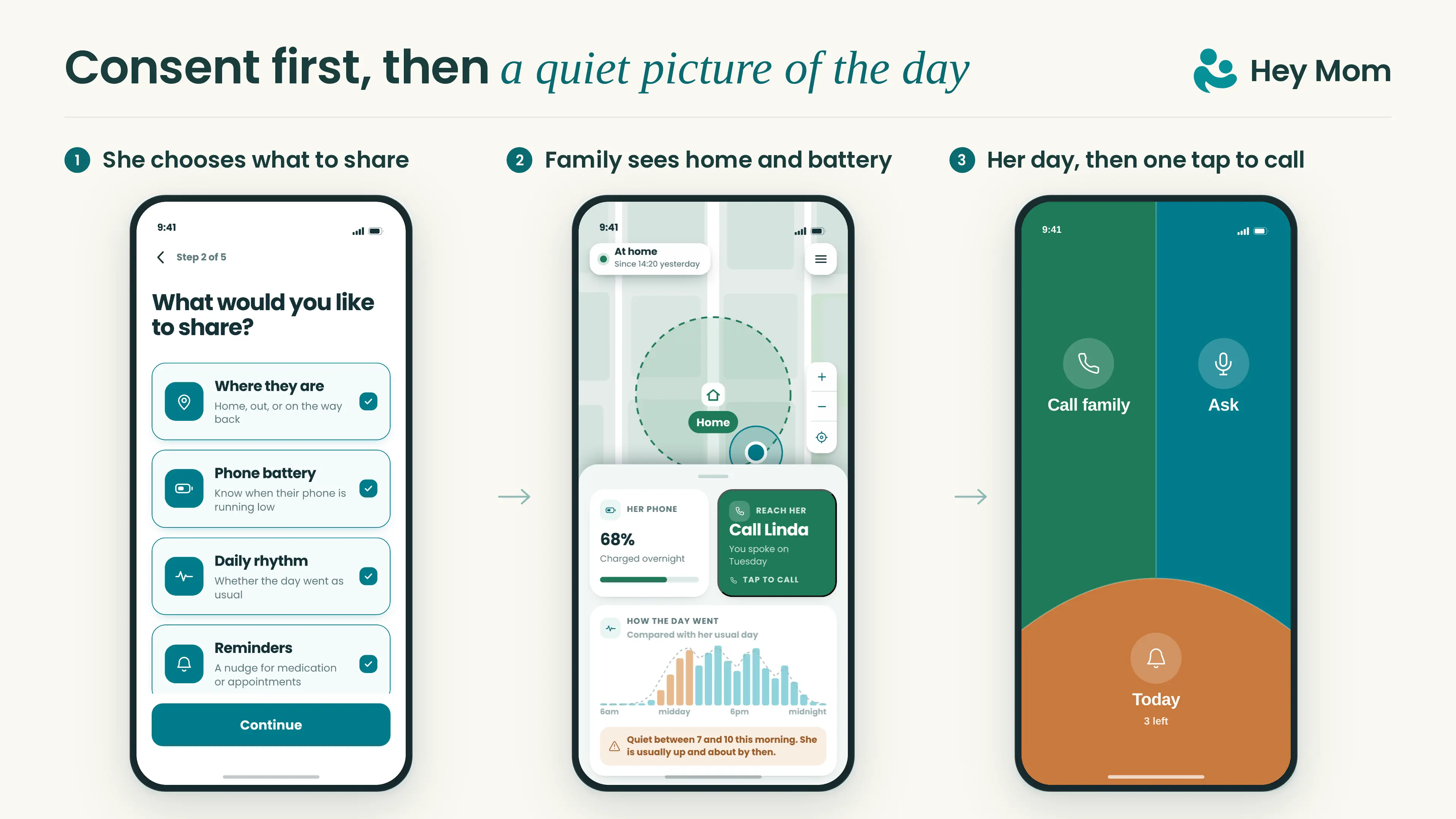
Planned Hey Mom Plus features include shared reminders with completion status, daily rhythm, and battery updates. The app uses phone updates, not passive sensors, and will not detect falls or contact emergency services.
Coming soon, the Hey Mom app will offer everyday contact and agreed updates for families supporting someone at home. It uses their existing phones, not a call-light button for requesting help.
The person sharing will choose which updates to turn on and can stop sharing at any time. Relatives will see only agreed updates, such as location or home status.
Yes. Local caregiver pagers and standalone call-light kits can work without a subscription because alerts go directly to a receiver in the home.
A monthly fee may apply when the system includes professional monitoring, cellular service, or an app subscription.
A caregiver pager's usable range depends on the model and the building. Walls, floors, metal, and radio interference can reduce the maker's stated range.
Test the pager from bedrooms, bathrooms, and outdoor areas before relying on it.
Yes. Adaptive call lights can replace a small button with a large press pad or squeeze bulb.
Low-force switches and sip-and-puff controls suit people with very limited hand movement.
No. A local radio-frequency pager can send an alert to its receiver without Wi-Fi or a landline.
App-based systems need internet access, while cellular hubs use a mobile network. Older auto-dialers may require a compatible phone line.
Only when the product includes professional monitoring or another documented dispatch service. A local pager, hallway light, or basic app alert normally notifies the chosen caregiver instead.
A manual call light cannot detect a fall by itself. Products with automatic fall detection or passive sensors can provide a separate alert route, but the household still needs a tested response plan.
No. Hey Mom App does not automatically detect falls or contact emergency services.
It supports everyday calls and agreed updates. If someone needs to request help through a call light or monitored alert, keep a separate, tested response plan for that system.

Author
Aleks Timm
Aleks Timm leads Guardian and builds privacy-first operations technology for care homes and home care providers. Teams get location-aware alerts they can act on, clearer situational awareness, and measured insight into how care work actually runs.
Read MoreRecommended reads
Keep reading
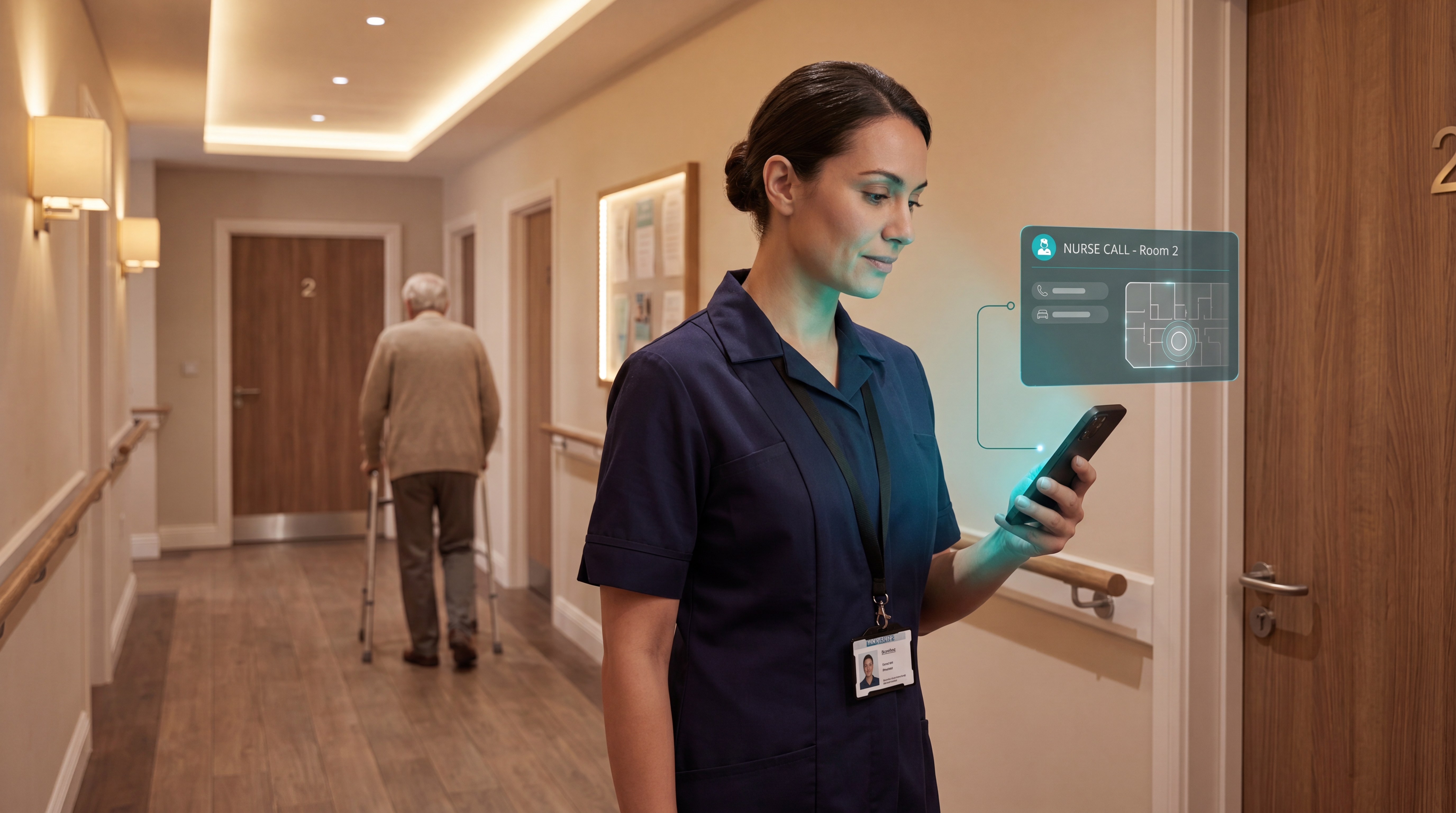
Smart Nurse Call Systems for Care Homes and Home Care Providers
Smart nurse call systems for care homes and home care providers: compare features, improve response times, and choose the right...
Read more
Indoor positioning systems for care homes
Indoor positioning systems for care homes help staff locate falls, exits, and nurse calls by room or bed, improving response,...
Read more
Wireless Patient Monitoring Systems for Care Homes
A complete guide to wireless patient monitoring systems, connected sensors, alert logic, care-home deployment, privacy, and...
Read more