

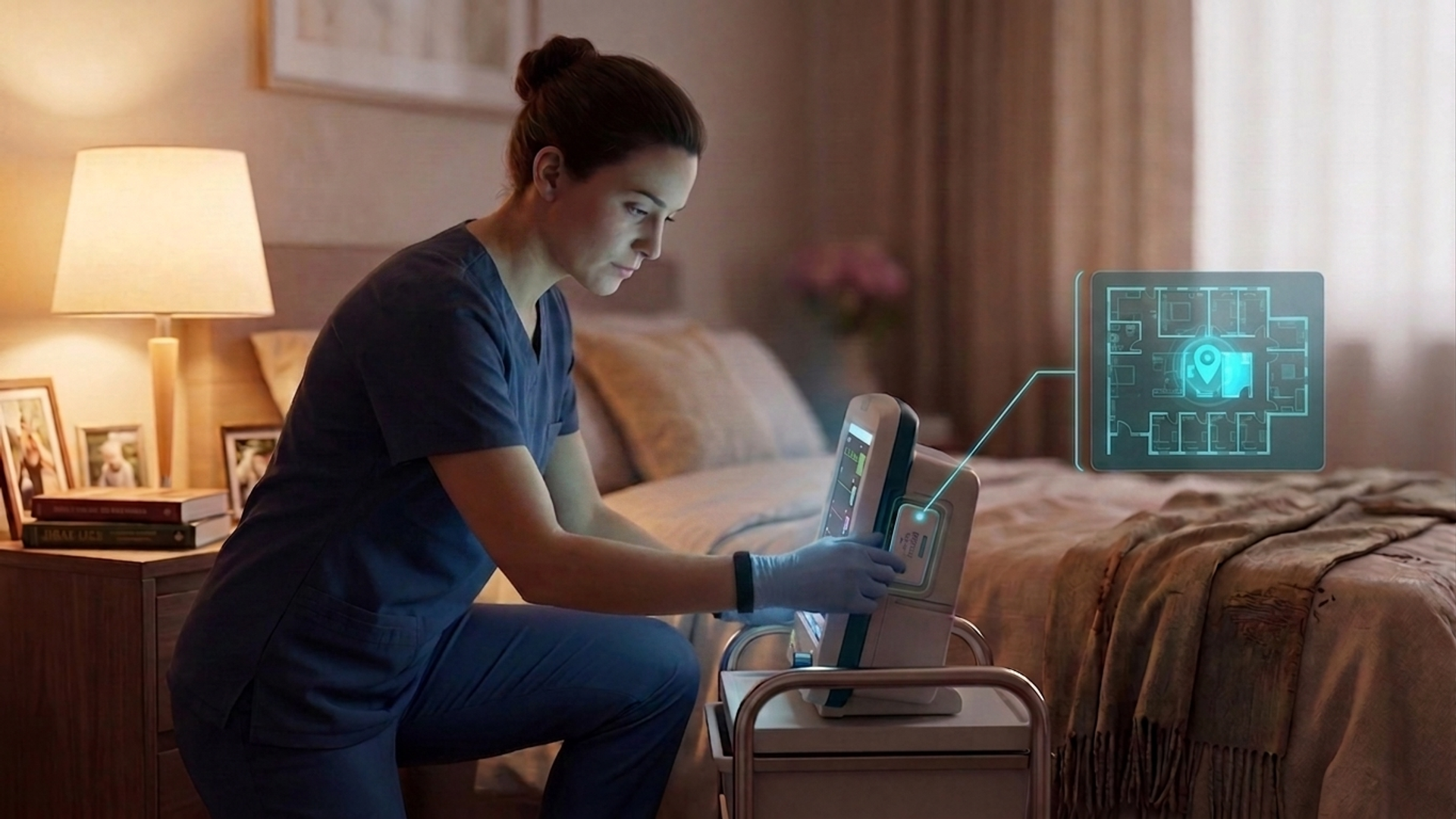
Healthcare Asset Tracking: Find Equipment Faster
In this article
A missing wheelchair, mobile hoist, or medical pump sends care staff searching rooms and calling other wards. That search interrupts care and complicates handovers.
An inventory list confirms ownership, not current location. This guide explains what to track, which technology fits the workflow, and how to test results before a wider rollout.
What is healthcare asset tracking?
Healthcare asset tracking identifies where equipment is and, where supported, whether it is moving or available. Asset management handles ownership, servicing, calibration, recalls, rentals, and compliance records.
Care settings use these systems for different jobs. Keep location tracking, asset management, and operational monitoring distinct when comparing products.
[Image: Diagram separating asset location tracking, asset lifecycle management, and wider care-operation monitoring]
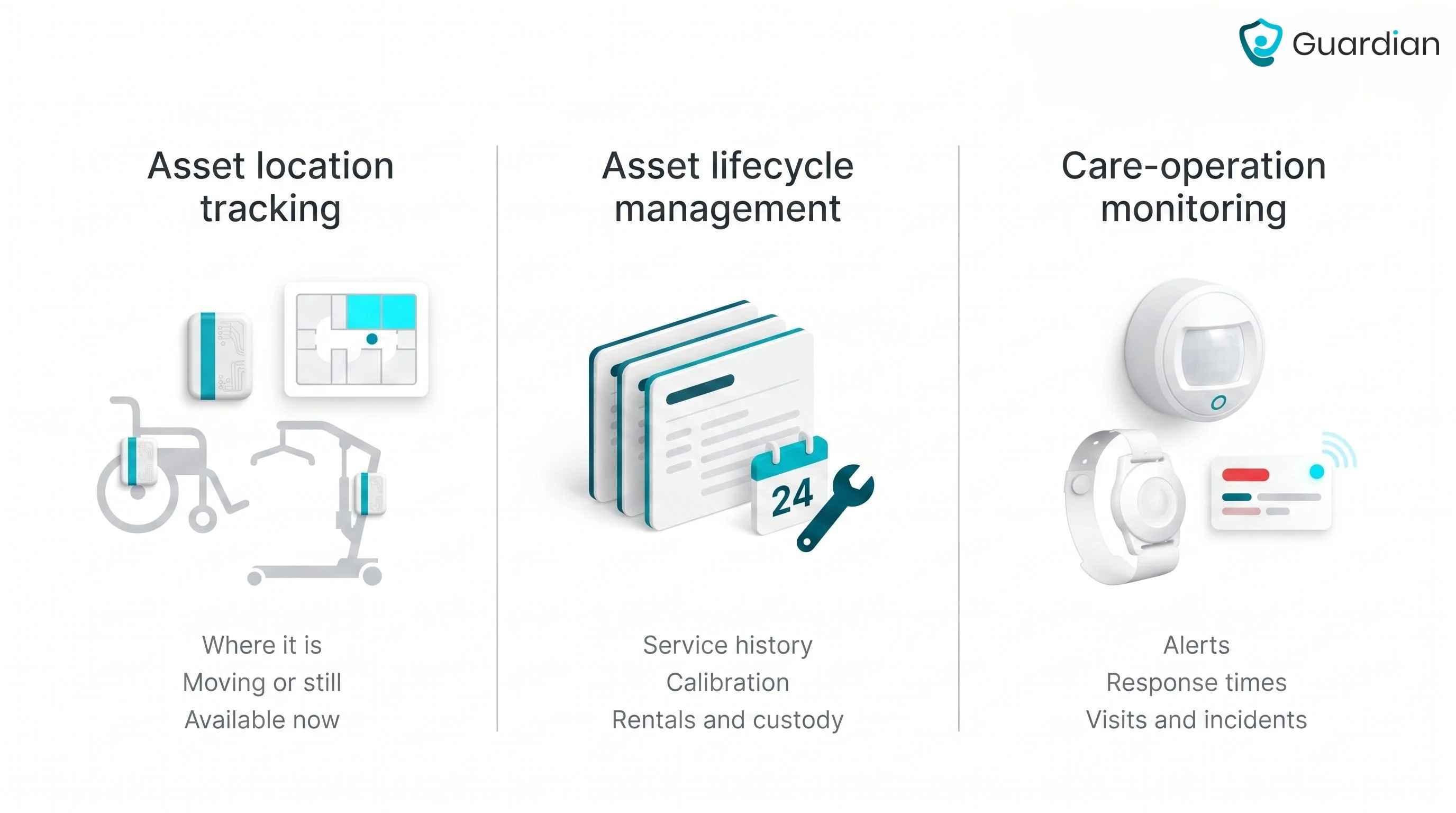
Shared care equipment: Wheelchairs, mobile hoists, pumps, monitors, and carts that move between rooms, wards, or sites.
Other mobile assets: Vehicles, loan kits, and high-value equipment that need a known owner or location.
Tracking data: Current location, movement, and availability or use when the chosen tags and software support those states.
Asset-management data: Service history, inspections, calibration, recalls, rentals, and custody require native lifecycle fields or an integration.
Operational monitoring: Alerts, staff response, visits, and incidents belong to the wider care operation rather than the asset record alone.
How healthcare tracking creates value
Live location data helps staff find an item. Availability, use, and service status appear only when the setup captures those fields or connects to an asset-management system.
Guardian is one example of how location tracking fits into a wider care operation. The camera-free, wireless platform brings tracked equipment, residents, care staff, vehicles, and alerts into one live view.
For asset searches, staff can search equipment by name and check its current location before calling colleagues or searching rooms.
Separately, Guardian gives resident and care alerts room-level context. It links installed sensors to a room or bed, then sends the location through its web portal to staff devices.
Cut search time: Check the live view before sending staff through rooms and storage areas.
Review replacement requests: Confirm that an item is not simply elsewhere in the setting before approving another purchase.
Connect maintenance records: Use native fields or an integration to link location with due work and completed checks.
Compare the pilot with its baseline: Measure search time, missing-item events, and replacement decisions before and during the pilot.
See how Guardian works in care settings.
Which assets should you track first?
Start with wheelchairs, mobile hoists, pumps, and other equipment that staff search for during a shift. Prioritise items whose absence delays a transfer, round, or treatment.
Use three checks to build the first asset list:
Search and movement: Add equipment that staff frequently search for or share between rooms, wards, or sites.
Care and cost: Add equipment whose absence causes delays, rentals, duplicate purchases, or reported loss.
Attachment and cleaning: Choose items whose tags can stay secure through cleaning, charging, storage, and daily movement.
For a first ward pilot, tag 10–30 items that staff already struggle to find. This is enough to test naming, coverage, tag attachment, cleaning, and staff routines without obscuring problems in a site-wide rollout.
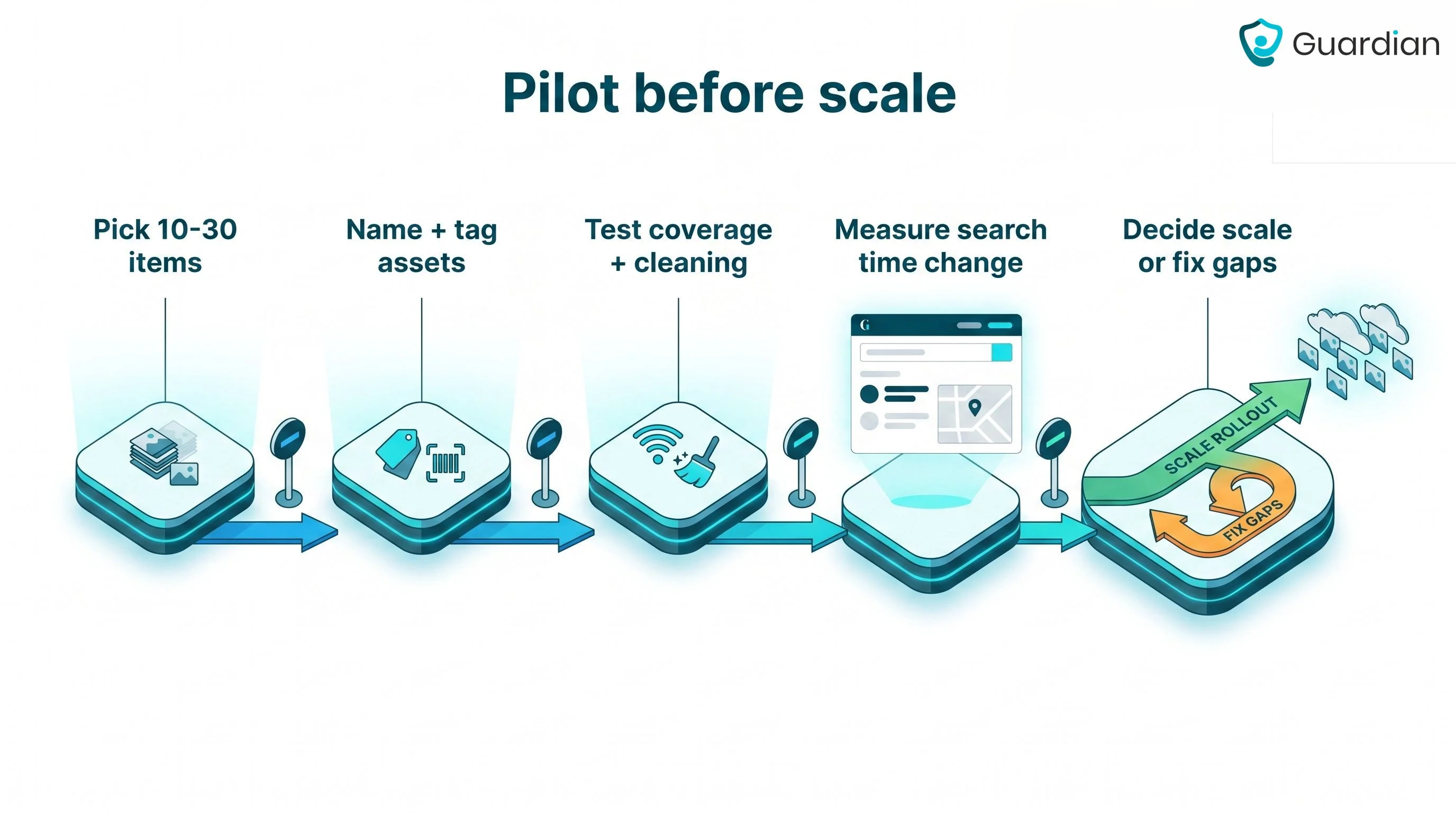
Record baseline search time and calls between wards for the selected items. Repeat the same measure during the pilot to test whether staff find them faster.
Which tracking technology fits the workflow?
Match the tracking method to the task, the location detail staff need, and the upkeep the setting can sustain.
Barcode and QR codes support manual stock checks. Passive UHF RFID supports batch or checkpoint reads when a continuously updated room location is unnecessary.
Active RFID and BLE-based real-time location systems can update locations automatically when the required readers, gateways, and network coverage are in place. RTLS describes the complete location system, not one tag technology.
Decide precision, refresh rate, and indoor or outdoor use separately. Room or zone detail may suit shared equipment, while a doorway read can be enough for stock control.
Check tag attachment, cleaning tolerance, batteries, coverage, and dead zones before choosing hardware. Weak upkeep or reader coverage makes any location record unreliable.
[Image: Comparison chart of barcode, passive RFID, active RFID, BLE RTLS, and GPS by update method, location detail, and typical use]
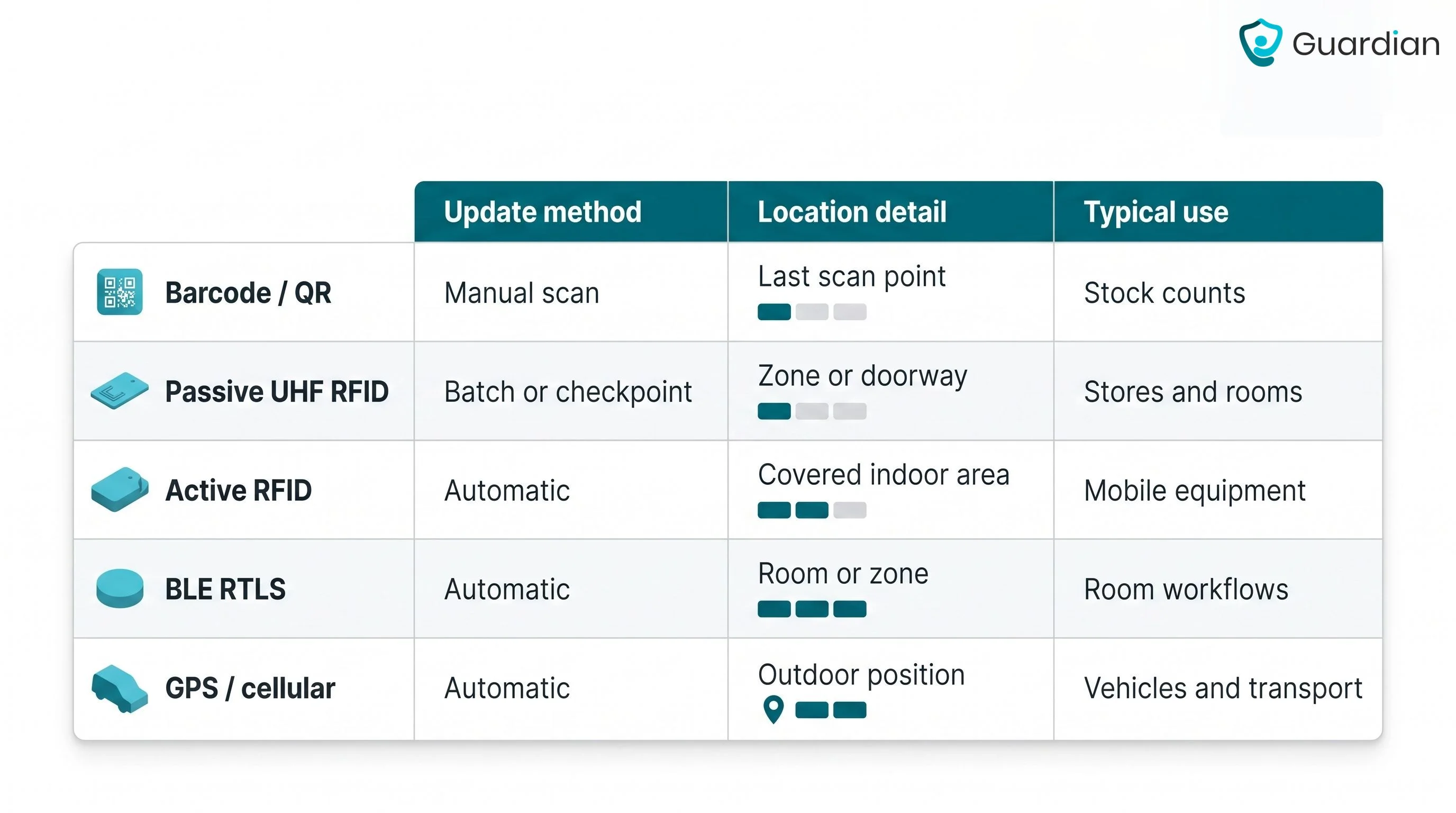
Use the workflow to narrow the technology:
Barcode or QR: Use for manual stock counts and low-mobility inventory.
Passive UHF RFID: Use for batch or checkpoint reads in stores and equipment rooms.
Active RFID: Use when mobile equipment needs automatic updates across covered indoor areas.
BLE-based RTLS: Use for room or zone workflows where gateways and mapping can be maintained.
GPS or cellular tracking: Use for vehicles and outdoor assets, not precise indoor positioning.
Condition sensors: Add temperature, movement, battery, or environmental data when the asset requires it.
Choose the lightest setup that supports the task. Confirm it with a coverage survey and daily-use test before expanding beyond the pilot area.
Where the biggest benefits show up
The clearest gains appear in search time, calls between wards, missing-item reports, rental requests, and equipment downtime. Measure the outcomes that the selected system actually records.
Less search time: A live location directs staff towards the tracked item instead of another room-to-room search.
Less avoidable spend: Location and usage data, when captured, help managers review rental and replacement requests against existing stock.
Fewer care delays: Staff can redirect a located device to the point of care instead of waiting while equipment sits elsewhere.
Cleaner maintenance handovers: An integration can connect location with service status, helping teams find equipment that is due for work.
How to implement it without a stalled rollout
A one-ward or one-unit pilot keeps the rollout manageable. Register the assets, test coverage and tag attachment, set staff routines, and expand only when the agreed measures support it.
Select one ward or unit. Keep the scope narrow enough to observe daily use and correct workflow gaps before a wider rollout.
Guardian can deploy one ward in about one week. The managed pilot then runs for 6–8 weeks.
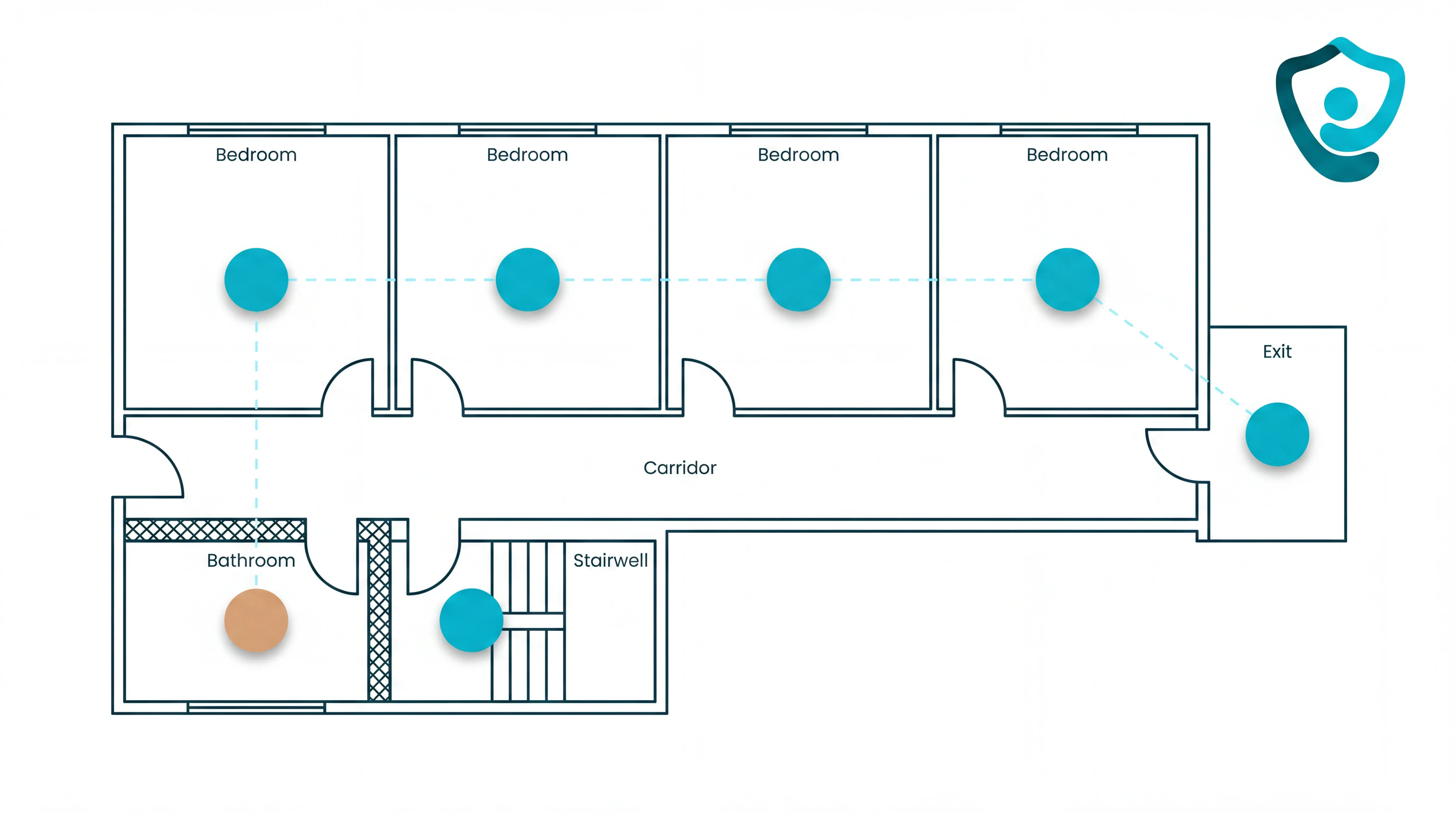
Map assets to the search workflow. Name and register each tagged item, define the location detail staff need, and test attachment through cleaning and daily movement.
Check stores, corridors, lifts, and priority rooms for coverage gaps. Document who investigates a missing or stale location before the pilot begins.
Set ownership and staff routines. Teach staff to search the live view before calling other wards, and assign responsibility for batteries, damaged tags, and stale locations.
For wider Guardian alerts, assign one role to acknowledge each event and a backup for unanswered alerts. Send only events that need action to mobile devices, so routine activity does not create noise.
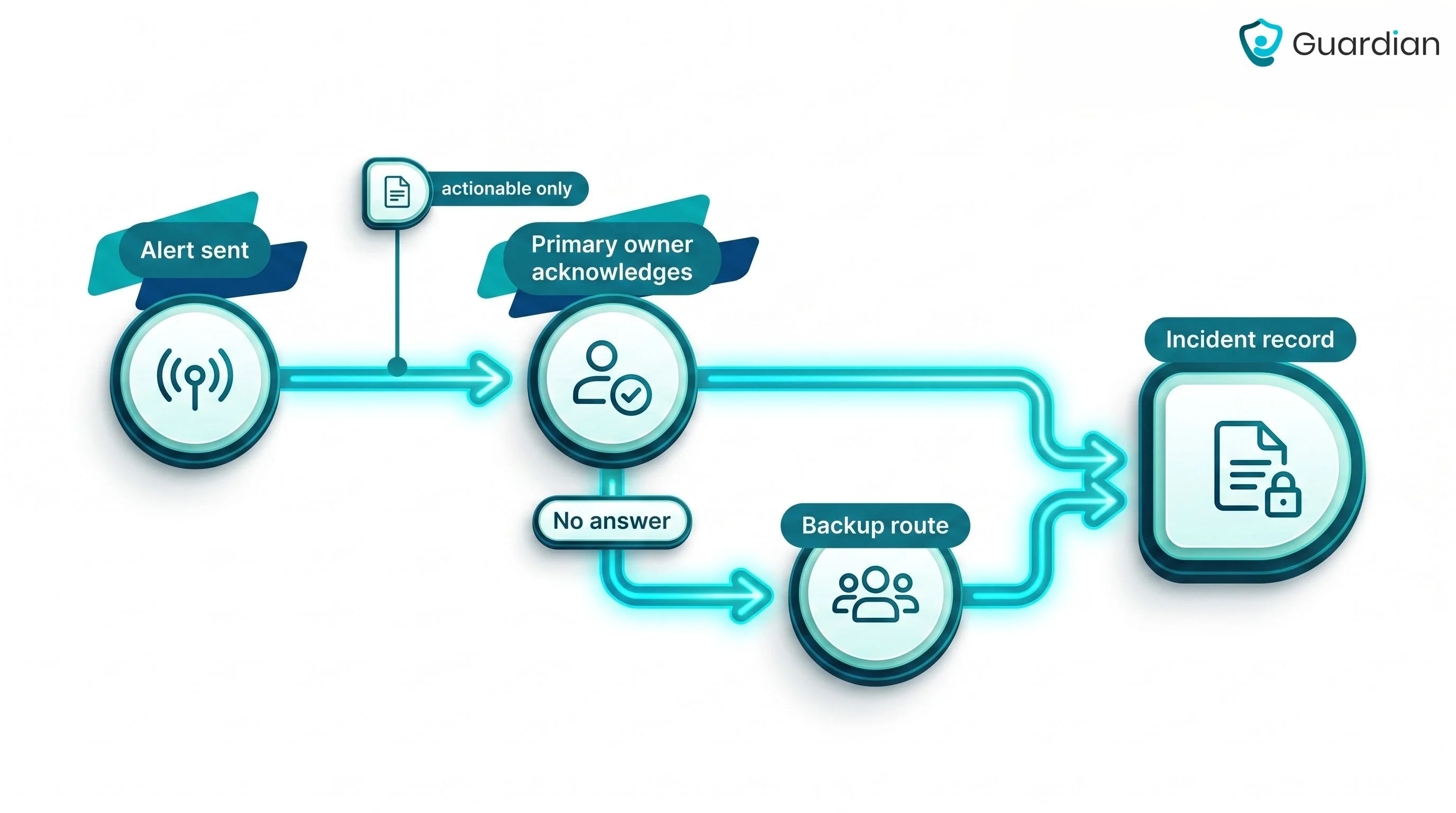
Review the measures before expanding. Require evidence in three areas before adding another ward or asset group:
Asset result: Search time, calls between wards, missing-item events, and replacement requests
Staff fit: Tag attachment, search habits, coverage problems, and upkeep feedback
Business case: Finance-approved savings, ongoing costs, broader care measures, and a written rollout plan
Expand by ward, asset group, or sensor group. Keep each phase contained so the team can isolate coverage and workflow problems.
Keep the same definitions, baseline, and responsibilities in each new area so results remain comparable.
How to measure ROI and operational impact
A pre-rollout baseline makes the decision testable. Measure asset outcomes against system costs, then report Guardian's broader care-operation outcomes separately.
Use one measurement framework throughout the pilot. Define each measure, data source, and denominator before go-live.
Search: Staff minutes and calls used to locate priority assets
Asset control: Missing-item events, replacements, rentals, and recoveries
Asset use: Usage or utilisation only when the system captures a reliable status
Maintenance: Equipment downtime and on-time service only when connected to the relevant records
Broader Guardian pilot: Response time, visits, incidents, staff hours, and staff feedback, reported outside direct asset ROI
Review the same measures after rollout. Do not annualise a short pilot result unless finance approves the volume and seasonality assumptions.
Turn measured changes into ROI only when finance approves each value and cost source. State whether the calculation covers the first year or a steady-state year.
First-year ROI (%) = ((first-year savings + documented first-year cost avoidance - first-year programme cost) / first-year programme cost) × 100
Payback period (months) = one-off implementation cost / monthly savings after ongoing costs
Savings can include staff time reclaimed and avoided replacement spending. Count cost avoidance only when finance can document it, and keep unpriced safety outcomes in the wider impact report.
Guardian records care staff arrival and stay duration automatically. Managers can report those timestamps with visit, shift, and incident records as broader pilot outcomes, not as direct asset savings.
Use the baseline comparison to correct coverage, tagging, and workflow gaps first. Expand only after the agreed asset and operational measures support it.
Use your own baseline to decide whether another ward should follow. Try Guardian in one care setting and receive a written impact and rollout recommendation.
Where asset tracking still falls short
Asset tracking falls short when coverage, stale data, tag upkeep, or staff routines fail. Even precise location data cannot resolve staffing gaps, unclear handovers, or missing lifecycle records.
Should you build around room-level context?
Use room-level context when staff need a specific destination rather than a floor or zone. Confirm that the selected asset technology can provide that precision in the actual building.
Reliable location depends on coverage, current maps, attached tags, charged batteries, and timely updates. A change to rooms or floor plans can make earlier mapping stale.
Check three groups of failure points:
Location and coverage: Zone-only results, dead spots, or interference leave staff searching after the system reports a location.
Freshness and upkeep: Moved assets, detached tags, low batteries, or changed floor plans create stale records.
Workflow and integration: Routing, access controls, closure records, and links to inventory or maintenance systems still need clear ownership.
If the location is precise and current but the delay remains, investigate the wider operation rather than adding more tracking hardware.
What if the problem is bigger than equipment location?
Treat the issue as an operational bottleneck when equipment is easy to locate but staff still cannot respond or complete the task.
A local cost estimate should include setup, tags, infrastructure, software, batteries, replacements, support, and staff time. Location data helps only when the team can maintain daily use.
Look beyond equipment location when any of these conditions applies:
Staffing: Staff know where the equipment is, but nobody is free to act.
Alert quality: Irrelevant or poorly routed alerts weaken trust and delay response.
Adoption: Training gaps or turnover leave search and response routines inconsistent between shifts.
Process: Handover, escalation, and task closure remain unclear after the location is known.
Location can remove one delay. Staffing capacity, alert ownership, and a clear handover route determine whether the work is completed.
What to check before you commit
Test the system during normal shifts and in a controlled pilot. Procurement needs observable pass-or-fail checks, not broad feature labels.
Write the starting measure, test method, and locally agreed acceptance criterion into the pilot plan before rollout.
Location test: Can staff locate a tagged asset in the agreed area during a normal shift?
Movement test: Does the location update after staff move the item?
Attachment test: Does the tag stay secure through cleaning, charging, storage, and daily use?
Coverage test: Can the team find a dead zone and correct it?
Upkeep test: Who owns battery checks, damaged tags, and replacements?
Outage test: What remains available during a network or power outage?
Data test: Can access be limited by role, and can the supplier explain hosting, retention, and export?
Pilot test: Can the supplier show the exact measures, report, and rollout decision the pilot will produce?
See healthcare operations live with Guardian
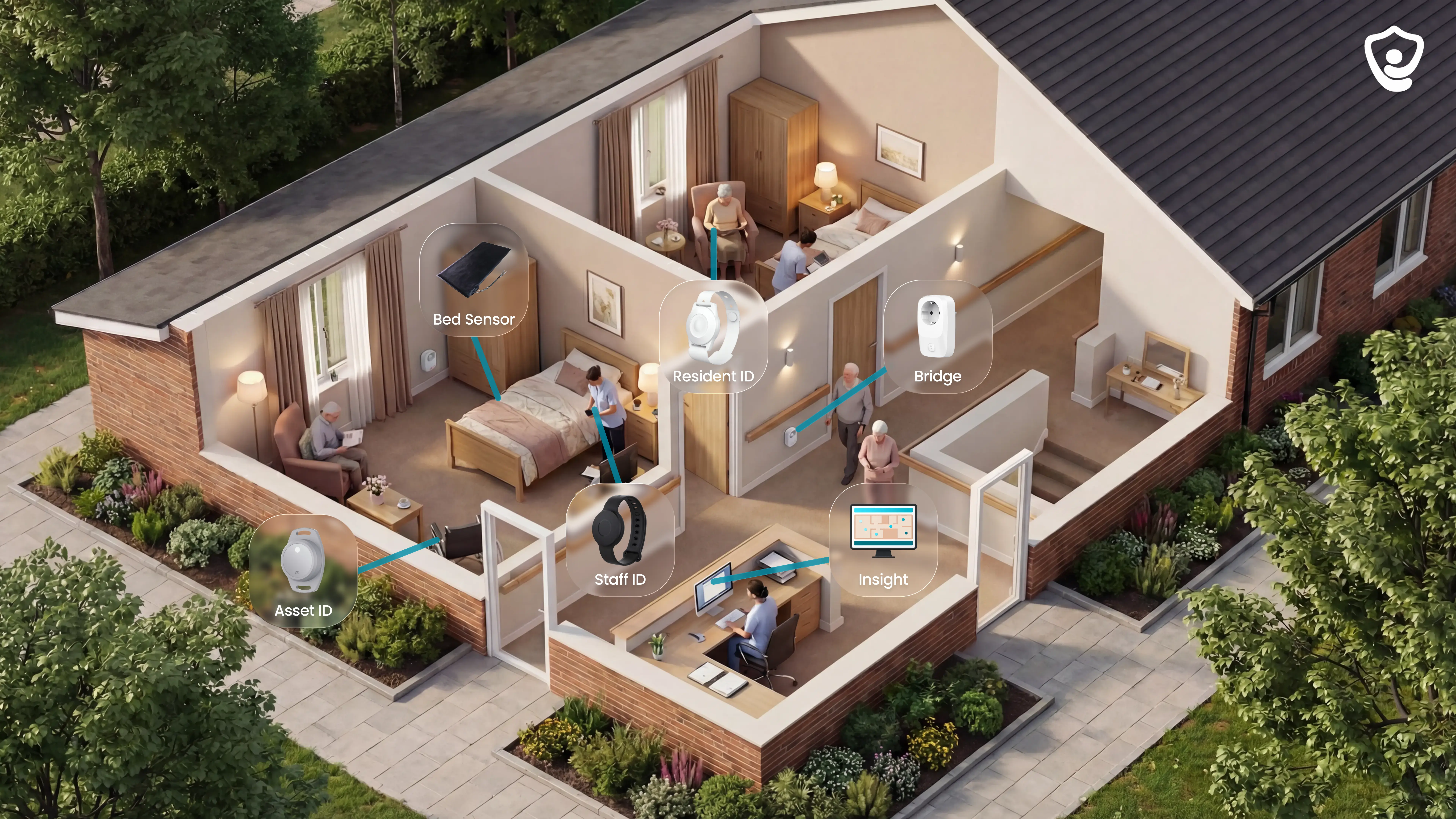
Guardian brings tracked equipment, vehicles, residents, care staff, and alerts into one camera-free operations view. Asset location and room-level care alerts remain distinct workflows inside that view.
Find tracked equipment: Search an asset by name and see its current location in the same live view as vehicles, people, and alerts.
Route room-level care alerts: Guardian links installed sensors to rooms or beds and sends alert context through its web portal to phones, tablets, and nurse-station screens.
Keep one operational record: Smart rules limit noise, while Guardian records visits, response times, shifts, and incidents in the background.
Go live without a long IT project: Guardian is wireless and pre-configured, with no drilling, cabling, new pagers, or separate monitoring station required.
A 6–8 week pilot starts with one setting, workflow, or equipment challenge. Guardian supports care homes, home care teams, specialist facilities, and mental-health settings without narrowing the platform to one region.
Asset tracking shows where an item is and may capture movement or availability. Asset management records ownership, service intervals, calibration, rentals, recalls, and lifecycle history.
Preventive-maintenance reminders require those scheduling fields in the tracking software or a connected CMMS or asset-management system. Location data can then help staff find the item when work is due.
Yes, when the software supports temporary ownership, custody, return dates, and status fields. A location tag alone does not manage the loan period.
Store the identifier, loan period, location, status, and custody record in the connected asset record. These fields distinguish each item, track return dates, and show who received or moved it when handovers are recorded.
Yes, when the connected asset record supports searchable identifiers, maintenance or calibration fields, and an action history. Location tracking alone does not create a complete compliance trail.
For a recall, search the affected identifier, locate each matching item, remove it from use, and record the completed action in the system that owns the recall workflow.
During an audit, filter the connected records by asset, date, location, or status. Confirm that exports preserve the required identifiers and action history before relying on them as evidence.
Start with a durable tag or identifier, the readers or gateways needed for coverage, and software that maps each event to the correct asset. Camera-free setups can use radio tags and sensors.
Begin with 10–30 representative assets in one ward or unit. Add areas only after the pilot confirms location accuracy, coverage, tag durability, battery upkeep, and staff workflow.
Check attachment, coverage, location detail, upkeep, and software before selecting hardware. Confirm that tags survive cleaning, priority areas have coverage, location accuracy fits the workflow, and staff own battery checks and replacements.

Author
Aleks Timm
Aleks Timm leads Guardian and builds privacy-first operations technology for care homes and home care providers. Teams get location-aware alerts they can act on, clearer situational awareness, and measured insight into how care work actually runs.
Read MoreRecommended reads
Keep reading
WiFi nurse call system guide for care homes
WiFi nurse call systems explained: alerts, clean records, and no wiring—compare options and choose the right setup for your care...
Read more
Patient bed alarms for elderly & hospital care
Patient bed alarms help prevent falls in elderly and hospital care. Compare alarm types, choose the right sensor, and protect...
Read more
Indoor positioning systems for care homes
Indoor positioning systems for care homes help staff locate falls, exits, and nurse calls by room or bed, improving response,...
Read more